Posted by: kurtsh | August 16, 2012

NEWS: The early returns on Windows 8

Many in the media have weighed in on Windows 8 already in just the past week since release to TechNet/MSDN & the Volume Licensing Service Center.

Here’s a few of the reviews:

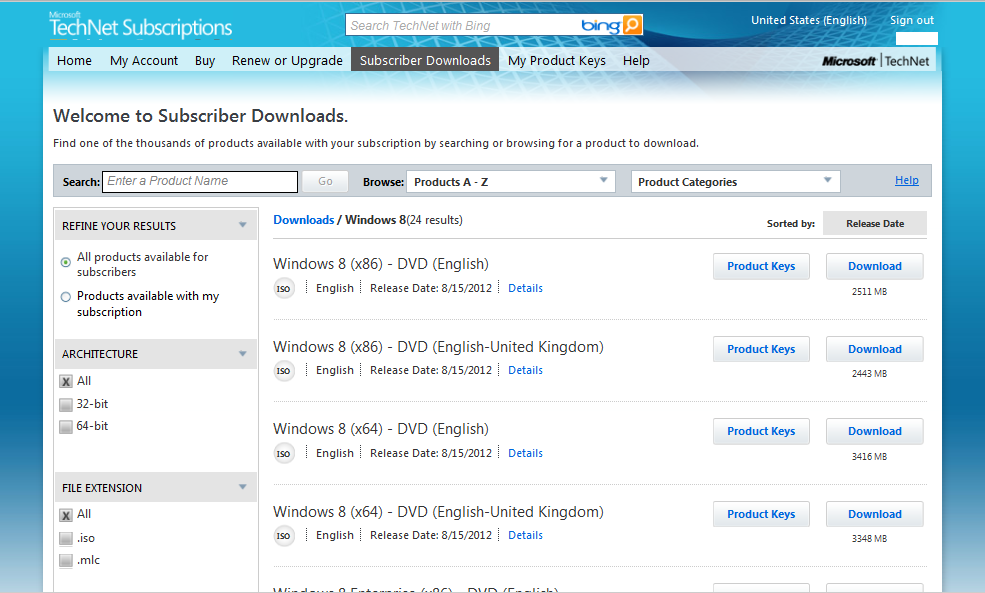
Yesterday, most people noticed that TechNet & MSDN subscribers were able to download the RTM release of Windows 8 :

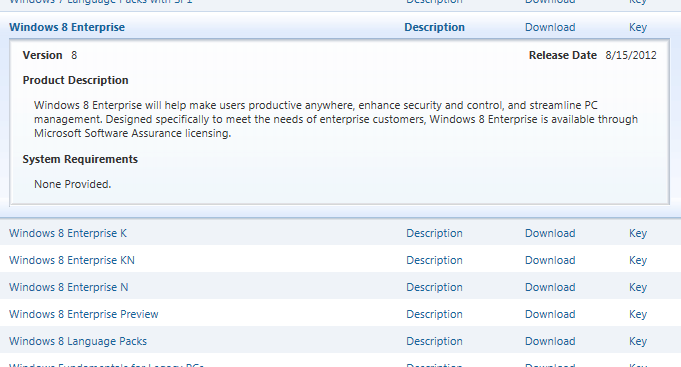
(Note: I believe TechNet Standard subscriptions were provided with Windows 8 (x86/x64) “Retail” media & a single Windows 8 Pro key; TechNet Professional subscriptions were provided both Windows 8 Retail Media and Windows 8 Enterprise Volume Licensing Media for business testing.)

image

Microsoft TechNet subscriber’s download area now lists Windows 8 (x64/x86)
(and Windows 8 Enterprise (x64/x86) for Pro Subscribers)

imageToday, Volume Licensing customers with Software Assurance discovered that the Volume Licensing media for Windows 8 Enterprise RTM is now available at:

This is the version that is Enterprise clone-able/deployable using centrally managed activation keys and Enterprise activation services/techniques such as KMS or MAK. 

Please keep in mind that Windows 8 Enterprise is again available only to Software Assurance volume licensing customers, and as such, is not listed under the “WINDOWS” category in the Download section of the VLSC but under “SOFTWARE ASSURANCE” category.

image

Microsoft Volume Licensing Service Center download area now lists Windows 8 Enterprise under “Software Assurance”

Posted by: kurtsh | August 16, 2012

RELEASE: Windows Essentials 2012

imageToday we’re happy to announce new versions of Movie Maker and Photo Gallery for Windows 7 and Windows 8.

We’ve added a few new capabilities while also taking advantage of some advances in Windows 8. Movie Maker and Photo Gallery are two essential Windows applications hundreds of millions of people have come to rely on for making the most of your photos and videos. And with this release, we’ve given you a few more reasons to enjoy them even more.

  • MOVIE MAKER
      • Built-in video stablization
      • Legal-integration of music soundtracks
      • Music narration & other audio controls
      • Improved visibility of text effects
      • H.264 encoding by default
  • PHOTO GALLERY
      • Built-in Auto Collage
      • Direct-to-Vimeo publishing
  • SKYDRIVE
      • Automated cloud backup and synchronization of documents and personal files – up to 5GB of storage free (more available for a fee)

And of course Windows Essentials continues to include:

  • Windows Live Mail
  • Windows Live Family Safety
  • Windows Live Writer
  • Windows Live Messenger
  • Outlook Connector Pack

NEED THE OLD ‘WINDOWS LIVE MESH’?
Windows Essentials 2012 will uninstall Live Mesh and replace it with Skydrive.  The differences between the two technologies is documented in this article.  If you don’t want this (or need to reinstall Live Mesh) you can download the OLDER Windows Live Essentials 2011 at http://www.microsoft.com/en-us/download/details.aspx?id=29219.

DOWNLOAD: Windows Essentials 2012
http://g.live.com/1rewlive5-all/en/wlsetup-all.exe

—————-

Original post:
BLOG: Introducing the New Windows Photo Gallery and Movie Maker
http://windowsteamblog.com/windows/b/windowsexperience/archive/2012/08/07/introducing-the-new-windows-photo-gallery-and-movie-maker.aspx

imageIn case you’ve been reading Acer’s comments as published by the media about Surface, I thought I’d couch some of those articles with some opinions on the topic from other sources.

SO IN CASE YOU HADN’T HEARD
A week ago, there was a somewhat ominous open communication to Microsoft from Acer Chairman, JT Wang, called by the media as “his warning to Microsoft”.

“Wang noted that Microsoft is currently looking for solutions such as creating a price gap to minimize the negative impact on other vendors’ product lineups, and he believes if Microsoft launches Surface at a price of US$199, it would have a rather significant impact, but if it is priced at around US$499-599, the effects will be a lot smaller.”
http://www.digitimes.com/news/a20120809PD216.html

Then JT Wang backed off his original statement’s harshness but still reiterated the “danger” of Surface to “the ecosystem” in this article:

“Microsoft, he said, was now considering possible differentiation strategies to minimize any possible impact on OEM partners, including introducing an artificial price gap. Still, it sound like Acer’s expectations of Surface are somewhat skewed in the first place; Wang supposedly claimed that the major damage would be done if Microsoft priced the entry-level tablet at $199 – thus directly competing with the Nexus 7, a figure which would be very unlikely. If Surface was $499-599, however, Wang sees less of an issue.”
http://www.slashgear.com/acer-please-microsoft-just-dont-make-surface-too-cheap-10242531/

On the other hand, a good chunk of the media weighed in with their take on Acer’s comments & Surface overall:

It should be noted that the OEMs that have signed up to do Windows RT devices – all I would suspect will be competitive with Surface RT – are Dell, Samsung, Asus, and Lenovo.

“Following sharp comments from Acer’s JT Wang surrounding Microsoft’s decision to compete with vital OEM partners in the tablet space, Mike Angiulo — the vice president of Microsoft’s Ecosystem and Planning team — has stepped to the plate with a resounding "thank you" to those very associates. Aside from praising those who will be helping to make Windows RT more than a passing fad, the company affirmed that ASUS, Dell, Samsung and Lenovo will all be shipping ARM-based products with the aforementioned operating system onboard.”
http://www.engadget.com/2012/08/13/microsoft-windows-rt-tablet-partners-asus-dell-lenovo-samsung/

I found this summary to be succinct:

Interesting support article.  I know there’s folks that have had this problem before. 

SYMPTOMS:
When viewing the size of the C:\Windows folder, users may notice that the C:\Windows\winsxs directory appears to be taking up large amounts of disk space

CAUSE:
The Windows component store (C:\Windows\winsxs) directory is used during servicing operations within Windows installations. Servicing operations include, but are not limited to, Windows Update, Service Pack and hotfix installations.

The component store contains all of the files needed for a Windows installation and any updates to those files are also held within the component store as they are installed. This will cause the component store to grow over time as more updates, features or roles are added to the installation. The component store utilizes NTFS hard links between itself and other Windows directories to increase the robustness of the Windows platform.

The component store will show a large directory size due to the way the Windows Explorer shell accounts for hard links. The Windows shell will count each reference to a hard link as a single instance of the file for each directory the file resides in. For example, if a file named advapi32.dll was 700 KB in size and was contained in the component store and the \Windows\system32 directory, Windows Explorer would inaccurately report that it consumes 1400 KB of hard disk space.

Read more here:

imageThis “Understand and Troubleshoot Guide” (UTG) enables you to learn technical concepts, functionality, and troubleshooting methods for Activation Technologies in Windows Server “8” Beta. This UTG provides you with:

  • A technical overview and functional description of this feature.
  • Technical concepts to help you successfully install, configure, and manage this feature.
  • User Interface options and settings for configuration and management.
  • Relevant architecture of this feature, with dependencies, and technical implementation.
  • Primary troubleshooting tools and methods for this feature.

WHITEPAPER: Understand and Troubleshoot Activation Technologies in Windows Server "8" Beta
http://www.microsoft.com/en-us/download/details.aspx?id=29014

Posted by: kurtsh | August 14, 2012

NEWS: Lenovo announced specs for ThinkPad Tablet 2

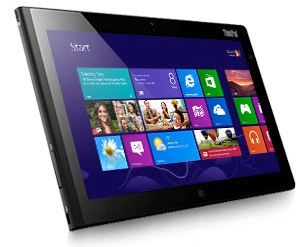
imageOnce again, I missed this too.  Apparently, Lenovo announced a potential ‘Surface Pro’ competitor with the “Lenovo ThinkPad Tablet 2”.  Leveraging a full Intel “Clovertrail” chipset, giving it full Windows application compatibility.

The Lenovo ThinkPad Tablet 2 measures less than 0.4 inches thick and weighs just over 21 ounces grams, making it both thinner and lighter than the Microsoft Surface Pro, which measures more than half an inch thick and weighs almost 32 ounces. However, the Tablet 2’s screen is also a bit smaller: 10.1 inches, versus the 10.6-inch screen that the Surface includes. Battery life will be about 10 hours, Lenovo claims, and connectivity options will include 4G WWAN, which is not avialable on the Surface.

The Tablet 2 will use the Intel Atom “Clover Trail” X86 processor, which is due this fall. Lenovo will include Windows 8 Pro on board, which makes the Tablet 2 a rival to the Surface Pro.

ThinkPad Tablet 2 full specs: (as reported online)

  • Processor: Intel Atom “Clover Trail” X86 processor
  • OS: Windows 8 Pro
  • Display: 10.1-inch IPS, 1366×768, optional digitizer/pen (makes the left side thicker than rest of the device)
  • Ports: miniHDMI, audio, microSD slot, USB 2.0, docking connector
  • Sound: stereo, dual-array microphone
  • Wireless: Wi-Fi, 3G HSPA+, LTE (AT&T only), Lenovo Mobile Access (pay as you go)
  • Connectivity: Optional Tablet 2 keyboard and dock
  • Camera: Front 2MP, Rear 8MP
  • Dimensions: 10.3 x 6.5 x .39 inches; 1.3 lbs. (9.8mm thick and under 600 grams or ~21 ounces)

Here’s the product page:

————————-

BTW: This is an interesting write up that was done at ReadWriteWeb about the Lenovo and the differing philosophies between them & the folks at Acer:

imageInteresting.  I totally missed this.

Apparently, Asus has published the specs and photos of their planned Asus Tablet 600, one of the first Windows RT devices on the market.  I have to guess that they’ll release theirs roughly the same time as models from Dell, Lenovo, Samsung, and Microsoft Surface RT get released.

Well, since they’ve published their specs, I guess a bunch of these elements aren’t hush hush, so here we go – straight from their Computex 2012 announcement web page:

  • 10.1" panel with Super IPS+ technology for superior visuals
  • Unique battery-boosting mobile dock that features a keyboard, touchpad and USB port for increased productivity
  • NVIDIA® Tegra® 3 4-Plus-1™ Quad-core CPU with 12-core GPU for low power consumption and high performance
  • 8MP rear camera for crystal clear photos and videos
  • Superior audio experience with ASUS SonicMaster technology
  • Built-in NFC sensor to easily communicate with other NFC-enabled devices

Did you catch that? 
QUAD code CPU.  12-core GPU.  8MP.  NFC.  Battery boosting mobile dock.

imageWindows 8 Enterprise’s new feature, “Windows-to-Go” is a lot more than just “Windows installed on a USB flash drive”.  This is a misconception that has propagated across the Internet for a long time.  The written differences are documented here however here’s a good run down:

  • Hibernate and sleep are disabled by default. To help prevent Windows To Go from accidental data corruption during roaming hibernate and sleep are disabled. They can be re-enabled by using Group Policy settings.
  • Internal disks are offline. To ensure data isn’t accidentally disclosed, internal hard disks on the host computer are offline by default when booted into a Windows To Go. Similarly if a Windows To Go drive is inserted into a running system the Windows To Go drive will not be listed in Windows Explorer.
  • Trusted Platform Module (TPM) isn’t used. When using BitLocker Drive Encryption a pre-operating system boot password will be used for security rather than the TPM since the TPM is tied to a specific computer and Windows To Go drives will move between computers.
  • Windows Recovery Environment isn’t available. In the rare case that you need to recover your Windows To Go drive, you should re-image it with a fresh image of Windows.
  • Push Button Reset isn’t available. Resetting to the manufacturer’s standard for the computer doesn’t really apply when running Windows To Go, so the feature was disabled.

Also driver configuration & host profiling is also something that has been engineered into Windows-to-Go:

  • Windows To Go drives can be booted on multiple computers. During the first boot on a computer Windows To Go will detect all hardware on the computer and install drivers. When returning to that computer Windows To Go will identify the computer and load the correct drivers automatically. Users can do this on multiple computers with the same Windows To Go drive enabling the ability to roam between them.

    (Note that when they say it will “detect all hardware”, they mean being able to work with both UEFI as well as legacy BIOS based PCs, and also detected at boottime what hardware is installed physically and build a ‘hardware profile’ for the PC being used.  The hardware profile remains persistent for future use so that boottime hardware detection isn’t necessary for subsequent uses on the same PC.)

One of many other important changes to Windows 8, specifically for Windows-to-Go includes:

  • Resilience to unintended removal.  When the USB device is pulled from the system suddenly, the user has 60 seconds to get it back in there while the entire operating system halts.  At this point, there is either a graceful recovery and the OS resumes (with a warning dialog box to ‘avoid doing that’) or the system is shutdown.  This shutdown occurs to ensure that sensitive data on the screen is not exposed when the user, say, leaves the PC with their WTG device quickly & rashly.

There is also a variety of other accommodations afforded to Windows-to-Go within Windows 8 such as configuration management-by-policy, enterprise central deployment, cloning, etc.  A tremendous amount of work was done specifically for Windows-to-Go for both central USB device deployment as well as user self-provisioning through System Center Configuration Manager 2012 SP1.

Now something else that I found out was that Windows-to-Go had some additional engineering considerations that are pretty important:

  • Devices are “Mass Storage”. When queried using Device Manager, the USB device reports as actual fixed media – instead of “Removable Storage”. This is specific to certified Windows-to-Go certified devices, I believe.
  • Devices must be considered ‘high performance’.  They are certified through the Windows 8 Hardware Certification Kit and must be USB 3.0 drives with SSD & high random Read/Write speed as well as high endurance with low latency.  The exact specifications isn’t something I know but if you look at the devices below, you can probably get a good idea.

Here are two ‘certified’ flash drives that we use at Microsoft:

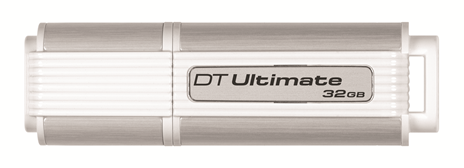
imageKingston KW-U4132-1FA – Bootable DataTraveler Ultimate 3.0

  • Capacity – 32GB
  • Fixed device – supports USB Boot
  • imageRequirements – system with USB 3.0 port
  • Fast – data transfer rates for USB 3.0 to 80MB/sec. read and 60MB/sec. write; USB 2.0 = 30MB/sec. read and 30MB/sec. write
  • Backwards compatible – with USB 2.0.
  • Dimensions – 2.90" x 0.87" x 0.63" (73.70mm x 22.20mm x 16.10mm)
  • Operating Temperature – 32° to 140°F (0° to 60°C)
  • Storage Temperature – -4° to 185°F (-20° to 85°C)
  • Simple – just plug into a USB port
  • Practical – durable casing with a solid lanyard loop
  • Guaranteed – five-year warranty

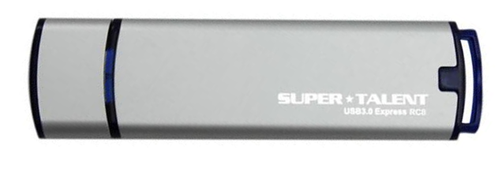
imageSuper Talent Electronics Bootable USB 3.0 Express RC8 Flash Drive
(25GB, 50GB, 100GB models)

image

  • Mfr Part Number: ST3U25GR8S
  • Capacity: 25 GB, 50 GB or 100GB
  • Interface: USB 3.0 and USB 2.0
  • NAND Flash: MLC
  • Performance:
    • Sequential Read Rate: 270 MB/s (max)
    • Sequential Write Rate: 220 MB/s (max)
  • Shock: 1500G (operating)
  • Vibration: 16G (operating)
  • Reliability:
    • Data Reliability: Built-in EDC/ECC function
    • Data Integrity: 10 years
    • Wear Leveling Algorithm: Global wear-leveling
  • Dimensions: 92.7 x 25.0 x 8.0 mm

Note:  If you’re interested in some other reading, I found a rather detailed 3rd party “review” of Windows-to-Go that has no association to Microsoft but might be useful to reference.

Posted by: kurtsh | August 12, 2012

BETA: SharePoint Server 2013 Preview available

imageSharePoint Server 2013 & all it’s social networking goodness is now available as a customer preview!

SharePoint Server 2013 Preview is designed to bring people together to get work done. Whether you’re using it to manage your enterprise content, make it easy for business end users to share ideas and information, or help developers build innovative new applications, SharePoint Server 2013’s improvements in scale, security, and flexibility have you covered.

  • Scalable – support for the most demanding workloads with end-user experience in mind.
  • Secure – governance, information protection and control – the right people access the right information.
  • Flexible – deploy quickly & easily and upgrade on your terms – online and on-premises.

Want an overview of SharePoint Server 2013 Preview? See the product details page.

Download site:

References:

Additional information:

« Newer Posts - Older Posts »

Categories