Posted by: kurtsh | August 12, 2012

BETA: SharePoint Designer 2013 Customer Preview

SharePoint Designer 2013 is the tool of choice for the rapid development of SharePoint applications. Using SharePoint Designer, advanced users and developers alike can rapidly create SharePoint solutions in response to business needs.

Advanced users can compose no-code solutions that encompass a variety of common scenarios, from collaborative sites and web publishing to Line-Of-Business data integration, business intelligence solutions, and human workflows, leveraging the building blocks available in SharePoint in an easy to use environment. In addition, developers can use SharePoint Designer 2013 to get a quick start on SharePoint development projects.​

imageGreat news!  Along with the announcement about Windows 8’s release to manufacturing, Windows Server 2012 was released to manufacturing and is being made available to OEM PC manufacturer’s per the Windows Server blog off of Technet.com.

Net-net:  We’re done and it’s the most significant jump in technology Windows Server has ever had, above even the jump to Active Directory.  The availability of the release software to http://www.microsoft.com/licensing/servicecenter should follow the schedule similar to Windows 8… in other words within a week or so. 

The overall goals for this release were to provide:

  • A comprehensive cloud platform
  • Cost savings & increased efficiencies
  • Support for a modern work style

Advanced capabilities of the new product include:

  • Virtualization including Network Virtualization, Shared-nothing Live Migration, Hyper-V Replicas, Virtual Fiber Channel,
  • Storage
  • Web & Application Platform
  • Networking
  • Management & Automation
  • VDI
  • Identity & Access

More information is available here:
http://www.microsoft.com/en-us/server-cloud/windows-server/2012-default.aspx.

imageOpportunity awaits. But not for long. Rise to the challenge with Visual Studio 2012!

The faster you can transform your big idea into software, the greater your chance for success. Be ready to rise to the challenge with Visual Studio 2012. Get a head start on your future by attending the Visual Studio 2012 Virtual Launch Event. See how Visual Studio 2012—supported by Team Foundation Server— can help turn your ideas into software.

Save the date and register now to attend this free event! If you are unable to watch the live stream, don’t worry. It will be available for on-demand viewing later.

Posted by: kurtsh | August 8, 2012

BTW? I’m away.

imageI haven’t posted in a while or maybe just sporadically not because I’m abandoning the blog or anything but because I’ve been out of town for training or for personal reasons. 

I’ll be back next week, and yes, I have a ton of blogging to catch up on but I’m always tweeting so catch me on my Twitter feed if you get the chance.  (And those of you who are customers should know what my Twitter name is already)

imageJoel Runyon, the guy behind the inspiring “Blog of Impossible Things”, wrote an epic post about an encounter he had with an older gentleman in his 80’s that may not sound like it has any relevance to the field of technology but does an excellent job of highlighting the important difference between ‘creation’ and ‘consumption’ while highlighting the importance of self-empowerment.

If you know how these words are commonly used in ‘client technology’ circles, you will find this blog post very relevant.  If you don’t, this should be an education for you about the direction client computing is headed in.

An Unexpected Ass Kicking
Added Aug 2, 2012
By Joel Runyon

I sat down at yet-another coffee shop in Portland determined to get some work done, catch up on some emails and write another blog post.

About 30 minutes into my working, an elderly gentleman at least 80 years old sat down next to me with a hot coffee and a pastry. I smiled at him and nodded and looked back at my computer as I continued to work.

“Do you like Apple? As he gestured to the new Macbook Air I had picked up a few days prior.

“Yea, I’ve been using them for a while.” Wondering if I was going to get suckered into a mac vs. pc debate in a portland coffee shop with an elderly stranger.

“Do you program on them?

“Well, I don’t really know how to code, but I write quite a bit and spend a lot of time creating online projects and helping clients run their businesses.”

Trust me:  This gets really interesting, especially once you discover who this gentleman is.  If the opening excerpt of Joel’s post caught your attention, you should read the whole post here:

Posted by: kurtsh | August 7, 2012

DOWNLOAD: SysInternals Suite (Updated August 3, 2012)

image

Initially, the Sysinternals web site was created in 1996 by Mark Russinovich and Bryce Cogswell to host their advanced system utilities and technical information. Whether you’re an IT Pro or a developer, you’ll find Sysinternals utilities to help you manage, troubleshoot and diagnose your Windows systems and applications.

The Sysinternals Troubleshooting Utilities have been rolled up into a single Suite of tools. This file contains the individual troubleshooting tools and help files. It does not contain non-troubleshooting tools like the BSOD Screen Saver or NotMyFault.

What’s new in this release: (Updated: August 3, 2012)

  • AccessChk v5.1: This update to AccessChk, a command-line utility that shows the security settings and effective access on many object types, including registry keys and files, now reports Windows 8 claims and capabilities, shows the token of processes running as local system, lists security descriptor flags, and checks for remote interactive logon rights.
  • Autoruns v11.33: This fixes a bug that caused the run as administrator elevation to fail if Autoruns was started from a path with spaces.
  • Coreinfo v3.05: Coreinfo, a tool that shows CPU features, cache sizes, and topology, now correctly shows hyperthreading support on AMD multicore systems and lists processor features on Windows XP.
  • Whois v1.1: Whois is a command-line utility that looks up domain name registration information. This release fixes a bug that could cause an infinite loop and a command-line option, -v, that prints verbose information about domain registration referrals.

http://technet.microsoft.com/en-us/sysinternals/bb842062

http://technet.microsoft.com/en-us/sysinternals/bb545021

imageThere’s an entire article that a coworker pointed out to me on “Running Domain Controllers in Hyper-V”.  There’s planning, deployment, operational guidelines, backup & restore directions, etc.  Here’s the table of contents:

Deployment Considerations for Virtualized Domain Controllers

Read more at:

imageHi! Just thought I’d let you know that Windows 8 was officially completed today & is being handed off to our OEM PC manufacturers for integrating with current & next-generation PCs, laptops, and tablets.

This is obviously something you may have already read about on Twitter, RSS, etc. However, for your reference, here’s the release schedule for the release software for Windows 8

  • MSDN and TechNet subscribers:  August 15
    (Developers will be able to download the final version of Windows 8 via your MSDN subscriptions.  IT professionals testing Windows 8 in organizations will be able to access the final version of Windows 8 through your TechNet subscriptions.)
  • Volume Licensing/VLSC for customers with SA (Enterprise):  August 16
    (Customers with existing Microsoft Software Assurance for Windows will be able to download Windows 8 Enterprise edition through the Volume License Service Center (VLSC), allowing you to test, pilot and begin adopting Windows 8 Enterprise within your organization.)
  • Volume Licensing/VLSC without SA (Professional):  September 1
  • Online/Retail availability: October 26

Our announcement blog post for the release of Windows 8 is here:
http://blogs.msdn.com/b/b8/archive/2012/08/01/releasing-windows-8-august-1-2012.aspx

clip_image002[4]

I would like to invite you to an exclusive free, one-day launch event designed to demonstrate new ways for your team to become an efficient, well-oiled machine

You and I know that leaders never stop learning. Your organization looks to you to provide the latest and greatest, and it’s your job to always be one step ahead.

So join me at The Cloud OS Signature Event Series, and check out the launch of the newest, most exciting products from Microsoft. You’ll find out how Windows Server 2012, Windows Azure, and Microsoft System Center 2012 can help alleviate day-to-day tasks so your team can focus on what’s really important and get back to work.

Here’s what you can expect at this free, in-person launch event:

  • An in-depth discussion on taking your virtualization infrastructure to the next level with Windows Server 2012, Hyper-V, and Windows Azure
  • An engaging talk on enabling the modern work style your users are demanding with Windows Server 2012
  • A presentation on management made simple with Windows Server 2012 and System Center 2012

Plus, at the event, you’ll be able to participate in a raffle for a chance to win an Xbox 360 + Kinect Bundle.*

I highly recommend this event. It’s a great opportunity to engage with qualified experts and learn all the ways you can boost your team to the next level. I hope to see you there.

clip_image006[7]

Attend The Cloud OS Signature Event Series, coming to a city near you.

  • September 5  New York City
  • September 14  Atlanta area
  • September 18  Dallas
  • September 19  Minneapolis
  • September 19  Houston
  • September 20  Irvine
  • September 20  Boston area
  • September 20  Chicago
  • September 25  D.C. area
  • September 25  Columbus
  • September 26  Detroit
  • September 27  Seattle
  • September 27  Charlotte
  • October 10  Denver
  • October 11  San Francisco
  • October 11  Philadelphia area
Posted by: kurtsh | July 29, 2012

HOWTO: Can I delete my Skype account?

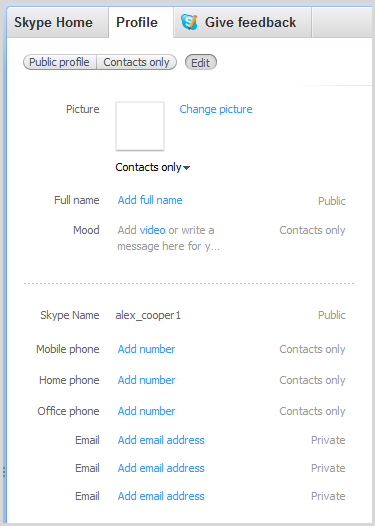
imageFor some reason, Skype has made it basically impossible to actually remove an account from their database.  Once it’s been created… it’s there forever.  So if you type in the wrong Skype name or misspell the name (as I accidentally did for a relative)… well, that’s tough.

The only resolution is to strip the account of any personal information by using the “Edit my Profile” menu of the Skype client software installed on your computer (not via the web page – this won’t work), ABANDON the account, and create a new one with the right name. 

Here’s what their support article says:

Can I delete my Skype account?

It’s not possible to delete a Skype account or change a Skype Name after it has been created. However, you can remove all the personal information contained in your profile. This will ensure that other people cannot search for you in Skype by using personal information such as your full name, email or phone number (although they will still be able to search for your Skype Name).

https://support.skype.com/en-us/faq/FA142/can-i-delete-my-skype-account

Additionally, there is a section on their support site that talks about ‘removing your old Skype name from the sign in menu.

How can I remove my Skype Name from the sign-in screen?

When you sign in to Skype, your Skype Name is added to the dropdown list on the sign-in screen.  To remove your Skype Name from the Skype sign-in screen:

  1. Quit Skype and make sure that Skype is no longer running.
  2. Click Start, type "run" and press Enter. (On Windows XP: Click Start and then Run.)
  3. Type “%appdata%\Skype” and click OK.
  4. Delete the folder with your Skype name.

If you cannot see the folder with your Skype name, press CTRL + H to display hidden folders.

When you restart Skype, your Skype Name will no longer be displayed.

https://support.skype.com/en-us/faq/FA11070/how-can-i-remove-my-skype-name-from-the-sign-in-screen

« Newer Posts - Older Posts »

Categories