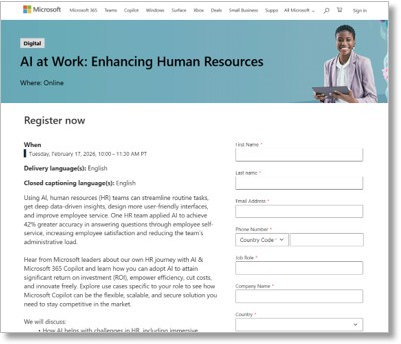
We have 4 webinars scheduled that are specific to different professions that you may want to share to help your users understand the impact of Artificial Intelligence on Human Resources, Finance, Marketing, Sales & Legal.
- AI at Work: Enhancing Human Resources
2026-02-17 • 10:00 – 11:30 PST
https://msevents.microsoft.com/event?id=2524624132
Using AI, human resources (HR) teams can streamline routine tasks, get deep data-driven insights, design more user-friendly interfaces, and improve employee service. One HR team applied AI to achieve 42% greater accuracy in answering questions through employee self-service, increasing employee satisfaction and reducing the team’s administrative load.
Hear from Microsoft leaders about our own HR journey with AI & Microsoft 365 Copilot and learn how you can adopt AI to attain significant return on investment (ROI), empower efficiency, cut costs, and innovate freely. Explore use cases specific to your role to see how Microsoft Copilot can be the flexible, scalable, and secure solution you need to stay competitive in the market.
- AI at Work: Transforming Finance for Improved Outcomes
2026-03-26 • 10:00 – 11:30 PDT
https://msevents.microsoft.com/event?id=3434677304
Finance teams using AI have seen a 60% reduction in case resolution time in cash collections.1 AI solutions empower finance workers to streamline audits, make strategic decisions with more speed and precision, and remain agile in competitive markets.
Hear from Microsoft leaders about our own Sales journey with AI & Microsoft 365 Copilot, and learn how you can adopt AI to attain significant return on investment (ROI), empower efficiency, cut costs, and innovate freely. Explore use cases specific to your role to see how Microsoft Copilot can be the flexible, scalable, and secure solution you need to stay competitive in the market. - AI at Work: Empowering Marketing
2026-01-27 • 10:00 – 11:30 PST
https://msevents.microsoft.com/event?id=2258775002
Using AI tools, marketers have seen a 21.5% higher conversion rate.1 AI solutions can automate labor-intensive and time-consuming tasks by helping swiftly summarize research, draft targeted messages, and create better content—helping employees prioritize time spent on creative innovation.
Hear from Microsoft leaders about our own Marketing journey with AI & Microsoft 365 Copilot and learn how you can adopt AI to attain significant return on investment (ROI), empower efficiency, cut costs, and innovate freely. Explore use cases specific to your role to see how Microsoft Copilot can be the flexible, scalable, and secure solution you need to stay competitive in the market. - AI at Work: Boost Sales Productivity and Revenue
2026-02-11 • 10:00 – 11:30 PST
https://msevents.microsoft.com/event?id=3335237405
AI isn’t just about productivity—it’s about transformation. Business AI-driven insights are empowering sales teams to boost productivity, customer engagement, and decision-making. One business group realized a 9.4% higher revenue per seller after using AI tools to automate or improve emails, meetings, proposals, and promotions.1 With higher-quality interactions, sellers are pursuing and closing more opportunities than ever.
Hear from Microsoft leaders about our own Sales journey with AI & Microsoft 365 Copilot, and learn how you can adopt AI to attain significant return on investment (ROI), empower efficiency, cut costs, and innovate freely. Explore use cases specific to your role to see how Microsoft Copilot can be the flexible, scalable, and secure solution you need to stay competitive in the market. - AI at Work: Streamlining Legal Processes for Improved Outcomes
[On-Demand – Previously recorded on 1/20/2026]
https://msevents.microsoft.com/event?id=1648471458
Legal teams are using AI to enhance productivity by automating and streamlining routine tasks like document review, legal research, analysis, and case management. By implementing AI solutions, legal teams can expect to reduce external spend for regulatory work by 5%.
Hear from Microsoft leaders about our own Legal journey with AI & Microsoft 365 Copilot, and learn how you can adopt AI to attain significant return on investment (ROI), empower efficiency, cut costs, and innovate freely. Explore use cases specific to your role to see how Microsoft Copilot can be the flexible, scalable, and secure solution you need to stay competitive in the market.
 kurtsh
 Kurt Shintaku's Blog
You must be logged in to post a comment.