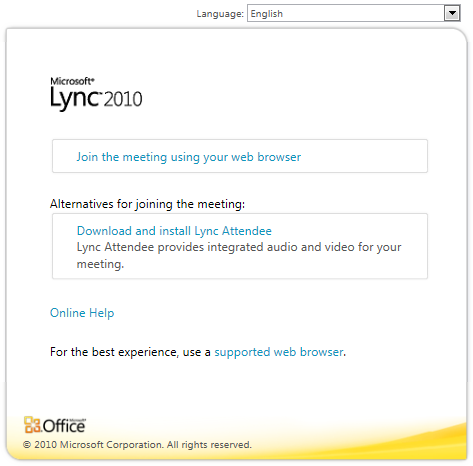
imageLync 2010 is awesome.  It’s fast, convenient, federates with other Lync-companies for secure messaging, and integrates with everything in the Office suite.

One thing that presenters often want however is the ability to see what their “Audience’s view” is like end-to-end. 

Assuming that your IT infrastructure supports it in it’s Lync implementation, add the following characters to the end of any Lync URL to get the option of accessing the meeting via the web:

?sl=

EXAMPLE:
So if you have the following Lync conference URL, which connects you to your conference call through the installed Lync client:

https://join.companyname.com/meet/namegoeshere/J7THYCPG

to get the Web Client, the URL should become:

https://join.companyname.com/meet/namegoeshere/J7THYCPG?sl

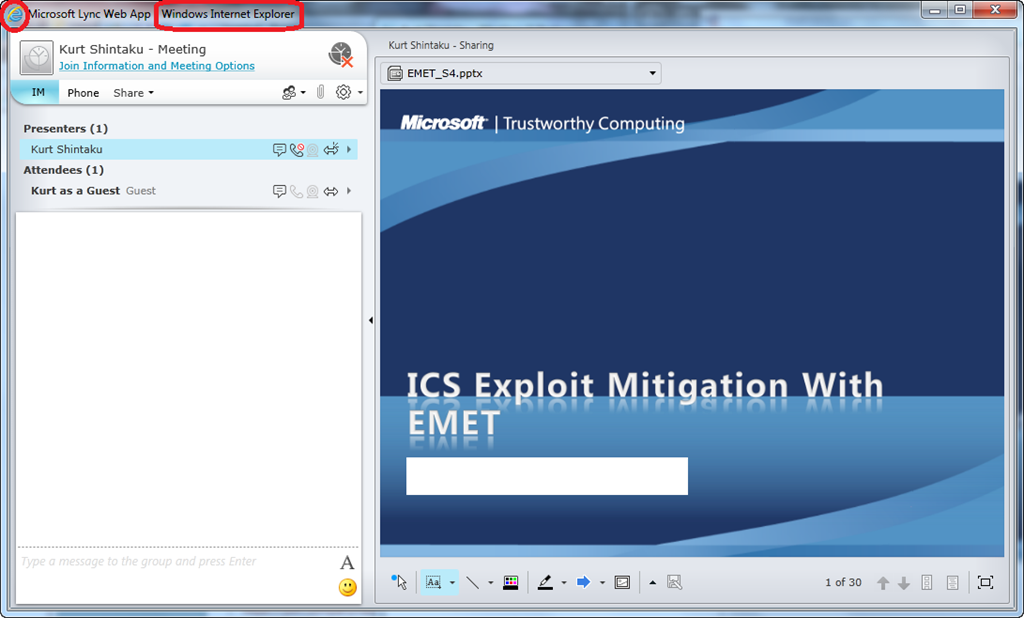
The resulting experience is a Silverlight client “over the web”. (See below)  The client below is just a web browser with Silverlight components displaying the participants list, the instant messaging window, attachment controls, any sharing being done on the stage, and most other functions from the traditional Lync client.
image

Posted by: kurtsh | October 6, 2012

INFO: Anyone else goin’ to CES 2013? (Part 1)

imageThis evening I made the decision to go to CES 2013.  I bought the flight, hotel, and started my traditional routine for preparing for the trip.

WHY?
This may seem like a peculiar question to some but allow me to explain.  Despite the fact that Microsoft is not attending CES anymore, I decided that there are several reasons why it still makes sense for me to go:

  1. Windows 8 Hardware & Peripherals:  This is a huge year for Microsoft and the hardware/peripherals ecosystem will be booming.
  2. Online Services Providers:  The future of computing is online services that leverage devices as end points.
  3. Vacation/Las Vegas:  Nothing says vacation like Vegas casinos, spas, restaurants, clubs, shows, bars, & sightseeing.  Whee!

So here’s a few things that will hopefully help others in their trips to CES 2013.

SCHEDULE:
The CES Expo/Exhibit floor is open during the following hours:

  • Tuesday, January 8: 10 a.m.-6 p.m.
  • Wednesday, January 9: 9 a.m.-6 p.m.
  • Thursday, January 10: 9 a.m.-6 p.m.
  • Friday, January 11: 9 a.m.-4 p.m.

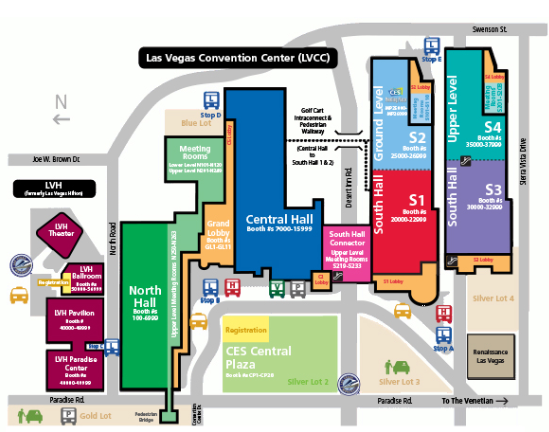
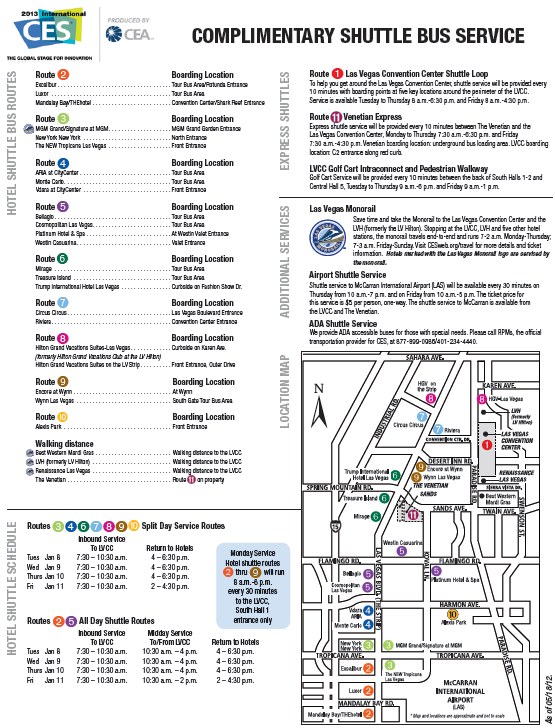
MAPS:
To get around CES, you’ll want two maps which have been provided:

OTHER SITES:

image

image

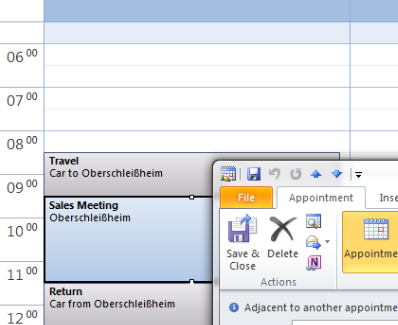
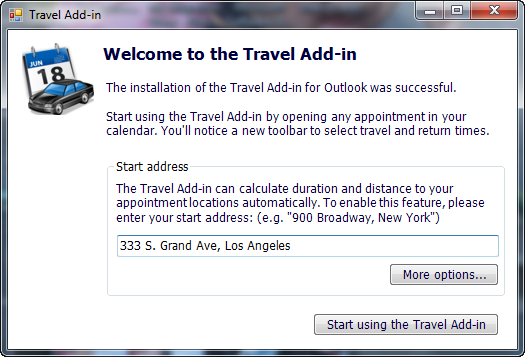
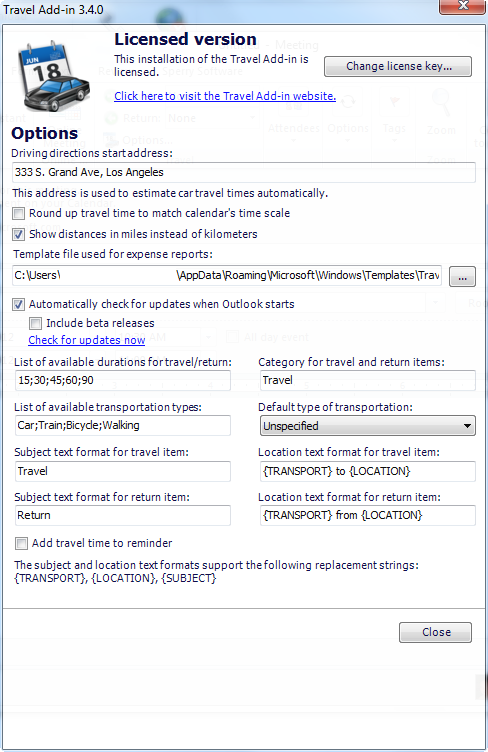
imageThe Travel-Time add-in from Instyler is compatible with Outlook 2003, Outlook 2007 and Outlook 2010 and uses the mapping service from Bing. It adds a directions button to the appointment/meeting window. It also allows you to automatically add traveling time for your appointments and to generate travel expensive reports.

When pressing the Directions button, the add-in uses your predefined address and the location field of the appointment or meeting to get the directions. The nice thing of this add-in is that this is being done directly in the appointment or meeting window and does not launch an external browser. This mapping is being done via Bing Maps.

imageThe main feature of this add-in is being able to set the travelling time needed to reach the location of the appointment or meeting. It has also a feature to calculate this automatically for you in the background (via OpenRouteService). When moving around the appointment/meeting in your calendar, it moves the traveling time block with it.

Automatically creating travel expense reports in Excel comes in handy when you do not have to pay for your own traveling. The Excel template can be customized to for instance to match the company’s template and to only view the information that you want.

imageMore information:

Halo fan?  You ought to check this out:  The backstory of Bungie.  For those of you that remember Marathon, the announcement of Halo by Steve Jobs, the acquisition by Microsoft, etc.  You’ll love it.

“O Brave New World”: Bungie’s 20th Anniversary Documentary (55 min)

“To cap off Bungie’s 20th Anniversary festivities, the team has assembled a near hour long documentary covering the studio’s past, present, and future. Featuring insight from the team — including their ever illusive Creative Director, Jason Jones — and interviews from key industry veterans and luminaries, "O Brave New World" is both a celebration of Bungie’s legacy and a love letter to the community of gamers who have embraced Bungie’s games for two incredible decades.”

imageDid you know that customers with MDOP that have an active Asset Inventory Service account (being retired)… get Windows Intune a no-charge for the duration of their MDOP subscription?

<taken from the Microsoft Product List October 2012>

Microsoft Desktop Optimization Pack for Software Assurance

Customers who wish to acquire the Microsoft Desktop Optimization Pack for Software Assurance (MDOP) must first have acquired and assigned to their desktop Windows Software Assurance, or a license for either Windows Virtual Desktop Access or Windows® Intune.

Volume License customers with active licenses for MDOP will receive the following software (as it is made available).

  • Microsoft Application Virtualization for Windows Desktops (App-V)
  • Microsoft Advanced Group Policy Management (AGPM)
  • Microsoft Diagnostics and Recovery Toolset (DART)
  • Microsoft System Center Desktop Error Monitoring (DEM)
  • Microsoft Enterprise Desktop Virtualization (MED-V)
  • Microsoft BitLocker® Administration and Monitoring (MBAM)

Windows® Intune Offer for Microsoft Desktop Optimization Pack (MDOP) Customers Using Asset Inventory Service

The Asset Inventory Service (AIS) offered as part of MDOP will be discontinued on April 3, 2013.  As of that date, customers will no longer have access to the service.  MDOP customers with active AIS accounts activated in the Volume Licensing Service Center on or before April 30, 2012 will have the option to transition to and use the Windows® Intune online service provided Windows® Intune is commercially available in the customer’s country.  A list of countries where Windows® Intune is commercially available can be found here: http://www.microsoft.com/en-us/windows/windowsintune/faq/default.aspx.

Offer Details

  • This offer can be accepted any time between April 3, 2012 and the expiration of customers’ current MDOP subscription.
  • To accept the offer, customers must (1) create a Windows® Intune trial account by going to http://www.microsoft.com/en-us/windows/windowsintune/try-and-buy.aspx , and then (2) submit the offer acceptance form at http://go.microsoft.com/fwlink/?LinkID=242876 .
  • Access to and use of Windows® Intune under this offer will expire upon expiration of the customer’s MDOP subscription.
  • The terms and conditions of customers’ agreements, the Universal License Terms of the Product Use Rights, and the General License Terms of the Online Services section of the Product Use Rights govern use of the service.
  • The number of devices from which a customer is eligible to access Windows® Intune under this offer equals the customer’s AIS subscription seat total at the time that customer accepts this Windows® Intune offer.  AIS seats added to an active account at any time up until the time the customer accepts the Windows® Intune offer will be included in the count.
  • MDOP seats acquired after a customer accepts this Windows® Intune offer, including licenses acquired through the true-up process under their volume license agreement will not be eligible to access Windows® Intune under this offer. If a customer wishes to access Windows® Intune from a number of devices in access of the number permitted under this offer, they will need to separately acquire additional licenses.
  • Rights to access Windows® Intune under this offer do not include any right to use Windows desktop operating system. 
Posted by: kurtsh | October 4, 2012

DOWNLOAD: Springboard Resource Guide for Windows 8

We just released this today!

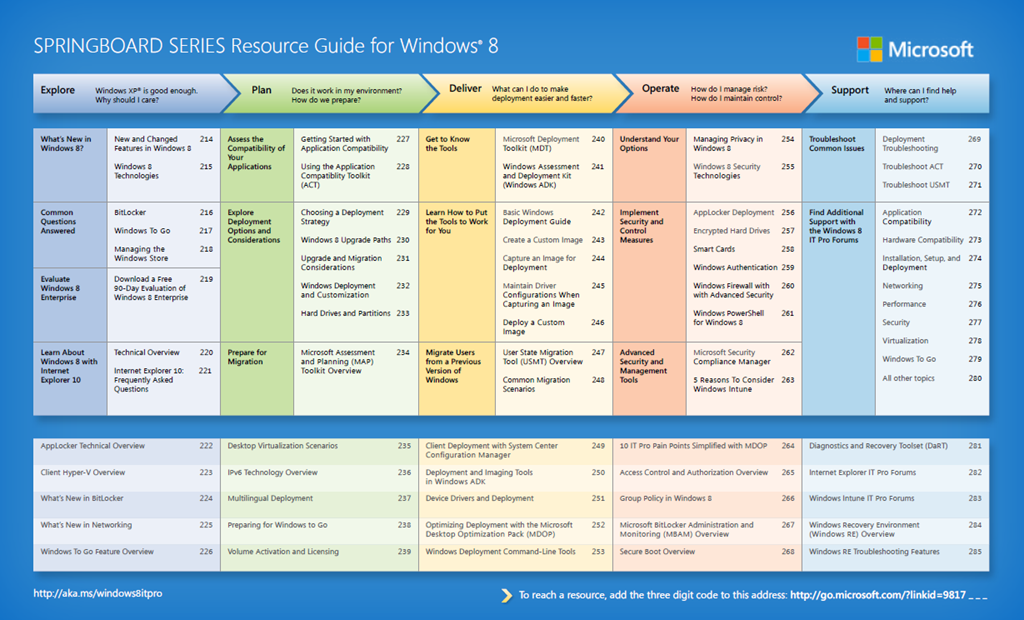
Download a one-page HYPERLINKED guide outlining the top resources for IT professionals interested in exploring, planning for, deploying, managing, and supporting Windows 8 as part of their IT infrastructure.

image

This has everything from ‘Exploring Windows 8’ to ‘Planning for Windows 8’s Deployment’ to ‘Executing a deployment of Windows 8’ to ‘Managing Windows 8’ to ‘Supporting Windows 8’.  It’s all in there.

image

The biggest wave of innovation in Microsoft history is transforming enterprise IT. Join me for a free launch event, and you’ll see how the latest technologies can inspire productivity and increase your value as a strategic leader.

  • Improve business performance and build a real-time enterprise by harnessing innovations in social, mobile, big data, and the cloud.
  • Visit our Experience Lounge to explore Windows 8, the new Microsoft Office, Windows Server 2012, and the latest PC devices with touch and keyboard.
  • See live demos showcasing real customer scenarios and end-to-end solutions for mobile, cloud, and business intelligence.

Attend The New Era of Work Launch Event for Windows 8, Office and More

Are you a server admin?  Do you run a server lab?

If so, you have to try this out.  There’s no reason not to.  This is really amazing and the trial is totally FREE.  Provisioning virtual servers in the cloud and setting them up with storage, networking, processing, memory… all through a web page and booting a template VM is just the start of using Windows Azure Infrastructure-as-a-Service (IaaS).

imageTry Windows Server 2012 on Windows Azure Free for 90 Days
Without downloading an ISO or VHD file or installing anything, you can be up and running in just a few steps. Your free trial includes 750 small compute hours per month, 10 websites, 10 mobile services, 1 SQL database, 35GB with 50 million storage transactions, unlimited

And you can upload your OWN Virtual Hard Drive (.VHD) files to the cloud and host them there.  Windows Azure takes care of the rest.  If you have .VMDKs, you can convert them using the free Virtual Machine Converter.

Just try it.  It costs nothing and it’s the coolest thing in the world.

imageHere’s another great presentation that was done at TechEd 2012 that I’m sure would be news to many.

WCL327: Maximizing Windows 7 Performance: Troubleshooting Tips
Ever thought about what Windows 7 actually is doing while you are waiting? Learn to troubleshoot and analyze a wide range of performance problems including application start times, boot issues, deferred procedure calls and interrupt activity (DPCs and ISRs), system responsiveness issues, application resource usage, and interrupt storms.

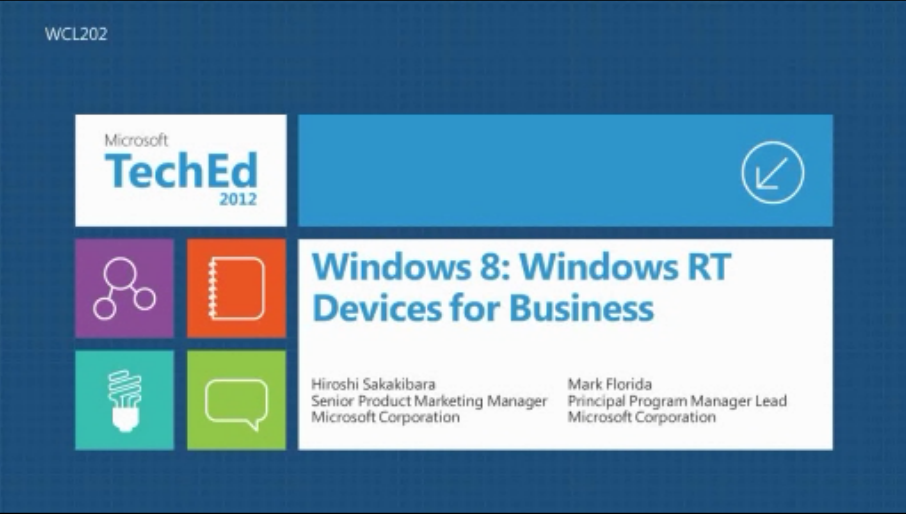
imageI’ve gotten a lot of questions about Windows RT and thought it best just to point to the video from TechEd 2012 that goes over the business capabilities of Windows RT.

WCL202:  Windows 8: Windows RT Devices for Business
In this session we will discuss the business capabilities of Windows RT (Windows on ARM) devices. We will talk about the Windows RT capabilities from business angle – e.g., user experience, productivity, connectivity, security, and manageability – as well as how organizations should assess Windows RT devices for their environment.

ONLINE STREAM: http://channel9.msdn.com/Events/TechEd/NorthAmerica/2012/WCL202 

POWERPOINT: Download WCL202_Sakakibara.pptx

VIDEO FILE: WCL202.wmv

—————————————————————————–

For more videos like this one visit the TechEd 2012 catalog at:
http://northamerica.msteched.com/contentcatalog#fbid=tTT6t7l_hv7

« Newer Posts - Older Posts »

Categories