imageWe just released Windows Azure IaaS.  IaaS empowers you to run Virtual Machines of the Windows Server or Linux in the cloud.  Upload them or provision them online.  Throttle their usage & manage them on virtual networks. 

And provide connectivity to your corporate Active Directory – extending your infrastructure securely into the cloud.

Today is an exciting day for Microsoft, Windows Azure and all of our customers around the world.  I am very pleased to announce the general availability of Windows Azure Infrastructure Services. This new service now makes it possible for customers to move applications into the cloud.

Our announcement today is a significant step in our cloud computing strategy, which has been influenced directly by our discussions with customers and partners around the world.  Throughout these conversations, one thing holds true in every discussion – enterprises know that success with the cloud lies in the power of “and.”  Customers don’t want to rip and replace their current infrastructure to benefit from the cloud; they want the strengths of their on-premises investments and the flexibility of the cloud. It’s not only about Infrastructure as a Service (IaaS) or Platform as a Service (PaaS), it’s about Infrastructure Services and Platform Services and hybrid scenarios.  The cloud should be an enabler for innovation, and an extension of your organization’s IT fabric, not just a fancier way to describe cheap infrastructure and application hosting

Customers have also told me that they don’t want to have to choose either a low price or good performance; they want a low price and good performance. That’s why today we are also announcing a commitment to match Amazon Web Services prices for commodity services such as compute, storage and bandwidth.  This starts with reducing our GA prices on Virtual Machines and Cloud Services by 21-33%.  Regardless of how you choose to buy Windows Azure, you’ll get the benefit of this price reduction. As our operations GM Steven Martin said, “If you had concerns that Windows Azure was more expensive, we’re putting those concerns to rest today.”

By listening to customer feedback, we learned a lot about the workloads you want to run. As part of our new Infrastructure Services release, we’ve added in new high memory VM instances (28GB/4 core and 56 GB/8 core) to run your most demanding workloads.  We also learned more about the apps you want to run so we’ve added in a number of new Microsoft validated instances to our list including SQL Server, SharePoint, BizTalk Server, and Dynamics NAV to name a few.

It’s gratifying to see our customers already using our unique hybrid solution to innovate. For example, automotive marketing and social media firm Digital Air Strike have utilized Windows Azure’s Infrastructure Services and Platform Services to create an instant feedback mechanism for all car purchases and service transactions for automotive giant General Motors. This enables GM to monitor the health of their customer relationships in near real time, providing deep and valuable business insights.

…

Read the rest of the article here:

imageMark your calendars!  With BUILD 2013 (Microsoft’s developer’s conference) at Moscone Center in San Francisco sold out completely, folks that would like to hear about what is being shown & discussed should at least tune into the live stream on June 26 – 28.

(Note: There is a waitlist for registrations.  I suspect, like in past events, that these are held-back slots for VIPs that have been invited and once the deadline for availability hits those open registrations, they will be released and made available to the public but I don’t believe there are very many of these so check in or follow the Twitter feed for BUILD, @bldwin.)

Posted by: kurtsh | April 14, 2013

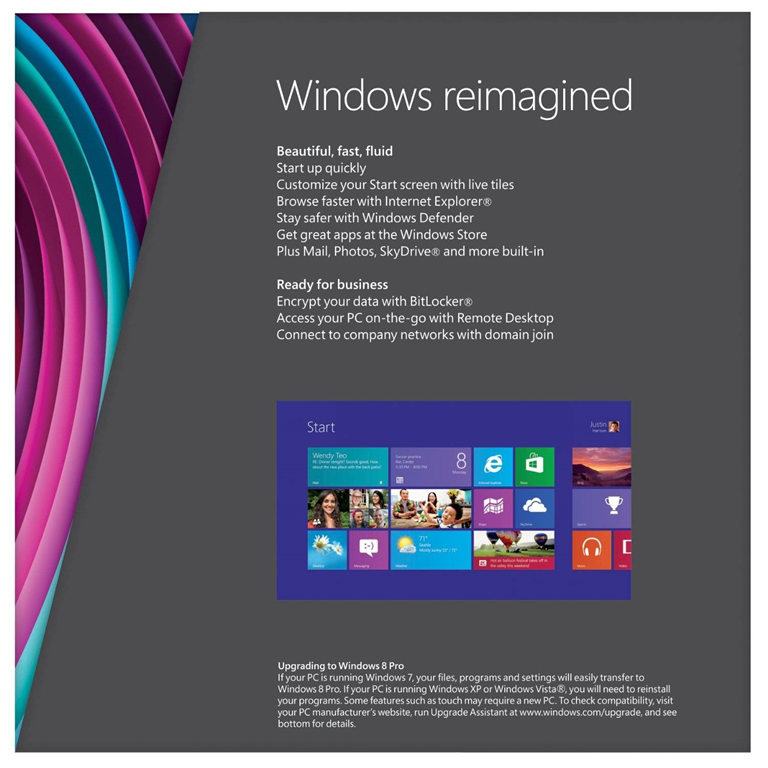
INFO: “Why Windows 8 over Windows 7?”

imageYeah, everyone knows about the touch-capable interface that Windows 8 has.

But what else has it got? 

Here’s a quick list of differentiators between Windows 7 & Windows 8:

  • MOBILITY-ENABLED
      • Optimized for touch & stylus
      • Longer battery life (Optimized for Ivy Bridge)
      • Faster WiFi negotiation, reconnection
      • Integrated 3G/4G cellular support, makes WWAN connectivity as easy as WiFi
      • Windows-to-Go, your PC environment on a USB stick
      • Cloud-connected (Configuration, files, profile, favorites… stored in the cloud)
  • PERFORMANCE-OPTIMIZED
      • Faster boot & shutdown times
      • Better performance of disk, networking, computation
  • SECURITY-FOCUSED
      • Microsoft-managed Adobe Flash (Updated by Microsoft, through Microsoft Update)
      • Trusted Boot, highly rootkit/malware resistant through hardware
      • Enhanced BitLocker, including deploying in an encrypted state
      • “Do-Not-Track” within Internet Explorer 10
  • PRODUCTIVITY-REFINED
      • Multi-monitor improvements
      • More powerful & intuitive file management through Ribbon-powered File Explorer
      • Improved troubleshooting & task management

For an explanation of any of these, go to the TechNet site for Windows 8 at
http://technet.microsoft.com/en-us/library/hh832030.aspx
For more details on “What’s New in Windows 8” specifically, go to:
http://technet.microsoft.com/en-us/library/hh832028.aspx

Posted by: kurtsh | April 14, 2013

NEWS: Ericsson to acquire Microsoft Mediaroom

imageSo we’re in the process of selling Microsoft Mediaroom to Ericsson. 

Microsoft Mediaroom is an array of technologies – not just one – it incorporates IPTV, console software & designs, & back-end server technology to deliver an end-to-end content delivery experience from provider to consumer.  In other words, it’s the set-top box, the datacenter technology that streams TV shows/movies, and the protocols used over TCP/IP.

This was something of a surprise to me… until I read these rumors, and it suddenly, if any of this is true, things became clearer:

Official coverage:

Other Coverage:

imageQ: Why does the media keep looking at the ‘supposed’ drop in PC sales… & ignore tablet sales? 

Virtually all articles written on the “shrinking PC” market have ignored a very important fact:  PC tablets driven by Windows (Windows 8 likely) are not included in PC shipment figures as calculated by the industry’s benchmarking firms.

This means that without any tablet sales numbers factored in, any Windows-based tablet is considered a ‘loss’ to PC sales.

Tablets are being broadly generalized by most of these metrics firms, and as a result low-to-mid range products like those listed below aren’t likely factored into PC sales:

  • Surface RT/Surface Pro
  • HP ElitePad/HP EliteBook
  • Dell Latitude 10/Dell XPS 10
  • Acer Iconia Tab W510/710
  • Asus Vivo Tab/Transformer Book TX300CA
  • Lenovo ThinkPad Tablet 2/Helix

…in fact, very few, if any, of the PCs I’d listed in my ‘Next-gen Windows tablets spreadsheet’ would be included in these numbers. 

imageWELL, AT LEAST FORRESTER CAUGHT IT.
The only folks that seem to have caught on to this is Forrester.  In a few blog articles they’ve written their observations, analyzing how the tablet market has blurred and aren’t a dividing line between PCs & non-PCs some make it out to be and considering the category as such is inaccurate.  They also debunk the declaration that the PC market has crashed by citing the lack of numbers around PC Tablet sales.

Some choice quotes:

  • “This week, the newswires are blazing with the news that PC shipments dropped 14% year-over-year…. But when I look at the fine print, I draw a different conclusion. Note that tablets – including the ones with detachable keyboards – are *not* included in the PC shipments figure.”
  • “We know that the primary investment strategy for Microsoft with Windows 8 is tablets, and so unless the news is accompanied by Windows 8 tablet sales data, any conclusions are meaningless.”
  • “A more accurate assessment: tablets are killing laptop and desktop sales… Apple reported last quarter that they see a lot of cannibalization of Mac sales with iPads, so what’s changing is a shift in spending away from traditional form factors to tablets. And like Ted, I argue that this is temporary.”
  • “Computers don’t go away, they just aren’t replaced as often. There is no post-PC era. There’s only a multi-device, "right tool for the job" era.”

Here’s the original blog posts that are very much worth reading to be more educated than the typical tech new reader:

imageI read just an unbelievably ‘from-the-hip’ article from a muckraking finger-waver that shall remain nameless, claiming essentially that Lenovo’s success in the past year is tied to:

  • ‘selling PC’s without Windows’
  • ‘focusing on downgrading Windows 8 to Windows 7’

…time to crank up the blog post editor.

re: ‘selling PC’s without Windows’
The first point about ‘selling PCs without Windows’ being the reason they’re successful is just patently false.  There’s a lot that folks don’t know about the relationship between Microsoft & OEM PC manufacturer’s that I don’t dare discuss, however two things should be readily obvious, at least to anyone who isn’t trying to sell ads for their online tech articles: 

  1. Lenovo’s client device revenues are primarily driven by Windows–based PCs & these devices are successful because of the cooperative investment that both Lenovo & Microsoft make in these devices
  2. Lenovo knows that Windows tablets are the key to success in Enterprise volume sales, because they don’t make iPads and there’s very few non-Windows tablet manufacturers that have been successful in the business market.

re: ‘focusing on downgrading Windows 8 to Windows 7’
Again – totally misleading.  Every OEM makes Windows 7 available on a subset of their PCs & Lenovo is no different.  They neither market their PCs differently, nor do they have any special programs or web sites that somehow make it easier. 

Again, there’s no difference between what Lenovo offers in terms of Windows 7 support & HP, Dell, Toshiba, etc.  Don’t believe me?  You’ll need to take my word for it on the Enterprise side of the house that Windows 7 is READILY available to any customer that wants it but I’d think it’d be obvious that any OEM that didn’t ship PCs with the OS chosen by their customer, be it Vista, 7, or 8, would find themselves with a very disgruntled customer. 

But as for consumer sales, Lenovo offers the exact same types of offerings as their competitors.  Some devices are Windows 8 ONLY, others are available with either Win7 or Win8, and some are Windows 7 only… just like other Windows OEMs.  Just look at the following links.  Windows 7 is an offering available at all of these OEMs:

imageSOME HINTS AROUND THE REASONS FOR LENOVO’S SUCCESS
Y’see unlike some people, I actually work with Enterprise customers & that’s the primary customer base for Lenovo, so I think I have a fairly good idea about where Lenovo’s success comes from.

The real reasons for Lenovo’s success?  Well, Occam’s Razor comes to mind:  THEIR PRODUCTS ARE STUNNINGLY GOOD.  Just look at what they’re selling, who they’re selling to, and what their competition is selling:

      • Lenovo ThinkPad Tablet 2
        The lightest & thinnest Windows 8 TOUCH tablet available– complete with 10pt capacitive touch Gorilla Glass, active digitizer/stylus, 3G/4G, & TPM security chip.
      • Lenovo ThinkPad Carbon X1 (Touch) 
        The lightest & thinnest 14" TOUCH ultrabook on the market – and adheres to MilSpec for rugged use.
      • Lenovo ThinkPad Twist
        The most versatile convertible Windows 8 TOUCH Tablet, including both 3G/4G, TPM security chip at a low price point.
      • Lenovo ThinkPad Helix
        Won over a dozen “Best of CES 2013” awards, with all the capabilities of the Carbon X1 except a tablet with two batteries in the keyboard & the tablet/display.

imageFORRESTER: “THE PC’S DEATH HAS BEEN GREATLY EXAGGERATED”
It appears that Forrester has taken a better look at the so-called reports on PCs claiming that there was a 14% drop in PC sales that were published and came to the realization that:

  • This was statistics being used ‘opportunistically’
  • No one can come to the conclusion that there was a 14% drop in PC sales because the quoted PC sales figures don’t include PC-based tablets

In other words, none of the amazing Windows PCs from Lenovo above classified as tablets are included in the survey.  Read the post from Forrester yourself.

Posted by: kurtsh | April 13, 2013

INFO: Windows Server 2012 Self-Study Guide

imageWelcome to the biggest Windows Server 2012 Self-study Guide… EVER.  I gotta hand it to Scott:  This thing is a monster.  I’m not even going to try to enumerate all the items that are covered here except to say that it’s around 10 pages of links and references, including:

  • Technet pointers
  • Downloadable documentation
  • Video training on-demand
  • etc.

To the right you’ll see a snapshot of less than 1/10th of the content he’s published/referenced.  Yeah… it’s that much.

Posted by: kurtsh | April 12, 2013

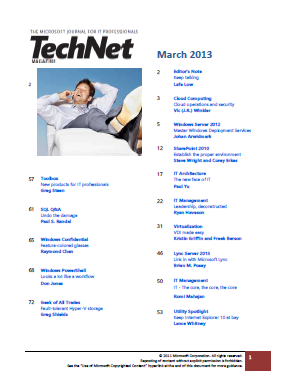
DOWNLOAD: Microsoft TechNet Magazine – March 2013

image

Here’s the digital download for the most recently published TechNet Magazine in PDF format:

  • Cloud Computing: Cloud operations and security
  • Windows Server 2012: Master Windows Deployment Services
  • SharePoint 2010: Establish the proper environment
  • IT Architecture: The new face of IT
  • IT Management: Leadership, deconstructed
  • Virtualization: VDI Made Easy
  • Lync Server 2013: Link in with Microsoft Lync
  • IT Management: IT – The core, the core, the core
  • Utility Spotlight: Keep Internet Explorer 10 at bay
  • Toolbox: New products for IT Professionals
  • SQL Q&A: Undo the damage
  • Windows Confidential: Feature colored glasses
  • Windows PowerShell: Looks a lot like workflow
  • Geek of All Trades: Fault-tolerant Hyper-V Storage

DOWNLOAD: Microsoft TechNet Magazine – March 2013
http://download.microsoft.com/download/D/D/7/DD77229E-1B86-4082-BDFF-320BF3E23495/March2013.pdf

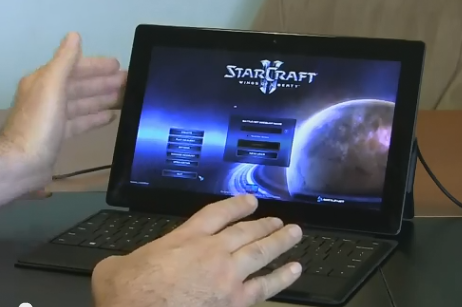
imageJust a quick note:  Anyone interested in installing Starcraft 2 on a Surface Pro should know that it will install just fine however initially, you may find that the mouse pointer will not appear to move on the Starcraft II login screen, making it impossible to login and start the game.

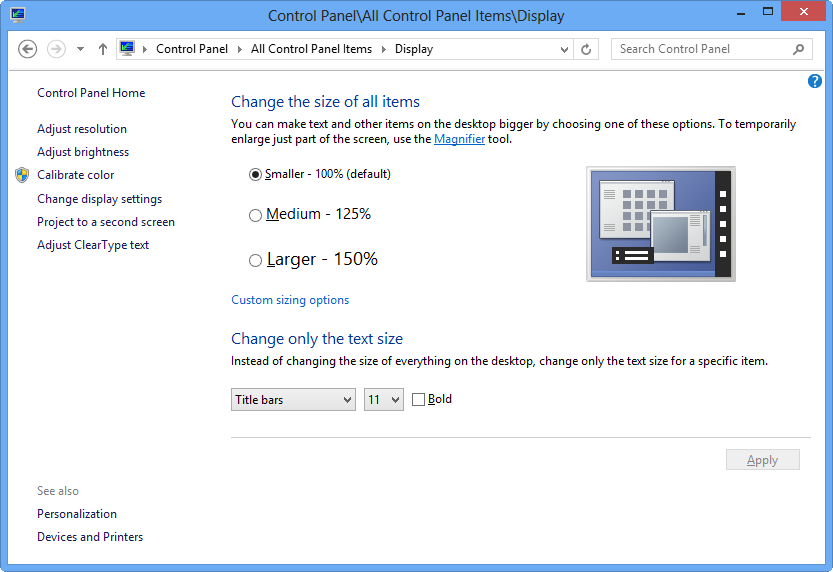
THE STARCRAFT 2 MOUSE POINTER/TEXT SIZE BUG:
The reason for this is Starcraft 2 has a well-known bug that makes it impossible to control the mouse pointer if Windows is configured with a Text Size of “Larger – 150%”.  This is a setting in Control Panel – Display.  This bug has never been fixed and has bothered gamers with large display resolutions for a long time.

Surface Pro is pre-configured with the display text size at “Larger – 150%” so if you change this to “Medium – 125%”, and reboot, you’ll find that that Starcraft 2 will work just fine.

image

An account manager I work with asked me this question and I thought it’d be worth writing up:

Q: How do you use USB Smartcards with Client Hyper-V Virtual Machines?

THE BAD NEWS:
Hyper-V in general does NOT allow guest virtual machines to use host-connected USB devices.  In other words, if you:

  1. Connect a USB SmartCard to a Win8 PC w/ Client Hyper-V enabled on it
  2. Run Windows 7/8 in a Client Hyper-V Virtual Machine

…you can NOT use the USB SmartCard in the VM through the Virtual Machine Connection client.  Neither the Virtual Machine Connection client nor Client Hyper-V are able to recognize and take advantage of USB devices.

THE GOOD NEWS:
Now, however, if you:

  1. Enable Remote Desktop for the Windows Client VM (Control Panel – System)
  2. Connect to your VM over Remote Desktop Connection using the Remote Desktop Connection client installed on your desktop

…the RDP session will redirect the USB port to the Hyper-V Virtual Machine, enabling you to access your local desktop SmartCard through the VM session for access into systems like two-factor authentication VPN.

EXAMPLE:
Below is me using the Remote Desktop Connection client into my local Windows 8 Client Hyper-V-driven Windows 7 VM.  You can see the IT VPN client recognizes my locally installed SmartCard on my machine’s USB port.  (I keep a Windows 7 VM with Office 2010 & other apps running on my system for testing.)

(IMPORTANT: The Remote Desktop Connection client MUST be RemoteFX enabled.  Windows 8 inherently has this capability however if you connect to your Windows 8 Client Hyper-V host from a separate Windows 7 computer, it will need to be updated with an RemoteFX-enabled RDC client by installing the Remote Desktop Protocol 8.0 Update for Windows 7 SP1.)

image

« Newer Posts - Older Posts »

Categories