 Have you ever wanted to hand out a bunch of Windows tablets to an executive audience to allow them to view a PowerPoint presentation you were delivering from the tablets?
It’s not really that hard to set up. The key is the ability to efficiently share your desktop screen across all the tablets over a wireless network. This isn’t a problem if you have good bandwidth to the Internet & have a Lync 2013 infrastructure since delivering PowerPoint presentations over Lync is an inherent feature of the product. But what if you don’t have good bandwidth (or ANY bandwidth to the Internet)… or maybe you don’t have the luxury of having access to a Lync infrastructure?
 INTRODUCING TIGHT PROJECTOR: MULTI-BROADCAST SCREEN SHARING
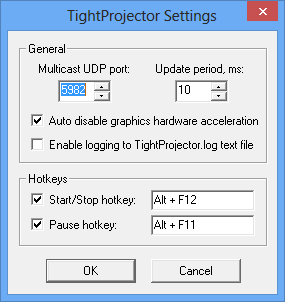
There’s a product called TightProjector that allows you to share your Windows desktop screen in real-time to multiple computers.
It is a very lightweight VNC-based solution that has a Windows ‘host’ agent and a Windows ‘client’ agent that installs on the respective PCs. It lurks in the SysTray of your Windows computers and operates over a multicast UDP port.
This has the benefit of:
- Unlimited Recipients: A single display stream can serve as many clients as you want on one network segment without degrading the quality of the transmission
- Client Auto-start: When you begin transmitting from your ‘presenter’ PC, all clients can automatically clear their screens & switch to your display FULL SCREEN, effectively allowing you to “take command” what your clients see on their screens regardless of what they were doing previously.
- Display Only: This transmits the display to all clients/recipients: It does NOT allow clients to ‘take control’ of your PowerPoint or mess around with your desktop from their client screens. It forces the viewer to watch what you’re displaying and follow along like a classroom.
- Works on all Windows: To date, I’ve found this to work on Windows XP, Windows Vista, Windows 7, AND Windows 8. All work equally well and stream fine.
KNOWN ISSUES
It’s not a flawless configuration but it’s still very good.
- Windows 8 Start Page: The only catch has been that since this is a desktop application, Windows 8 clients/recipients must be in the ‘desktop’ itself to see the screen broadcast, of course. If the user goes to the Windows 8 “Start Page”, they will of course, no longer see the content you are broadcasting until they return to the desktop.
- Wireless Network: You’ll obviously need a wireless network. This can be rectified by bringing your own wireless access point with it’s own pre-tested DHCP server & having all the clients pre-configured to use it. I have a Portable/Travel TrendNet Wireless Access Point that I use.
(WARNING: Do NOT attempt to use a Portable/Cellular MiFi Access Point. This should be obvious but in my experience, these devices sometimes don’t transmit Multicast UDP packets and more importantly, the lag from transmitting all the way to your cellular providers network and back is horrendous.)
- Lag/Frame Rate: The frame rate over even the fastest networks will show a bit of lag and operates at ~10fps – not 30fps. This is noticeable particularly during PowerPoint animations & transitions so be aware of this when planning.
- Esc key: Users can ‘get out’ of the viewing session if they press ‘Escape’. I’m working on a workaround for this however be aware that this can happen.
- Client Hyper-V: The virtual networking that is installed when the Client Hypervisor is installed on Windows 8 messes with Multicast UDP transmission specifically over WiFi. In other words, you can’t ‘project’ or be the host if you have Client Hyper-V installed, but you can be a receiver. I haven’t quite figured out why yet.
NOTE: THIS IS NOT FREE
For the “frugal” types, I’m sorry to say, this isn’t a free product but good things frankly usually aren’t. If unregistered, the software will allow you to use it for 20min then it will shutdown. If registered for $29, you can use a single host “projector” and an unlimited number of clients.
Also remember: This is ‘multicast UDP’ meaning that it will only likely work on a SINGLE LAN SEGMENT in your organization if you’re connected to a LAN. It is in fact possible that your organization is passing multicast UDP across routers, but be aware that it is unlikely.
Comments Off on HOWTO: Broadcast a PowerPoint Presentation to Windows Tablets in a Roundtable scenario
Posted in Uncategorized
 Lock & load, folks. 28 days ’til it’s ‘go’ time.






 kurtsh


You must be logged in to post a comment.