imageLast week, the Office 365 product group responsible for Government Community Cloud (GCC), GCC High and DoD service updated the service description on these platforms. If you leverage these regulated cloud instances, please check the links below:

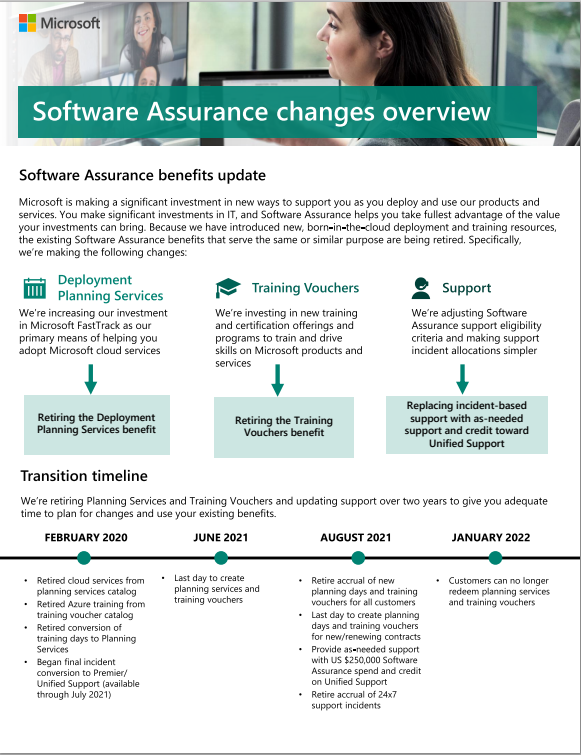
imageThere are 3 major changes happening to Software Assurance beginning in 2020 that all SAB Administrators should be aware of that affect both EA renewals as well as existing benefits in February 2020: (Read the summary or the FAQ for details)

  • Planning Services
    We’re retiring Planning Services & making additional future investments in Microsoft FastTrack to assist with the adoption of cloud services.
  • Training Vouchers
    We’re retiring Training Vouchers benefit & instead investing in new future training/certification offerings. (Nothing announced yet)
  • Support
    We’re replacing 24/7 Problem Resolution Support incidents with credit toward Premier Unified Support contracts.

The timeline is documented in the following written .PDF summary of these changes. Please download it for details:

Posted by: kurtsh | February 28, 2020

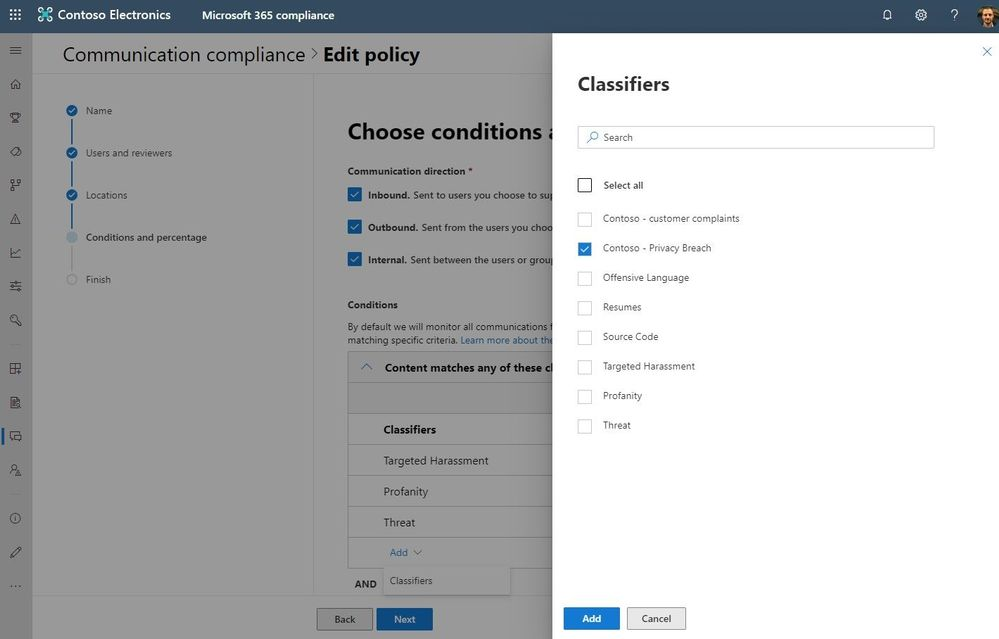
RELEASE: Communication Compliance for Microsoft 365 E5

Looking for a solution to detect, remediate, & obtain insights/trends around communication compliance violations within Microsoft 365, including:

  • Targeted harassment
  • Profanity
  • Threats
  • Source code links
  • Improper resume distribution
  • Customer privacy violations/breaches
  • Offensive language

Enter “Communication Compliance for Microsoft 365 E5”.

imageAt Ignite last November, we announced the preview of Communication Compliance, part of the new Insider Risk Management solution set in Microsoft 365.

Since Ignite, we’ve been hard at work developing the ability to scale and deliver a solution that leverages machine learning to quickly identify and take action on code of conduct policy violations in company communications channels. This builds upon the investments we have made in helping regulated organizations meet specific supervisory compliance requirements.

Feedback from customers during the preview has been phenomenal. Key delighters are the ability to:

  • Leverage built-in machine learning classifiers to detect code of conduct violation (harassment, threat, profanities)
  • Conversation threading, keyword highlighting, exact & near duplicates, filters for efficient review
  • Built-in remediation workflows to quickly act on violations
  • Support for multiple company communications channels, including Microsoft Teams messages, Exchange email, Skype for Business Online, and third parties such as Instant Bloomberg

Today, we move to the next phase and are excited to announce the general availability of Communication Compliance. Now, all multi-tenant customers worldwide can access this solution. Communication Compliance helps your organization identify and take action on code of conduct policy violations with:

  • Machine learning at scale to intelligently detect violations in company communications channels
  • Flexible remediation workflows to quickly act on violations in collaboration across your organization
  • Actionable insights through an interactive dashboard with policy violations, actions and trends

Read the announcement here:

Ever wonder how to set naming policies for Office 365 Groups?

I found this off of Twitter one day and it was so well-thought out, I thought I’d share.

imageYou and I both know handing over the reigns and enabling self-service Office 365 Group creation is scary, especially when it comes to Microsoft Teams Deployment.

An Office 365 groups naming policy may be worth considering if you’re looking to manage users and groups at scale but is it a good fit for your environment?

I’ve been pondering what these policies look like in action and how they vary per organization, so I’ve done some research. Let’s look into the possibilities and impacts of enforcing a naming policy when deciding if it fits into your Office 365 ecosystem.

Read more here:

[Note: The above isn’t about a Microsoft written post.  It’s just something I found from interesting written by Jamie LaPorte, an independent Office 365 expert who’s written a lot of good stuff including, “How Can I Reduce My Email with Teams” and “That Team Should Be a Yammer Group”]

Posted by: kurtsh | February 25, 2020

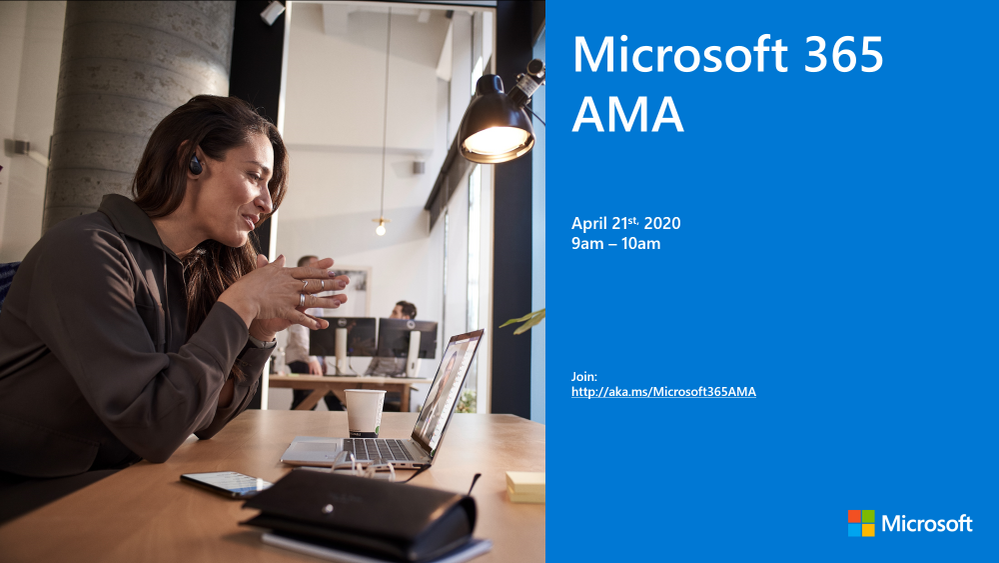
EVENT: Microsoft 365 “AMA” – Tues, April 21st, 2020

imageWe are very excited to announce a Microsoft 365 ‘Ask Microsoft Anything’ (AMA) for Microsoft 365!

The AMA will take place on Tuesday, April 21st, 2020 from 9:00 a.m. to 10:00 a.m. PT in the Microsoft 365 AMA Space in the Microsoft 365 Community. Add the event to your calendar and view in your time zone here.

An AMA is a live online event similar to a “YamJam” on Yammer or an “Ask Me Anything” on Reddit. This AMA gives you the opportunity to connect with members of the product engineering team who will be on hand to answer your questions and listen to feedback.

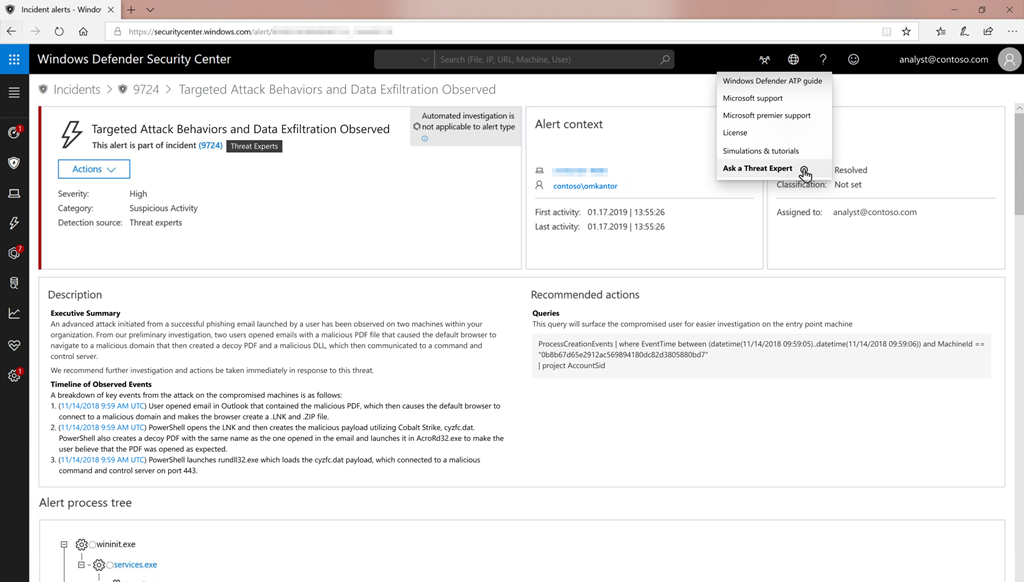
imageWe’re excited to introduce Microsoft Threat Experts, an additional layer of expertise and optics that Microsoft customers can utilize to augment security operations capabilities as part of Microsoft 365. This new managed threat hunting service in Microsoft Defender Advanced Threat Protection provides proactive hunting, prioritization, and additional context and insights that further empower security operations centers (SOCs) to identify and respond to threats quickly and accurately.

Microsoft Threat Experts enables SOCs to jump-start threat investigations by providing context-rich intelligence. This release of the service includes 2 capabilities:

  1. Targeted attack notifications: Alerts that are tailored to organizations provide as much information as can be quickly delivered to bring attention to critical threats in their network, including the timeline, scope of breach, and the methods of intrusion.
  2. Experts on demand: When a threat exceeds the SOC’s capability to investigate, or when more actionable information is needed, security experts provide technical consultation on relevant detections and adversaries. In cases where a full incident response becomes necessary, seamless transition to Microsoft incident response (IR) services is available.

Read more about the service here:

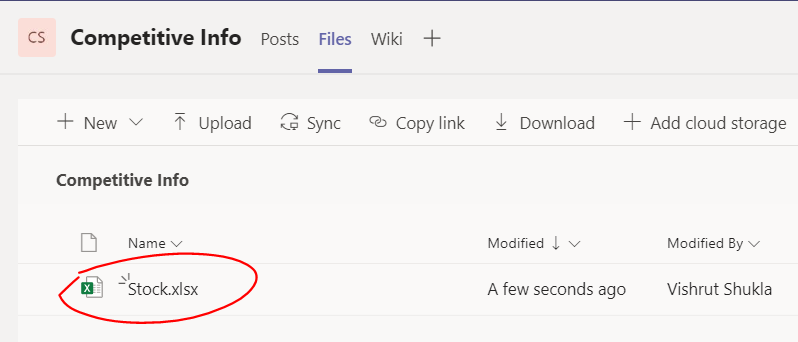
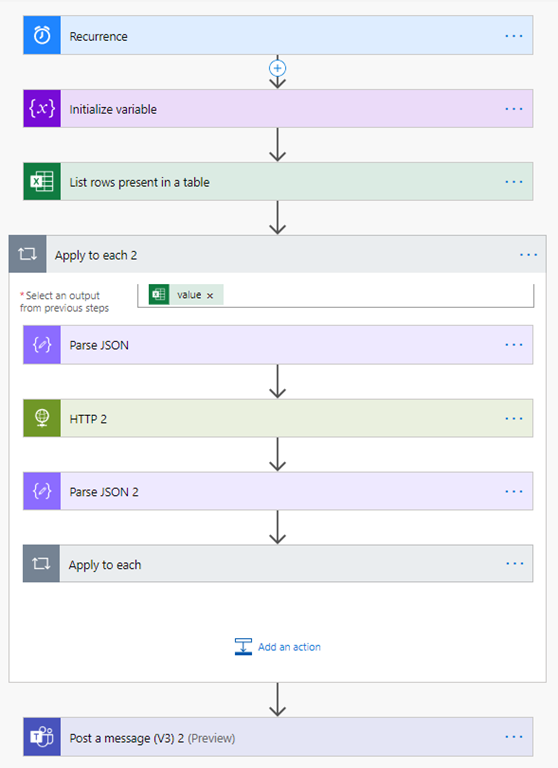
imageMillions of users in enterprises today start their day with Microsoft Teams, live their day in Teams and wrap their day with Teams! Teams is where people come together to plan, collaborate, share, discuss, decide and take action on things that matter to their businesses and productivity. Teams as the collaboration hub also plays a central role in enterprises today among strategy and planning group members who keep a close eye on all facets of the business including competition.

imageRead about how Microsoft Teams and PowerAutomate when put together allows strategy teams in an organization keep a close eye on competition’s stock prices – a leading metric of how Wall Street perceives their progress!

Posted by: kurtsh | February 24, 2020

PREVIEW: Microsoft 365 Live Events Assistance Program

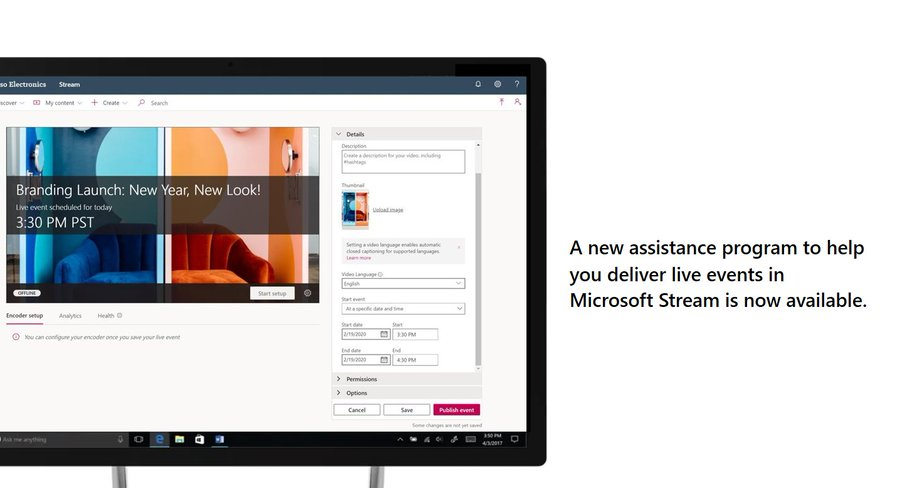
imageBeginning today, Microsoft has launched the public preview of a new support service for customers to help them successfully deliver live events using Teams, Stream or Yammer.

The new service provides virtual support for anyone interested in becoming more familiar with setting up and running a live even – including support before, during and after the event for hosts and presenters.

While the program is in preview, these services are available at NO COST to customers. Visit the resource page to learn more and get started with live events in Stream!

Posted by: kurtsh | February 24, 2020

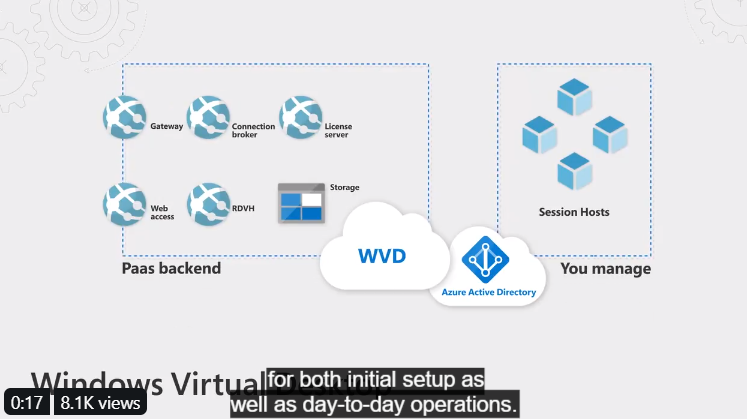
TRAINING: Windows Virtual Desktop Essentials

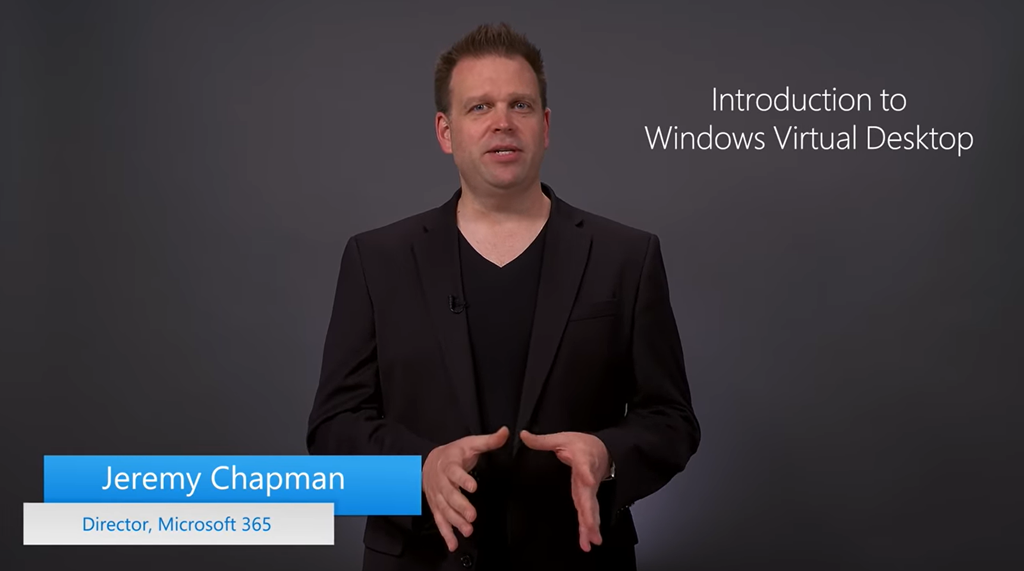
imageThis is a Windows Virtual Desktop full set up tutorial – every prerequisite step, PowerShell cmdlet, permissioning, and FSLogix reg key.

This is the first video in our series on Microsoft’s Windows Virtual Desktop (WVD) Solution on Microsoft Azure.

imageIf your organization is looking for a more efficient, productive, and secure approach to desktop virtualization, this series will walk you through the full solution. WVD offers a fully managed desktop virtualization solution in the cloud and it works with all your apps and devices as you can expect. Including full-featured native client support for Windows Mac iOS and Android as well as new HTML5 support so you can access remote desktops and apps for almost any modern browser.

Watch the full video to find out why and how to implement desktop virtualization at your organization. Keep watching this playlist (http://aka.ms/wvdplaylist) or continue on to the next demo in the series at http://www.aka.ms/wvdprereqs Download PowerShell and JSON files highlighted in this series at http://aka.ms/MechWVDScriptSamples

Watch the WVDseries here:

image

[I totally stole this from Panu Saukko and I’m so sorry.]

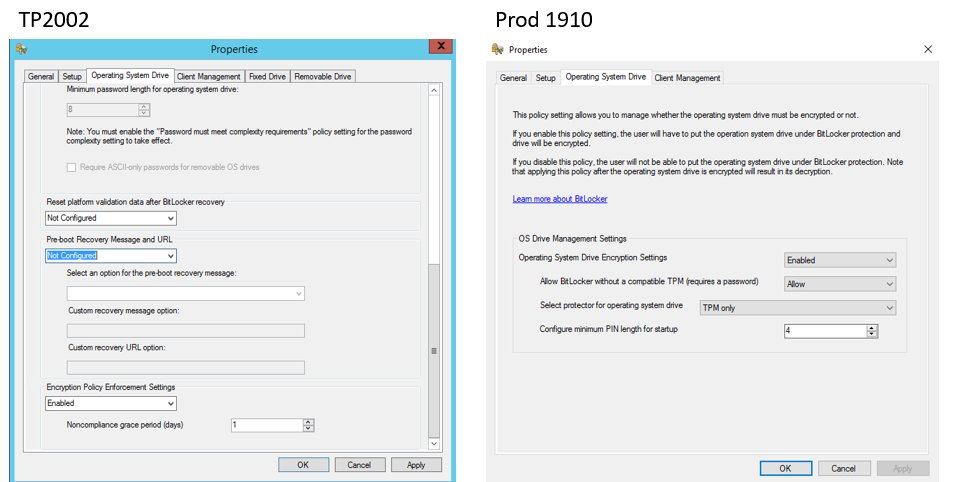
But he’s totally right.  The new Microsoft Bitlocker Administration & Monitoring (MBAM) settings available in Microsoft Endpoint Manager Configuration Manager (MEMCM) TP2002 are CRAZY. 

The number of controls have skyrocketted in number.  This is a great time to investigate managing Bitlocker Enterprise wide with Config Manager!

Improvements to BitLocker management

The BitLocker management policy now includes additional settings, including policies for fixed and removable drives:

  • Global policy settings on the Setup page:

    • Prevent memory overwrite on restart
    • Validate smart card certificate usage rule compliance
    • Organization unique identifiers
  • OS drive settings:

    • Allow enhanced PINS for startup
    • Operating system drive password policy
    • Reset platform validation data after BitLocker recovery
    • Pre-boot recovery message and URL
    • Encryption policy enforcement settings
  • Fixed drive settings:

    • Fixed data drive encryption
    • Deny write access to fixed drives not protected by BitLocker
    • Allow access to BitLocker fixed data drives from earlier versions of Windows
    • Fixed data drive password policy
    • Encryption policy enforcement settings
  • Removable drive settings:

    • Removable drive data encryption
    • Deny write access to removable drives not protected by BitLocker
    • Allow access to BitLocker protected removable drives not protected by BitLocker
    • Removable drive password policy
  • Client management settings:

    • User exemption policy
    • Customer experience improvement program

For more information on these settings, see the MBAM documentation.

Read the following for docs on TP2002:

« Newer Posts - Older Posts »

Categories