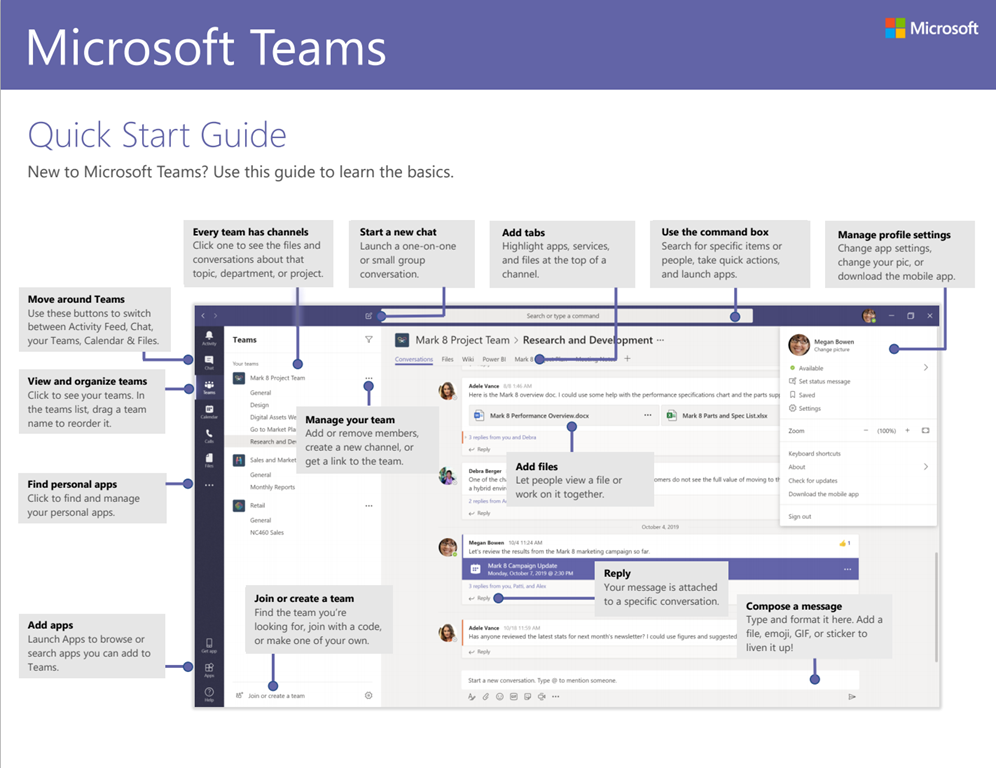
We all love a good cheat sheet.
Here’s one for the Outlook Mobile app lovers.
- iOS: https://msft.it/6011Tjedb
- Android: https://msft.it/6012Tjedj
We all love a good cheat sheet.
Here’s one for the Outlook Mobile app lovers.
Comments Off on DOWNLOAD: Outlook Mobile Pro-tip Cheat Sheet (for iOS, Android)
Posted in Uncategorized
<taken from BDO Digital’s site about Power Platform>
The potential to create, edit and duplicate application workflows and functionality with greater speed and agility has put advanced automation – including pre-build AP components – into the hands of organization of all sizes thanks to Power Automate.
But don’t just take our word for it. Look at what the market is saying: According to a recent Forrester Research study, the overall economic impact of Power Platform is hard to ignore.
- Power Apps and Power Automate can reduce application costs by 70%. Organizations can save on internal development efforts, professional services fees, and/or vendor application purchase costs.
- $3.5 million in application development and management costs. Over the life of the study, hundreds of thousands of hours were saved between application builds, as well as the effort to maintain code and manage applications moving forward.
- Save $91,454 by reducing vendor license costs. By developing additional applications in-house, organizations can eliminate costly vendor costs associated with third party providers.
- Power Apps and Power Automate increase process automation and efficiencies. It’s important not to forget the value of digitizing manual, and often paper-based processes. This efficiency gains are equally valuable.
For more details on how to approach innovation in Power Platform, and to watch a real-world demo of how organizations are using Power Platform to innovate today, check out the Microsoft Power Platform demo.
Check out the video at the following URL:
Comments Off on INFO: “The Real Value of the Power Platform” (3rd party)
Posted in Uncategorized
The Microsoft Cybersecurity Reference Architecture (https://aka.ms/MCRA) describes Microsoft’s cybersecurity capabilities and how they integrate with existing security architectures and capabilities.
We have seen this document used for several purposes by our customers and internal teams (beyond a geeky wall decoration to shock and impress your cubicle neighbors 🙂
Download the file here:
Comments Off on DOWNLOAD: Microsoft Cybersecurity Reference Architecture
Posted in Uncategorized
If there’s one article you read about “working remotely”, I think it should be this one.
This is the story of how Microsoft’s own IT organization (called CSE) has set up their employees to “work from home” at scale. They go onto explain how we’ve actually done this before for 30,000 employees all working from home – when a snow storm hit the Pacific Northwest and prevented people from commuting to our Redmond Campus.
There’s lots of links to additional guidance so take a look:
Comments Off on INFO: How Microsoft is enabling its employees to work remotely with Microsoft Teams
Posted in Uncategorized
I’ve recently gotten this question twice now: “What’s the roadmap & commitment to Microsoft Whiteboard?”
This has surprised me a bit considering we just recently released two major features to the public in the last few months:
WHITEBOARD ROADMAP
The public web site shares a Whiteboard FAQ that might be of interest.
Additionally, the Whiteboard team is finishing up Tenant Admin Privacy Controls for Microsoft Whiteboard right now. The Public Whiteboard roadmap is here:
https://www.microsoft.com/en-us/microsoft-365/roadmap?ms.url=roadmap&rtc=1&filters=&searchterms=whiteboard
USERVOICE FOR WHITEBOARD
Whiteboard has a UserVoice site and if you parse through the UserVoice site for Whiteboard, you can get a glimpse at some of what they’ve confirmed that they’re “working on”. For example:
Comments Off on INFO: Microsoft Whiteboard Roadmap
Posted in Uncategorized
Wouldn’t it be cool to have a chart that showed the published timeline of Azure services expected availability by published timeframes for each Azure region?
“AZURE TIMELINE”
Check this chart out that shows the timeline of availability of services for each region. You can select views for every region globally, INCLUDING Azure Government regions.
View the chart here:
https://azurecharts.com/timeline/?r=usgov-virginia
AZURE CHARTS
This is one chart of many located at http://azurecharts.com
Comments Off on INFO: Azure Charts (including Azure Timeline for Arrival of Services)
Posted in Uncategorized
We are very excited to announce a SQL Server 2019 ‘Ask Microsoft Anything’ (AMA) for SQL Server!
The AMA will take place on Wednesday, March 11th, 2020 from 9:00 a.m. to 10:00 a.m. PT in the SQL Server AMA Space in the SQL Server Community. Add the event to your calendar and view in your time zone here.
Comments Off on EVENT: SQL Server 2019 “Ask Microsoft Anything” – March 11, 2020, 9:00AM-10:00AM PST
Posted in Uncategorized
Don’t know if or how Microsoft Forms is being used within your organization? Forms activity reports are rolling out to all Office 365 commercial tenant users over the next week in the Microsoft 365 admin center.
Expect to see them around March 11.
With this easy to use dashboard, you can dig into many useful aspects of the data:
See more details here: Microsoft 365 Reports in the admin center – Forms activity
Read more at the announcement page here:
Comments Off on RELEASE: Microsoft Forms Activity Reports
Posted in Uncategorized
This is a great article about OneDrive for Business’s deployment & adoption at Microsoft.
Within Microsoft, there are some entrenched employee habits that make the company what it is, like living in email, dressing casually, and project managing a solution for every problem.
Also high on that list?
Saving files locally, a habit that has stuck with a company that grew up around Windows and its system of using folders to store and organize files.
Now, the company wants its employees to store everything in the cloud on OneDrive for Business, where it’ll be more secure and easy to access, plus several other reasons that will be shared below.
…
If this sounds familiar, read the following article about our journey to OneDrive for Business:
Comments Off on NEWS: OneDrive for Business feature shifts how employees save files within Microsoft
Posted in Uncategorized
Got Splunk? Interested in ingesting Azure Sentinel alerts?
As most of the enterprises consume more and more cloud services, there is a huge requirement for Cloud-Native SIEM where Azure Sentinel comes in play and has following advantages.
If you need to focus on Splunk as your aggregation point, the post below has the focus of ingesting Azure Sentinel alerts into Splunk by using the Microsoft Graph Security API.
Read this article for more:
Comments Off on INFO: Azure Sentinel Side-by-Side with Splunk
Posted in Uncategorized
You must be logged in to post a comment.