imageWe’re excited to share the latest innovations coming to all the Microsoft business applications—from Dynamics 365 to Power BI to Power Automate to Power Apps—and can’t wait to see how they’ll help you better engage customers, make faster decisions, and solve your everyday business challenges. 

Join us for the Microsoft Business Applications Virtual Launch Event on Thursday, April 2, 2020, at 8:00 AM Pacific Time. You’ll hear directly from James Phillips, President of the Business Applications Group, as he guides you through all the new features, capabilities, and apps—and what they mean for you and your business. 

Here’s just a taste of what you can expect at this free, virtual event: 

  • Key announcements from the hundreds of new features and capabilities
  • In-depth, practical demonstrations
  • Advice and insights from Microsoft leaders
  • Answers to your common questions 

Whether you’re a business professional, developer, or implementer, you won’t want to miss this virtual event to discover your next step in driving business transformation. Hope you can join us! 

imageWe want to hear from you and answer your questions around using Microsoft Teams in the government space! We will be hosting an "Ask Microsoft Anything" (AMA) session on Thursday, March 19 at 9:30-10:30 AM Pacific Time, here, on the Tech Community. Save the date!

To join, simply, visit the Government AMA space on March 19 at 9:30 AM Pacific Time and click "Start a New Conversation" to post your question. This event is open to all Tech Community members and we’ll have members of the Microsoft product, engineering, and licensing teams standing by to provide answers.

In the meantime, if you haven’t already, be sure to join the Public Sector Tech Community.

We look forward to answering your questions!

imageFind out how to accelerate your move to the cloud with Windows Virtual Desktop. Register for this virtual event and learn how to get started quickly and securely with new Windows Virtual Desktop features that simplify the deployment and experience of desktop and app virtualization on Azure.

Get best practices and tools directly from the Microsoft team building the product, and learn how it enables you to:

  • Deploy the only multi-session Windows 10 virtual desktop experience.
  • Quickly enable optimizations for Office 365 ProPlus in a virtualized environment.
  • Deploy and scale in minutes through the Azure platform.

This virtual event includes live presentations by Microsoft executives and engineering teams followed by on-demand sessions.

imageMicrosoft employees are the company’s greatest asset. Our investments in a reimagined employee experience are enabling Microsoft employees to innovate, create, and collaborate seamlessly among the teams in which they work.

We’re moving our entire organization toward a digitally assisted workday in an interconnected and integrated digital workplace, to provide the most productive employee experience possible as we continue our digital transformation.

Focusing on the Employee Experience
Productive Enterprise focuses on reimagining the employee experience at Microsoft. We’re rethinking how we work across physical and digital experiences. By better fulfilling our employees’ needs, we are building a more solid foundation for our entire business.

To deliver our vision for a reimagined employee experience, we’re investing in multiple aspects of our technology and culture. The following figure illustrates the six primary investments we’re making.

image

The six investments of the Productive Enterprise initiative

If you’re interested in learning more about Microsoft Core Services Engineering and Operations (CSEO) strategy in driving the Productive Enterprise initiative, read the following whitepaper that was just published.

Note: We’re encouraging our employees to be the agents for our digital transformation, to expedite our transformation. You can learn more about our digital transformation initiatives by reading “Inside the transformation of IT and operations at Microsoft."

imageFor 13 consecutive years, Gartner has recognized Microsoft as a Magic Quadrant Leader in analytics and business intelligence platforms.

In this report, we believe, you’ll learn about Gartner’s assessment of the features and capabilities that differentiate the various products in this market.

Learn how a comprehensive product vision, positive sales experience, and intuitive user experience contributed to high levels of customer satisfaction and helped position Microsoft as a Magic Quadrant Leader among analytics and business intelligence platforms.

image

Get the report here:

Looking to replace SQL Server Reporting Services now that you’ve moved your databases in to Azure SQL Database Managed Instances?

Check this out:
image

This graphic above is an example of the reporting that we deliver through “Power BI Embedded for ISVs”.

As you can see, it is a locked down, simple static report, virtually identical to SQL Server Reporting Services… but produced by “Power BI Embedded”.

This is one of the many out of the box experiences you can have with Power BI embedded and is the perfect solution for folks getting out of the stone ages and moving their SQL data & accompanying SQL services to Azure.

WANT MORE?
If you’re interested in learning more about implementing Power BI Embedded as an ISV, please visit: https://azure.microsoft.com/en-us/services/power-bi-embedded/.

DEMO
If you’d like to play with Power BI Embedded out-of-box reporting scenarios, visit https://microsoft.github.io/PowerBI-JavaScript/demo/v2-demo/index.html.

imageFrom early cancer detection to fighting climate change, new advances in quantum computing are inspiring solutions to some of the world’s most pressing issues. Explore the possibilities in our newest series, Quantum Impact, hosted by Dr. Julie Love and Dr. Krysta Svore.

Watch series:

imageRegister for this free, 60-minute online event to learn about strategies, insights, and technologies to optimize your hybrid cloud across on-premises, multicloud, and the edge. And, be among the first to hear about the latest innovations in Azure Arc and Azure Stack—two game-changing hybrid cloud offerings from Microsoft. 

Join us live and learn about:

  • The future of hybrid cloud from industry experts.
  • Ways to advance your hybrid strategies, including best practices and real-world examples.
  • Securing and governing virtual machines, containers, and data in hybrid environments.

You’ll also get to ask experts your questions about hybrid cloud during the live Q&A.

DATE/TIME:
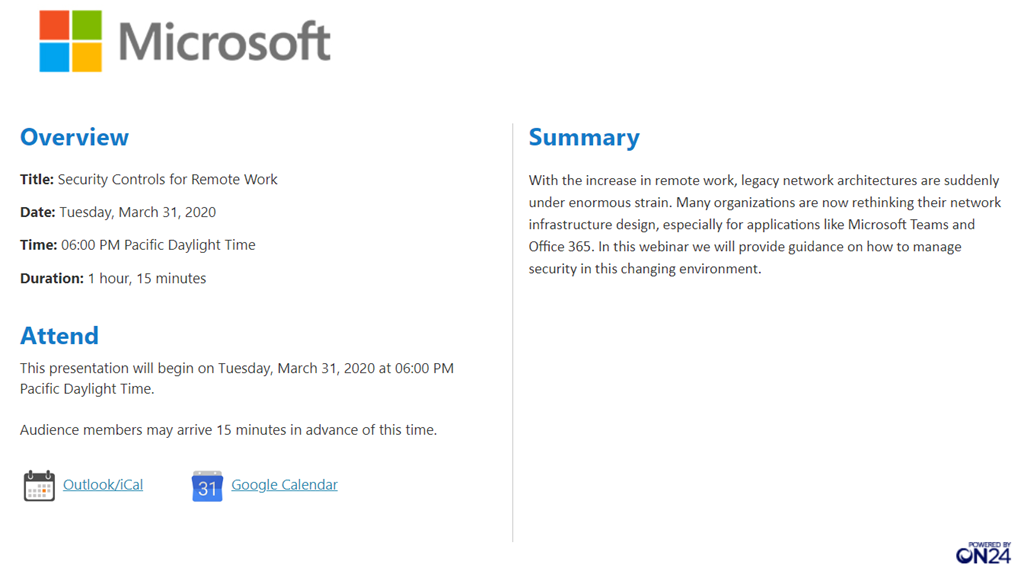
Tuesday, March 31, 2020 8:00 AM–9:00 AM Pacific Time

REGISTRATION:
https://info.microsoft.com/ww-registration-azure-hybrid-virtual-event.html

imageMicrosoft cloud services include powerful communication and collaboration capabilities. But suppose that you want to restrict communications between two groups to avoid a conflict of interest from occurring in your organization. Or, perhaps you want to restrict communications between certain people inside your organization in order to safeguard internal information. Microsoft 365 enables communication and collaboration across groups and organizations, so is there a way to restrict communications among specific groups of users when necessary? With information barriers, you can!

Information barriers are rolling out now, beginning with Microsoft Teams. Assuming your subscription includes information barriers, a compliance administrator or information barriers administrator can define policies to allow or prevent communications between groups of users in Microsoft Teams. Information barrier policies can be used for situations like these:

  • A day trader cannot call someone on the marketing team
  • Finance personnel working on confidential company information cannot receive calls from certain groups within their organization
  • An internal team with trade secret material cannot call or chat online with people in certain groups within their organization
  • A research team can only call or chat online with a product development team

For all of these example scenarios (and more), information barrier policies can be defined to prevent or allow communications in Microsoft Teams. Such policies can prevent people from calling or chatting with those they shouldn’t, or enable people to communicate only with specific groups in Microsoft Teams. With information barrier policies in effect, whenever users who are covered by those policies attempt to communicate with others in Microsoft Teams, checks are done to prevent (or allow) communication (as defined by information barrier policies). To learn more about the user experience with information barriers, see information barriers in Microsoft Teams.

Information barriers are rolling out now, and are included in subscriptions, such as:

  • Microsoft 365 E5
  • Office 365 E5
  • Office 365 Advanced Compliance
  • Microsoft 365 E5 Information Protection and Compliance

For more details, see Compliance Solutions.

imageInsider risk management is a solution in Microsoft 365 that helps minimize internal risks by enabling you to detect, investigate, and take action on risky activities in your organization. Custom policies allow you to detect and take action on malicious and inadvertent risk activities in your organization, including escalating cases to Microsoft Advanced eDiscovery if needed. Risk analysts in your organization can quickly take appropriate actions to make sure users are compliant with your organization’s compliance standards.

Managing and minimizing risk in your organization starts with understanding the types of risks found in the modern workplace. Some risks are driven by external events and factors and are outside direct control. Other risks are driven by internal events and employee activities that can be eliminated and avoided. Some examples are risks from illegal, inappropriate, unauthorized, or unethical behavior and actions by employees and managers. These behaviors include a broad range of internal risks from employees:

  • Leaks of sensitive data and data spillage
  • Confidentiality violations
  • Intellectual property (IP) theft
  • Fraud
  • Insider trading
  • Regulatory compliance violations

Read more at:

« Newer Posts - Older Posts »

Categories