Posted by: kurtsh | November 4, 2010

BETA: “Office 365” – Productivity in the Cloud

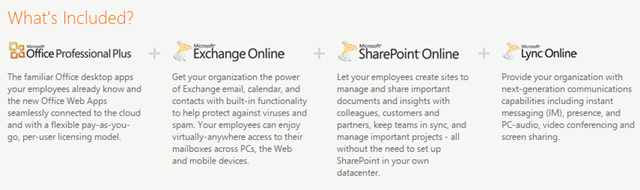
imageWe are pleased to announce the availability of a limited Beta for Office 365. Be one of the first customers to explore the cloud-based features and benefits of Office 365, and stay up-to-date on the latest Office 365 information and buzz. The Beta lets you explore the new features of Microsoft Exchange Online, Microsoft SharePoint Online, Microsoft Lync Online and Microsoft Office Professional Plus desktop suite – and experience the seamless integration across services and devices.  Space is limited.
image

There are two versions of Office 365 available:  Small/Medium Business & Enterprise

Microsoft Office 365 for enterprises brings together cloud versions of our trusted communications and collaboration software with our familiar Office Professional Plus desktop suite. It is designed to help meet your IT needs for robust security, reliability, and user productivity.

There are two plans:

Plans for Business Users:
We have a variety of plans to meet the needs of businesses of all sizes and varying IT needs. Priced from $2 – $27 per month per user, each plan has the same 99.9% uptime guarantee and includes the security and support you expect from Microsoft. Office 365 offers great flexibility by allowing businesses to provide users access to only the services they need and pay-as-you-go pricing options.

Benefits:
  • Large 25 GB mailboxes and the ability to send attachments up to 25 MB
  • Financially-backed, guaranteed 99.9% uptime Service Level Agreement
  • 24/7, IT-level support over the phone, the web or email
  • Single sign on capabilities with Active Directory deployment 
  • Latest version of Office Professional Plus – connecting users to communication and collaboration services (with certain plans)
  • Office Web Apps for viewing, sharing and minor editing of documents directly from your browser (with certain plans) 
  • Industry-leading, always-up-to-date antivirus and anti-spam solutions
  • Integrated IM and presence, as well as online meetings with audio and video conferencing and multiparty data sharing
  • Team sites to share documents, task lists, and schedules to keep workgroups in sync

Plans for Kiosk Users
Many larger businesses have users who do not have a dedicated computer – sometimes called kiosk workers. Getting kiosk workers access to email and documents to stay connected to the broader organization is still important. Office 365 has several subscription plans that offer value and flexibility for companies with kiosk workers, starting at just $2 per month per user. Kiosk plans can be combined with our Office 365 for enterprises plans for greater IT control and efficiency.

Benefits:
  • 500 MB email storage per mailbox
  • Outlook Web Apps for email access on a PC
  • Ability to view organization SharePoint sites to stay informed
  • Access to Office Web Apps for viewing, sharing and light editing of documents (with certain plans)
  • Single IT management console to easily add users and administer between plans

Download this Fact Sheet to keep it all straight:

BETA REGISTRATION
Register for the limited Beta of Office 365 and select the right version for your organization. You also get ongoing information from the Office 365 team and early notification of service availability.

Posted by: kurtsh | November 4, 2010

INFO: SharePoint Online Resource Center Launched

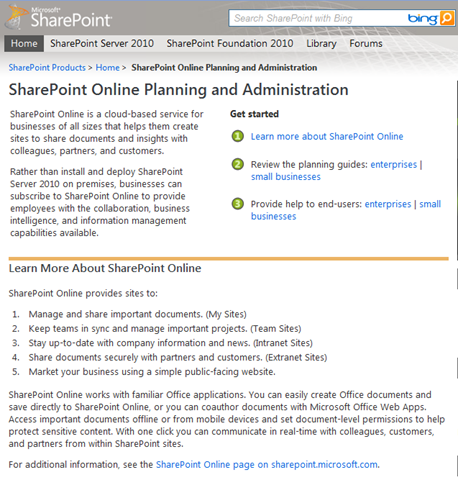
imageThe newly launched SharePoint Online Planning and Administration resource center provides key resources for planning, administration, and operation of SharePoint Online, a cloud-based service that helps businesses provide collaboration, business intelligence, and information management capabilities.

SharePoint Online Planning and Administration

SharePoint Online is a cloud-based service for businesses of all sizes that helps them create sites to share documents and insights with colleagues, partners, and customers.

Rather than install and deploy SharePoint Server 2010 on premises, businesses can subscribe to SharePoint Online to provide employees with the collaboration, business intelligence, and information management capabilities available.

Learn More About SharePoint Online

SharePoint Online provides sites to:

  1. Manage and share important documents. (My Sites)
  2. Keep teams in sync and manage important projects. (Team Sites)
  3. Stay up-to-date with company information and news. (Intranet Sites)
  4. Share documents securely with partners and customers. (Extranet Sites)
  5. Market your business using a simple public-facing website.

SharePoint Online works with familiar Office applications. You can easily create Office documents and save directly to SharePoint Online, or you can coauthor documents with Microsoft Office Web Apps. Access important documents offline or from mobile devices and set document-level permissions to help protect sensitive content. With one click you can communicate in real-time with colleagues, customers, and partners from within SharePoint sites.

For additional information, see the SharePoint Online page on sharepoint.microsoft.com.

Check it out!

Posted by: kurtsh | November 4, 2010

INFO: Windows 7 Deployment Learning Portal

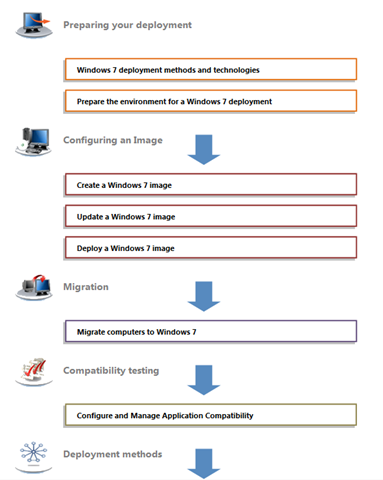
imageCreated by the group that developed the Windows 7 certification exam, the Windows 7 Deployment Learning Portal offers a free online assessment that covers key areas of the deployment process such as preparing for deployment, configuring a Windows 7 image, migration, and compatibility testing.

Windows 7 Deployment Learning Portal

The portal is designed to help you identify the strengths and gaps in your knowledge around Windows 7 deployment and provide some targeted learning to help you reach the top of your game.

About This Portal
The Deployment Learning Portal is an online assessment and learning tool administered by The Test Factory on behalf of Microsoft Ltd. It requires a separate registration and login process than the Windows Live login process used by TechNet. By registering for this experience, you accept that your data will be sent to The Test Factory, which is located in the United Kingdom.

Check it out!

Posted by: kurtsh | November 4, 2010

TOOL: Image Resizer 2.11 for Windows 7/Vista

imageAs taken from the web site:

This is a clone of the Image Resizer Powertoy for Windows XP — a PowerToy that allows you to right-click on one or more image files in Windows Explorer to resize them. It was created (by me) to extend support to non-XP and 64-bit versions of Windows (including 2000, Vista & 7).

This is a tool identical in every way to the original Powertoy for Windows XP that accomplished the same task.  The codebase is completely different however.  (Likely for legal reasons – see below) 

Resizing photos for the purposes of email distribution or web publication is now very easy within Windows 7 – and works in batches through the Explorer UI using this simple tool. 

imageIt should be noted that Brice, the author, is a Microsoft employee.  If you’ve noticed, we at Microsoft haven’t released any Powertoys in a very long time but lots of tools have been publicly released on Codeplex.  My suspicion is that Brice was the original writer of the Image Resizer Powertoy (I’m too lazy to look it up internally) and it was simply easier for Brice to publish the app through Codeplex (after a rewrite using a NEW non-Microsoft published codebase) than to go through our legal gauntlet every time he published a version.  Publishing to Codeplex in many respects, separate from Microsoft, is likely the way all “powertoy” like tools have gone.

imageNew York Times is reporting on our agreement to acquire Canesta, as is Engadget:

From what I’ve read, Canesta (and it’s some 47 patents) provides good 3D camera visualization but it’s completely different from how Kinect’s camera and ultimately PrimeSense & 3DV’s technology works today.  It’s roots are in car’s rear view cameras and autodetecting specifically defined objects in real time to, say, avoid people, pets, and other items when backing up extremely quickly.  Check out their list of public clients:  http://canesta.com/customers-and-partners

PrimeSense & 3DV’s technology depends on conventional, everyday, low-cost image sensors whereas the Canesta depends on proprietary, patented image sensors and most importantly, a proprietary type of pixel to define the image.  The pixel is extremely sensitive to movement however has historically been large in size, resulting in lower image resolution than other technologies.

Either way, it’s clear that the future of motion & image sensing at Microsoft for both Xbox 360 & Windows is rich with opportunity.  Minority Report, anyone?

You’ve seen this before:  You look at your System Tray to use a tool that’s normally there, but it’s gone.  You look at Task Manager and the process is still running for your tool but the icon’s just missing from the System Tray making it inaccessible.

Aggrevating, ain’t it?  In 15 years, we’ve never fixed this – I assume – because the workaround is so easy to do.  Simply stop & restart the EXPLORER.EXE process and all your icons reappear.  This requires going into Task Manager, killing the process, & using File-Run to restart EXPLORER.EXE.  Annoying.

imageSo if you’re running Windows Vista or Windows 7, here’s a quick way to automate all of that assuming you have administrative privileges:

  1. Start a new text file (i.e. run notepad.exe)
  2. Enter the following batch commands:

    taskkill /f /IM explorer.exe
    start explorer.exe
    exit

  3. Save the text file as RESTARTEXPLORER.BAT.  (Note the extension saved is .BAT and not .TXT)

The next time you want to refresh your Systray icons, simply double click the .BAT file and BOOM:  They’ll VERY QUICKLY reappear.  I drag & drop this .BAT file into the QuickLinks tray or the START menu.

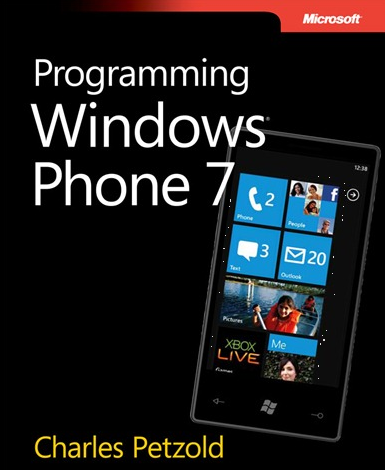
imageWanna start developing for for Windows Phone 7 soup to nuts?

It’s not hard.  All the tools are available for free.  That includes the Integrated Development Environment and the compiler, the frameworks, and of course THE BOOK. 

Charles Petzold put together this huge tome that shows how any developer can get started with the C# programming language and develop the Silverlight and XNA 2D frameworks.

As taken from the Microsoft Press post:

Gang, we’re done! 24 chapters, about 1,000 pages. Congratulations to Charles, who has outdone himself!

Speaking for Charles and for the Windows Phone 7 team, we hope that you will enjoy Programming Windows Phone 7:

You can download a PDF here (38.6 MB).

And you can download the ebook’s sample code here (5.03 MB).

It’s often trivial to hijack someone’s session between themselves and a non-SSL’ed web site over an unencrypted, non-VPNed pipe after the initial authentication is completed.  Most of the time the communication, after the initial user authentication, is in the clear.

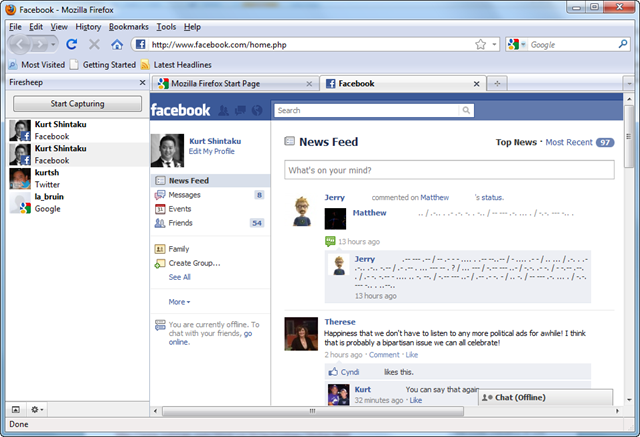
Facebook, Twitter, Flickr all for example, can be easily hijacked using a simple Firefox browser plugin called “Firesheep” that was announced in San Diego a week ago:

image

ABOVE:  Firefox for Windows using the FireSheep Plug-in after it’s detected unencrypted sessions between Google, Facebook & Twitter, completely hijacks a Facebook session.

It’s made it “script-kiddie simple” to hijack (READ: Impersonate) someone else’s fully logged in web browsing session with a web server on the Internet.  The steps are simple:

  1. Install Firesheep
  2. Connect to a network using the Firesheep sidebar.  A list of open users with insecure connections will be displayed.
  3. Double click on a user.  Everything they see, is now on your browser.  You have full control over their session.

You can now submit Tweets on their behalf, Facebook updates, photos into Flickr, etc. etc.  NOTE:  This requires a network adapter (wireless) that may need to be switched to “promiscuous mode”, a driver setting for the NIC.  It also doesn’t appear to work on Windows 7 x64 or Windows XP in a virtual machine.

MORALDon’t use public networks without establishing a VPN first.  This goes for surfing, emailing, using applications with their own Web APIs like TweetDeck or MetroTwit, etc.

Posted by: kurtsh | October 28, 2010

NEWS: Quick summary of Steve Ballmer’s Keynote at PDC10

imageHere’s a quick roll up of some of the major announcements during Steve Ballmer’s opening keynote at PDC10 in Redmond, WA.

  1. Every paying attendee at the PDC will receive at Windows Phone 7 device of their choice.
  2. Pixar on stage with Windows Azure team – will be rendering movies in Azure using RenderMan in the cloud
  3. Announced over 1000+ apps for Windows Phone 7 will ship at launch
  4. Showed the never-before-seen Kindle app for WP7
  5. Ripped Google for acquiring companies and not integrating them in their cloud
  6. Java will be first class citizen (double smack against Google’s poor Java support & Apple’s deprecating comments about Java this week)
  7. Announced the Windows Azure VM role and Server App Virtualization … so sick!
  8. New to Windows Azure, Microsoft’s operating system in the cloud:  Remote Desktop, Virtual Networks, Multiple Admin support
  9. Team Foundation Server in the Cloud/Azure will allow Google or Yahoo authentication/sign in
Posted by: kurtsh | October 28, 2010

EVENT: The Underground powered by PDC10 – Nov 9th

Microsoft invites you to
The Underground powered by PDC10
Tuesday, November 9, 2010
6:00PM – 10:00PM
Club Nokia |L.A. Live
800 West Olympic Boulevard, Los Angeles, CA 90015 |Suite A335| t 213.765.7000
Must be 21 years of age, with identification to attend
Preregistration is required – You must have an RSVP code to attend
REGISTER HERE
(CUSTOMERS:  PLEASE CONTACT ME FOR VIP RSVP Code)
Directions

AGENDA
6:00PM – 7:00 PM Doors Open & Registration
7:00PM – 7:15PM Welcome & Announcements
7:15PM – 9:30PM Executive Q & A with Dan’l Lewin and Blake Irving moderated by Jason Nazar, Content Vignettes, Windows Phone 7 Showcase, Bing Mobile Challenge
9:30PM – 9:45PM Content Wrap & Prizes

clip_image002The Underground powered by PDC10 is a highly anticipated annual event that is organized by Microsoft for the technology and startup community in Southern California.

The event will feature a wide range of speakers and activities, including a Question and Answer session with Dan’l Lewin (Corporate Vice President for Strategic and Emerging Business Development at Microsoft) and Blake Irving (Executive Vice President and Chief Product Officer at Yahoo!). Jason Nazar (Co-Founder and CEO of Docstoc.com, a prominent startup in the LA community) will be moderating.

In addition, this invitation-only event will feature members from some of Southern California’s hottest startups, including MobilePayUSA and CloudBasic. Local developers of some of the most eagerly awaited Windows Phone 7 applications, including Realtor.com and Slacker Personal Radio will also be speaking. Throughout the course of the evening, these speakers will illustrate how they are taking advantage of the rapidly changing mobile and cloud computing landscape through their use of Microsoft’s latest innovative technologies.

Event participants will have the chance to win great prizes, network with other technologists and enjoy an open bar and appetizers throughout the course of the evening.

Doors open at 6:00PM and speakers kick off at 7:00PM. The first 100 registrants to arrive will receive limited edition door prizes!
Follow us on Twitter for more updates: @UndergroundPDC

For more information, please visit: http://undergroundpdc.com/

« Newer Posts - Older Posts »

Categories