imageWut.

That’s what I said when I heard about this.  There’s a post that popped up yesterday by Rod Trent, System Center MVP extraordinaire, that is entitled, “Download all the MMS 2012 PPTs in one fell swoop”.

It’s exactly what the title states.

I’m downloading it right now as I type this post and since I have only a 3Mb pipe, it’s about a half hour download.  It’s a 655MB ZIP file that contains every single presentation that was presented at MMS 2012 that’s available on DigitalMMS.  That more than 160 decks on everything from System Center to PowerShell to Virtualization to Deployment & Configuration to Security to Datacenter Automation.

(What I don’t get is how they’re paying for the network connectivity costs.  That’s more than half a terabyte for each download.  Whaadddever.  Grab it before they run out of bandwidth!)

imageDownload all the MMS 2012 PPTs in one fell swoop

This download includes all of the PPTs and XML files from MMS 2012.
Content provided by myITforum. Read the rest: http://myitforum.com/myitforumwp/2012/04/24/download-all-the-mms-2012-ppts-in-one-fell-swoop/

image

Combining the broad reach of Windows, best-in-class developer tools, a reimagined user experience, support for new chipsets, and a built-in store with industry-leading business terms—Windows 8 is the largest developer opportunity, ever.

Join us for this free, full-day event designed to share all the knowledge you need to start building Metro-style applications for Windows 8—today. We’ll begin by showing you how to use Microsoft Visual Studio to code fast, fluid, immersive, and beautiful Metro-style applications in HTML5/JavaScript, XAML/C#, and C/C++. Your existing investments in these languages carry forward, making Windows a no-compromise platform for developers.

Whatever language you choose, your app gets deep integration with the Windows shell, including notifications, live tiles, deep links, and contracts with other apps. And now you can build once and support all Windows customers, no matter what type of PC they have—from tablets to laptops to convertibles to desktops.

We’ll cap the day off with an open, hands-on lab session. It’s the perfect opportunity to get your dream application under way, or finish that app you’ve already started—with Windows 8 experts available to guide you through every step. Bring your laptop or tablet to join in the fun, and show off your skills while getting started on developing your company’s first Metro application.

Prerequisites
Please bring a laptop or tablet and your personal identification. Also, we recommend you check out the Windows Dev Center, and download the Windows 8 Consumer Preview before you come so you can be prepared for the hands-on portion of the event.

Important: Windows 8 Consumer Preview requires a clean install. If you decide to go back to your previous operating system, you’ll need to reinstall it from the recovery or installation media that came with your PC, which is typically DVD media. If you don’t have recovery media, you might be able to create it from a recovery partition on your PC using software provided by your PC manufacturer. Check the support section of your PC manufacturer’s website for more information. After you installWindows 8, you won’t be able to use the recovery partition on your PC to go back to your previous version ofWindows.

Notes
This free event is brought to you by Microsoft; however, you are responsible for booking and funding your own travel and accommodations. Please note that there is limited space available for this event, so be sure to register early at a location near you

Registration opens at 8:30 A.M.
Event starts at 9:00 A.M.
Paid parking at this event will be available.

Seating is limited, so register today.

Location:
Microsoft Los Angeles
333 S Grand Ave
Suite 3300
Los Angeles, California 90071

Registration: Los Angeles, CA
http://www.microsoft.com/click/services/Redirect2.ashx?CR_CC=200099466&CR_EAC=300043006

clip_image001

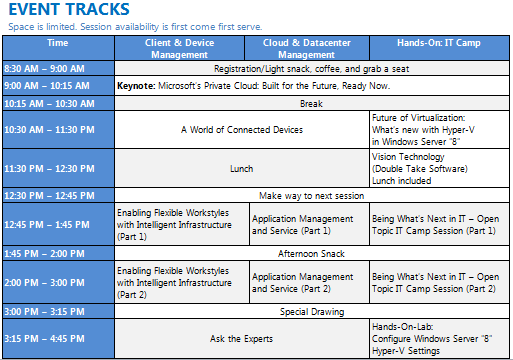
The Best of Microsoft Management Summit is coming to Los Angeles! Microsoft is bringing Vegas to you with the Microsoft Private Cloud Summit & Best of Microsoft Management Summit 2012 Replay! Join us at this special one-day event to learn how the new System Center 2012 can help you manage nearly everything in your infrastructure.

Hear directly from our Redmond-based System Center product team as they share the best from MMS 2012. Bring your laptop and get hands-on experience installing and configuring the trial with Microsoft technology evangelists. Engage our panel of experts to get your questions answered. And get a sneak peak at Windows Server “8”. This is your chance to build your skillset by learning how to simplify management of your devices and infrastructure, monitor and remediate application issues, automate routine tasks, and take control of across clouds!

image

Microsoft Private Cloud Summit, Los Angeles
Tuesday, May 22, 2012
8:30 AM – 5:15 PM

Westin LAX
5400 West Century Boulevard
Los Angeles, California 90045

imageHey whaddyaknow.  It turns out that The Next Web published content exclusively for IE9 users.  The content is eventually made available at a later time but if you want to see what’s being published for IE users only, check this site out:

imageStay Informed: Microsoft Licensing Series:  System Center 2012 Licensing

Please join us Friday, April 27, 9:00 A.M.–10:00 A.M. Pacific Time while we continue our customer licensing webcast series with Microsoft System Center 2012.

System Center 2012 represents an evolution in the Microsoft management strategy, a response to the emergence of cloud computing and management challenges that our customers face running applications in private cloud and "hybrid IT" computing environments. To better address these needs, System Center 2012 is becoming a single integrated product, and System Center licensing, packaging, and pricing is being updated to support these changes. Please register now for the webcast on April 27.

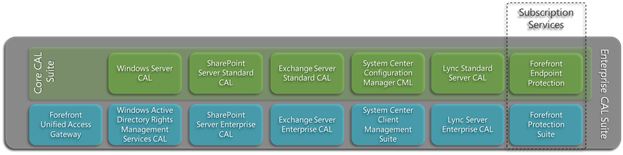
Okay.  I work for Microsoft and I’ll fully admit that while I’m pretty good, even I – an employee of Microsoft – have the occasional difficulty recalling off the top of my head what’s in the Core CAL Suite & the Enterprise CAL Suite.

image

The Core CAL contains:

  1. Windows Server CAL
  2. Exchange Server Standard CAL
  3. SharePoint Server Standard CAL
  4. Lync Server Standard CAL
  5. System Center Configuration Manager Client Management License
  6. System Center Endpoint Protection (SUBSCRIPTION)

The Enterprise CAL Suite:

  1. ALL of the components of the Core CAL Suite (listed above)
  2. Exchange Server Enterprise CAL
  3. SharePoint Server Enterprise CAL
  4. Lync Server Enterprise CAL
  5. Rights Management Services CAL
  6. Forefront Unified Access Gateway CAL
  7. Forefront Protection Suite (SUBSCRIPTION)
        1. Forefront Protection for Exchange
        2. Forefront Protection for SharePoint
        3. Forefront Security for Office Communications Server
        4. Forefront Online Protection for Exchange
        5. Forefront Threat Mgmt Gateway Web Protection Service
  8. System Center Client Management Suite
        1. System Center Operations Manager Client Management License
        2. System Center Data Protection Manager Client Management License
        3. System Center Service Manager Client Management License
        4. System Center Orchestrator Client Management License

Here’s the whitepaper that documents all of this:

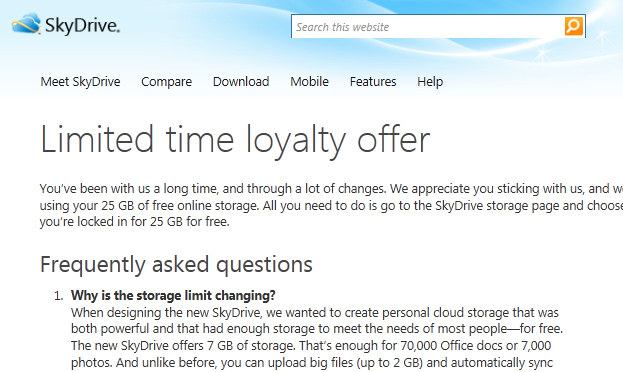
imageApparently, they’re dropping the storage capacity of free Skydrive accounts from 25GB to 7GB.  Yeah… don’t ask.  Our explanation is IMHO weak sauce.  (See the link below) 

I have to assume the change in policy is linked to the fact that someone in Redmond probably anticipates usage of Skydrive to go up in the coming year due to the vastly improved flexibility of Skydrive as a service as well as the coming release of Windows 8.

As such, the “marketing 25GB” ceiling that we set on Skydrive accounts (The limit was in fact real… however, by ‘marketing’ I mean, extremely few people really use 25GB today) actually might be something people use going forward, meaning that they need to account for that 25GB financially in terms of storage costs planning and can’t just use ‘25GB’ as a marketing tool.

That being said, for a limited time, you can visit your EXISTING SKYDRIVE ACCOUNT (you can’t just make one up now – sorry) and you’ll maintain your full 25GB limit.  This way they know who’s really using Skydrive, what accounts are really active, and to what extent it’s being used.  I personally have 4 Skydrive accounts and just upgraded all of them for the full 25GB in under 2 minutes.

Note: All new Skydrive storage accounts moving forward will be capped at 7GB.

In order to upgrade your account, all you need to do is log in to http://skydrive.live.com with your Windows Live ID, and if you’d previously established a Skydrive storage account, you’ll see your ‘directory’ and a link at the top that you can click to upgrade you account to the full 25GB instead of just 7GB.

image

UPDATE 4/21/12 4:40PM:
Amazon defeats EA to wins the AHGL League of Legends Championship, playing for Child’s PlayGG Amazon. 
http://afterhoursgaming.tv/league-legends/

————————

I’ve been dreading having to write this post but I think it has to be done now that the finals are taking place today.

Put simply, season 2 of AHGL has not been kind to Microsoft:

For background on the AHGL:

imageThe After Hours Gaming League is a fun, modern twist to the traditional corporate sports league. Instead of softball or basketball, the AHGL offers corporate teams the chance for some friendly competition on the virtual battlefields of top strategy games. The AHGL is also a fundraiser for charity: corporate teams compete for the chance to donate the $5,000 top cash prize to the charity of their choice.

Season One of the AHGL saw eight high-tech giants—Amazon, Dropbox, Facebook, Google, Microsoft, Twitter, Yelp and Zynga—duke it out on the battlefields of StarCraft II. The tournament Grand Finals were held on the Facebook campus in Palo Alto, California, and broadcast live over Day[9]TV to an audience of over 100,000 live viewers. In an exciting victory, Microsoft won the day for its charity, Amnesty International.

A *certain arch-competitor* of ours didn’t fare as well as us, but at the end of the day, neither of us are in the finals so I guess in the end it doesn’t matter… best of luck to the finals competitors:

Starcraft 2 Finals:
IBM (Youth Service America)
vs
Epic Systems (Doctors Without Borders)
http://afterhoursgaming.tv/starcraft-2-season-2/

League of Legends Finals:
Electronics Arts (Make-A-Wish Foundation®
vs
Amazon (Child’s Play)
http://afterhoursgaming.tv/league-legends/

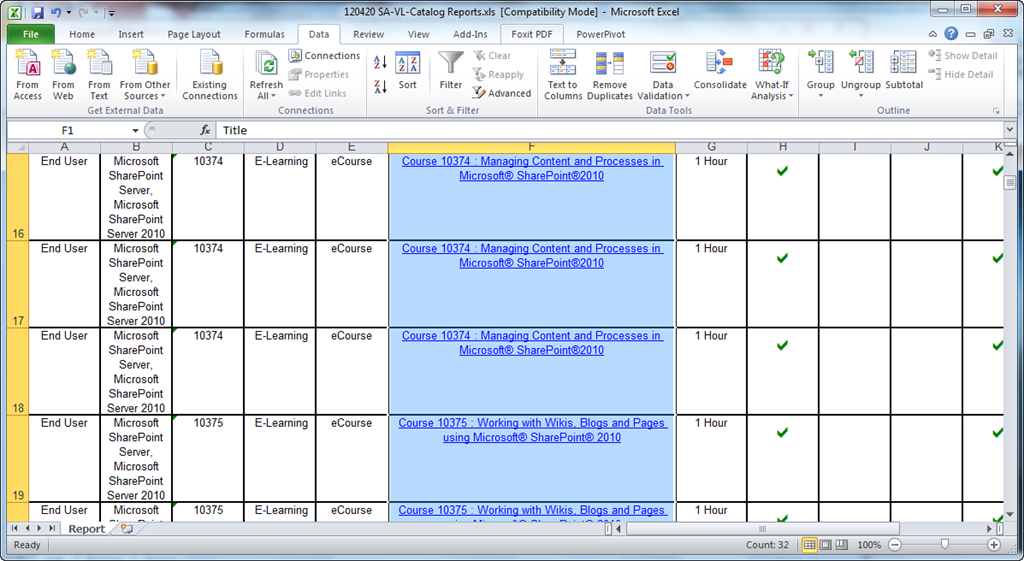
If you have Software Assurance benefits from your agreement with Microsoft, you likely have access to many of the course available on http://www.microsoftelearning.com.  The courses your organization has access to however is a select group of courses that reflect the business technologies that Software Assurance customers typically license – it is not the entire eLearning catalog.  This list of courses that SA customers are eligible for, to date, is around 300+ and growing.

image

You can access this full catalog via the web at the URL below.  The results are hyperlinked to the actual class posted on the Microsoft eLearning web site for your convenience.  You can also export the list if you wish as the list of classes available changes every month or so. http://www.microsoft.com/learning/sa-vl-catalog/savldefault.aspx

Here’s a sample of the first ~20 courses that may be relevant for your end users:

  • Course 10166 : Windows 7 Essentials I
  • Course 10167 : Windows 7 Essentials II
  • Course 10293 : Beginner Skills in Microsoft® Outlook® 2010
  • Course 10294 : Beginner Skills in Microsoft® Word 2010
  • Course 10295 : Beginner Skills in Microsoft® PowerPoint® 2010
  • Course 10296 : Beginner Skills in Microsoft® Excel® 2010
  • Course 10353 : Beginner Skills Training in Microsoft® OneNote® 2010
  • Course 10354 : Beginner Skills Training in Microsoft® Publisher 2010
  • Course 10355 : Taking Content Offline using Microsoft® SharePoint® Workspace 2010
  • Course 10356 : Beginner Skills Training in Microsoft® Visio® 2010
  • Course 10360 : Working with Microsoft® Lync 2010 for Collaboration
  • Course 10373 : Making Decisions using Business Intelligence in Microsoft® SharePoint® 2010
  • Course 10374 : Managing Content and Processes in Microsoft® SharePoint®2010
  • Course 10375 : Working with Wikis, Blogs and Pages using Microsoft® SharePoint® 2010
  • Course 10376 : Finding Content and People using Microsoft® SharePoint® 2010 Enterprise Search
  • Course 10377 : Connecting to People and Resources with My Sites in Microsoft® SharePoint® 2010
  • Course 10378 : Setting Up Projects in Microsoft® Project 2010
  • Course 10379 : Building a Project Schedule in Microsoft® Project 2010
  • Course 10380 : Tracking and Managing Projects in Microsoft® Project 2010
  • Course 10381 : Customizing and Sharing Projects in Microsoft® Project 2010
  • Course 10382 : Beginner Skills in Microsoft® Access® 2010

As for accessing & understanding the usage, we provide all the documentation required for using Software Assurance benefits, including eLearning in the Software Assurance Document library available here:

Key documents that you will want to pay attention to include:

Additionally, you should download the customer QuickStart guide available here:

image

Good released their client for Windows Phone today.

Today, Good Technology is pleased to announce the launch of Good for Enterprise™ for the Windows Phone® platform (aka "Mango").

Good for Enterprise – Windows Phone provides critical security and management features that allow corporate IT to secure and control Windows Phone deployments within your enterprise. IT can rest easy with over-the-air and on-device encryption of enterprise data, complete password policy enforcement, and remote wipe of enterprise data. In addition, IT helpdesk can easily manage and troubleshoot issues with complete visibility of all Windows Phone deployed within your company through a simple, web-based management interface.

Good for Enterprise – Windows Phone capabilities include:

  • Email
  • Contacts
  • Calendar

The Good for Enterprise app can now be downloaded directly from the Windows Phone Marketplace (see links below).

Links to the app on Marketplace:

For a list of Window Phone devices that Good has certified, visit:

Press release:

« Newer Posts - Older Posts »

Categories