UPDATE 10/6/12:
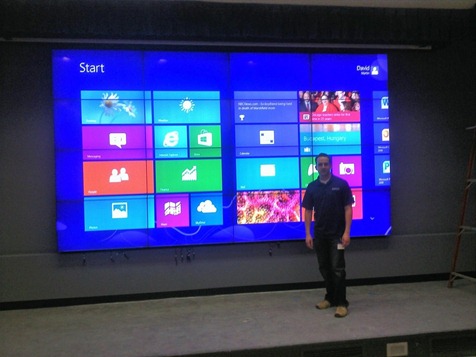
And it’s installed.  What’s amazing is that I guess this could really be as big as anyone wants to it be.  I don’t have a wall big enough for something like this.  V__5AD0
———————–
ORIGINAL POST:
Anyone want a really HUGE display?

V__A780

The photo doesn’t do this justice:  These are massive 60+” panels in a 3×2 configuration presenting a gargantuan single HDMI display.  What you’re looking at is something called the Casgan PiXelWall:  A multiscreen high definition series of displays with ultrathin bezels that combine to form a highly configurable wall monitor.

They’re deployed anywhere from showrooms, to Entertainment industry theatres, to command & control centers for Enterprise companies, to the home theatres of the rich & famous.

As you can see, the configuration above is a configuration being put together for a client of a friend that works at Casgan.  The first thing they through up on the PiXelWall was a 6 display configuration showcasing a single monitor view of a Windows 8 display.  Looks pretty sexy, ‘eh?
image

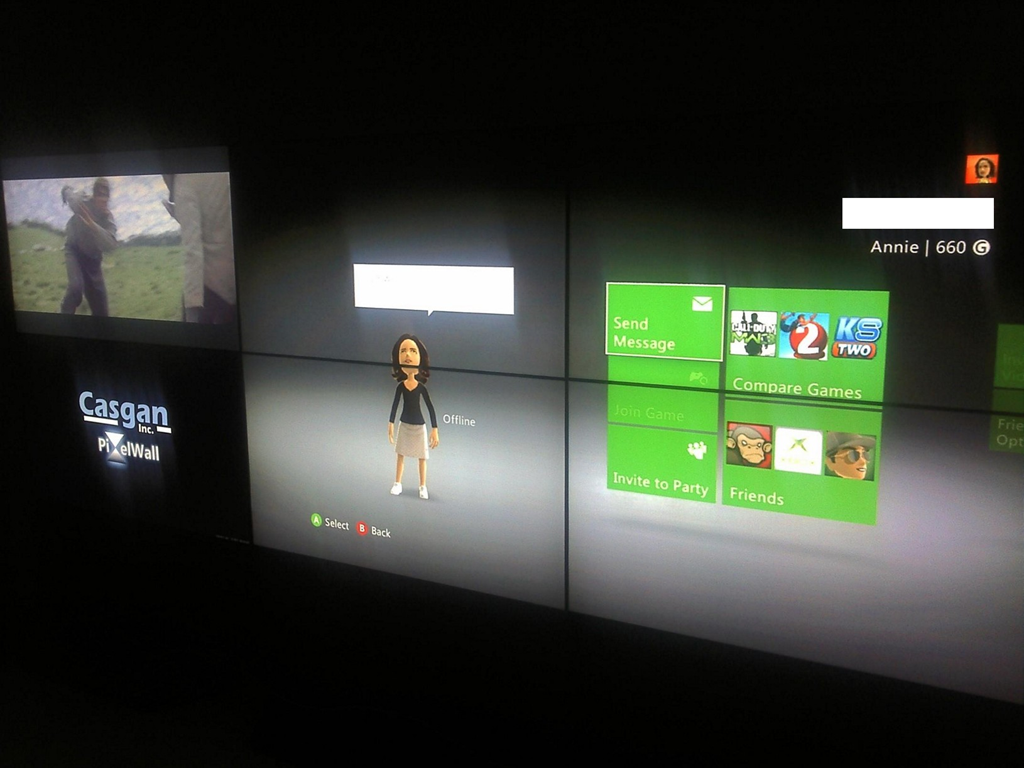
As mentioned earlier, the displays are configurable on the fly so you can have one display configured for say watching a live feed – like TV – and another for computer stats – and yet another for… recreational usage, as evidenced above.
A fact of life is that laptop batteries don’t last forever. But it’s a fact that we largely forget about, and we blame Windows for being a “power pig” & only until the battery completely fails do we consider that it’s a hardware issue.  The truth is that a lot of folks find their laptop’s battery doesn’t last very long and the reason is… it’s OLD!  And it’s dying! 

So how does one figure out – without too much effort, whether their battery is failing and if they want better battery life, they need to get a battery replacement?  It turns out that in Windows 7 & Windows 8, we have some great tools that make it very easy to determine how well your machine is doing power-wise in just 60 seconds.

imageHOW TO RUN A 60 SECOND REPORT ON YOUR LAPTOP’S POWER CONSUMPTION:

  1. Open a CMD shell with Administrative privileges in Windows 7 or 8.
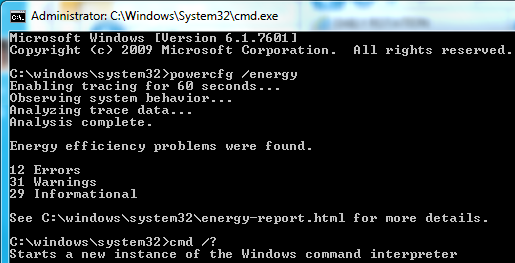
  2. Run POWERCFG /ENERGY and a 60 second analysis will be run on your machine.
  3. If any issues arise, the analysis will tell you how many issues the OS found on the screen once it’s finished.  A report should be written to your \windows\system32 directory called “energy-report.html

image

ANALYZING THE RESULTS
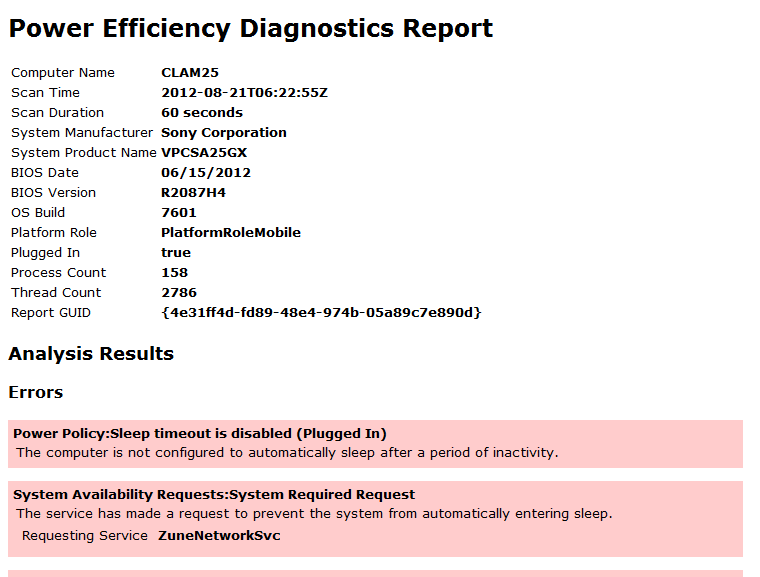
The resulting HTML file will tell you a lot.  For example, one of the things it will tell you is what applications are the biggest power hogs on your system.  On my system for example, besides the usual suspects, like Internet Explorer, I found some surprising CPU hogs on there like Soluto & Windows Live Writer.  Something to know when you’re on the road and want to conserve battery.

The thing you’re looking for in this case is in the 3rd section, near the end entitled, “Battery:Battery Information”.  There are two numbers you need to look at in this section:

  • Design Capacity
  • Last Full Charge

These two numbers should be relatively close to each other obviously.  On my PC for example, I have a Design Capacity of 52170 and a Last Full Charge of 48770, meaning that the maximum charge I can hold on my battery is apparently about 93.5%.  Not bad.

If you have largely divergent numbers, you probably have yourself a bad battery and it’s time to replace it.

Posted by: kurtsh | August 20, 2012

INFO: “Client Hyper-V” for Windows 8

imageWindows 8’s Client Hyper-V is real, and it’s spectacular.  Forgive my enthusiasm but this is the desktop virtualization technology you’ve been waiting for on the desktop: A true type-1 client hypervisor, with all the power of Microsoft’s best virtualization technology… right up against the metal.

That means all the ‘against-the-metal’ speed & ‘x64’ power of the BEST server virtualization technology at your workstation without loading Windows Server on your machine as your base OS… and you still get to use it on any current generation x64 processor and have the richness of the Windows hardware/driver ecosystem!

imageHOW TO TURN IT ON:

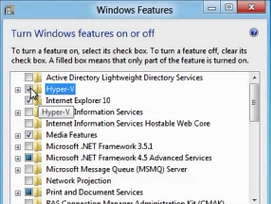
  1. Open Windows 8 CtrlPanel
  2. Go to Programs&Features & click Turn Windows Features On or Off
  3. Check "Hyper-V" (and the tools)
  4. Reboot… and you’re done.

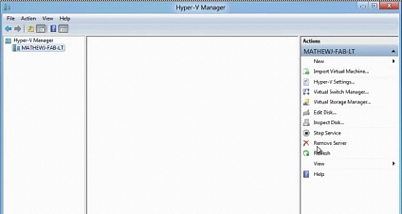
You’ll notice Hyper-V Manager & Hyper-V Virtual Machine Connection client appear on the Start page, so if you’re used to Windows Server’s Hyper-V, you’re gonna be in familiar territory.  In the meantime, here’s some references that you’ll need once you’ve got things going:

Posted by: kurtsh | August 17, 2012

VIDEO: Windows Server 2012 recordings @ TechEd 2012

imageI’ve noticed something:  It seems like not too many people know exactly HOW MUCH content is available for Windows Server 2012.

Folks – there’s so much recorded & written it’s insane.  Maybe we’re not doing a good enough job of exposing it but in any case, here’s a simple list of all the sessions on Windows Server 2012 from the recent TechEd 2012 Conference in Orlando, FL.

Each are 1hr & 15min long.

For more sessions, visit:
http://channel9.msdn.com/Events/TechEd/NorthAmerica/2012

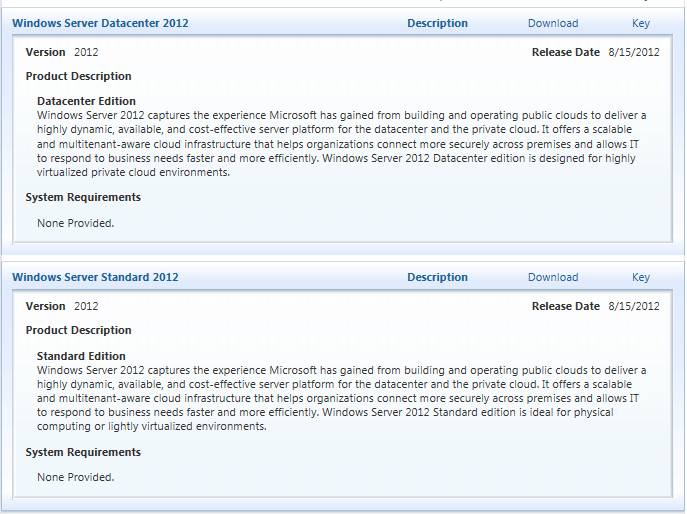
For Volume Licensing customers, the .ISO images of Windows Server Datacenter 2012 and Windows Server Standard 2012 are now available on the Volume Licensing Service Center web site:

image

VIDEO RECORDINGS
The following overview video recordings are available for Windows Server 2012:
(Note: Each are roughly 1hr & 15min long)

(Note:  There’s a LOT more recorded content than this.  I only listed the above recordings because it was what one of you wanted to hear about.  If you’d like to see all the Windows Server 2012 content from TechEd 2012, check this post out:
VIDEO- Windows Server 2012 recordings @ TechEd 2012)

LICENSING:
Find licensing and pricing details in the downloadable datasheet; find the answers to the most commonly asked pricing and licensing questions:
http://www.microsoft.com/en-us/server-cloud/windows-server/2012-editions.aspx

DOWNLOAD:  Windows Server 2012  – Volume Licensing Service Center
https://www.microsoft.com/Licensing/servicecenter/Downloads/DownloadsandKeys.aspx
(Requires Volume Licensing Administration privileges for your organization)

Posted by: kurtsh | August 16, 2012

NEWS: The early returns on Windows 8

Many in the media have weighed in on Windows 8 already in just the past week since release to TechNet/MSDN & the Volume Licensing Service Center.

Here’s a few of the reviews:

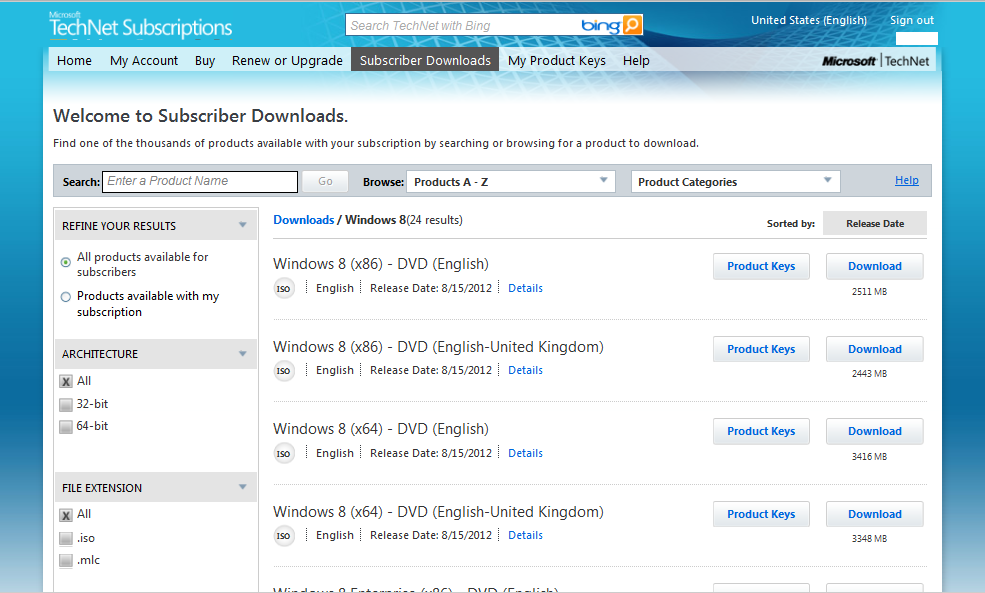
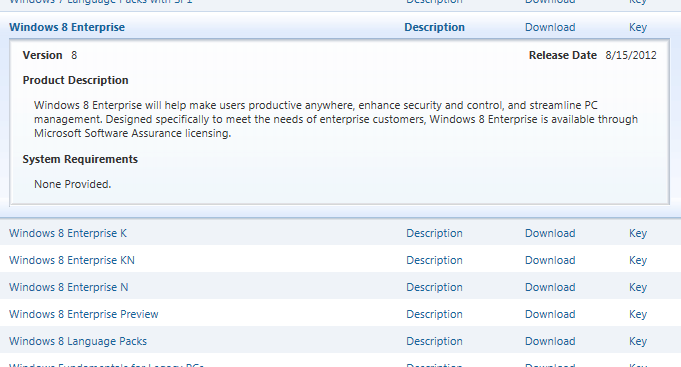
Yesterday, most people noticed that TechNet & MSDN subscribers were able to download the RTM release of Windows 8 :

(Note: I believe TechNet Standard subscriptions were provided with Windows 8 (x86/x64) “Retail” media & a single Windows 8 Pro key; TechNet Professional subscriptions were provided both Windows 8 Retail Media and Windows 8 Enterprise Volume Licensing Media for business testing.)

image

Microsoft TechNet subscriber’s download area now lists Windows 8 (x64/x86)
(and Windows 8 Enterprise (x64/x86) for Pro Subscribers)

imageToday, Volume Licensing customers with Software Assurance discovered that the Volume Licensing media for Windows 8 Enterprise RTM is now available at:

This is the version that is Enterprise clone-able/deployable using centrally managed activation keys and Enterprise activation services/techniques such as KMS or MAK. 

Please keep in mind that Windows 8 Enterprise is again available only to Software Assurance volume licensing customers, and as such, is not listed under the “WINDOWS” category in the Download section of the VLSC but under “SOFTWARE ASSURANCE” category.

image

Microsoft Volume Licensing Service Center download area now lists Windows 8 Enterprise under “Software Assurance”

Posted by: kurtsh | August 16, 2012

RELEASE: Windows Essentials 2012

imageToday we’re happy to announce new versions of Movie Maker and Photo Gallery for Windows 7 and Windows 8.

We’ve added a few new capabilities while also taking advantage of some advances in Windows 8. Movie Maker and Photo Gallery are two essential Windows applications hundreds of millions of people have come to rely on for making the most of your photos and videos. And with this release, we’ve given you a few more reasons to enjoy them even more.

  • MOVIE MAKER
      • Built-in video stablization
      • Legal-integration of music soundtracks
      • Music narration & other audio controls
      • Improved visibility of text effects
      • H.264 encoding by default
  • PHOTO GALLERY
      • Built-in Auto Collage
      • Direct-to-Vimeo publishing
  • SKYDRIVE
      • Automated cloud backup and synchronization of documents and personal files – up to 5GB of storage free (more available for a fee)

And of course Windows Essentials continues to include:

  • Windows Live Mail
  • Windows Live Family Safety
  • Windows Live Writer
  • Windows Live Messenger
  • Outlook Connector Pack

NEED THE OLD ‘WINDOWS LIVE MESH’?
Windows Essentials 2012 will uninstall Live Mesh and replace it with Skydrive.  The differences between the two technologies is documented in this article.  If you don’t want this (or need to reinstall Live Mesh) you can download the OLDER Windows Live Essentials 2011 at http://www.microsoft.com/en-us/download/details.aspx?id=29219.

DOWNLOAD: Windows Essentials 2012
http://g.live.com/1rewlive5-all/en/wlsetup-all.exe

—————-

Original post:
BLOG: Introducing the New Windows Photo Gallery and Movie Maker
http://windowsteamblog.com/windows/b/windowsexperience/archive/2012/08/07/introducing-the-new-windows-photo-gallery-and-movie-maker.aspx

imageIn case you’ve been reading Acer’s comments as published by the media about Surface, I thought I’d couch some of those articles with some opinions on the topic from other sources.

SO IN CASE YOU HADN’T HEARD
A week ago, there was a somewhat ominous open communication to Microsoft from Acer Chairman, JT Wang, called by the media as “his warning to Microsoft”.

“Wang noted that Microsoft is currently looking for solutions such as creating a price gap to minimize the negative impact on other vendors’ product lineups, and he believes if Microsoft launches Surface at a price of US$199, it would have a rather significant impact, but if it is priced at around US$499-599, the effects will be a lot smaller.”
http://www.digitimes.com/news/a20120809PD216.html

Then JT Wang backed off his original statement’s harshness but still reiterated the “danger” of Surface to “the ecosystem” in this article:

“Microsoft, he said, was now considering possible differentiation strategies to minimize any possible impact on OEM partners, including introducing an artificial price gap. Still, it sound like Acer’s expectations of Surface are somewhat skewed in the first place; Wang supposedly claimed that the major damage would be done if Microsoft priced the entry-level tablet at $199 – thus directly competing with the Nexus 7, a figure which would be very unlikely. If Surface was $499-599, however, Wang sees less of an issue.”
http://www.slashgear.com/acer-please-microsoft-just-dont-make-surface-too-cheap-10242531/

On the other hand, a good chunk of the media weighed in with their take on Acer’s comments & Surface overall:

It should be noted that the OEMs that have signed up to do Windows RT devices – all I would suspect will be competitive with Surface RT – are Dell, Samsung, Asus, and Lenovo.

“Following sharp comments from Acer’s JT Wang surrounding Microsoft’s decision to compete with vital OEM partners in the tablet space, Mike Angiulo — the vice president of Microsoft’s Ecosystem and Planning team — has stepped to the plate with a resounding "thank you" to those very associates. Aside from praising those who will be helping to make Windows RT more than a passing fad, the company affirmed that ASUS, Dell, Samsung and Lenovo will all be shipping ARM-based products with the aforementioned operating system onboard.”
http://www.engadget.com/2012/08/13/microsoft-windows-rt-tablet-partners-asus-dell-lenovo-samsung/

I found this summary to be succinct:

Interesting support article.  I know there’s folks that have had this problem before. 

SYMPTOMS:
When viewing the size of the C:\Windows folder, users may notice that the C:\Windows\winsxs directory appears to be taking up large amounts of disk space

CAUSE:
The Windows component store (C:\Windows\winsxs) directory is used during servicing operations within Windows installations. Servicing operations include, but are not limited to, Windows Update, Service Pack and hotfix installations.

The component store contains all of the files needed for a Windows installation and any updates to those files are also held within the component store as they are installed. This will cause the component store to grow over time as more updates, features or roles are added to the installation. The component store utilizes NTFS hard links between itself and other Windows directories to increase the robustness of the Windows platform.

The component store will show a large directory size due to the way the Windows Explorer shell accounts for hard links. The Windows shell will count each reference to a hard link as a single instance of the file for each directory the file resides in. For example, if a file named advapi32.dll was 700 KB in size and was contained in the component store and the \Windows\system32 directory, Windows Explorer would inaccurately report that it consumes 1400 KB of hard disk space.

Read more here:

« Newer Posts - Older Posts »

Categories