imageMicrosoft SQL Server 2014 brings to market new in-memory capabilities built into the core database, including in-memory OLTP, which complements our existing in-memory data warehousing and BI capabilities for the most comprehensive in-memory database solution in the market. SQL Server 2014 also provides new cloud capabilities to simplify cloud adoption for your SQL databases and help you unlock new hybrid scenarios.

Need more information about SQL Server 2014 Community Technology Preview 2 (CTP2)?  See the product details page.

Posted by: kurtsh | October 30, 2013

NEWS: What did Nokia announce on Oct 22nd?

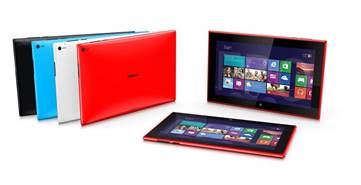
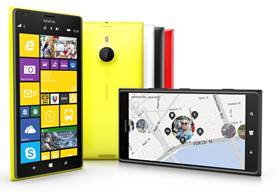
Nokia revealed three Windows devices on Oct 22nd at Nokia World, including:

  • its first tablet, the Lumia 2520, running Windows RT with LTE support on AT&T
  • two massive new 6-inch Windows Phones, the Lumia 1520 (AT&T) and Lumia 1320 (not available in the US).

Nokia & Microsoft announced many new Windows Phone and Windows 8 apps including Nokia Storyteller, Instagram, Xbox Video, Vine, Flipboard and many more apps. Read the complete list on the Windows Phone Blog.

image

Lumia 2520 Tablet

  • “it looks and feels incredibly solid… much thinner and sleeker than we originally expected, and it’s very comfortable to hold” – Engadget

Lumia 1520 Phone

  • image“it’s a lot lighter, slimmer, and sexier than many other phablets” – CNet
  • “Slimmer and lighter than you’d expect of a supersize handset, the 1520 brings the goods” – CNet

Lumia 1320 Phone

  • “A huge 720p Windows Phone with a budget-minded price” – Engadget
Posted by: kurtsh | October 30, 2013

NEWS: Microsoft Acquires Apiphany

Taken from the Windows Azure blog:

imageToday, I’m excited to announce that we have acquired Apiphany—a leading API management delivery platform.

While there is nothing new about app extensibility, cloud computing has rapidly accelerated the use cases for extensibility which has increased the value of the APIs. As you might expect, with expansion and increased value, comes additional work to expose APIs reliably, securely and at scale.  Our newly acquired API management services provide businesses of any size the tools they need to expose particular endpoints while selectively gating access to more sensitive data and services. 

We look forward to surfacing API management services within Windows Azure and providing our customers with the technology they need to grow their API ecosystem very soon.

Steven Martin  
General Manager  
Windows Azure Business and Marketing

Source:
http://blogs.msdn.com/b/windowsazure/archive/2013/10/23/microsoft-acquires-apiphany.aspx

clip_image002

Yup.  It’s that time again already. 

imageThe “Call of Duty: Ghosts” Midnight Launch at the Microsoft Store Century City will be taking place on Nov 4th at 10:00PM.  Arrive early to secure your place in line – first 50 people will receive a special giveaway!

BONUS: We will have 4 special guest developers from the COD team at Activision coming in and signing posters and games. 

We’ll see you there!

Pre-order deal: (Offer will END at close of business on, SUNDAY, NOVEMBER 3rd)

  • Pre-order Xbox 360 Titles, Get a $10 Microsoft Store Gift Card
  • Pre-Order Any Xbox One Title, Get a $10 Microsoft Store Gift Card

I’m assuming that there’ll be food & drinks even though I’ve gotten no notification of such. <AHEM>  (And if there isn’t… I’ll probably pay for it myself cuz I gots to eat too.)

TIME/DATE:

Nov 4th, 10:00PM

LOCATION:

Microsoft Store Los Angeles
(Westfield Century City)

10250 Santa Monica Blvd
Los Angeles, CA 90067
Phone: (310) 228-3550

EVENT:

http://content.microsoftstore.com/en-us/event/detail/westfieldcenturycity?eid=23c43c6b-3940-e311-beaa-00155d7d431f

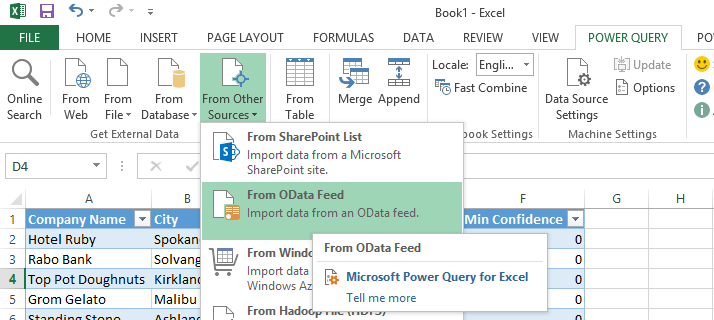
imageSummary: The Self-Service Business Intelligence workshop is an intensive two-day class that is designed to get you up to speed using tools easily accessible to Power Users. First you will learn the basics of creating models using Power Pivot. Then using Power Query you will shape additional data that can be found in external data sources.  Finally, you will learn the best ways to present your data by building reports using Excel, Power View and Power Map. You will also learn how to make the self-service BI solutions you create scalable across your entire enterprise environment.

Prerequisites: This class is targeted for Power Users or End Users that are looking to design their own self-service Business Intelligence solutions.  Because this class is focused on self-service end user solutions, previous SQL Server knowledge is not required.  It is not mandatory but ideally students would have a basic understanding database terminology (tables, views column, rows, etc..)

System Requirements:
Excel 2013 allows you to follow entire class
Excel 2010 allows you to follow Power Pivot and Power Query.  A hosted SharePoint service can be used to try Power View.

  • Instructor: Devin Knight
  • Duration: 2 Days
  • Location: Microsoft Office
    3 Park Plaza
    Suite 1600
    Irvine, CA 92614
  • Schedule: 12/2/2013 – 12/3/2013
    8:30 AM – 5:00 PM

Registration:
http://pragmaticworks.com/LearningCenter/Workshops/BusinessAnalytics.aspx/12-2-13_LosAngelesSelf-ServiceBusinessIntelligenceWorkshop

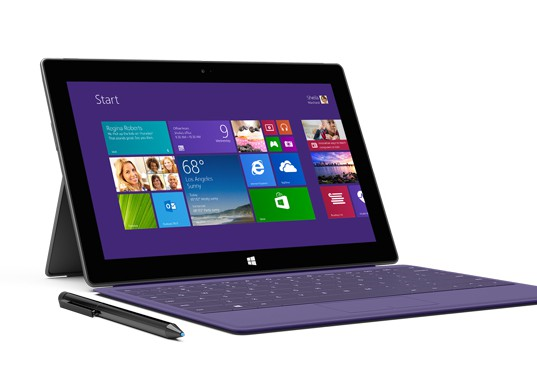
imageI have historically looked at Surface Pro & Pro 2 as my "advanced companion device"… my home away from home, so to speak. 

  • PREVIOUSLY WITH SURFACE PRO 1, it was simply my handwritten note-taking device, customer presentation machine, & "hey-look-at-me-your-capacitive-touch-tablet-can’t-do 90%-of-what-I’m-doing" image device. My limitation was storage capacity (max 128GB) & battery life to a lesser degree.
  • NOW WITH SURFACE PRO 2, I’m syncing all my data, 100% of it, between my home desktop & my Surface.  I now have all-day battery life exceeding 8hrs while on Power Saver.

…this makes for an interesting quandary for me because with its new 4th-gen Intel Haswell CPU & its DisplayPort, my Surface Pro 2 is officially better than ANY other laptop or desktop I own.  With the dock I get big-ol’ screens for home use, and when I’m on the road, I get portability, great battery life, 256GB of storage (I typically need about 140GB) & it’s both a consumption & a creation device. 

BOTTOM LINE: 
I believe Surface Pro 2 has met the vision of having “one single device” for everything with this release.

————————–
EPILOGUE: So now the question is, why do I need my Lenovo X1 Carbon?  While is a great laptop, it’s slower.  It’s screen is bigger, yes, but I don’t need a bigger screen while I’m on the road visiting customers, and when I am home, my Surface dock connects to larger displays anyway.  The battery’s not any better.  I can’t use it as a tablet.  It’s got DisplayPort on the side so it’s got that going for it but outside of being a “home base” device… I’m not sure what to do with it other than keep it synced for those times when I might have long term work away from home requiring the larger screen.

Posted by: kurtsh | October 26, 2013

TRAINING: SQL PASS Summit 2013 On-Demand Video Recordings

image

If you’re interested in Microsoft SQL Server, you should already know about the PASS Summit, the independent (Microsoft-supported) SQL Server conference that happens every year. 

PASS Summit is 100% SQL Server focused so if you make your living working on Microsoft SQL Server, this conference is nirvana.  With over 190 technical sessions delivered over 2-days of pre-conference learning, plus 3-days of main conference attendance, PASS Summit provides the ultimate networking & education experience for IT Professionals looking to meet SQL MVPs, experts & peers in the industry.  It also provides and opportunity to get face-to-face support with Microsoft CSS & SQLCAT, while participating in chalktalks throughout the event.

Here’s a short example of many of the sessions for Microsoft SQL Server administrators & programmers:

imageThe PASS Summit for 2013 published recordings of many of their 190 sessions online at PASS TV:

If you’re interested in knowing what was presented, download the PDF Session Schedule here:

I’ve gotten this question more than once so I thought I’d jot down a quick answer:

Q: Why doesn’t Surface Pro & its Docking Station have an HDMI port?

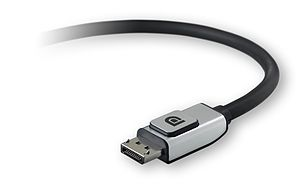
The simple answer is that it has something better: A DisplayPort.
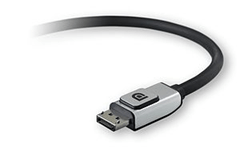
imageFor those that can’t get over their need for HDMI, DisplayPort has $5-$10 cabling or dongles that easily transform the port into VGA, microHDMI, fullHDMI, DVI, component, etc.  The technology also supports the encrypted path of HDMI 1.4 for playing protected content like that from BluRay.  It transmits both audio & video over a single channel exactly as HDMI does… but there are a several major big differences that give it a leg up.

DisplayPort supports:

  • DAISY CHAINING. You can connect a DisplayPort cable to your monitor then connect that monitor to another monitor then connect that one to another monitor… 4 simultaneous 1080p+5.1 channels over a single cable. Unlike HDMI which is single channel only.
  • BI-DIRECTIONAL I/O. You can connect touch screens to DisplayPort and push 1080p video to it, and have touch I/O from the display transmitted BACK to the device over the same DisplayPort connection without needing a second USB cable to loop back to the PC.

There are other benefits but these are the two big ones most people like to hear about. DisplayPort standard is not used a lot outside of Macintoshes because there’s a licensing fee involved that eats into most PCs margin, however the VESA organization that manages the IP for DisplayPort granted Microsoft the right to use DisplayPort for Surface Pro. (Terms/conditions weren’t disclosed)

Bottom line: You should be very happy that DisplayPort is on Surface Pro & the dock. It’s a much better solution than HDMI which is far less capable, but more popular because it’s cheap & does the job.

Xbox One is going on tour juuuuuust before the release on November 22nd.  And you can be there here in Los Angeles, CA via the Xbox One “Test Drive” – a decked out Xbox One truck making an appearance here in Southern California.  Meet us at a Test Drive stop and we’ll put a controller in your hands, a game on the screen, and a spring in your step that’ll carry you through to launch.

This is where you want to be if you want to see the new console in action & get hands-on time with the NEW games, the NEW Kinect, & the NEW Xbox One controller.

  • imageNov 17, 12pm to 8pm
    Outlets At Orange
    One City Boulevard, West
    Orange CA, 92868
  • Nov 18, 10am-4pm
    USC @ McCarthy Quad
    1201 S Figueroa St,
    Los Angeles, CA 90089
  • Nov 20, 10am-10pm
    Microsoft Store @ Century City
    10250 Santa Monica Blvd
    Los Angeles CA, 90067
  • Nov 22 to Nov 24
    LA Auto Show – LA CONVENTION CENTER

Follow the Xbox One Test Drive here:
@XboxOneTrucks: http://www.twitter.com/xboxonetrucks 

And by the way:  Consider yourselves invited.

Xbox One: Invitation
Posted by: kurtsh | October 24, 2013

INFO: An Unboxing of the Surface Dock Accessory

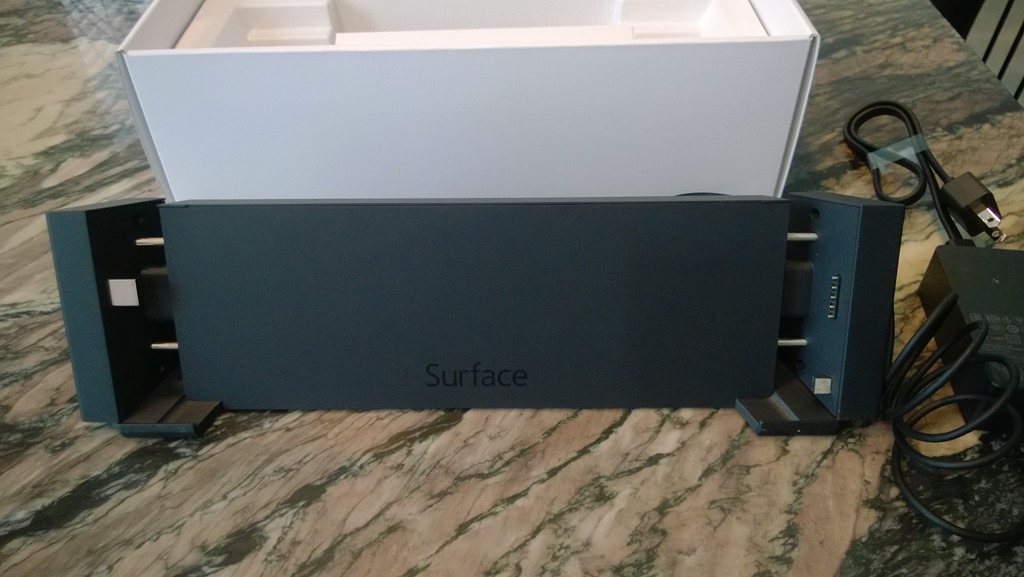
WP_20131023_10_10_00_ProI got a Surface dock.  
Smile

It’s wonderful & works beautifully with my Surface Pro 2.  Extremely well designed.  I haven’t tested my Surface Pro 1 with it yet but I’m sure it works fine as well… worth every dollar.  (And I paid $199 for it.) 

I was previously on the fence about this device, but after using it in production, I’m totally sold. Simply by docking my Surface Pro into this unit, I instantly get:

  • Connected to my multiple external displays over DisplayPort
  • Stereo audio from my dock-connected Jawbone speakers
  • Wired Ethernet connectivity
  • An immediate charging system for my Surface Pro 2 & future Power Cover
  • Over the USB ports
    • Access to my dock-connected USB 3.0 hard drive
    • Use of my dock-connected USB mouse & microphone
    • Connected to my 1080HD LifeCam Cinema camera
    • Connected to my Lync-integrated Polycom CX300 Deskphone

…and despite being able to use a USB connected keyboard, I continue to use the Surface Type Cover to type because I like using the cover keyboards that much.

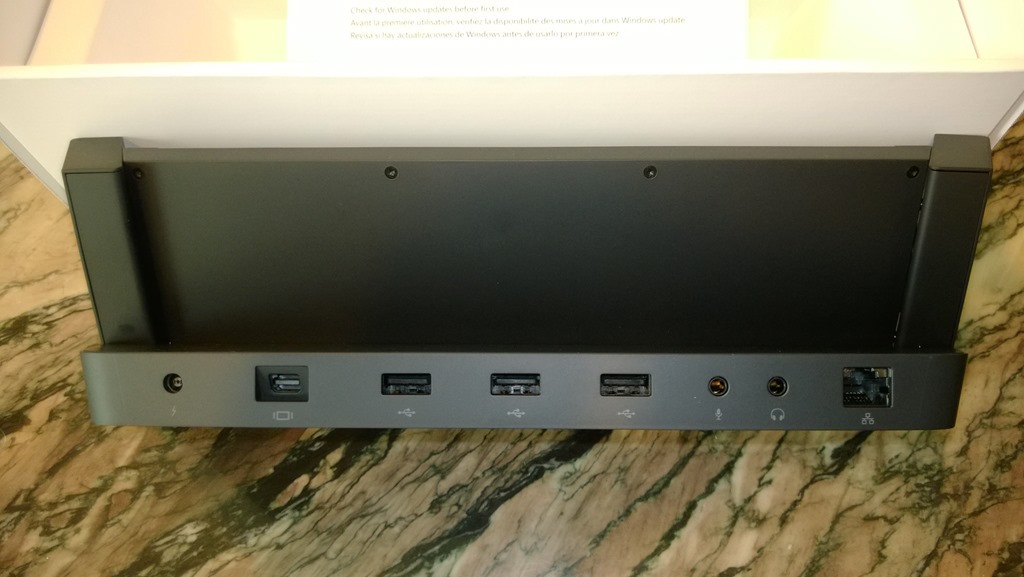
WP_20131023_10_12_13_ProWP_20131023_10_12_35_Pro

WP_20131023_10_12_50_ProWP_20131023_10_13_31_ProWP_20131023_10_11_44_Pro

WARNING:
In case you’re wondering… “Where’s the USB 3.0 port?”  One photo that I’m missing is a side shot of the dock where the USB 3.0 port is.  You can see all the other ports on the back but I simply forgot to take a shot of the USB 3.0 port on the side… but trust me, it’s there.

« Newer Posts - Older Posts »

Categories