One of the things that the HTC Windows Phone 8X had as a benefit over other Smartphones in the industry was the unmatched power routed to its audio jack for headphones and its speakerphone.  Branded with Beats Audio, there’s really been no challengers on the market with the same volume & quality of sound.

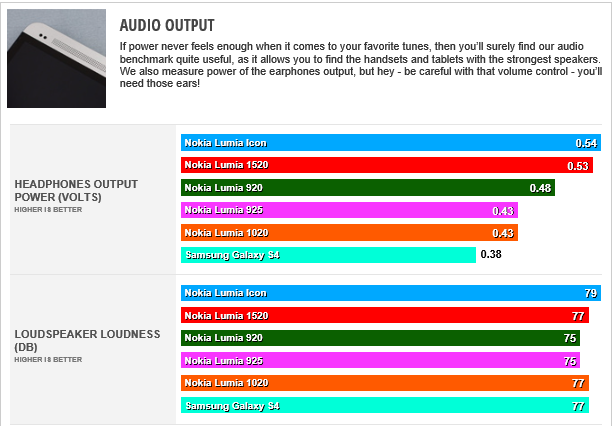
Nokia has, with the Lumia Icon, gotten bit closer.  According to Phone Arena, the Icon delivered the highest voltage of any smartphone that they’ve tested on the market.
image

AUDIO OUTPUT:
The “audio output voltage” (.54V) and the “loudness of the speakerphone” (79dB) on the Nokia Lumia Icon is the best of ANY SMARTPHONE ON THE MARKET.  This includes the Samsung Galaxy S4 and all other Lumias, including the 1520.

The benchmark that I’ve personally used has been Imagine Dragons’ “Radioactive” which is a song with incredibly low bass requiring a strongly backed audio port to sustain the level of bass necessary for the right clarity & minimal distortion.  Previous Nokia Lumias designs didn’t deliver the level of power required to play the song back without distortion.  (much less Android & iPhones)

The Nokia Lumia Icon is a dramatic improvement over existing smartphones for audio quality.  For more information on the tests & the other phones compared, visit the following URL:

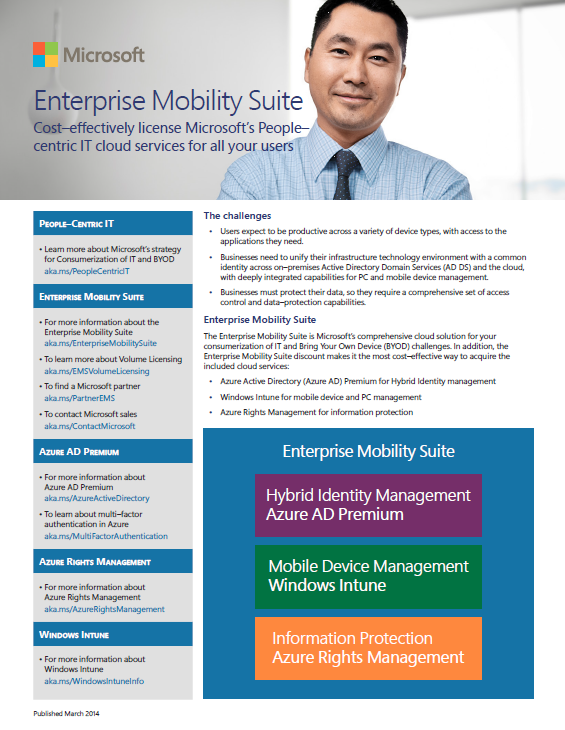
imageToday, Microsoft announced a new suite of technologies called the Enterprise Mobility Suite (EMS) that solves 3 core challenges for mobile computing users in a single, extremely affordable subscription:

  • Identity & Access Management
  • Mobile Device Management
  • Data Protection

The technologies that are subscribed to by EMS are:

  • Azure Active Directory Premium
  • Windows Intune
  • Azure Active Directory Rights Management Services

Enterprise Mobility Suite is a subscription purchased for $7.50/per-user/per-month and will be first available on May 1st.  This is 30% savings over the aggregate costs of all 3 services.

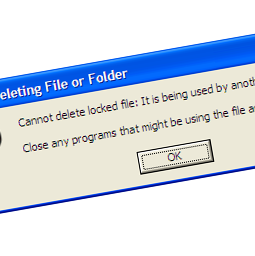
imageHave you ever noticed that if you have the Preview Pane turned on within Windows Explorer that Adobe Acrobat’s .PDF preview handler for Windows Explorer locks the selected file, preventing you from deleting it? 

This is annoying.  And Adobe’s had this problem for more than 6 years now and never fixed it.

Well, it turns out that Tim Heuer solved the problem at no cost to you.  It involves installing a new Preview Handler from FoxIt, displacing the one used in Windows Explorer from Adobe.  It allows you to continue to use Adobe Acrobat normally as it’s installed but when you are viewing a .PDF file within Windows Explorer through the Preview Pane, it uses FoxIt’s preview handler which doesn’t suffer from the same “locked file” problem as Adobe’s.  As a result, you can preview the file in Explorer… and delete it quickly if the file is nothing you want.  Works on Windows 7 & 8!

(Of course you might just simply want to wholesale switch to using FoxIt’s PDF tools instead of Adobe Acrobat.  FoxIt’s tools are lighter weight, faster, and cheaper.)

Posted by: kurtsh | March 27, 2014

RELEASE: Office for iPad… the REAL Office apps.

Download the newly released Office for iPad.  Read, view and present documents, spreadsheets and presentations for free.  To get the full editing & creation experience, you can sign up for a free 30 day Office 365 trial at www.office.com/try. During your trial period, you can use Office across your PC, Mac and iPad.

The real Microsoft Office apps for iPads are here!


The announcement & what the press has to say about it:

image

UPDATE 3/20/14:
It turns out that Tim Rains from Microsoft Trustworthy Computing did actually address this about 6 months ago on the Microsoft Security Blog but apparently it went under the radar for most.

Paul Brennan from WhySettle, an IT network management company, wrote a straight to the point post about this exact matter as well:

————–
ORIGINAL POST:

These are my thoughts on why Windows XP users will dangerously exposed after April 8th as I understand it.

SUMMARY:

  1. After April 8th, 2014, Microsoft will publish security patches for Vista/Win7/Win8 that are not patched on Windows XP.
  2. Malware writers reverse engineer these post-April 8th Windows Vista/7/8 patches to learn how to take advantage of the vulnerabilities they fix as they’re made available.
  3. Windows XP, as a result, will be exposed to zero-day threats after every monthly Microsoft security patch Tuesday at possibly an increasing speed.

DETAIL:
I’ve read a lot of people that don’t believe that the end of support of Windows XP is a concern.  I really think this is foolish & here’s why:  There’s a number of things that people don’t often understand or take into consideration when they discount the “End of Support for Windows XP”:

  • Microsoft can’t/doesn’t fix every vulnerability
    Microsoft receives information about lots & lots of vulnerabilities from both internal & external folks.  Most people know that Microsoft prioritizes the resources it has to focus on fixing vulnerabilities based on the threat they poses.  Of the worst potential threats, if the vulnerability is either actively being taken advantage of (“in the wild”) or about to release in the form of malware as an imminent threat, it gets the highest priority.
    … this leaves vulnerabilities on the table to be worked on next month when resources are freed up.
  • It takes much longer to create a patch for Windows XP than it does for Windows Vista/7/8.
    The reason not every vulnerability is fixed is that it takes more resources & a longer amount of time to write patches for Windows XP than any current Windows OS – up to 6x as much.  The reason for this is Windows XP’s source code was designed/written during another programming era at Microsoft & is much harder to debug & test than Windows Vista & beyond.  One of the most significant fundamental improvements of Windows Vista was that it was much easier to understand the cascading impact of fixes/patches on the codebase than in prior releases.  The result is that patching Vista/7/8 is done in a fraction of the time of XP.
  • Malware writers use security patches to write malware.
    This isn’t news to those in the security community but for non-techfolk, malware writers don’t need to discover new vulnerabilities:  They just simply wait until Microsoft releases security patches then reverse engineers them – i.e. picks them apart – to determine what flaw they patch, where in the OS the vulnerabilities are, then write malware to take advantage of unpatched systems.  This “piggybacking” technique was used, for example, in two of the largest, most notorious malware threats to hit the Internet – “SQL Slammer” and “MSBlast” – and caused hundreds of millions of dollars in damage.
  • Windows Vista/7/8 patch releases should increase once no longer tied to Windows XP’s patch availability.
    Today’s vulnerability patches are uniformly released on a monthly basis across all supported versions of Windows on “Patch Tuesday”.  This is because the majority of Windows vulnerabilities often apply to other versions as well.  For example: If a vulnerability for Windows 7 was quickly patched & released but not Windows XP or Windows Vista, it would be easy for criminals to reverse engineer the Windows 7 patch, then write malware targeting the older OS’s for the same vulnerability.
    What this also means however, is that Windows Vista/7/8 patches are “held back” until Windows XP has the same patches written for it.  Remember what I said about Windows XP taking a ‘really long time’ to write patches for?  Yup.  Windows Vista/7/8 security is thus, effectively held back because of Windows XP.  So once Windows XP patch support ends, all other versions of Windows will start to have patches released for them, at a much quicker rate.

A few conclusions:

  1. There’s a lot of vulnerabilities out there that remain unpatched.
  2. After Windows XP support ends, those vulnerabilities will be patched on Windows Vista/7/8 at an increasingly rapid pace… but not for Windows XP.
  3. Malware will be written targeting Windows XP computers, based on the release of these patches for newer versions of Windows.

Don’t be left vulnerable – Upgrade from Windows XP to Windows 7 or 8 today!  Visit http://www.windowsxp.com for more information.

image

Learn to make amazing Windows Phone apps at the upcoming Nokia DVLUP Day in San Diego and win big prizes just for participating. Join Nokia Developer Ambassadors as they provide hands-on Windows Phone development training in a dynamic and fun event. Whether you’re a seasoned developer or barely know how to code, you will walk away with the ability to write a mobile app.

With full sample source code and step-by-step instructions, you will learn how to make an app or game from scratch, or learn new techniques to enhance your current apps & games. No matter what you want to build – an app or a game – or what your programming skill level is, there are four individual tracks to choose from, which means there is something for everyone.

DVLUP Day is a unique community event that combines presentations by Windows Phone experts along with a hands-on workshop to help attendees get started on their apps. BRING YOUR LAPTOP! Work with our experts, get started on your app or game, publish it within 3 weeks after the event and get a free Windows Phone 8 device!

DVLUP Day was a huge hit with developers in 2013, with stops in Boston, Tampa, Sunnyvale and Vancouver. Just for showing up and learning, you’ll get hooked up with some cool DVLUP swag. This is going to be an awesome day in San Diego and we look forward to seeing you all there!

To pre-register and be notified once formal registration opens, please send an email to ext-becky.andrews@nokia.com.

Multi-Factor Authentication for Office 365 Technical Support Webcast | March 11, 2014 (Webcast)     

imageWhat : Multi-Factor Authentication for Office 365 TECHNICAL SUPPORT WEBCAST, will talk about and demo Multi-Factor Authentication for Office 365 that has been recently released and covering how to set it up, how to use it, and how to resolve some of the common issues you might see

When : March 11, 2014 @ 9:00 AM (PST), 1 hour presentation

Where : Add this meeting to your calendar by clicking the above REGISTER NOW button, or use the iCalendar link attached, then click on the Lync meeting link in your calendar at the scheduled time to join the call

Who : Bill Fiddes is the Support Technical Readiness Program Manager for Windows Azure Active Directory and have been heavily involved in this release as well as writing support documentation

Office 365 Support Webcasts are a critical program for relieving support issues and encouraging foundation technical readiness, and are free of charge for both an internal and external audience. It is a great opportunity to have a conversation with Microsoft employees and get your questions answered. If you have questions regarding this webcast, please contact the IGNITE TEAM.

For more information on future Office Technical Webcasts visit the Ignite website.

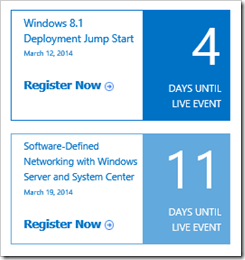
imageYou probably didn’t know this but we have an on going schedule of LIVE training events delivered by the Microsoft Virtual Academy – all FREE.  And the content is recorded for on-demand access after the event is over.

For example, here’s a few of the upcoming LIVE events:

  • Using Git with Visual Studio 2013 Jump Start
    March 12, 2014 9:00am-5:00pm PDT
    In this demo-focused session, find out more about the excitement around Git—the wildly popular source control system. Experts Steven Borg and James Tupper give you a fundamental understanding of Git, show how it differs from other systems, and explore the benefits of using Git with Visual Studio Online and Windows Azure. If you want to learn more about Git and the benefits of using it within the Microsoft ALM stack, don’t miss this course!

  • Windows 8.1 Deployment Jump Start
    March 12, 2014 9:00am-1:00pm PDT
    Do you want to deploy Windows 8.1 the "right way"? Find out how to avoid deployment pitfalls and how to streamline the process with Microsoft experts. Benefit from their real-life experience, as they teach you how to plan, configure, and manage client deployment to Windows-based computers using the Microsoft Deployment Toolkit (MDT). Save time and money by automating the process. Why learn the hard way?

  • Software-Defined Networking with Windows Server and System Center Jump Start
    March 19, 2014 8:00am-1:00pm PDT
    Is your infrastructure outgrowing your current networking strategy? Want to simplify the process for managing your datacenter? Software-defined networking (SDN) can streamline implementation with self-service provisioning, take the complexity out of datacenter management, and help increase security with fully isolated environments. Join this Jump Start to get deep technical guidance, best practices, and lots of demos based on real-world datacenters with Windows Server 2012 R2 and System Center 2012 R2. Get your questions answered by the team who built this popular solution!
  • DevOps – Visual Studio Release Management Jump Start
    April 9, 2014 9:00am-5:00pm PDT
    Developers and Project Managers, do you wonder how to implement DevOps principles to resolve delivery challenges? The popular "ALM Wednesdays" series continues with this fifth event, as Microsoft experts equip users of Visual Studio ALM with the necessary skills to build an effective release pipeline with the Release Management functionality provided by Visual Studio and Team Foundation Server.

Check out what’s coming up here:

Missed this one too.  If you’re running System Center Configuration Manager 2012/2012 R2, this is a must get.

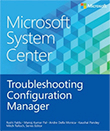
imageMicrosoft System Center: Troubleshooting Configuration Manager
Rushi Faldu, Manoj Kumar Pal, Andre Della Monica, Kaushal Pandey, and series editor Mitch Tulloch
November 2013
108 pages

Part of a series of specialized guides on System Center—this book addresses the most common pain points for Configuration Manager administrators, providing insider and from-the-field insights to help you succeed. Written by experts on the Microsoft System Center team and with Microsoft MVP Mitch Tulloch as series editor, this title delivers concise technical guidance as you step through key concepts and tasks.

image

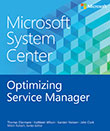
Somehow I missed this.  We released an eBook recently about optimizing System Center Service Manager, Microsoft’s help desk & ticketing solution that natively integrates with Configuration Manager (for PC information) & Operations Manager (for alerts & ticket creation).

Microsoft System Center: Optimizing Service Manager
Thomas Ellermann, Kathleen Wilson, Karsten Nielsen, John Clark, and series editor Mitch Tulloch
December 2013
96 pages

Part of a series of specialized guides on System Center—this book provides a framework for planning and delivering a successful Service Manager project. Written by experts on the Microsoft System Center team and with Microsoft MVP Mitch Tulloch as series editor, this title delivers concise guidance, from-the-field insights, and best practices for optimizing and maintaining your Service Manager environment.

« Newer Posts - Older Posts »

Categories