imageMicrosoft Press just released the following 136 page eBook for free:

Microsoft System Center: Building a Virtualized Network Solution
Mitch Tulloch with Nigel Cain, Alvin Morales, Michel Luescher, Damian Flynn
February 2014
136 pages

This book is geared to private and hybrid cloud architects preparing to design and build a virtualized network solution based on Windows Server 2012 and System Center 2012 SP1, or later. Written by experts on the Microsoft System Center team and with Microsoft MVP Mitch Tulloch as series editor, this title focuses on architecture and design.

image

The webcast on the NBC Olympics Live stream from Microsoft and iStreamPlanet is now available on-demand at the link below. 

image

image

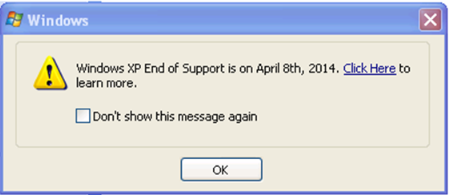
clip_image001Some of you may have seen this posted Monday on the Windows blog along with our new data transfer tool:

On March 8th, 2014, Windows XP customers using the Home or Professional editions who have elected to receive updates via Windows Update will receive an official notification on their desktop screen via Windows Update informing them that support for Windows XP will end on April 8th, 2014.

http://blogs.windows.com/windows/b/windowsexperience/archive/2014/03/03/new-windows-xp-data-transfer-tool-and-end-of-support-notifications.aspx

Please note that this pop-up only goes to consumer (unmanaged) Windows XP PCs. For those PCs affected, there is no “XP Blocker Toolkit” nor is there a registry key that can be set to block the update, however a single click on the checkbox will disable it forever. If the computer is managed by WSUS, it will not by default receive the pop-up.

Additional details on this message:

  • The pop-up will recur monthly (on the 8th of every month at 3:00 p.m. local time, and the code will continue to show the message on this schedule indefinitely or until the user disables the notification)
  • If the user is not logged in during the scheduled time, the message will be shown the next time s/he logs in.
  • If there are multiple user accounts on the machine, the scheduled task is tied to the user who is logged in when the update is installed and only he/she will see the notification.
  • The notification will direct customers to this end of support web page:
    http://windows.microsoft.com/en-US/windows/end-support-help 

If you’ve made investments in Windows Server, you may want further understand how to take advantage of Windows Azure for sending workloads to the cloud for more elastic, more cost-effective operations.

imageMicrosoft’s growth is predominantly a result of the growth of Windows Azure: Azure now accounts for close to 90% of all web-facing computers at Microsoft. Windows Azure has grown by almost 50% since May 2013, during the February 2014 Web Server survey Netcraft found 27,000 web-facing computers (both Windows and Linux) using the cloud computing platform.  Many of Microsoft’s own services are powered by Windows Azure including Office 365, Xbox Live, Skype, and OneDrive.

Windows Azure Web Sites service — available to the general public since June 2013 — may be the driving force behind Azure’s growth. This Platform as a Service allows existing applications written in ASP, ASP.NET, PHP, Node.js, or Python to be deployed on an automatically scaling platform without managing individual computers. Microsoft also provides pre-configured software packages, such as WordPress, which can be used immediately with the Web Site service.

Read more here:
http://microsoft-news.com/report-microsoft-edges-ahead-of-amazon-to-become-the-largest-windows-hosting-company/

Posted by: kurtsh | February 28, 2014

NEWS: S/MIME encryption now in Office 365

First, we introduced Office 365 Message Encryption – i.e. the ability send public secured emails to recipients without requiring any add-ins or additional technologies on either the sender or recipient’s computers.  This service is available at no additional cost to Office 365 E3/E4 subscribers.

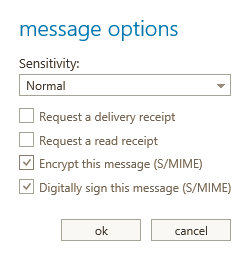
Now, we’re introducing S/MIME as well for Office 365, enabling public key encryption & digital signing of messaging data, and again, at no additional cost to Office 365 E3/E4 subscribers.
imageRecently, we published a blog post that outlines how strongly committed we are to protecting our customers’ information. A key aspect of our strategy is to expand encryption across all our services. Earlier this month, we announced Office 365 Message Encryption, a new service that allows you to send encrypted mail to anyone. As part of our ongoing focus on encryption, we announced yesterday that we’re bringing S/MIME capability to Office 365 and Exchange Server 2013 Service Pack 1. With this release, customers will have S/MIME support across Outlook, Outlook Web App (OWA), and Exchange ActiveSync clients. S/MIME for Outlook and EAS is already available on Exchange Online and S/MIME on OWA is being rolled out and is expected to be completed by early April.

S/MIME (Secure/Multipurpose Internet Mail Extensions) is a standard for public key encryption and digital signing of MIME data, and it is defined in a number of Requests for Comments (RFCs): 3369, 3370, 3850, and 3851. S/MIME allows a user to: (1) encrypt an email and (2) digitally sign an email, and thus provides cryptographic security services such as authentication, message integrity, and non-repudiation of origin (using digital signatures). It also helps enhance privacy and data security (using encryption) for electronic messaging. You can learn more about S/MIME in this technet article.

Read more here:

image

Containing twenty-four design patterns and ten related guidance topics, this guide articulates the benefit of applying patterns by showing how each piece can fit into the big picture of cloud application architectures.

It also discusses the benefits and considerations for each pattern. Most of the patterns have code samples or snippets that show how to implement the patterns using the features of Windows Azure. However the majority of topics described in this guide are equally relevant to all kinds of distributed systems, whether hosted on Windows Azure or on other cloud platforms.

In case you missed it, this was our 2014 Super Bowl commercial entitled, “Empowering”.

Microsoft 2014 Super Bowl Commercial: “Empowering”

This one minute production is a collage of many of the ways that people are empowered & inspired through technology.  For more on any of these stories, click on one of the story videos below:

With Exchange 2013, we released a new data loss prevention (DLP) capability based on deep content analysis that helps you identify, monitor, and protect sensitive information. We’re continually looking to expand our DLP capabilities, and today we’re bringing two new ones to you—Document Fingerprinting and Policy Tips in Outlook Web App (OWA). Both are being rolled out for Office 365 users right now, and they’ll be part of the Exchange Server 2013 SP1 release for our on-premises users (please stay tuned for more information on SP1).

Watch this short video that explains what DLP has to offer today and how the new capabilities can help your organization be more compliant.

Data Loss Prevention with Exchange and Office 365


Read more:

Posted by: kurtsh | February 26, 2014

RELEASE: Exchange Server 2013 Service Pack 1

imageExchange Server 2013 Service Pack 1 (SP1) is now available for download! Please make sure to read the release notes before installing SP1. The final build number for Exchange Server 2013 SP1 is 15.00.0847.032.

SP1 has already been deployed to thousands of production mailboxes in customer environments via the Exchange Server Technology Adoption Program (TAP). In addition to including fixes, SP1 provides enhancements to improve the Exchange 2013 experience. These include enhancements in security and compliance, architecture and administration, and user experiences. These key enhancements are introduced below.

imageJust a reminder that the Microsoft Exchange Conference 2014 is coming up soon!  If you haven’t registered, you ought to do so now!

Microsoft Exchange Conference (MEC) is the premier global event for Microsoft Exchange and Office 365 professionals to enhance their skills and meet with peers, speakers and the people who actually build and maintain the product.

With hundreds of educational breakouts, interactive sessions and evening events to foster productive networking, MEC allows Exchange administrators, IT Pros and Developers to elevate their career potential and enhance their overall knowledge of Microsoft Exchange.

« Newer Posts - Older Posts »

Categories