imageIf you’re in the market for MS Press eBooks or bound books, now’s the time to order:

Now through July 12, 2014, save 40% by applying discount code TECHED during checkout. And if that’s not enough, the Microsoft Press Store offers FREE shipping to US addresses, all the time. And if you’ve ever purchased one of these books, you’ll know just how heavy these can get – and heavy typically equals expensive shipping!

Want to take it with you wherever you go? The Microsoft Press Store has the flexibility to make that happen. This 40% discount also applies to your purchase of an eBook… and you’ll get three formats for use on your devices.

Ready to save? We thought so. Get your discount HERE and enjoy your new book!

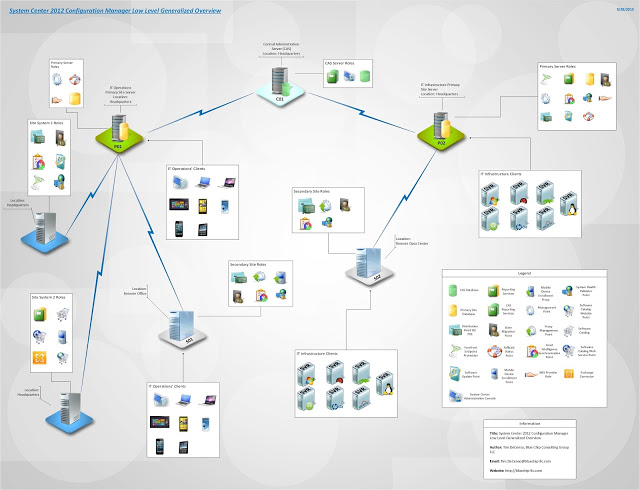
imageIf you’re responsible for documenting architecture, you may want to take a look at some of these Visio Stencils for System Center products.

I have created some "Modern" style Visio stencil for the following System Center products:

  • Virtual Machine Manager
  • Data Protection Manager
  • Configuration Manager
  • Orchestrator

They are based on the modern style stencils from Microsoft available here.

They were based on stencils from Kevin Greene MVP (http://kevingreeneitblog.blogspot.co.uk/)

Please note they are for Visio 2013.

Posted by: kurtsh | July 5, 2014

INFO: Replacement stylus for Surface Pro 3

UPDATE 7/14/14
Yup.  This stylus works like a charm.  There’s no Bluetooth pairing since there’s no button on the back end to “click” to turn on the Surface Pro 3 and initiate OneNote however the pen works immediately once you put the included AAAA battery in and it has two buttons, one for “erasing ink”, and one for “selecting ink”. 

The pen’s pressure sensitivity is every bit as good as the original OEM stylus/pen but it’s shorter and more compact.  One interesting thing is that the nib or the “writing tip” is made of a harder material that doesn’t wear down as easily as the OEM stylus/pen but still glides smoothly across the glass without scratching.

It is also not magnetic like the original stylus but I don’t know if that’s a problem for me.  The only other difference is that the OEM Surface Pro 3 stylus/pen is $49.99.  This is $9.25.

——————

imageORIGINAL POST 7/5/14
For those of you looking for a backup stylus for your Surface Pro 3, check this out:  “HTC Stylus Scribe Digital Pen” 

I’ve ordered a few.  At $9.25, it’s not much of a risk at all and several folks on Reddit, in the Amazon comments, and other places have reported that it works perfectly on the Surface Pro 3.

I’ll post results once mine arrive but it looks really promising… and very inexpensive!

imageSeveral major announcements were made in support of Microsoft’s commitment to encryption & transparency:

  1. Outlook.com is now protected by Transport Layer Security, or TLS, encryption for both outbound and inbound email.
  2. Outlook.com has also enabled Perfect Forward Secrecy (PFS) encryption support for sending and receiving mail between email providers.
  3. OneDrive has now enabled PFS encryption support.
  4. Microsoft opened the first “Microsoft Transparency Center”, on its Redmond, Wash. campus to provide participating governments with the ability to review source code for our key products, assure themselves of their software integrity, and confirm there are no “back doors.”

For more details, read the original blog post here:
http://blogs.technet.com/b/microsoft_on_the_issues/archive/2014/07/01/advancing-our-encryption-and-transparency-efforts.aspx

imageSurface Pro Artist’s very talented Rick Rodriguez was the first to report the availability of new Wintab drivers for artists that leverage the Surface Pro for use with various drawing & sketching tools.

For those not familiar with Wintab, these drivers make it possible for graphics applications to function correctly with the tablet/stylus/multitouch environment presented to the app by Surface Pro 3’s hardware.

Anyway, in case you missed it, here are two posts Rick’s written and taken great pains to document, to highlight how Surface Pro 3 has improved since announcement & release.  Kudos to Rick:

Posted by: kurtsh | July 4, 2014

COMMENTARY: Vacation reading for geeks–July 2014

imageThis is a partial list of my online vacation reading.  If you’re a geek like me, my bet is you’ll appreciate some of this stuff too:

imageThese guides are designed to provide Surface Pro 3 users with an orientation around their new devices.

NOTE:  The User Guide is what’s really useful and a good reference.  The Quick Start guide is likely not of any use to most in that half of it is in French, and the rest is very basic orientation.

imageIf you need to backup your data or simply want to host files in the cloud, there’s simply nothing like Microsoft’s recent online storage offer. 

Here are the details behind Microsoft’s recent offer and I would challenge you to compare Microsoft’s $99/yr pricetag to other online storage vendors such as Google, DropBox, BOX, and SugarSync:

Online Storage packages Office 365 Home Subscription OneDrive for Business OneDrive for Consumers (FREE)

Online Storage

1 TB/per user 1 TB 15 GB

Number of users per family per subscription

5 N/A N/A

Office Suite with 1yr of upgrades:
(On up to 5 PCs/Macs)

  • Word
  • Excel
  • PowerPoint
  • Outlook
  • Access
  • OneNote
  • Publisher
YES No No

Office for iPad/Android:
(On up to 5 tablets/phones)

  • Word
  • Excel
  • PowerPoint
  • OneNote
YES N/A N/A

Skype World Long Distance Calling

60 min N/A N/A

Technical Support

Unlimited Phone & Web-based
(https://support.microsoft.com/
ContactUs/TechnicalSupport
)
Web-based Web-based

Price

$99/year $25/year FREE


Support resources are available online:

This is a great video that demonstrates a common use case for diagraming & org charting with Visio:

image

Link to the video: The Game Changer

More on Visio: 
http://microsoftvisiogamechanger.com/bdms/?fxm_cid=300#

Just released: Forrester Consulting “Windows Server 2012 R2 Total Economic Impact” study, June 2014.

image

To better understand the benefits, costs, and risks, Forrester interviewed six customers who have upgraded to Windows Server 2012 R2 from Windows Server 2008 or 2012, and who manage those servers with System Center 2012 R2.

Windows Server 2012 R2 along with System Center 2012 R2 increased agility by making infrastructure easier to deploy and easier to grow and shrink. The key benefits that were highlighted include cost savings with software-defined storage (SDS), improved scale and performance of large workloads with built-in virtualization, and increased agility and mobility with software-defined networking (SDN). Customers were able to take advantage of these new features to reduce and avoid software and hardware costs, reduce management costs, streamline and reduce storage costs, and deliver better services to customers and employees.

While this study focuses on the upgrade to R2, an earlier Forrester TEI study focused on the costs and benefits of migrating to WS 2012 from a non-current volume license or alternative server solution, and highlights from that study are referenced.

« Newer Posts - Older Posts »

Categories