Posted by: kurtsh | November 20, 2015

RELEASE: Matter Center for Office 365

[taken from the Office blog]

imageOver the past two years, Microsoft’s legal department set out to create an internal tool that didn’t exist—a way to organize its legal matters and collaborate on documents within the familiar Office 365 tools attorneys use most. So last year our Legal & Corporate Affairs Group (LCA) shared its vision for an Office 365 Add-in that would do just that. Since then, LCA has worked to turn this concept into Matter Center for Office 365, an Office 365 Add-in currently in use internally at Microsoft, and is becoming available to legal professionals at law firms and in-house departments of all sizes.

In fact, we have already shipped Matter Center to IT solutions providers who specialize in serving the legal community. These Microsoft partners are now offering Matter Center on a limited basis, and will begin offering it broadly in the coming weeks. These partners include Epona, Handshake Software, LawPoint365, Perficient, Ubiquity Wave, Project Leadership Associates and the PayneGroup. Microsoft Services will also offer for-fee consulting and support services for Matter Center beginning in September. And finally, we’ll be making Matter Center available broadly through GitHub this calendar year.

Once installed, Matter Center allows people to create or view legal matters right from Outlook; tie Word, Excel, OneNote and other files to those matters; and securely collaborate with other legal professionals inside or outside their organizations. There are a few benefits that make Matter Center stand out:

  • Access anytime, anywhere—Like Office 365, Matter Center is available across PCs, tablets and phones, across Windows, Apple and Android devices, and allows you to access matters and documents either online or offline using OneDrive for Business.
  • Real-time collaboration—Using the automatic version control feature of Office 365, you can simultaneously edit documents with multiple people inside or outside your organization.
  • Intuitive search and data visualization—You can easily search, preview and find matters and related documents across all cases directly within Outlook and Word. Power BI can be configured to visualize your matter data.
  • Pinning and tagging—You can track or pin frequently used matters and documents and connect to Delve to provide personalized experiences about who on your team is working on them.
  • Compliance with security standards—Matter Center allows you to control who can access, review or edit a document and provides all the same enterprise-grade security, management and administrative controls as Office 365.
  • Better flexibility and control—By offering Matter Center through an open GitHub repository, customers and partners can build or extend the solution to meet specific customer needs faster.

Microsoft Legal & Corporate Affairs’ Matter Center for Office 365

To review Microsoft’s Matter Center details, go to:

For more on the release, read:

Posted by: kurtsh | November 18, 2015

DOWNLOAD: Windows 10 Deployment & Management Lab Kit

Get hands-on experience with the latest Microsoft tools for commercial Windows 10 deployments. This lab covers in-place upgrade and provisioning scenarios plus traditional deployment methods and includes a downloadable lab environment and detailed lab guides.

imageThe Windows 10 Deployment and Management Lab Kit includes everything you need to review the new in-place upgrade option plus traditional deployment methods and other management tools. This free kit features:

A complete lab environment*

The kit includes evaluation versions of:

  • Windows 10 Enterprise
  • System Center 2012 Configuration Manager Service Pack 2
  • Windows Assessment and Deployment Kit for Windows 10
  • Microsoft Deployment Toolkit 2013 Update 1
  • Windows Server 2012 R2

*Lab environment requires 32 GB of available memory and 300 GB of free disk space. Lab expires January 29, 2016. A new version will be published prior to expiration.

Step-by-step labs

Illustrated lab guides take you through multiple deployment and management scenarios, including:

  • Image creation
  • Lite-touch and zero touch deployment
  • Managing Windows 10 with Configuration Manager
  • Code integrity
  • Windows 10 provisioning
  • In-place upgrade

Get your free kit by downloading from the link below:

Posted by: kurtsh | November 18, 2015

NEWS: Introducing PowerPoint Designer & Morph

If you have Office 365 Pro Plus (for businesses) or a Office 365 Home/University/Personal subscription, you’re about to see one of the benefits of having access to Microsoft continuous innovation from the cloud.

Introducing PowerPoint Designer & Morph:  Two new features are now available in PowerPoint 2016 – only available to Office 365 Pro Plus or Home/University/Personal subscribers.

Introducing PowerPoint Designer & Morph


  • PowerPoint Designer makes it easy to use graphics & photos as if you were a professional designer in just 2 clicks.
  • Morph is a new slide transition that allows you to move smoothly from  one slide to another as if the slides transformed or “morphed” from one to the next.

These PowerPoint innovations are just the highlights of new Office 365 exclusive value we are delivering this month. You’ll see new capabilities and improved usability across Office 2016 for Windows, including personal finance templates in Excel, new sharing options across Word, PowerPoint and Excel, and online video embedding in OneNote. Learn more about the November update here.

Read more here:

imageWhat happens when you let 9 science fiction authors have access to Microsoft Research & the technologies the researchers are developing?

They write a book of science fiction short stories, of course.

[taken from Microsoft News’ article]

To the casual observer, the kind of technological breakthroughs Microsoft researchers make may seem to be out of this world.

Their research is a blueprint for the future of technology, in areas such as – but not limited to – computer vision, artificial intelligence, real-time speech translation, machine learning and quantum computing. So it’s only natural that their work can inspire others – especially those who write about other worlds.

On Tuesday, Microsoft releases an anthology inspired by the work Microsoft researchers are doing. “Future Visions: Original Science Fiction Inspired by Microsoft,” is available to anyone as a free download.

“The idea was to bring authors in to expose them to what some people might think is science fiction. In a way, you could say the world of Microsoft Research turns science fiction into science fact,” says Steve Clayton, chief storyteller at Microsoft. “We didn’t show them a piece of technology and ask them to please write about that. We showed them technology and introduced them to a group of people, and then asked them, what did it spark in your mind as ideas, where did it inspire you to think the technology may go?”

The stories are based on meetings with the research scientists who are working on the most cutting-edge areas of research.

“All of our product teams look over the horizon, but probably more in the one- to two-year realm, whereas Microsoft Research has a bit more license to look at the realm of anywhere between one and 10 years,” says Clayton. “It gives them more opportunity for things that might seem like flights of fancy, but ultimately do become science fact.”

Read more on Microsoft’s News page:

Download your own copy of the book here:

Posted by: kurtsh | November 17, 2015

INFO: Outlook Suggestion Box

[The following is a guest post from my friend & coworker, Chandler Bootchk, a Principal Office 365 Technology Specialist in Southern California]

imageOutlook is one of the most widely used applications in the world.  In recent years Microsoft has expanded access to its beloved features by making versions of the software available on mobile platforms and enriching the capabilities of the clients for Windows, Mac and the browser. 

With so many users, it’s no wonder there’s a lot of ideas about how to make Outlook even better.  Our customers and even internal employees of Microsoft often want to share those ideas but it hasn’t been clear how to do that until now.

The Outlook Suggestion Box is the place to submit your feedback.  Leveraging the powerful UserVoice platform for product management, the Outlook Suggestion Box enables Microsoft engineers to gather customer feedback and product ideas in an organized manner so that your voice is actually heard instead of lost in a sea of emails, Yammer posts, etc. 

Click here today to signup and have your voice heard.

Posted by: kurtsh | November 15, 2015

INFO: Accessories for the Surface Book SD flash card slot

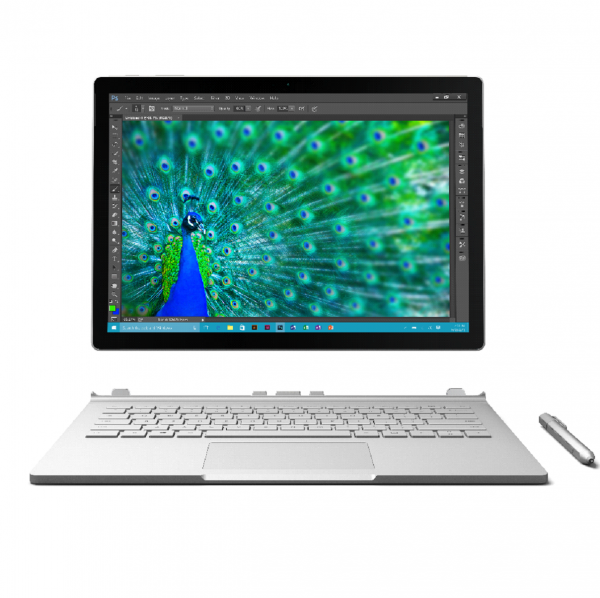
For folks with new Surface Books, some have discovered that the SD card slot doesn’t completely envelop the card itself, meaning that regular SD cards will “stick out” of the Surface Book from the side.  This has caused some to seek accessories that fit the shortened profile of the slot.

SOLUTION:  Custom fit SD cards & adapters
Thanks to MacBooks – especially the 2010-2014 MacBook Air 13” models – a few 3rd parties have stepped up previously to produce SD cards & adapters that are designed to fit into “shortened slots” like that within the Surface Book.

Here’s a few:

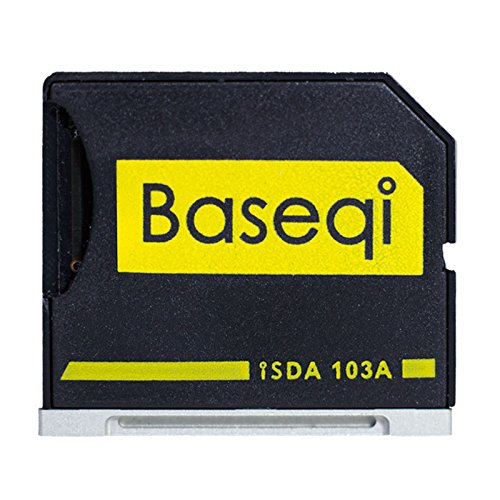
  • imageBASEQI aluminum microSD Adapter
    ($25, Amazon.com)
    This is a shortened adapter that fits into the Surface Book’s SD flash card slot nearly completely that specifically accepts ‘microSD’ flash cards.  Perfect for the individual that’s already made investments in 256GB microSD flash cards and wants to reuse them in their Surface Book.
    Made of aluminum, the adapter is sturdy & sticks out just a little bit – enough for your fingernail to pull the adapter out of your Surface Book.
    http://www.amazon.com/gp/product/B00WQVK754
    • imageTranscend 256GB JetDrive Lite 130 Storage Expansion Card
      ($160, Amazon.com)
      This is a high capacity, high performance expansion card, and the 130 series is designed to fit the profile of a shortened .9” SD card slot in a Surface Book.  There are also other storage sizes from 64GB to 128GB to fit other people’s budgets.
      The benefit of these full sized SD cards is the performance:  Max Read: 95MB/s, Max Write: 60MB/s.  This is of course quite a bit above that of the fastest microSD cards.
      http://www.amazon.com/gp/product/B00WGARJIS
    Posted by: kurtsh | November 12, 2015

    NEWS: Red Hat Cloud Access now available on Azure

    imageAs part of Microsoft Azure being the Red Hat Certified Cloud and Service Provider (CCSP) you can now migrate your Red Hat subscriptions to Microsoft Azure.

    For any subscriptions that migrate, you will continue to maintain your direct relationship with Red Hat even when your subscription benefits move to Azure. We are also announcing the immediate availability of integrated support between Microsoft and Red Hat. We are collocating Red Hat and Microsoft support teams to offer a uniquely higher quality enterprise support experience.

    In order to register your existing or newly purchased Red Hat subscription for Red Hat Cloud Access, you must follow the steps outlined in this page. You can also learn more about how to prepare your images to deploy into Azure on this page. With this announcement, you can start running Red Hat Enterprise Linux on Azure, today!

    Read more here:

    Skype for Business: Maximizing End User Adoption and ROI

    (Recorded November 2nd, 2015)
    This session will highlight the importance of adoption, guide attendees through a basic adoption framework, and provide best practices, real customer examples, and relevant resources to help drive rapid and sustained adoption of Skype for Business. You will leave this session with the tools needed to execute a successful rollout and maximize Skype for Business ROI.

    To obtain the templates referenced in the video, email sfbadoption@microsoft.com.

    Posted by: kurtsh | November 10, 2015

    DOWNLOAD: Skype for Business, Bandwidth Calculator

    imageWith the Skype for Business, Bandwidth Calculator, you can enter information about your users and the Skype for Business Server OR Lync Server features that you want to deploy, and the calculator will determine bandwidth requirements for the WAN that connects sites in your deployment.

    The accompanying User Guide describes the recommended process for estimating your WAN bandwidth needs for Skype for Business OR Lync client real-time traffic. The User Guide will be updated periodically with new information and modifications.

    PLEASE NOTE: This download is also applicable to Lync Server 2010 and 2013 deployments

    imageSometimes when you disconnect the screen on a Surface Book & reattach it in its reverse/tablet position to the keyboard base, the Surface Book will still not recognize that the screen is attached – and thus the ‘detach’ buttons won’t work. 

    At that point there is seemingly no way to detach the now-reversed screen from the keyboard base.

    SOLUTION: POWER + VOLUME UP
    Hold down POWER + VOLUME UP for 22 seconds.  This is usually the Boot-to-BIOS procedure, however if you keep holding the buttons down, the BIOS will appear and then shut off and reappear.

    This procedure resets the hardware’s recognition of the keyboard’s state. The detach button & on-screen detach should work fine now.

    « Newer Posts - Older Posts »

    Categories