The FindTime for Outlook 2013/2016 (on Office 365) team has released a series of hacks to use against FindTime to improve productivity with meeting scheduling.

See all 5 hacks here:

Here’s the 1st of those hacks here:

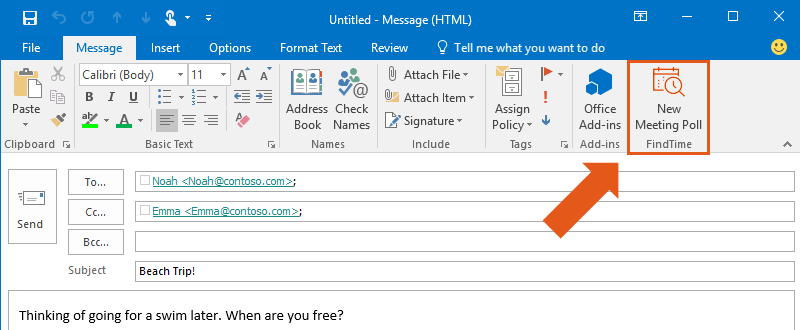
FindTime Hack #1 out of 5: use the optional attendees feature.

If you need to keep someone in the loop but don’t want to wait for them to respond, include them as an optional attendee by moving them to the CC: line. As you choose your time slots, only required attendees’ names are underlined.

If all of your required attendees have voted and they have agreed upon a time, we will schedule the meeting. Optional attendees’ availabilities are taken into consideration only if there are multiple times that work for your required attendees.

Posted by: kurtsh | December 3, 2015

RELEASE: FindTime for Outlook (for Office 365)

imageFindTime is an Office app for Outlook that helps you come to consensus on a meeting time. Have you ever spent more time deciding when to meet than actually meeting?

FindTime offers intelligent suggestions on what days and times work the best for people within your organization. Propose your selected times to all attendees and allow everyone to vote.

Once you reach consensus, FindTime sends out the meeting invite on your behalf, eliminating the time consuming back-and-forth usually required to find the best meeting time.

Here’s a video of how it works:

FindTime – Discover the easiest way to find time to meet across companies


Frequently asked questions:

  • Do recipients also need to have FindTime installed?
    Nope! Your friends and colleagues only need an email address and Internet access in order to be a recipient. You are certainly welcome to spread the love and invite them to install FindTime, however, and become an organizer!
  • Can I send invites to people who don’t use Office 365?
    Yes! You can send a FindTime invite to anyone with an email address. Only organizers are required to be on Office 365.
  • Can I send a test invite?
    Definitely! Just add a second personal email address to the To: or Cc: line and you’re in business!
  • Is my personal information or information about my emails stored on the FindTime server?
    For added security, FindTime encrypts personal information (such as your email address) in Azure. FindTime also encrypts information about the invites you create, such as the email subject, the attendees, and the email body. Don’t worry, we’ve got you covered!
  • What is FindTime?
    FindTime is an Outlook mail add-in that allows you to quickly find time to meet with others – something that can take weeks without FindTime! FindTime helps you pinpoint times to meet by looking at available free/busy data for your attendees as well as creating a poll where attendees can vote on the times you suggest, and even suggest new times themselves!
  • How do I get started?
    Simply install FindTime! You can also check out our How It Works page to see a quick walkthrough. If you have any questions, shoot us an email at love@findtime.uservoice.com
  • From what devices can I access FindTime?
    Recipients can receive invites on any email provider, and can access the FindTime voting website on any device. Organizers’ email accounts must be on Office 365 and can access the FindTime Outlook mail add-in in Outlook 2013, Outlook 2016, or Outlook Web Access (OWA).
  • I’ve got some feedback! Where can I send it?
    Send it our way! Email us at love@findtime.uservoice.com.
  • Who made this fantastic app?
    Aw shucks, thanks for the kind words! We are a small team within Microsoft, working hard to make scheduling pain a thing of the past! Feel free to contact us anytime at love@findtime.uservoice.com.

Grab FindTime here!

Posted by: kurtsh | December 2, 2015

NEWS: Debian GNU/Linux now available in Azure Marketplace

imageFurthering Microsoft’s commitment to Linux in its public cloud, Azure, we now have endorsed distributions of Debian GNU/Linux available in the Azure Marketplace.

This means that any Azure customer can immediately get a Debian 7 & 8 virtual machines up & running in Azure in just a few minutes & know the distribution is up to date & supported.

<taken from the Azure blog>

Today we are announcing the availability of Debian GNU/Linux as an endorsed distribution in the Azure Marketplace in collaboration with credativ.

Debian is a free operating system that comes with over 43,000 packages and runs in many architectures and even different kernels. The 64-bit version of Debian GNU/Linux for Intel architecture is one of the most popular Linux distributions in the market, used by developers, governments, enterprises, application architects and derivative developers alike.

With this announcement, customers are able to provision Debian-based virtual machines in Microsoft Azure by selecting the most up-to-date point versions of Debian 7 (codename “wheezy”) and Debian 8 (codename “jessie”) built by credativ.

Read more at the Microsoft Azure blog:

Posted by: kurtsh | December 1, 2015

Wishing you peace and harmony this holiday season.

We hope you’ll take a second to pause, listen, and share the voices of Microsoft employees and a local NYC youth choir as they share the spirit of the season.

Microsoft spreads the spirit of the season on 5th Ave


Spread Harmony,
clip_image004

image

<taken from Major Nelson’s blog>

The Game Awards 2015 is happening next week and the Xbox team (including a few notable luminaries) will be there to support a number of our titles nominated for awards.

“Join the biggest names in entertainment to celebrate the best video games of 2015, plus get a sneak preview of what’s next. The Game Awards 2015 Presented by Go90 highlights the cultural significance of video games with awards, world premieres, musical performances and other surprises.”

Xbox Fan Celebration

Xbox is hosting an exclusive Xbox Fan Celebration for 200 lucky fans, who will also receive a ticket to The Game Awards 2015, happening immediately following the social. Enjoy an afternoon of food and drinks and meet special guests from the Xbox team before they open the doors to The Game Awards.

When: Thursday, December 3, 2015 (Exact times TBD – I’ll update this post once the times are confirmed)

Where: JW Marriott Los Angeles at LA LIVE (900 West Olympic Blvd, Los Angeles, CA 90015)

What: Access to the Xbox Fan Celebration and a ticket to the Game Awards (one per person, first-come, first-serve, must be 21+ years old or over). Please note, this is for a ticket to the event only – you are responsible for all other travel, lodging or miscellaneous expenses.

The Game Awards 2015

When: Thursday, December 3, 2015 – 6:00p PT

Where: Microsoft Theater (formerly Nokia Theatre L.A. LIVE), Los Angeles, CA (check ticket availability)

The Game Awards 2015 will be streamed on a number of platforms and apps including Xbox Live, Twitch and YouTube, so even if you’re not going to the event you can watch the show.

Basically the fan event is for the first 200 folks that show up.  All those admitted will also get tickets to the Game Awards 2015 event as well.

Read more here:

Posted by: kurtsh | November 30, 2015

INFO: “Surface turns on, but Windows won’t start”

imageIf Windows doesn’t start correctly when you turn on your Surface, here are solutions for some of the more common screens that might appear.

imageOrganization charts show reporting relationships and how employees are grouped into departments. Organizational charts are used as part of those processes related to coordinating people and job responsibilities within and between departments.

In this session, participants will learn how to create an organizational chart from a data source and Active Directory. This session would be beneficial for anyone in Human Resources, Operations, Project Management, Facility Management, and Information Technology who uses or would like to learn how to use Visio 2016.

Participants will also learn how to take advantage of the new Visio 2016 features to maximize productivity and collaborative securely with information rights management, data loss prevention, and multi-factor authentication. Visio 2016 all allows users to share diagrams across the enterprise utilizing SharePoint and Visio Services.

Posted by: kurtsh | November 25, 2015

HOWTO: Enable Hibernate in Windows 10’s Start Menu

imageEver notice that there’s no selection for Hibernate under the Power button on Windows 10?

Hibernate’s a good way to ensure your PC uses as little power as possible between uses.  If you want to quickly place, your PC (in my case, my Surface Pro 3) into the lowest power utilization mode possible without having to close your running applications & otherwise losing your desktop’s state, this how you can enable Hibernate:.

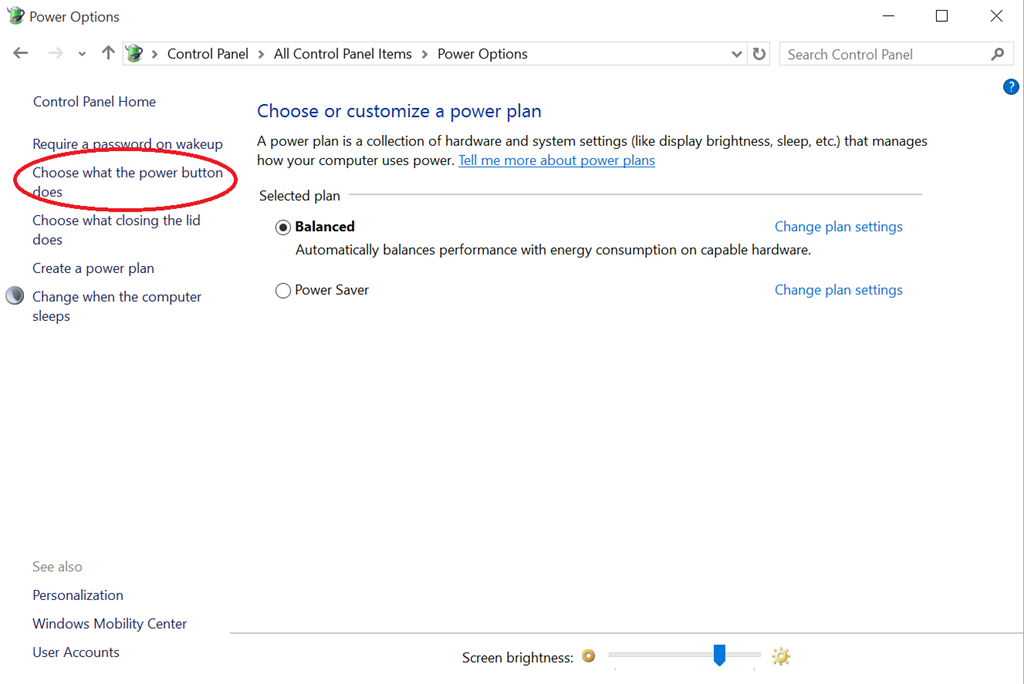
  1. Click the START menu & type “Control Panel” & hit ENTER.  Select “Power Options” and a dialog box will appear.

    image
     

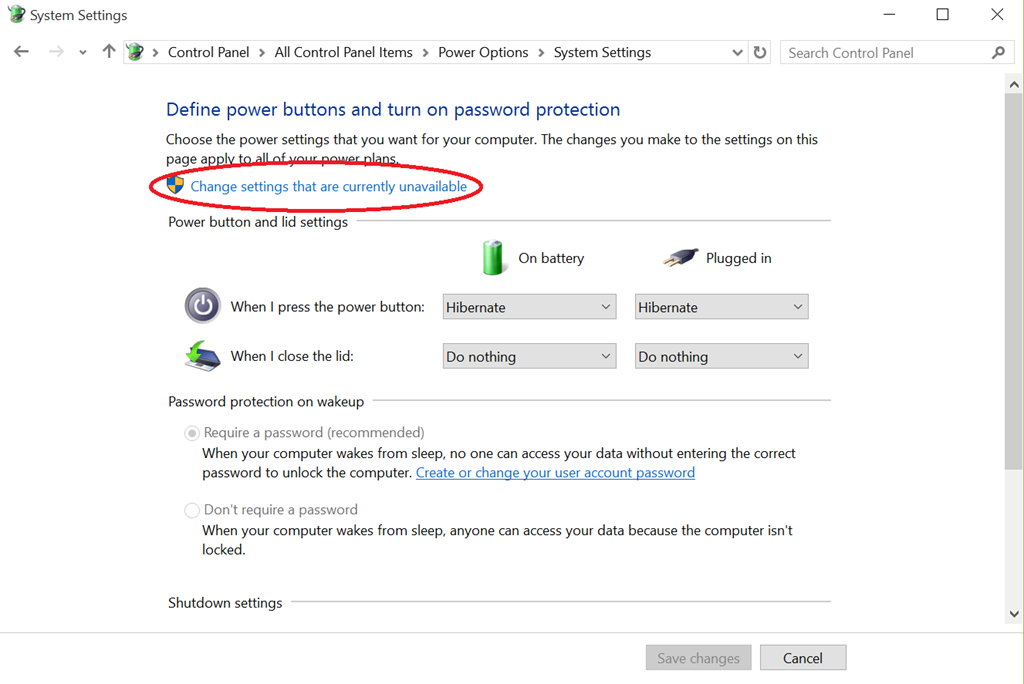
  2. Click “Choose what the power button does” in the left hand column of the Power Options dialog box.  The “System Settings” menu will apear.

    image
     

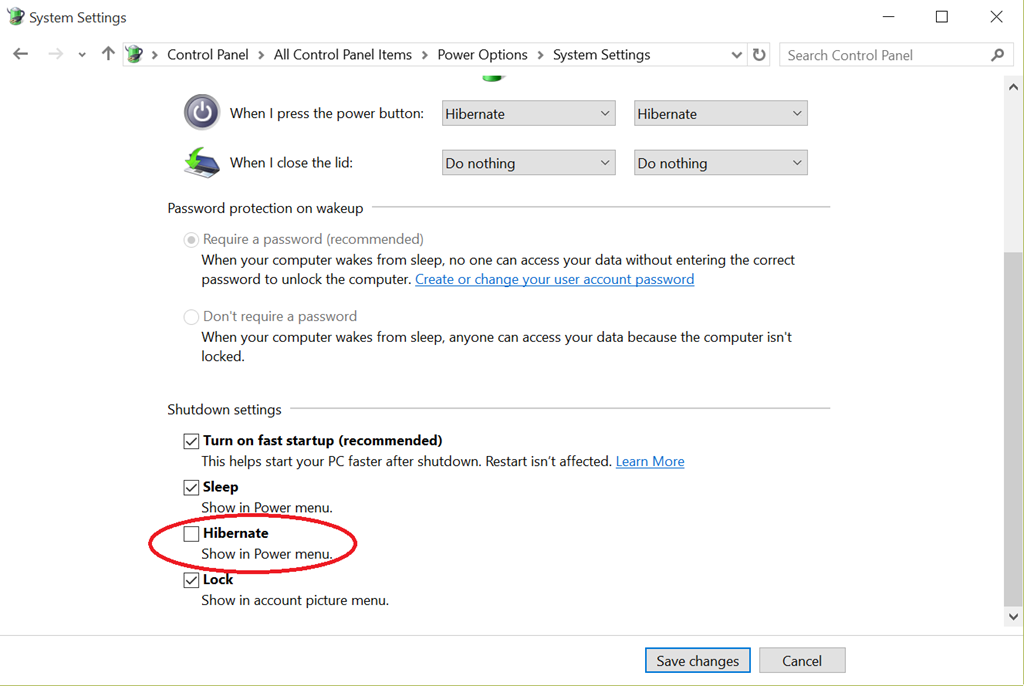
  3. Click “Change settings that are currently unavailable” near the top, then scroll down the window below to reveal “Shutdown settings”.

    image
     

  4. Check the box labeled, “Hibernate – Show in Power Menu”.

    image
     

  5. The next time you click the START button and click “Power”, Hibernate will now show up as an option.

    image
     

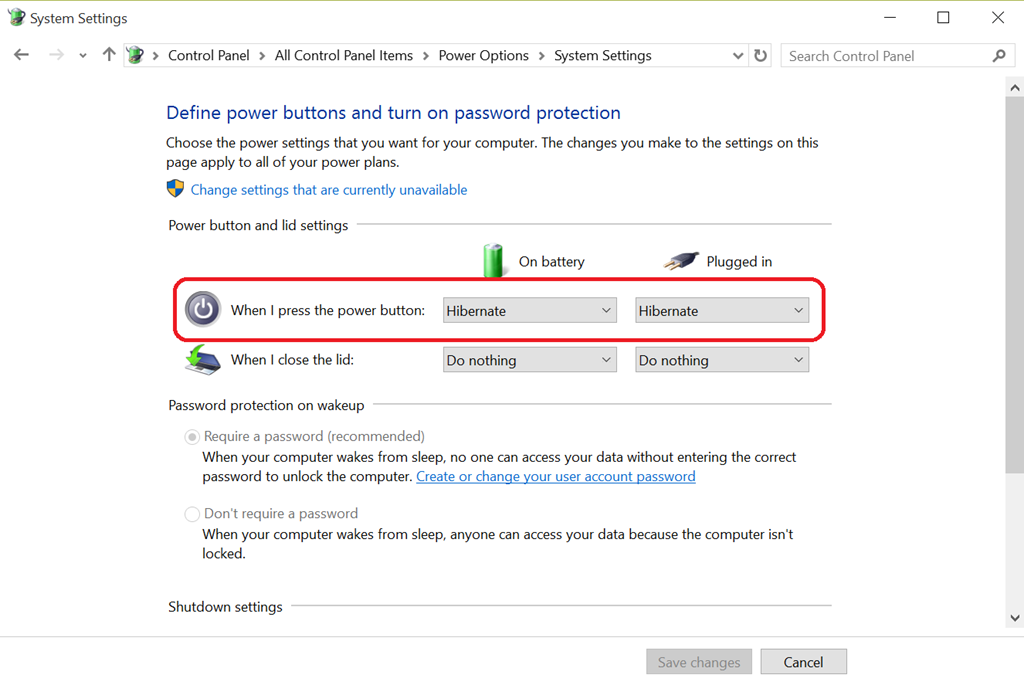
  6. OPTIONAL: You can set the Power button to immediately go to Hibernate.

    image
     

  7. OPTIONAL:  If you own a Surface Pro, you may want to also disable the Surface keyboard’s ability to wake the device.  See the following blog post: 
    https://kurtsh.com/2015/08/25/howto-prevent-your-surface-from-waking-up-in-your-bagcarrying-case/

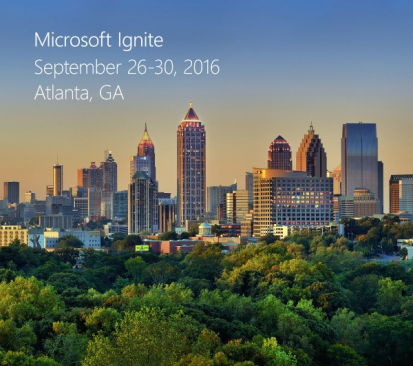
imageMicrosoft Ignite is headed to Atlanta, Georgia, on September 26–30, 2016.

Microsoft Ignite is for IT professionals looking for what’s next in technology and skill building across Microsoft’s technologies. Pre-register now and get ready for—

  • 1,000+ hours of content, 700+ sessions and a multitude of networking opportunities.
  • Insights and roadmaps from industry leaders.
  • Deep dives and live demos on the products you use every day.
  • Direct access to product experts.
  • Interactive digital labs.
  • Knowledge and answers direct from the source.
  • Smart people talking tech everywhere you look.

Pre-register now for the lowest price and claim your spot in Atlanta, September 26–30, 2016.

For those of you interested in learning more about Windows, Office, Azure or any other IT, developer or business technologies, join us at any of our upcoming Cloud Roadshows:

Posted by: kurtsh | November 20, 2015

VIDEO: Microsoft Virtual CIO Summit 2015 (On-demand)

image

Watch the 2015 Virtual CIO Summit on demand now to learn how key trends, like IoT and Cloud, and new technologies, such as Windows 10, Office 2016 and Surface Book, can empower you and your business.

  • Reinventing your Business in a Mobile-First, Cloud-First World
    Panel
        • David Lapeze – CTO, United Talent Agency
          Michael Clark – VP, West Region, Microsoft
        • Jayson Hahn – CTO, C.V. Star
          Karen Del Vescovo – VP, East Region, Microsoft
        • Chris Sakalosky – VP, Central Region, Microsoft
          John Regal – CMO, Ziosk
  • How to Prepare for the IoT Revolution
    Frank Gillett – Vice President, Forrester Research
  • How to Revolutionize Business Processes and Customer Experiences with Windows 10
    Kuleen Bharadwaj – Director, US Commercial Device, Microsoft
  • How to Empower your Workforce with Modern Productivity Tools
    Jared Spataro – General Manager, Apps & Services, Microsoft
  • The Newest Generation of Windows is here! Watch the Windows 10 Demo
    Peter Gossin – Product Manager, Windows, Microsoft
  • Cyberspace 2025: What will Cybersecurity Look Like in 10 Years?
    Tim Rains – Chief Security Advisor, Microsoft
  • IT Leaders Panel: How to Successfully Move to the Cloud
    Tom Grounds – CIO, Dillon Gage
    Andre Garcia – AVP, Global Infrastructure Services, ABM
    Mark Masterson – CIO, Arizona Department of Education
  • Introducing Office 2016
    Eric Hudson – Senior Product Manager, Office, Microsoft
    BJ Haberkorn – Director, Skype, Microsoft
  • Why your Organization Needs to Move to the Cloud
    Takeshi Numoto – Corporate Vice President, Cloud & Enterprise, Microsoft
  • Security: It’s not “If”, but “When”
    Bret Arsenault – Chief Information Security Officer, Microsoft

View the summit recording here:

« Newer Posts - Older Posts »

Categories