image

Interested in a free LIVE course on Deploying Windows 10 with System Center Configuration Manager.

Looking to use System Center Configuration Manager (SCCM) to automate deployment of Windows 10? Join experts Aaron Czechowski and Ed Gallagher as they step you through it. Windows 10 represents a major paradigm shift for Microsoft and the Windows ecosystem in general as we modernize the platform by introducing “as a service” capabilities. Hundreds of millions of devices are already running Windows 10 today. Businesses are beginning to evaluate the new capabilities of Windows 10, including Windows as a service, as part of their deployment plans. With Windows 7 recently transitioning into extended support, businesses need to begin planning for the future of their Windows operating system environment.

Although there are many aspects to consider in managing a Windows device, one of the essential early stages of the lifecycle is deployment. More than 70 percent of businesses use System Center Configuration Manager for PC management, and that market share continues to grow every quarter. SCCM is an industry leader, and the Operating System Deployment (OSD) feature is one of the most popular and frequently used. The product supports many traditional operating system deployment methods, in addition to newer Windows 10 deployment scenarios, such as in-place upgrade. Join us, and get your questions answered.

Note: Want a head start? Take a look at the free e-book from Microsoft Press, Deploying Windows 10: Automating deployment by using System Center Configuration Manager.

COURSE OUTLINE:

  • Preparing Your Environment for System Center Configuration Manager
  • Configuration Manager Operating System Deployment Concepts
  • Deploying and Supporting Windows 10

imageDATE/TIME:
March 16, 2016
9am–12pm PDT

COST:
Free

REGISTRATION:
Deploying Windows 10: Automating Deployment by Using System Center Configuration Manager
https://mva.microsoft.com/liveevents/deploying-windows-10-automating-deployment-by-using-system-center-configuration-manager

imageIf you’ve used OneDrive for Business (OD4B), and you’re using the old Windows sync client, you might notice that occasionally due to what looks like some sort of conflict during an attempt to sync a file and the user’s actions DURING the sync process… a file or directory may “hang” and just continuously attempt to sync in an never ending loop.

In other words, it looks like OD4B is just constantly trying to sync that file or folder but it never seems to complete.  You never get that satisfying “green checkmark” next to the files/folder & OD4B’s system tray icon continuously looks like it’s syncing.

HOW TO REMEDIATE FILES OR FOLDERS THAT HAVE HUNG DURING SYNC
This is what has worked for me, in order to get the sync to complete.  (Note: This problem doesn’t seem to happen with the new OneDrive for Business Next Generation sync client)

  1. Go to either your OneDrive for Business sync folder or your SharePoint sync folder.  This is usually something like: 
    c:\users\yourname\OneDrive – Microsoft
    c:\users\yourname\SharePoint
  2. Look for the file or folder causing the sync hang.  Navigate through the folder structure until you find the ONE file or folder that’s the root of the hang.
  3. Move the file/folder in question to somewhere on your drive that is not being synced.  For example, your desktop or your Videos folder.
  4. Right mouse click the file or folder and copy it.
  5. Wait for OD4B to sync.  This should finally stop the system tray icon from indicating that a sync is happening.
  6. Paste it back to the original folder or location.
  7. Wait for OD4B to sync.  This should initiate another sync between your PC & the cloud to replicate the newly copied file.  The sync should complete successfully:  The file should have a green checkmark next to it and the system tray OD4B icon should stop syncing.
  8. Delete the copy of the file you MOVED to you machine on your desktop or in the video folder.

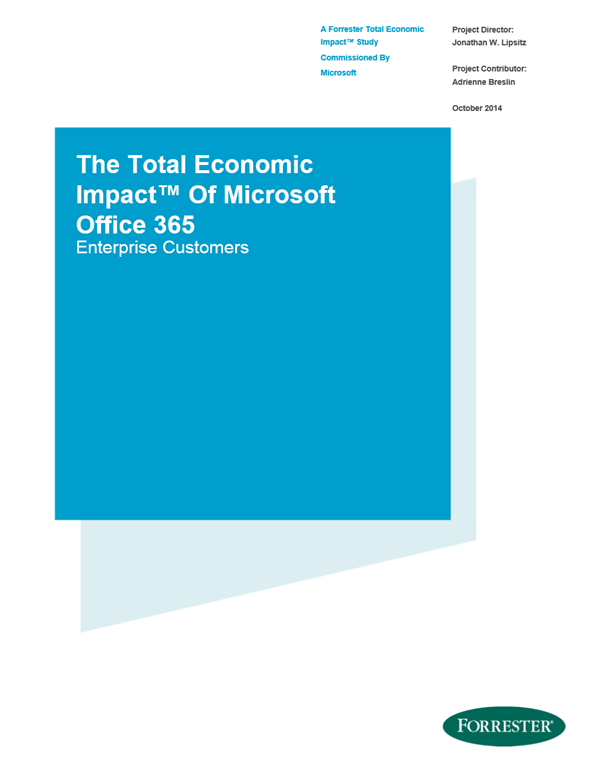
imageWhat is the Total Economic Impact of Microsoft Office 365 for Enterprise Customers?

Forrester worked with Microsoft to analyze the total economic impact that Office 365 has on a number of its customers, who shared these business challenges and objectives:

  • “We were reaching a tipping point with over half of our system users being mobile users.  All roads lead to mobile first and we needed to support it through the cloud”
  • “Moving to Office 365 is part of an overall program to cut support costs in half.  to do that we needed to move to a more of a consumer style support model.”
  • “Business executives asked “how can we reduce IT costs and increase productivity?”

Conclusions included:

  • ROI / IRR
  • Payback Time
  • NPV

For an infographic that summarizes all conclusions as well as the ability to download the original report from Forrester at no cost, visit:

Posted by: kurtsh | March 9, 2016

BETA: Windows Defender Advanced Threat Protection

At the RSA Conference, we announced a new service designed to proactively monitor your machines for intrusions & threats.

imageTo help protect our enterprise customers, we are developing Windows Defender Advanced Threat Protection, a new service that will help enterprises to detect, investigate, and respond to advanced attacks on their networks. Building on the existing security defenses Windows 10 offers today, Windows Defender Advanced Threat Protection provides a new post-breach layer of protection to the Windows 10 security stack. With a combination of client technology built into Windows 10 and a robust cloud service, it will help detect threats that have made it past other defenses, provide enterprises with information to investigate the breach across endpoints, and offer response recommendations.

Here’s a video explaining the goals of Windows Defender Advanced Threat Protection:

Announcing Windows Defender Advanced Threat Protection

For more details on the new features of the upcoming Windows Defender Advanced Threat Protection service, read the rest of the announcement here:

Posted by: kurtsh | March 9, 2016

BETA: Azure Container Service Preview

Interested in Docker Containers?  So are we!  Container support is being built into Windows Server 2016 but Microsoft’s first support for it is in Azure, by way of the Azure Container Service.

imageIn today’s cloud-first world, businesses increasingly rely on applications to fuel innovation and productivity. We are seeing more and more technologies that are specifically designed for the cloud to take advantage of the associated flexibility and scalability it allows. Containers are emerging as an attractive way for developers to quickly and efficiently build and deploy these “born in the cloud” applications.

This week, Microsoft announced the Azure Container Service preview to help customers deploy and manage containers using their favorite tools. Azure Container Service optimizes the configuration of popular open source tools and technologies specifically for Azure, delivering an open solution that offers portability for both your containers and your application configuration. You select the size, the number of hosts, and choice of orchestrator tools, and Container Service handles everything else.

Read the announcement here:

Posted by: kurtsh | March 9, 2016

BETA: Azure Stack Technical Preview

If you’re looking to stand up not just a Virtual Machine farm, but a REAL Private Cloud driven by elasticity & self-service, check out Microsoft’s new Azure Stack.

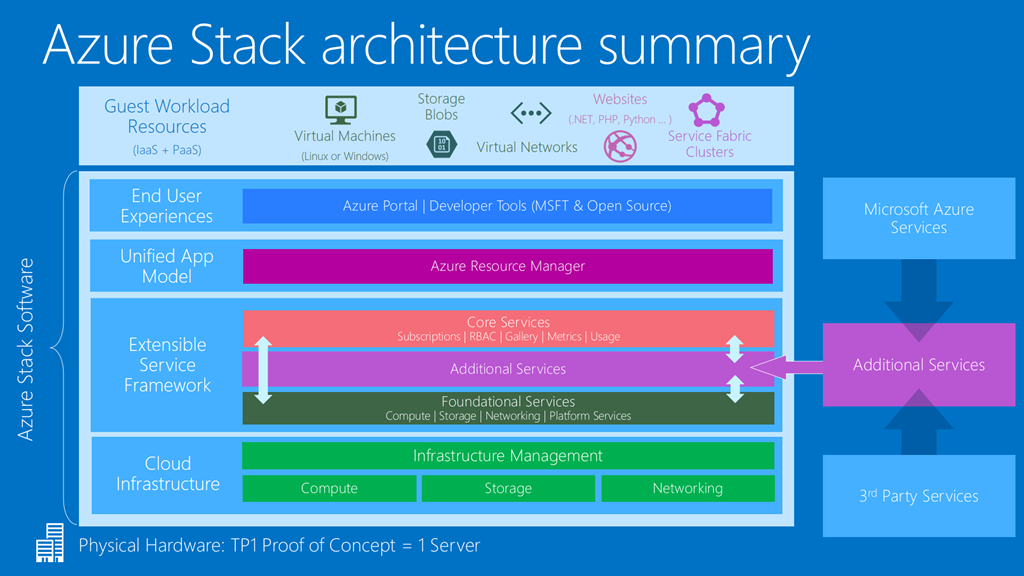
imageThe first Technical Preview of Microsoft Azure Stack, the only hybrid cloud platform that is consistent with a leading public cloud, is live today. Born from Azure, Azure Stack helps organizations deliver Azure services from their own datacenters.

With Azure Stack, organizations can embrace hybrid cloud computing on their terms by helping them address business and technical considerations like regulation, data sovereignty, customization and latency. Azure Stack enables that by giving businesses the freedom to decide where applications and workloads reside without being constrained by technology.

“Just like Azure, Azure Stack is a comprehensive platform for hosting modern business applications.  Azure and Azure Stack have a standardized architecture, including the same portal, a unified application model, and common DevOps tools,”  wrote Microsoft’s Mike Neil, Corporate Vice President of Enterprise Cloud. “The application model is based on Azure Resource Manager, which enables developers to take the same declarative approach to applications, regardless of whether they run on Azure or Azure Stack. Tooling-wise, developers can use Visual Studio, PowerShell, as well as other open-source DevOps tools thereby enabling the same end user experiences as in Azure.”

Here’s an early look at Azure Stack from Jeffery Snover, father of Powershell:

An early look at Azure Stack and what it means for IT, with Jeffrey Snover

Read more of the announcement here:

Visit the Azure Stack web site here:

imageJoin our virtual event to hear Microsoft CEO Satya Nadella and customers share how data insights are driving business transformation.

Microsoft leaders will also share how customers are embracing data to drive innovation and why SQL Server 2016 has become the industry leader.

Watch it live | March 10, 2016, 10AM-Noon EST

imageAttend this FREE Microsoft Office 365 webinar to understand what training resources are available and discover new ways to foster adoption.

A live presenter will encourage questions and discussion of scenarios specific to you.

DATE/TIME:

REGISTRATION:
http://aka.ms/O365buildawareness!

DISCUSSION:
Read more on the Yammer thread for this event:
https://www.yammer.com/itpronetwork/#/Threads/show?threadId=657738057

Posted by: kurtsh | March 8, 2016

TRAINING: Office 365 for Business Training

imageOffice 365 for business refers to Office 365 plans that are designed for organizations. As a business user, you can access the Office applications across your devices, and you get online file storage and sharing.

If you’re the purchaser for your organization, you can choose from different plans where the applications and services vary according to what your organization needs.

Tip  If you’re looking for training for Outlook, Word, Excel, PowerPoint, OneNote, and other Office apps, visit the Office Training Center

Help and training for Office 365 administrators

Training for everyone

See Also

Office 365 Home training

———–

[taken from https://support.office.com/en-us/article/Office-365-for-business-training-e990f8ff-56d7-450e-ad9f-74ae8718ef09?ui=en-US&rs=en-US&ad=US]

Posted by: kurtsh | March 7, 2016

NEWS: Microsoft announces SQL Server on Linux

Hot off the presses!

imageToday I’m excited to announce our plans to bring SQL Server to Linux as well. This will enable SQL Server to deliver a consistent data platform across Windows Server and Linux, as well as on-premises and cloud. We are bringing the core relational database capabilities to preview today, and are targeting availability in mid-2017.

SQL Server on Linux will provide customers with even more flexibility in their data solution. One with mission-critical performance, industry-leading TCO, best-in-class security, and hybrid cloud innovations – like Stretch Database which lets customers access their data on-premises and in the cloud whenever they want at low cost – all built in.

Read more from the announcement here:

« Newer Posts - Older Posts »

Categories