imageIf you plan on deploying Windows 10 Anniversary Update, you’re going to need this update to System Center Configuration Manager.

SCCM Update 1606 delivers new features and enhancements in:

  • Security and data protection
  • Application management
  • Content distribution
  • Deployment and provisioning
  • End user experience
  • Hybrid mode with Microsoft Intune

Read about it at the announcement here:

FORCING THE UPDATE
To force the update on your SCCM central administration site, instead of waiting for the update to get pulled down through “Updates & Servicing”, run the following PowerShell script:

More documentation, support, feedback and forums for the 1606 Update are listed in the public announcement.

imageMicrosoft announced both their quarterly earnings for Q4FY16 & their annual earnings for 2016 yesterday. 

It was a particularly well-received announcement as earnings per share came in at 69 cents relative to analyst’s expectation of 58 cents. 

More importantly, in arguably Microsoft’s most important businesses, Azure revenue grew by 102% (up 108% in constant currency) while Azure compute usage more than doubled from the same period last year.

Here’s some of the market reactions:

Here’s some of the artifacts from the announcement yesterday, including the recording & the PowerPoint presented:

wp_ss_20160719_0001

Subscribing to a podcast feed shouldn’t be a problem using the Podcast app on Windows Phone 8.1 or Windows 10 Mobile.  Generally, all you have to do is search for the podcast name in the Podcast app search bar and – BAM – the podcast shows up for you in the results to click & subscribe to.

But what the podcast doesn’t show up? 
This can happen if the podcast hasn’t been indexed by the search engine yet.  If this is the case, the search field won’t find it and you won’t see it in the results.  And if the podcast is new, it can take up to a week or more to show.

(Note: To speed things up, you can submit the site for indexing by going to http://www.bing.com/toolbox/submit-site-url.)

Can’t you just type in the RSS feed address if you know it? 
Unfortunately (and annoyingly) the answer is no, not from the search bar.  See, the search Podcast app search bar is actually “Bing” and when you search for a podcast through it, the podcast app is very strict about the results that it returns.  Typing in the .RSS URL like http://feed.podcastname.com/rss isn’t accepted.

WORKAROUND: USING THE PODCAST: PREFIX FROM INTERNET EXPLORER OR EDGE
But as a workaround, you can go to Internet Explorer or Edge in Windows 10 Mobile & type:

  • podcast://[podcastURLgoeshere]

For example:

  • podcast://cheeky.tech/feed

Doing this will send the feed URL to the Podcast app which will enable you to subscribe to the podcast without searching for it.

imageWould you be interested in gaining valuable insights into how Microsoft IT deployed Skype for Business to its global user base?

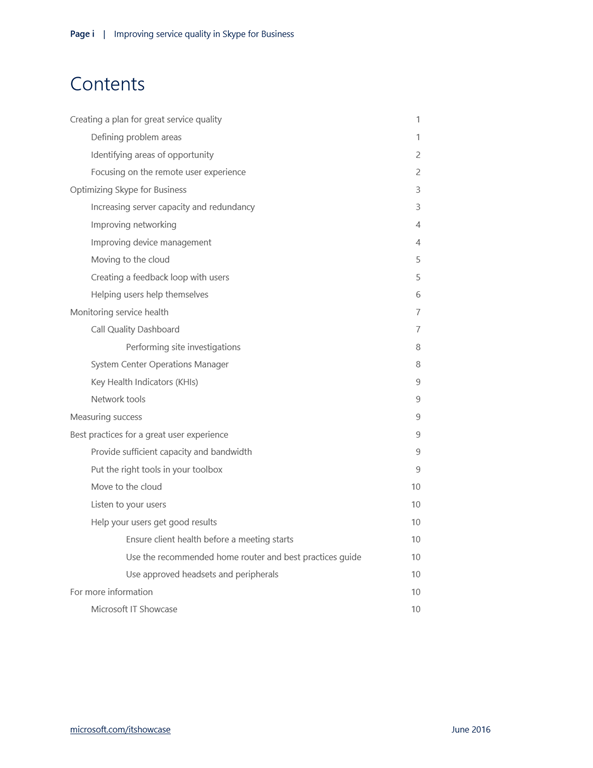
Read this whitepaper from Microsoft IT about its concentration on services quality around Skype for Business.  The whitepaper reviews the following topics:

  • Creating a plan for great service quality
  • Optimizing Skype for Business
  • Monitoring service health
  • Measuring success
  • Best practices for a great user experience

Download the paper here:

imageThe upcoming Windows 10 Anniversary Update promises a new array of security features building upon an already vastly improved foundation for secure computing over previous releases of Windows.

Windows 10 Anniversary Update has improvements in the following categories:

  • Platform Architecture
  • Pre-Breach Defense
  • Identity Protection
  • Post-Breach Defense
  • Information Protection
  • Compliance and Certification

Read the following post for a breakdown of each category:

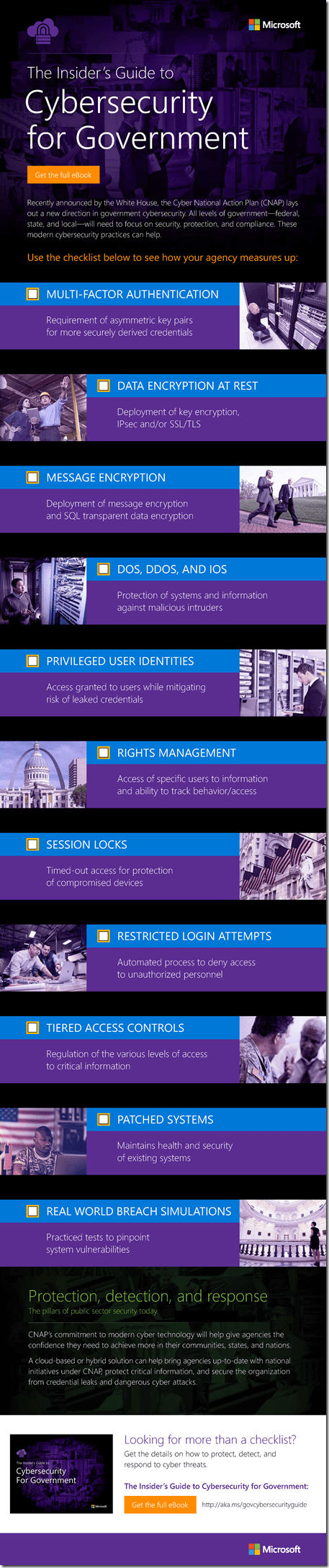
The White House’s recently announced Cyber National Action Plan (CNAP) outlines a new direction in government cybersecurity. It encourages government agencies at all levels to commit to modern cybersecurity practices that improve security, protection, and compliance.

Stay up-to-date with the new national initiatives outlined in CNAP with our Cybersecurity Checklist for State and Local Government and see how your agency measures up when it comes to best practices, including:

  • Multifactor authentication
  • Data encryption
  • Tiered access controls
  • Rights management

Download the complete checklist and see if your current cybersecurity strategy provides your agency with the resources it needs to confidently combat modern cyber threats.

image

Download the guide from here:

imageWe’re happy to announce the availability of our newest free ebook, Configuring Microsoft SharePoint Hybrid Capabilities (ISBN 9781509302437), by Jeremy Taylor, Neil Hodgkinson, and Manas Biswas.

Introduction by SharePoint/OneDrive Corporate VP, Jeff Teper:

In spring of 2016, Microsoft announced the general availability of SharePoint Server 2016, which includes new hybrid capabilities that make it possible for on-premises customers to tap into the innovation the company is delivering in Microsoft Office 365.

For more than a decade, Microsoft’s customers have relied on SharePoint to power teamwork, to automate business processes, to create business applications, and to build company-wide intranets. As a core part of Office 365, SharePoint provides content management and collaboration capabilities that are seamlessly integrated with the other applications people use every day to create and coauthor documents, meet and work with their teams, brainstorm, analyze, and make decisions. SharePoint is also integrated with the powerful cross-suite capabilities of Office 365, such as Office 365 Groups, the Office Graph, and governance controls for security, privacy, and compliance.

Our vision for SharePoint Online in the cloud and SharePoint Server on-premises extends into a connected extensible hybrid experience in which users can take advantage of the powerful features of both SharePoint Server on-premises and the innovation we are delivering in SharePoint Online. Device-independent collaboration and file sharing through Microsoft OneDrive for Business, coupled with intelligent intranets driven by modern team sites, publishing and business applications on your desktop, and mobile device lead the charge in providing new ways to work.

SharePoint Server also delivers cloud-born innovation through hybrid capabilities and experiences that span, integrate, and unify on-premises farms and Office 365. With hybrid search, we have delivered an improved user experience that unifies the index, query results, and search experience across Office 365 and on-premises farms running SharePoint 2016, SharePoint 2013, and even SharePoint 2010. Hybrid search also makes on-premises content available within Office Graph– powered applications such as Delve.

Hybrid OneDrive provides businesses with a stepping stone into the Office 365 experience, paving the way for the gradual migration of personal sites to SharePoint online. With the Hybrid Sites feature, you can connect users to their favorite teamsites, whether on-premises or cloud based. External sharing polices provide granular control of the sharing experience, providing businesses with the ability to securely collaborate with partners. IT professionals can also use hybrid configurations to unify compliance policies and auditing.

With these and other integrated, unified, and hybrid experiences and services, you can take advantage of innovation and capabilities in Office 365 while maintaining workloads on-premises that are not suited to Office 365. You can move workloads to Office 365 at your own pace, based on your own requirements, and still take advantage of Office 365 where it best meets your needs. Additionally, the SharePoint mobile app will support both on-premises and Office 365 sites for hybrid customers.

This ebook draws together the SharePoint Server and Office 365 hybrid workloads and user experiences in one place, providing solid guidance to meet business needs and achieve productivity goals in the cloud-enabled workplace.

Grab the book here:

This is a pretty interesting datasheet listing many of the security gaps in Windows 7 vs Windows 10.

image

This list however is missing some key items.  Here’s some of the items that AREN’T listed above:

  • Granular UI control i.e. Kiosk-level Lockdown
    Windows 10 Enterprise edition has the ability to use traditional Windows Embedded features like “write filtering” which wipes/eliminates any writes to the hard drive
  • Credential Guard
    Windows 10 stores domain credentials using a combination of security hardware & Virtualization-based security, effectively making credentials inaccessible to illicit processes.
  • Windows Event Forwarding
    Windows 10 Security events can be automatically forwarded to a central authority, the Windows Event Collector server.
  • Windows Defender Advanced Threat Protection
    With the Anniversary Edition of Windows 10, Windows 10 Enterprise & Pro will have available WDATP which via subscription will detect intrusions post-breach, leveraging the global threat information collection Microsoft has & as well as machine learning within Microsoft’s cloud.

Download the datasheet here:

image

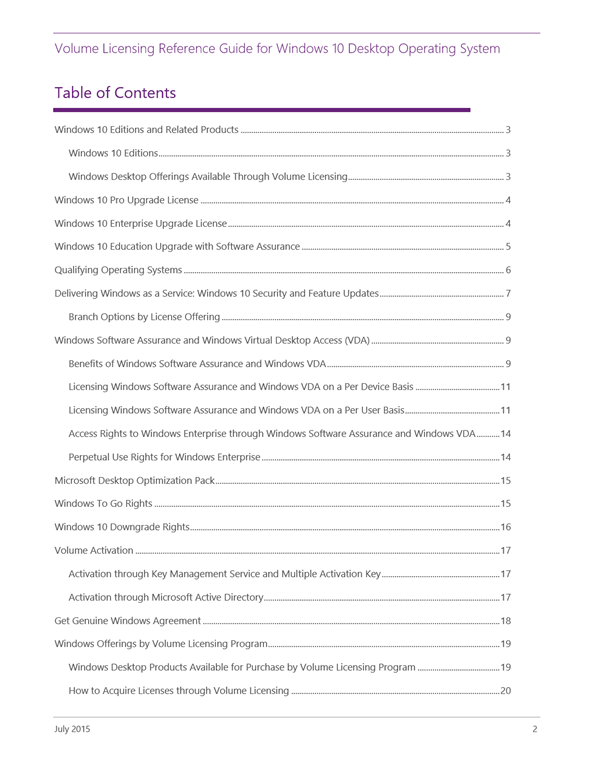
This is a very important document for anyone involved with Windows 10 – even if you’re not affiliated with licensing or procurement for your organization.

It goes over:

  • Editions of Windows
  • Windows 10 “Enterprise-only” specific features
  • Windows as a Service (How to license CBB, LTSB, etc.)
  • Windows-to-Go licensing
  • Desktop Optimization Pack rights
  • Downgrade rights
  • Volume Activation

Here’s the intro:

Windows 10 offers the experiences that people love while delivering enterprise-grade solutions that businesses require. 

Microsoft Volume Licensing solutions provide the most flexible and cost-effective way to give your organization access to the latest Windows desktop technologies. Whether you want to upgrade your PCs to Windows 10, gain access to exclusive offerings such as Windows 10 Enterprise edition and the Microsoft Desktop Optimization Pack, or use Windows with greater flexibility, there is a Volume Licensing option that is right for your organization. 

imageThis document provides an overview of the products available through Volume Licensing, information about the products that are eligible for upgrades, and the key choices you have for utilizing Windows in your organization.

Content included is for informational purposes only and is not meant to replace or override other licensing documentation such as the Windows 10 End User License Agreement or Volume Licensing Product Terms.

imageThis guide offers easy-to-follow, step-by-step instructions on how to upgrade multiple devices (PCs or tablets) to Windows 10. It will show you how to assemble your upgrade toolkit, get the upgrade started, and verify that upgrade was successful.

« Newer Posts - Older Posts »

Categories