Posted by: kurtsh | January 18, 2017

INFO: Connecting your AWS & Microsoft Azure Environments

image

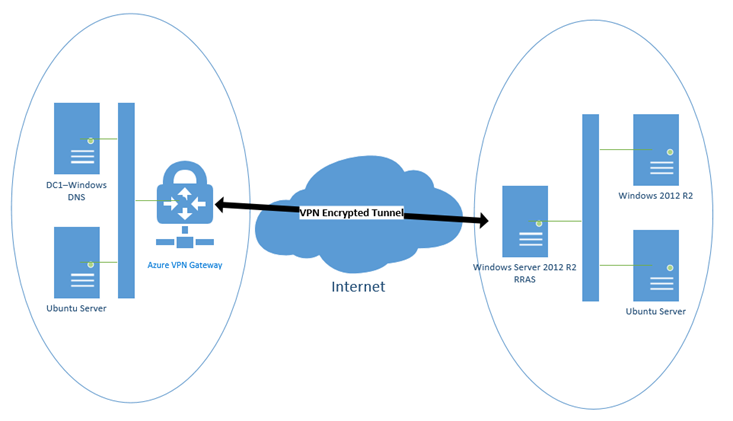
I loved this post about connecting AWS environments securely with your Microsoft Azure environment… so I wanted to let you folks know about it as well:

In this post I will show how created that site to site IPsec tunnel to connect to a Virtual Private Cloud (VPC) hosted in Amazon Web Services (AWS) to a Virtual Network in Azure. Using this setup you can have workloads in one or both clouds with full VM to VM connectivity over a secure IPsec tunnel. This easily can provide connectivity for high availability operations, backup or (like in our case) migration between clouds.

Read more here:

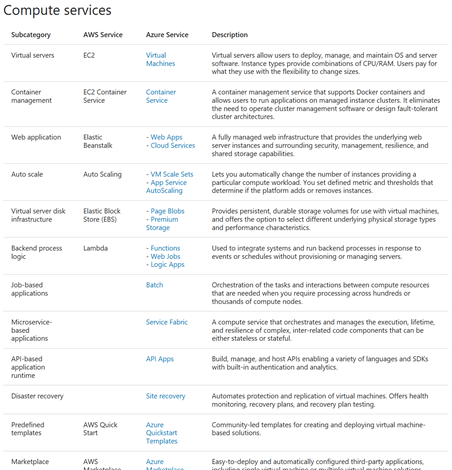
This article helps you understand how Microsoft Azure services compare to Amazon Web Services (AWS). Whether you are planning a multicloud solution with Azure and AWS, or migrating to Azure, you can compare the IT capabilities of Azure and AWS services in all categories.+

In the tables following, there are multiple Azure services listed for some AWS services. The Azure services are similar to one another, but depth and breadth of capabilities vary.

image

Read the article here:

Additionally, there’s a larger article about Azure for the AWS professional that’s available for review:

imageSign up for a Groove Music Pass, and the next four months are on the house. What’s even better than millions of songs in your pocket – plus playlists, artist radio, Xbox Background Music for gamers, and more? Getting all that music free for 4 whole months.*

For a limited time, new customers who sign up for a Groove Music Pass will get their first trial month free, and will receive a promo code for the next 3 months on us. As always, you can cancel anytime. But act fast – this deal won’t last long.

Sign up here:

(*Sign up for a 30-day Groove Music Pass trial before March 1st, 2017 and we’ll send you a token within 30 days for an additional 3 months of free music. Must be redeemed by 03/14/17. 30-day trial continues to a paid monthly subscription unless canceled or after the promotional period. Credit card required. Limit 1 per person; prior Zune, Xbox or Groove Music Pass trial customers not eligible. Groove Music Pass sold separately and in selected markets. Catalogue size and availability varies by market and over time. Microsoft account and internet required; ISP fees apply. Works with Windows 10, PCs, tablets and phones, Windows 8.1, Windows Phone 8, Xbox One and Xbox 360 (Xbox Live required). Works with Sonos, Android and iPhone; see app stores. Requires up to 100 MB storage. Download music on up to 10 devices (not available on Xbox and the Web). Stream to one device at a time. Subject to terms (which may change without notice) at microsoft.com/msa.)

image

Cloud computing has become a crucial element in today’s businesses, and as a result, IT organizations must play increasingly important roles in driving business strategy. Among its other benefits, cloud computing shifts portions of capital expenses into operating expenses. This paradigm shift has enabled organizations to accelerate their rate of growth and speed to market, which results in revising and updating tactics. But, as with any business decision, there are a number of factors to consider—not the least of which is making the transition to the cloud.

Migrating part or all of the IT portfolio to the cloud might seem like a daunting task—but migration doesn’t have to be prohibitively complex. Moving to the cloud is transformative for companies and while it isn’t a trivial matter to do so, the long-term benefits far outweigh the short-term issues.

This eBook goes over the value of a move to the Azure cloud as well as what the steps are to migrate.

Posted by: kurtsh | January 17, 2017

TOOL: Kurt’s Favorite Tools for Windows

[This is as of 1/17/17]
I recently got a new computer and it reminded me that I’ve never posted about the tools that I use that I consider essential to my Windows PC.

So here’s a list of my favorite tools.  Each of these deserve a a full post but this fiscal year hasn’t granted me nearly the time so here’s a quick synopsis instead.  Enjoy.

  • CCleaner Professional
    http://www.piriform.com/ccleaner
    imageEveryone knows the FREE version of this tool clears Internet history/caches, temp directories, memory dumps, etc. but not everyone knows that the Professional version (which costs $25) also does the following:

          • Removes cookies & trackers DAILY or whatever frequency you need from IE, Edge, Firefox, Chrome, & Opera (with an easy-to-use whitelisting tool to KEEP the cookies you want)
          • Real-time monitoring, to automatically clear cookies & trackers whenever you close the browser or whenever the cache exceeds a certain size.
  • DUMeter
    http://www.hageltech.com/dumeter/about
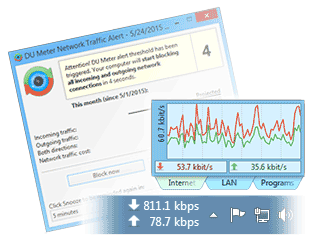
    imageThis is a little desktop tool that shows bandwidth consumption in real-time.  It can show it numerically, graphically in a histogram, or by application so you know what apps are consuming bandwidth on your machine.  Really essential tool.
  • AutoHotKey
    https://www.autohotkey.com/image
    This is a free automation tool that allows you to program keystrokes to execute macros.  In my case, I love to reprogram CTRL-LEFT ARROW and CTRL-RIGHT ARROW to be Home & End, and AutoHotKey does that for free.
  • DrawboardPDF
    https://www.microsoft.com/store/apps/9wzdncrfhwqt
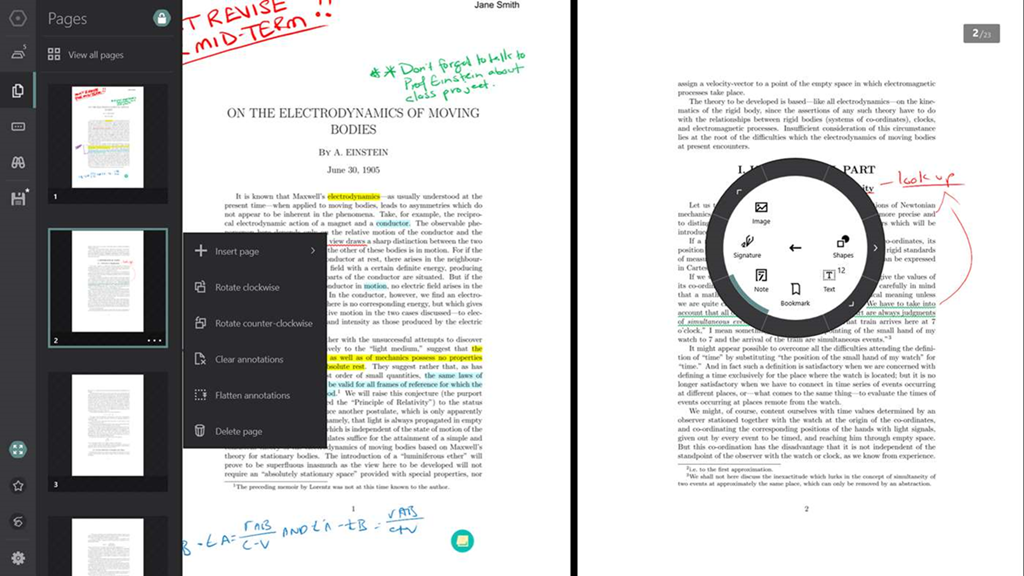
    imageThis is a great tool for modifying & marking up PDF files.  Ever wish you could type into a PDF-based form or add your signature using your Surface Pen?  This is the tool to do it with.  It’s $9.99 but I think it’s worth it to be able to visually sign forms using my stylus and be able to save them digitally.
  • Multiplicity
    http://edgerunner.com/multiplicity
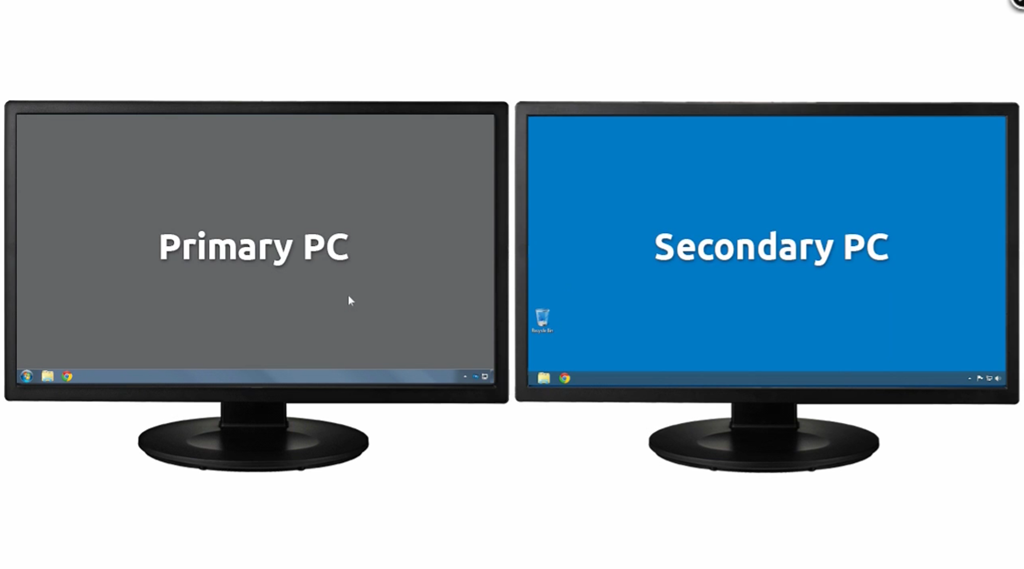
    imageI have 3 laptops on my desk at all times: Surface Pro 3, Surface 3, and a Surface Book which is my primary.  Using the mouse & keyboard of my Surface Book, I can move the mouse pointer across all 3 laptops and use the keyboard depending on where the mouse is using Multiplicity.  It costs as little as $20 for 2 PCs and has solid tech support which is – believe me – CRITICAL to ensuring connectivity/troubleshooting support.  I’ve personally tried Synergy, MouseWithoutBorders, SpaceDesk, SplashTop, and others and only Multiplicity had the support I think a tool like this needs.
  • FileMinimizer Suite
    http://balesio.com/fileminimizersuite/eng/index.php
    imageThis is a tool that compresses & shrinks Office & PDF documents while keeping the files readable.  This is not a ZIP tool as it keeps the document readable by inspecting it for things like oversized graphics and resizing them, conserving space.
    The tool is very useful when you want to send a file over email and need to shrink it down in order to attach it and stay under the maximum attachment size threshold.
    It’s not free however.  At $95 a copy, it might be a little beyond a lot of folks but it’s been a good value for me.
  • SimplyFile
    http://www.techhit.com/SimplyFile/
    imageTechHit’s SimplyFile is one of my all time favorite tools:  It’s an Outlook add-in that automatically determines what folder an email should be moved/filed in.  Simply clicking on an email displays the predicted folder name on a button & pressing that button moves the email to that folder.  If the folder is incorrect, you can change the prediction directly in the toolbar.  It’s one of the biggest productivity enhancers I’ve had and I’ve used it for over 10 years.
    Warning:  It’s not cheap.  I think it’s something like $50. But it’s been very worth it for me as a ‘filer’.
  • SendIndividually
    http://www.sperrysoftware.com/Email-Tools/product/send-individually/image
    Another of my all time favorites, Send Individually is my mail merge tool and it’s something I’ve been using for a decade or so.  It’s an Outlook add-in that allows you to put hundreds of people in the TO: line of an email – including Contact Groups – and send an individual copy of an email to each of them. It doesn’t use BCC: and none of the recipients other than the single destination show on the To: line.
    You can insert the recipients name in the body of the message using <firstname> or <lastname> and other mark up terms, and it automates the creation of all the individual mails you need, puts them in the Outbox, and you can watch them leave Outlook as they’re sent.  Note: This is also not a cheap tool at $50 but it doesn’t incur ongoing charges like many mail services do.
  • Teracopy
    http://codesector.com/teracopy
    imageTeracopy is a free tool that does one thing:  Copy files reliably and quickly.  It’s special features, compared to a standard Windows file copy, include the ability to check the copy’s CRC, pipeline files for reading & writing to optimize throughput, and provide specific instructions on what to do in case of collisions.  (For example, “Overwrite the destination file, only if it’s smaller than the file being copied.”)
  • Open Live Writer
    http://openlivewriter.org/
    imageOpen Live Writer is what I’m using to write this post to WordPress.  It’s a free tool that originated from the open sourcing of Windows Live Writer, a lightweight blogging tool created many years ago.
    Open Live Writer is a wonderful blogging tool for folks like me that just need the ability to have a WYSIWYG editor that will create drafts, insert photos & videos, directly publish posts to my blog, edit previously published blog posts, and manage multiple blog accounts.
    It’s sort of like Word… but quick to load, quick to create, and quick to publish.  Like I said, ‘lightweight’.
Posted by: kurtsh | January 13, 2017

RELEASE: Microsoft StaffHub (for Office 365)

clip_image002

We released Microsoft StaffHub today, which is web/mobile solution we’ve developed to provide schedule management, information sharing, & workgroup communications, targeting workers that have hourly shifts & task oriented labor.

StaffHub enables:

  • Managers to create, update and manage shift schedules for their team
  • Employees have access to all their shift information via web or StaffHub mobile app
  • Employees can swap shifts with others from the web or the StaffHub mobile app
    (Managers can receive & approve shift swaps before they are executed)
  • StaffHub Mobile App (iOS, Android) provides
        • Summary of upcoming shifts as well as any important notes
        • Review important information for their team, such as policy documents, news bulletins or videos
        • Receive messages from managers directly or as team broadcast messages
  • StaffHub integrates with Kronos Workforce Management with more systems to be announced
        • Pull in shift information for teams or individuals
  • StaffHub can show links to other work-relevant/important cloud apps

Licensing is simple: All Office 365 K1 licensed users (and E3 users) are eligible to use StaffHub immediately.

For more information, please read the announcement here:

imageYou’ve heard about the cloud, you know the benefits it offers, yet you’re still using an on-premises solution for your company’s emails. Maybe the thought of the transition is too daunting, or you’re not convinced it’s necessary at this time—there are many reasons that you might chose to stay with on-premises servers.

According to the 2015 IDG Enterprise Cloud Computing Survey, 72 percent of organizations already have at least one application in the cloud and 56 percent are currently identifying which IT operations to move. Here are some common misconceptions about on-premises email and the reality of what migrating your business email to the cloud can do for your organization.

Read more here…

We’ve released an eBook describing the value of cloud-based email versus on-premises that goes through the bullets in the blog post more thoroughly.  Hint: “Regulatory mandate” is no longer a reason for on-premises servers.

imageWe announced today that we are making available a FREE Audible Audiobook, “Born a Crime: Stories from a South African Childhood,” (usually $24.95) written and narrated by Trevor Noah, comedian and host of “The Daily Show”. (Courtesy of Microsoft & Audible for Windows users.)

Read more here:

imageMany people don’t know that it’s possible to “double dip” & use a single Windows Server license in both:

  1. On-premises datacenter
  2. Cloud-based Virtual Machine

USE ONE LICENSE IN TWO PLACES SIMULTANEOUSLY WITH WINDOWS SERVER DATACENTER EDITION
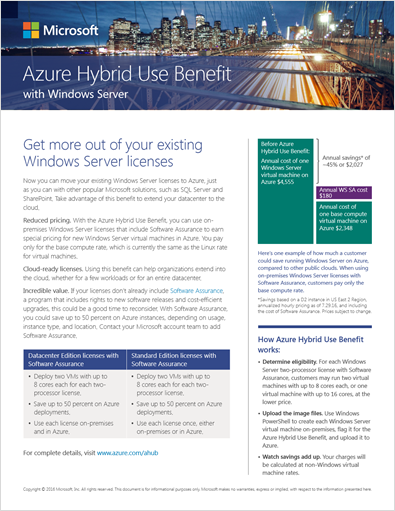
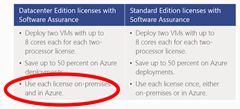
This is known as the “Azure Hybrid Use Benefit” for Windows Server Datacenter Edition and it gives the licensee the ability to use a single Windows Server Datacenter Edition license simultaneously in both a physical server in-house as well as in Azure.
  • imageEXAMPLE #1:
    An example of this would be an organization that has an existing Windows Server in their datacenter running a line-of-business application (like an ERP application), that they’d like to gradually migrate systems to Microsoft Azure without decommissioning the servers on-prem, and don’t want to purchase additional licenses for use in the cloud.
  • EXAMPLE #2:
    The licenses however are not tied any any specific workload.  Another example is an organization that has a lot of Windows Server instances in their datacenter and would like to stand up Windows Server in the cloud for other workloads, and don’t want to purchase additional license for use in the cloud.

(Note: If you do not have Windows Server Datacenter Edition, there is a step-up price available that allows you to upgrade your existing Windows Server Standard Edition.  For more information, visit http://www.microsoft.com/en-us/cloud-platform/windows-server-pricing and http://download.microsoft.com/download/6/A/1/6A1647EE-3FC7-47F2-9AFE-470AD5E5D856/StepUpLicenses.pdf)

CONVERT ONE WINDOWS SERVER LICENSE INTO 2 VIRTUAL MACHINES WITH WINDOWS SERVER STANDARD
Alternatively, one can move or transition their license from their datacenter to Microsoft Azure when using Windows Server Standard. 

This entitles the user to implement 2 Virtual Machines w/ 8 cores each at no additional Server OS licensing cost.

VALUE: 41% COST SAVINGS ON CLOUD VIRTUAL MACHINE INSTANCES
The value to an organization to using the Azure Hybrid Use Benefit is a dramatic reduction in cost. 

Not having to re-purchase the Windows Server license by leveraging the Azure Hybrid Use Benefit reduces the cost of cloud VM instances by 41%.

REQUIREMENTS

There are some basic requirements to obtain the Azure Hybrid Use Benefit

  • AZURE ONLY: Only applies to running VMs within Microsoft Azure – not applicable to any other cloud hosting service.  This grants 2 VMs using 8 cores each per license.
  • SOFTWARE ASSURANCE REQUIRED: Customers must have Software Assurance (aka ‘maintenance’) on their Windows Server licenses.
  • SIMULTANEOUS USE REQUIRES DATACENTER EDITION: Requires licenses to be Windows Server Datacenter Edition to simultaneously use Windows Server in both on-prem datacenters as well as Azure.

For more information, visit the Azure Hybrid Use Benefit site:

Posted by: kurtsh | January 9, 2017

DOWNLOAD: Windows Essentials 2012

imageIf you’re like me and you still love Windows Essentials 2012, but can’t find it, don’t fret: It’s still there. And it still installs on Windows 10.  There’s a catch however:

  • Windows Messenger is no more so there’s no point in installing it.
  • Windows Mail has been replaced in basically every way by the more functional Mail app built into Windows 10.
  • Windows Live Writer won’t install because of dependency on .NET Framework 3.5 which has an installation reference problem. (This is easily rectified by installing Open Live Writer, which is the same code base but open sourced & “fixed up”)
  • Support ends tomorrow for the suite per https://support.microsoft.com/en-us/help/13785/windows-essentials-2012-release-notes.

So… uh, why install it again? For the following:

  • Windows Photo Gallery
    I’ve always loved this tool.  Does a great job of organizing & touching up & editing photos.
  • Windows Movie Maker
    A really basic movie editor.  Uses WMV format but whatever.  If you’re looking to crank something easy out, edit out a couple seconds, add some transitions, look no further!  And it’s free

Grab the tool here:

If it’s not available any more, I have it available to download here:

« Newer Posts - Older Posts »

Categories