imageMicrosoft Teams has arrived to Office 365, bringing a chat-based workspace to your fingertips. See how Microsoft Teams can pull together everything you need to collaborate – schedule and conduct meetings, share notes and files, have threaded conversations – all in one place.

At this event, you’ll experience

  • Collaboration challenges organizations face with distributed, multi-generation workforce.
  • Options users look for to get things done, and how that affects the role of IT.
  • How to make your team more effective and give them instant access to everything they need – right in Office 365.
  • Hands on environment to test drive Microsoft Teams.

About Microsoft Teams

  • Chat for today’s teams: A one-to-one or one-to many chat with content and chat history.
  • A hub for teamwork: instant access to everything your team needs right in Office 365 with built-in integration to SharePoint, OneNote, and Skype for Business.
  • Customizable for each team: integrate the content and features your team needs to access and use every day.
  • Security teams can trust: enterprise security and compliance features you expect from Office 365.
  • Learn more about Microsoft Teams and start using it today.

Events are taking place nationwide in 21 locations, from Austin to New York to Milwaukee to Tempe. 

Register here:

image

Are you interested in ‘inclusive design’? Do you want your approach to technology to include ‘accessibility’ as a design theme?

Microsoft is a great resource for inclusive design & accessibility and our research is available for download:

Microsoft @ CSUN Assistive Technology Conference 2017
We recently also participated in the CSUN Assistive Technology Conference this past March as hosted by the Cal State Northridge Center on Disabilities.  Here’s the list of sessions Microsoft presented at the conference:

If you’re a customer of mine, and are interested in talking to one of Microsoft’s presenters, let me know and I’ll see what I can do.

If you’re interested in the PowerPoint decks from the conference that were presented by Microsoft, most can be found here:

image

Did you miss out on the Microsoft Tech Summit?  If so, you missed out on close to 100 sessions, including these:

imageRECORDINGS & DOWNLOADS
But you’re in luck: All available slides and recordings from the Chicago Tech Summit event are available at: http://techcommunity.microsoft.com.

clip_image001[3]

Microsoft Teams has arrived to Office 365, bringing a chat-based workspace to your fingertips. See how Microsoft Teams can pull together everything you need to collaborate – schedule and conduct meetings, share notes and files, have threaded conversations – all in one place.

Hear from Emmitt Smith, Hall of Fame NFL Running Back, Businessman and Entrepreneur, on how to unlock the potential of teams and see a live demo of the new Microsoft Teams.

At this event, you’ll learn:

  • How to make your team more effective and give them instant access to everything they need — right in Office 365.
  • A new way to work in an open environment and how to be more productive working as a team.
  • How other organizations are already using Microsoft Teams.

Event details:

clip_image001

Posted by: kurtsh | March 27, 2017

WEBCAST: Microsoft CXO Summit – March 29th

image

“90% of CEOs believe that the digital economy will impact their industry but less than 15% are executing on a digital strategy” -MIT Sloan & Cap Gemini.  On Wednesday, March 29th join Microsoft online as we livestream from the Microsoft Campus and share actionable insights to add to your company’s digital transformation journey. The virtual event is open to all business leaders looking to learn how digital transformation is being applied across various industries and disciplines.

Join this event to learn about:

  • New technology trends like artificial intelligence and blockchain that will affect the way your business operates and engages customers
  • Strategies for keeping your organization secure against cyberthreats
  • Customer-centric marketing in the new digital age
  • The opportunities presented by the combination of LinkedIn with Microsoft

Be sure to stay engaged and connect with your peers! Follow us on Twitter @MSFT_Business and share your thoughts and questions during the event using #CXOsummit17.

Save the date and register to join us!

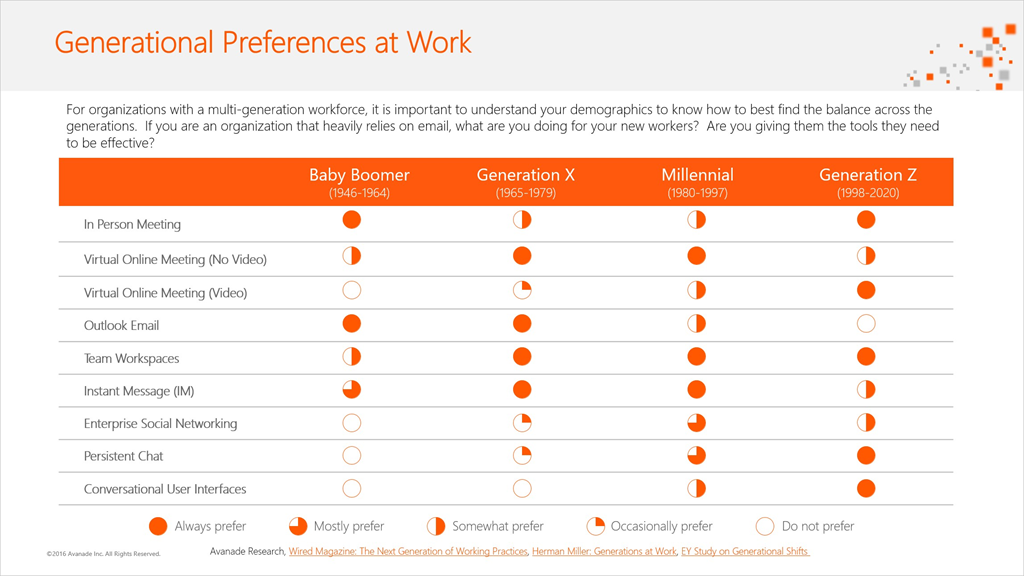
imageAvanade has written a nice blog post that talks to the frequent issue of “what Office 365 collaboration tool should we use for a given need”. 

They wrote a blog post that outlines 9 modes of communication & collaboration and how they appear to different generations in the workforce.  They also should what specific Microsoft Office 365 solutions meet these needs.

image

Read the full blog post here:

Download the slides here:

imageToday Jeff Teper, CVP of SharePoint & OneDrive for Business, announced the SharePoint Virtual Summit, an online event similar to last year’s news-packed “The Future of SharePoint” event, taking place on May 16th, 2017. 

Taken from the announcement page:

At this year’s SharePoint Virtual Summit you’ll learn how to take advantage of SharePoint, OneDrive and the rest of the Office 365 collaboration toolkit to create a connected workplace, empowering you to securely connect to the people and content you need, to transform business processes, to inform and engage your employees, and to harness the collective knowledge of your organization.

Microsoft Corporate Vice President Jeff Teper will unveil the latest product innovations and roadmap. You’ll also hear from industry-leading customers on how they are leveraging these technologies as part of their digital transformation. Jeff will be joined by Microsoft Corporate Vice Presidents James Phillips and Chuck Friedman to discuss how Office 365— connected with Windows and Azure—is reinventing productivity for you, your teams and your organization.

Read more at the announcement site here:

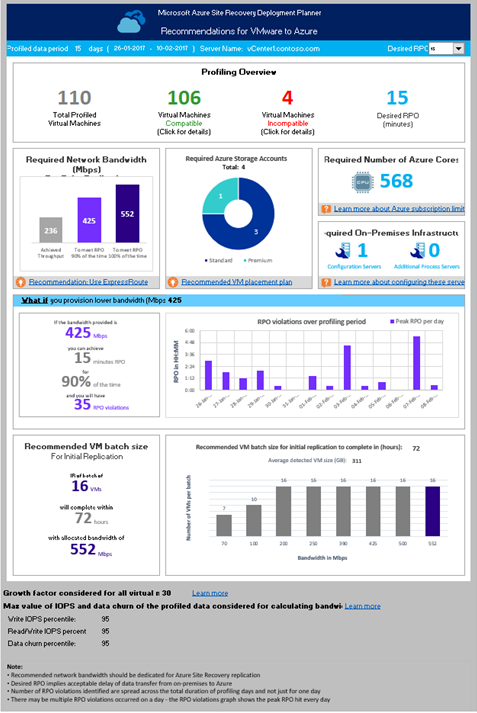
imageWith large enterprises deploying Azure Site Recovery (ASR) as their trusted Disaster Recovery solution to protect hundreds of virtual machines to Microsoft Azure, proper deployment planning before production rollout is critical. Today, we are excited to announce the Public Preview of the Azure Site Recovery Deployment Planner. This tool that helps enterprise customers to understand their on-premises networking requirements, Microsoft Azure compute and storage requirements for successful ASR replication, and test failover or failover of their applications. In the current public preview the tool is available only for the VMware to Azure scenario.

  • The Deployment Planner can be run without having to install any ASR components in your on-premises environment.
  • The tool does not impact the performance of the production servers, as no direct connection is made to them. All performance data is collected from the VMware vCenter Server/VMware vSphere ESXi Server which hosts the production virtual machines.

For more information on the Public Preview or to download the tool, visit:

image

Damn. I missed this.

Apparently, the Azure Active Directory engineering team did an “Ask Me Anything” (AMA) on Reddit On March 9th from 10AM-1PM PST.
https://blogs.technet.microsoft.com/enterprisemobility/2017/03/02/first-ever-azure-ad-ask-me-anything-ama-march-9th-10am-1pm-pacific/

Here’s a few of the many, many questions they answered:

  • “ETA on Azure Active Directory Domain Services in ARM?”
  • “Any cool new AAD-Joined device features in the pipeline?”
  • “When we can expect self service reset to be available from the windows lock screen?”
  • “Why doesn’t the Authenticator App say what you are trying to authenticate?”
  • “I have O365 and have just purchased EMS/Azure AD Premium, what should I do next?”

Yeah, I’m ticked I missed this and even more ticked I didn’t get to share it with y’all before it happened.

Here’s the archive of the AMA for your own viewing:

Here’s the video from the product team about Azure Active Directory:

Azure Active Directory: Protect your business, empower your users

Taken from the registration site:

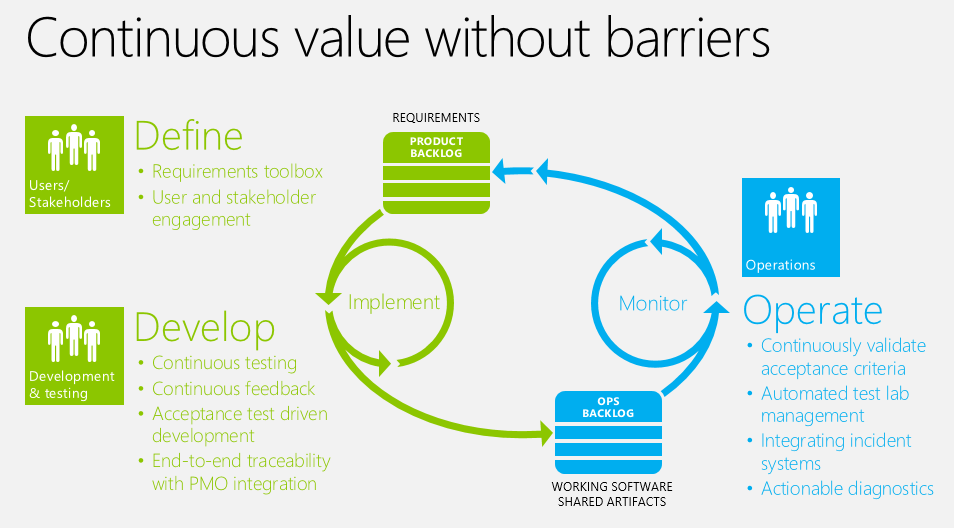
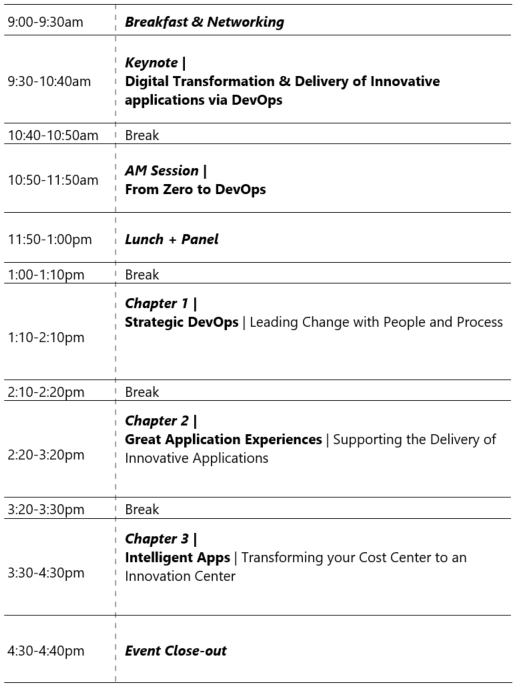
imageCustomers and employees quickly judge the health and relevance of organizations based on their application experience.  Because of this, it’s never been more important to ensure that the most stunning, innovative and insightful applications are being designed, released, maintained and continuously improved.

Microsoft technologies support a holistic environment that can succinctly deliver the most intelligent applications, streamlined operations, and an IT platform that allows you to create a new breed of applications. Being able to successfully combine DevOps, mobile + web application development, and intelligence can produce truly innovative applications that can drive these successes and gain/maintain customer and employee loyalty.

This event will provide you with the insight to optimize your development, IT operations, and data departments, turning them from cost centers into innovation centers. Let us help you enable a robust application platform that can support your next generation of innovative applications.

WHO SHOULD ATTEND

Sr. Development, IT and Data Professionals who are interested in identifying how they can move their organization forward by implementing DevOps practices, tools and adoption of the newest application architecture and functionality that can differentiate their organization from their competitors.

We suggest that you forward this to your colleagues who would be working with you on implementing this transformation.

Please note:  This is ‘NOT’ a hands-on lab boot camp.

image

« Newer Posts - Older Posts »

Categories