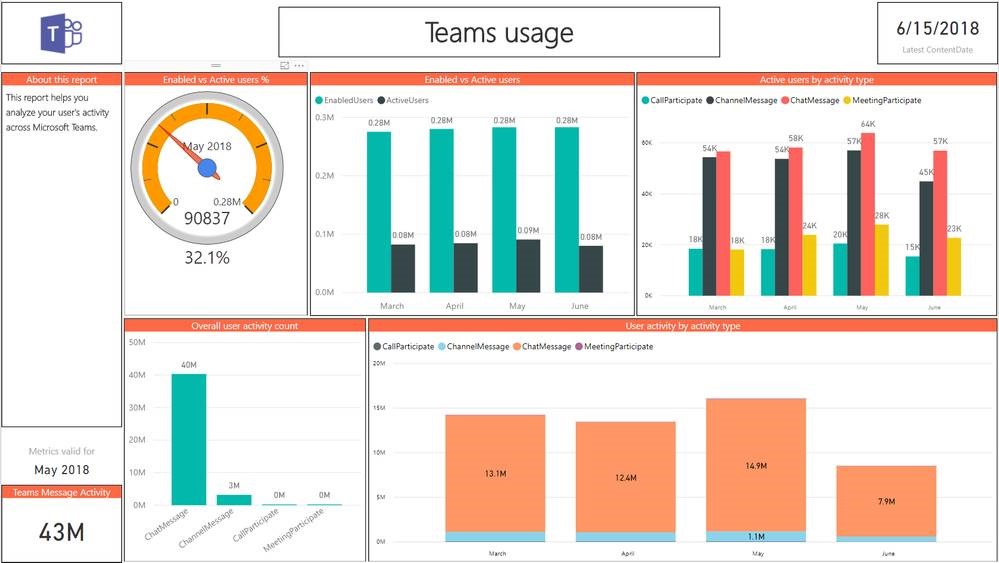
Today, we’re excited to announce the general availability of Microsoft 365 usage analytics in Power BI, with new data and reports for Microsoft Teams. You can get started with usage analytics in Power BI right away, or read on for more details.

clip_image002New data and reports for Teams and Groups
Microsoft Teams is the hub for teamwork that integrates all the people, content, and tools your organization needs to be more engaged and effective. Usage analytics for Microsoft 365 includes information about how your organization is using Teams to help your users create, collaborate, and communicate more effectively.

The Teams Usage report provides an overview of how your organization is using Teams, including a view on how they use the various functions like chat, channels, and meetings.

(Read more about Teams Overall Usage, Teams User Activity, Teams inclusion in Product Usage, and more.)

imageDid you know that you can leverage Azure Cognitive Services without writing a single line of code?

Microsoft Flow has dozens of GUI-based templates for common tasks. Just add your subscription keys, connect your accounts, and go!

WHAT IS MICROSOFT FLOW?
Microsoft Flow is a codeless automation environment that enables end users to orchestrate multi-step workflows that allow them to execute repetitive tasks or trigger automated processes.

And anyone is licensed to use Microsoft Flow via the “Free” version – especially if they have Office 365 subscriptions for its employees, in which case they have “Flow for Office 365”. (https://flow.microsoft.com/en-us/pricing/)

WHAT CAN COGNITIVE SERVICES DO?
Cognitive Services includes things like text analytics that can scan text content for “whether a Tweet is positive or negative” or “whether a person is happy or sad”.  These can act as triggers for other actions that Flow can automate.

Here’s some Microsoft Flows using:

…and there are Connectors to use the Bot Service, QnA Maker Service, Custom Vision API, and more!

For a brief tutorial on how to use Microsoft Flow & how to incorporate Cognitive Services:

Posted by: kurtsh | July 23, 2018

INFO: Azure Pricing Calculator & Azure TCO Calculator

There are two calculators that everyone using Azure should know:

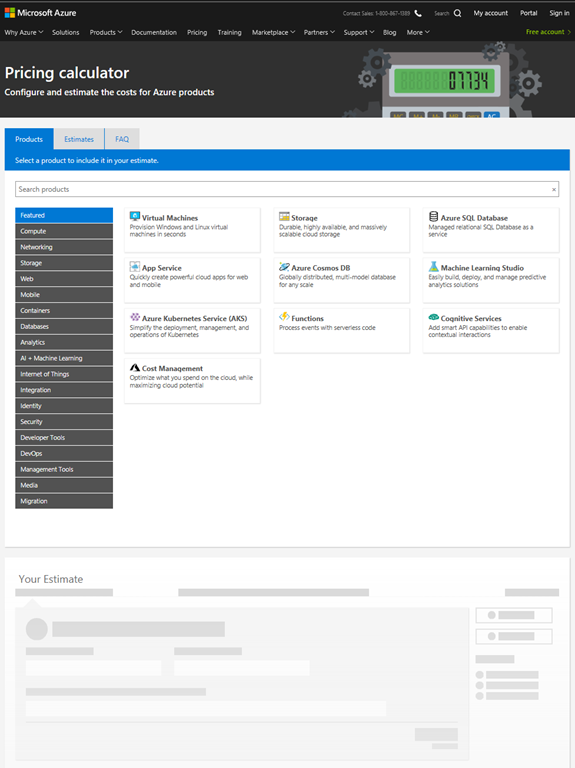
imageAzure Pricing Calculator
Estimate your expected monthly bill using our Pricing Calculator, and track your actual account usage and bill at any time using the billing portal. Set up automatic email billing alerts to be notified if your spend goes above an amount you configure.

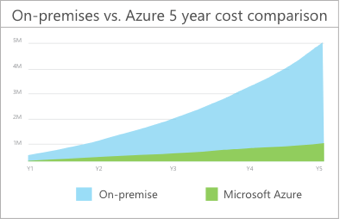
imageAzure TCO Calculator
Quickly compare the total cost of ownership (TCO) of your on-premises infrastructure with a comparable Azure deployment using our TCO Calculator and estimate savings you can realize by moving to Azure.

For a quick tutorial on how to use the Azure Pricing Calculator, check out this video:

  • VIDEO: Using the Azure Pricing Calculator to price out a simple VM based solution

https://blogs.technet.microsoft.com/uspartner_ts2team/2018/02/06/using-the-azure-pricing-calculator-to-price-out-a-simple-vm-based-solution/

Posted by: kurtsh | July 23, 2018

TRAINING: Getting started with Azure

Getting started with Azure?  Explore free online learning resources from videos to hands-on-labs to develop skills you need for your job and career.

Free online courses with Pluralsight

Gain the know-how and confidence your job demands through these free online courses, delivered in partnership with Pluralsight.

Follow a guided learning path

Build practical job skills you can start using right away. Azure learning paths are provided for free in partnerships with Pluralsight.

Hands-On labs

Practice what you learned with free interactive hands-on labs. Apply and validate your learning in live Azure environment.

Azure certification

Build expertise and advance your career with Azure certification. Whether you’re new to Azure or already a cloud professional, level up your skills and gain opportunities for career advancement.

For this and more information, on:

  • Free Azure accounts: $200 in Azure  credit and 12 months of popular services free
  • Microsoft Azure Essentiasl
  • Visual Studio Dev Essentials
  • Microsoft Tech Community
  • Azure Technical Documentation

…visit:

imageWe just recently published a table that goes over the differences between ‘Microsoft Teams’ and ‘Microsoft Teams Free’ that Teams administrators should review.

tl;dr: Microsoft Teams has the following capabilities above & beyond Microsoft Teams Free:

  1. Scheduled meetings
  2. Meeting recordings
  3. Phone calls and audio conferencing
  4. Administrative tools for managing users and apps
  5. Usage reporting for Office 365 services
  6. 99.9% financially backed SLA uptime
  7. Configurable user settings and policies

Read more about all the features shared between the services SKU’s:

image

Forward-thinking CMOs are driving marketing transformation initiatives and many organizations are benefiting from their efforts. They are using emerging technologies to find new customers and to build deeper relationships and loyalty with existing customers. Many are leveraging Artificial Intelligence and automation to achieve their transformation initiatives. 

So what does a modern marketing team look like and what are the keys to success in marketing transformation? Argyle Executive Forum, in partnership with Microsoft is bringing together leading marketing executives to discuss these topics and more at our 2018 CMO Virtual Event: Defining Modern Marketing. Through an interactive panel discussion, we’ll explore the following topic areas: 

  • Understanding Artificial Intelligence, the growing application of AI and next generation technologies for Marketing
  • The implications of new technologies on your organization
  • How to optimize media through AI
  • Using AI for customer journeys
  • How to drive 2-way conversations with your customers using AI
  • The key success factors in modern Marketing transformation
  • How to get started on your journey

Microsoft is sponsoring the event:

For modern marketing, our tools across Intelligent Analytics, Streamlined Operations, and Incredible Experiences help accelerate creativity and productivity, providing a strong operational foundation for your marketing team to thrive and focus on your customers. Companies like Pier One, MediaCom and Real Madrid are working with Microsoft technology to engage their customers across the world.

Read more at: www.microsoft.com/marketing.

Register for “2018 CMO Virtual Event: Defining Modern Marketing” here:

imageEveryone will soon face a decision point regarding the end of support for SQL Server 2008/R2 (July 2019) and Windows Server 2008/R2 (Jan 2020).

To help our customers in this moment, we are announcing extended security updates for three years beyond the end of support dates, free only in Azure.

This means our SQL Server & Windows Server 2008/R2 customers can migrate to Azure to get free extended security updates.  This offer provides unmatched value by moving to Azure while helping customers who need to maintain their existing SQL Server & Windows Server 2008/R2 environments.

The announcement blog for this new offer was published yesterday.

imageBeginning today, Microsoft Teams is available in a free version worldwide in 40 languages. This offer was designed for small businesses and groups of coworkers that don’t have commercial Office 365 subscriptions.

Now with this great introductory experience, any group can use Teams as their hub for teamwork and discover the value of Office 365 as they grow and scale.

Get the free version of Microsoft Teams, available now. And with more people using Teams, we’ll show you updates that extend stability and management, including for developers, how you can now bring your Line of Business applications into Teams.

Read more about this announcement here:

Posted by: kurtsh | July 10, 2018

INFO: Screen sharing over Skype Meeting Broadcast

imageRecently, there’s been a surge in the number of people learning Skype Meeting Broadcast in Southern California.  A lot of it seems to originate from certain other solutions not doing very well when it comes to global reliability or scalability – both of which Skype Meeting Broadcast does very well.  Skype Meeting Broadcast is very reliable – and available to every Office 365 E3+ subscriber.

SCREEN SHARING CHALLENGE
One thing Skype Meeting Broadcast doesn’t do very well – or at all for that matter – is broadcast screen sharing.  Skype Meeting Broadcast will broadcast a video source and also a PowerPoint presentation… but if you need to share a desktop screen for the purposes of a demo during a broadcast, Skype Meeting Broadcast doesn’t inherently deliver that capability.

imageFortunately Sonia Cuff found a relatively simple workaround for this, using a popular software tool called XSplit Broadcaster that simulates a virtual video camera with the video source being the desktop screen.

Read about this solution here in Sonia’s article on REgarding 365:

imageThis last week was a big week for Microsoft Cloud and Windows Server with the delivery of our first ever Windows Server Summit. The event was a great opportunity to engage the Windows Server community, provide HOURS of updates since the last Microsoft Ignite conference and get them excited for the upcoming Microsoft Inspire and Ignite conferences in July and September respectively.

We had top subject matter experts delivering a comprehensive agenda detailing what’s new in Windows Server and where we’re going in Windows Server 2019 with regard to Hybrid Cloud, Hyper-Converged Infrastructure, Security and Application Platform.

The Windows Server Virtual Summit is available online for streaming here: https://www.microsoft.com/en-us/cloud-platform/windows-server-summit

« Newer Posts - Older Posts »

Categories