imageMicrosoft provides open access to no-cost, instructor-led complimentary training for a variety of topics.

  • Azure
  • Microsoft 365
  • Power Platform
  • Security
  • Dynamics 365

US-ONLY
Here is a US-centric view of the upcoming virtual training we have for:

WORLDWIDE
And here is the super-secret master index of all the training we deliver online worldwide.  (The URLs are crafted for Pacific Timezone & English language delivery.)

Enjoy.

imageWe announced a new set of capabilities for Microsoft Defender for Endpoint that empower organizations to discover and secure network devices and unmanaged endpoints.

This is especially critical in the new global hybrid working environment, which exposes the most challenging cybersecurity landscape we’ve ever encountered.

For more details, visit:

Psst. If you’re interested in some one-on-one time with the product groups responsible for BC/DR here at Microsoft, here’s 2 opportunities to hear about what’s coming and provide feedback at Build 2021 this week.

—————–

Join Business Continuity Disaster Recovery Product roundtables at Microsoft Build 2021 on Wednesday, May 26!

Note:

  • Must be registered for Microsoft Build 2021 – if you still need to register, visit https://build.microsoft.com
  • You will need to fill out a questionnaire to determine eligibility to participate.

Roundtables:

Wednesday, May 26 2:30 AM – 3:30 AM
CON-PRT125 Business continuity-challenges in planning & execution (Intermediate 200)
Do you have a need for business continuity on Azure? Do you need help in choosing the right business continuity solution – Azure Backup or Azure Site Recovery or High Availability or a combination of the above? Do you face challenges while ensuring business continuity of your applications? Join the discussion with Azure Business Continuity product team to share your journey and let us fix these challenges for you!
http://aka.ms/BusinessContinuity_MicrosoftBuild2021

Wednesday, May 26 6:30 AM – 7:30 AM
CON-PRT109 Azure Backup: automation & security for databases & storage (Intermediate 200)
What are the key automation clients you use for backup management in Azure? Help us build end-to-end backup automation tools to protect and monitor your data assets at scale in Azure. Are you looking to build generic DIY backup solutions using database clients? How do you manage and access secrets for databases in Azure? Our Azure Backup engineering teams would love to collaborate on a number of roadmap features that span IaaS and PaaS across Windows and Linux.
http://aka.ms/AzBackup_MSBuild21

imageIf you need to deploy Microsoft Teams via Microsoft Endpoint Configuration Manager (formerly known as SCCM) as well as where to download the .MSI packages for the Teams client, the instructions on deploying the package are available below:

  • .MSI Download (for Commercial, GCC, GCC High, DoD – 32-bit, 64-bit, ARM)
  • Deployment procedure
  • How the Microsoft Teams MSI package works
  • PC Installation
  • VDI installation
  • Clean up and redeployment procedure

Read more about this process here:

(There’s also a 3rd party blog with step by step snapshots of the steps to take here from Prajwal Desai: https://www.prajwaldesai.com/deploy-microsoft-teams-using-sccm/)

imageInternet Explorer 11 has increasingly become more of a threat to Enterprises.  Bad actors aren’t just attacking IE11 users as they browse – they’re attacking users through phishing, software vulnerabilities, and subsequently calling the IEXPLORE.EXE executable on the desktop outside of the user’s conventional browsing as part of their threat.

IT organizations need to not only move to a modern browser like Microsoft Edge – they need to prevent Internet Explorer 11 from being accessible by users & foreign processes on the desktops they manage.

The following instructions provide guidance around 4 means by which Internet Explorer 11 can be disabled:

  1. Use Control Panel (client systems only), Feature On Demand
  2. Use DISM (client and server systems), Feature On Demand
  3. Use Control Panel (client systems only), Windows Feature
  4. Use DISM (client and server systems), Windows Feature

For more details on each of these methods of disabling Internet Explorer 11, visit:

imageMany compliance requirements or organizational policies require approval before the deletion of records. Often this review process has multiple phases and involves numerous groups of people. Previously, Microsoft Records Management allowed only one stage of review.

Today, we are announcing the public preview of multi-stage disposition approval. Multi-stage disposition approval is available today worldwide in all commercial tenants. Please try these features and give us your feedback. This release includes several groups of new features, including:

  • The ability to specify a multi-stage approval process in retention label settings
  • Improvements to the reviewer experience
  • Additional features for records management admins

For more information, please read the announcement here:

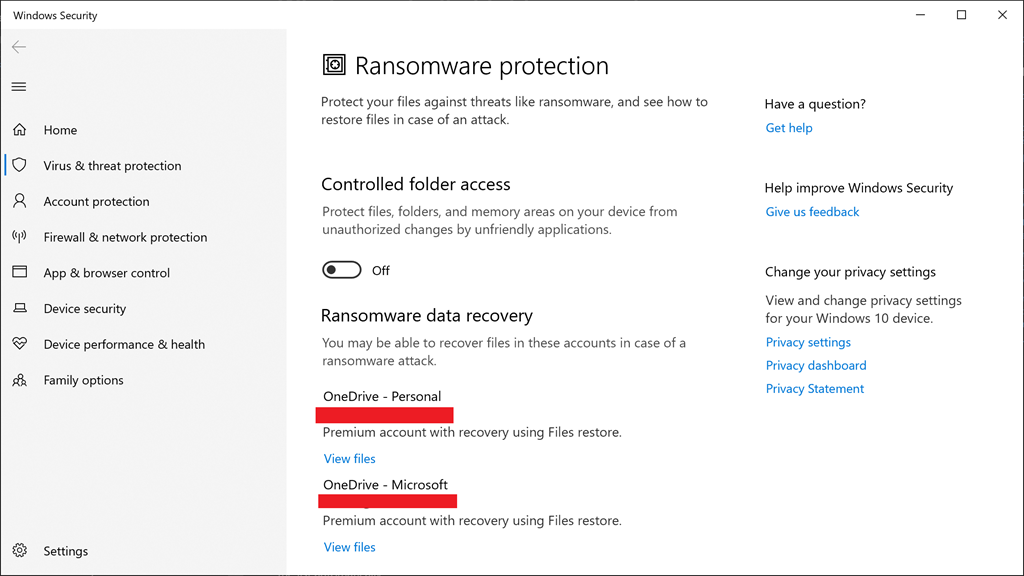
imageWindows 10 comes with built-in Ransomware protection that guards files, folders & memory areas on your PC from unauthorized access/changes (like encryption) by bad actors & unfriendly applications.

CONTROLLED FOLDER ACCESS
This active protection is also called “Controlled Folder Access for Windows 10” and can be found by simply typing “Ransomware protection” in the START menu.

This is a Windows Security pane under “virus & threat protection” that allows for:

  • Viewing the history of how Controlled Folder Access has blocked attempts
  • Configuration of folders to be protected
  • Authorize applications to bypass Controlled Folder Access

IT organizations can control the activation of this function in Windows 10 through Microsoft Endpoint Manager or Microsoft Intune.

RANSOMWARE DATA RECOVERY
Additionally, personal data recovery is possible by perpetually backing up one’s documents to OneDrive (Personal) or OneDrive for Business.

Pointers to these backed up files are visible in the Ransomware Protection menu as well.

For more details on “Controlled Folder Access”, read the following:

Posted by: kurtsh | May 20, 2021

NEWS: Internet Explorer 11 to be retired June 2022

That’s it.  Internet Explorer 11 is going to be retired.  Customers have a little more than 1 year to transition to Microsoft Edge.

Microsoft Edge provides superior security & protection for end user Internet browsing while also providing:

  • Internet Explorer 11 site compatibility
  • Chrome web site compatibility – including Chrome extensions
  • Hardware Virtualization-based protection from bad web sites
  • Strong privacy & data protection from data collecting web sites & services
  • Enterprise manageability & controls through Group Policy, SCCM, & Intune
  • Active Directory authentication/passthrough
  • Fast performance, optimized for low power utilization on laptops/tables
  • And many more benefits…

Again:

Internet Explorer 11 desktop application will be retired and go out of support on June 15, 2022, for certain versions of Windows 10.

image

This includes Windows 10 Home, Pro, Enterprise… so yes, it very likely includes your installation. 

For more details, read the FAQ on the the IE 11 retirement:

Read more about the retirement and guidance here at the announcement post here:

Look what just showed up in the Microsoft 365 Admin Center for GCC customers:

image

Here’s the message text from https://portal.office.com/adminportal/home?ref=MessageCenter/:/messages/MC256836:

Whiteboard for GCC

MC256836 · Published May 17, 2021

Message Summary

Whiteboard for web and Teams meetings will become available for your tenant.

Note: The new Whiteboard experience requires OneDrive for Business. If your organization does not have OneDrive for Business, please verify that Whiteboard is disabled.

When this will happen

Starting in mid June and completing by mid-July.

How this will affect your organization

Your end users can create and collaborate on whiteboards in the web application and in Teams meetings.

Whiteboard will begin a gradual roll-out in GCC. The data is stored in OneDrive for Business and Whiteboard is on by default but can be disabled using the SharePoint admin PowerShell cmdlets. The supported features allow you to create and collaborate on whiteboards using the web application and within a Teams meeting. It does not yet include native applications on Windows 10, Surface Hub or iOS.

Note: If you have a Surface Hub, the Whiteboard application will continue to operate in a local-only mode and cannot collaborate with the service. We will be adding support for the native applications later in 2021, another announcement will be shared as we have more details.

What you need to do to prepare

If you do not wish to have this service available, you can disable it using the SharePoint Online PowerShell module following the instructions in the Additional Information.

If you do not have OneDrive for Business, you should verify that Whiteboard is disabled using the SharePoint Online PowerShell module.

Help keep your organization resilient imagethrough security & compliance challenges

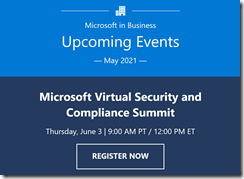
The realities of widespread remote and hybrid work scenarios pose new challenges for organizations. Security, compliance, and identity are more complex—and more critical—than ever. Join us on Thursday, June 3rd 2021, for the Microsoft Virtual Security and Compliance Summit to hear some of the industry’s leading voices speak on mitigating risks and strengthening your security posture.

At this event, you’ll gain fresh insights on:

  • Perspectives on what’s top of mind for CISOs – cloud-first security, training, resiliency
  • Get an inside look at how we secure Microsoft today
  • Securing the remote and hybrid workplace
  • Trends and best practices from Microsoft defenders, detection & response teams
  • Strategies for protecting against insider risk
  • Tactics to protect and govern data across your digital estate

Don’t miss this interactive, high-profile event with Microsoft experts—and the opportunity to connect with us on the cybersecurity techniques you need to help safeguard your organization in 2021 and beyond.

« Newer Posts - Older Posts »

Categories