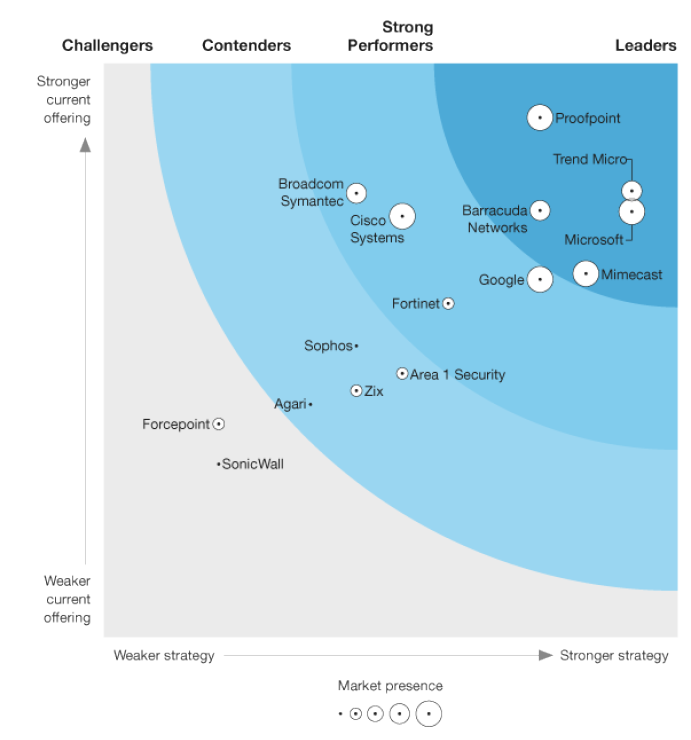
imageForrester just announced that “Microsoft Cloud App Security” is a tremendous leader in their evaluation of Cloud Security Gateways.

I am thrilled to share that Forrester Research has named Microsoft Cloud App Security as a Leader in The Forrester Wave™: Cloud Security Gateways, Q2 2021. Additionally, Microsoft received the highest score in the strategy category.

People have increasingly used cloud apps to stay productive and connected during this challenging period. Organizations have accelerated the migration to the cloud to address their evolving needs. While the adoption of cloud apps offers a simple and cost-effective solution, it can also lead to a rise in shadow IT and creates an urgency to address new security and compliance requirements.

Our continued innovation in Microsoft Cloud App Security is focused on helping you gain visibility of your cloud apps, discover shadow IT, protect sensitive information anywhere in the cloud, enable protection against cyber threats, assess compliance, and manage security posture across clouds. We are honored to be recognized as a leader in this Forrester Wave for Cloud Security Gateways based on the strength of our security solution and strategy.

Read more at the announcement blog:

imageWith so many people working remotely, it is a good time to review guidance on deploying security updates to remote devices, such as desktops, laptops, and tablets. Here are some resources to answer questions pertaining to deploying updates to remote devices.

See also: Mastering​Configuration Manager Bandwidth limitations for VPN connected Clients

The Security Update Guide is our recommended resource for security update information. You can customize your views and create affected software spreadsheets, as well as download data via a RESTful API. As a reminder, the Security Update Guide has now formally replaced traditional security bulletin webpages.

See following useful links:

For the entire list of published Security Advisories, visit the Security Advisory Archive page. To learn about security vulnerabilities that Microsoft discovered in third-party products, visit the Microsoft Vulnerability Research Advisories page.

Best practices on managing cyber-risks and protecting your information in today’s work-from-home world

Iimagenternal bad actors are always a possibility and external ones are assured—what types of monitoring and testing processes and FinTech tools are appropriate to detect and stop these types of threats?

In this webinar, delivered by Microsoft security experts at Compliance Week’s Cyber-Risk & Dara Privacy Summit, you will learn:

  • How Microsoft looks at cybercrime through the Digital Defense Report
  • Cybercrime issues and considerations in the current remote environment
  • How Microsoft solutions can help with internal and external protection across the threat kill chain
  • Actionable learnings of what you can do today to mitigate internal and external threats

Visit this website to register:

Keep up with the evolving compliance and risk landscape

imageAs the pace of digital transformation accelerates, organizations face greater security risks associated with data, users, devices, and applications. More than half of risk management decision-makers say IT and cybersecurity risks are their biggest concern (1). It’s critical today for IT professionals to have the knowledge and tools to effectively assess potential threats and key challenges to safeguarding the organization.

Many organizations are trying to meet compliance requirements, and figuring out where to start and what to implement can be overwhelming. In this webinar, learn how you can use Microsoft Compliance Manager to help you prioritize and take risk-informed actions to manage compliance.

Explore:

  • The benefits of implementing a solution to help you meet organizational compliance requirements.
  • Recommendations and use cases to help you manage data and compliance risks
  • How Microsoft Compliance Manager can support you throughout your compliance journey.

(1) Source: Gartner (Risk management market landscape web survey)

imageCheck out our new, free Microsoft Learn module focused on managing Windows Updates!  If you’re not familiar with the full end to end process such as:

  • understanding update rings
  • enrolling in feature releases
  • managing cloud-based driver updates
  • configuring Microsoft Endpoint Manager or Group Policy for deferral periods
  • setting compliance deadlines
  • optimizing downloads & managing bandwidth
  • enabling power management to wake systems for updates
  • managing when to restart
  • controlling self-updating
  • etc.

…check out this module.  It’s not long and it’s VERY informative for those wanting to make sure they aren’t missing something in their Windows Servicing strategy.

By the end of this module you will be able to:

  • Describe the tools you can use to update Windows devices
  • Manage quality, feature, and driver updates for Windows devices
  • Manage the post-deployment experience for updates

View the module here:

imageMicrosoft has recently released 30 multi-module “learning paths” for Security Engineers spanning Azure, Azure Active Directory, Microsoft 365 as well as a few on-premises technologies such as Active Directory, Windows Server, & Windows 10.

These are available at no cost to the student.  Each path requires roughly 5 hours of training.  Here’s a sample of what’s available as of 6/19/21:

Azure:

Microsoft 365:

Review the entire security training catalog here:

imageLooking for a framework to help you transform Windows endpoint management and simply by moving to a cloud-first model?

We just published exactly that… a framework for Endpoint Managers & Client Administrators to make that transformation.

Investments in Azure and Microsoft 365 can streamline your transition to the cloud and make it easier to manage endpoints across your organization. Now let’s explore ways to develop and implement effective strategy to make that transition and help you create the “how” and “why” to leverage these solutions in your own environment.

  • Update
  • Extend
  • Standardize
  • Revitalize
  • Secure
  • Simplify

Review the framework in it’s entirety here:

imageIf you are an existing Microsoft Defender for Endpoint customer but have Exchange servers that are not onboarded, see instructions at this documentation site for onboarding Windows Server to Microsoft Defender for Endpoint.

Posted by: kurtsh | June 21, 2021

RELEASE: Microsoft Teams Panels

imageMicrosoft Teams Panels are now generally available. 

Teams Panels are discreet touch-friendly “signage” posted outside of a conference room that displays current & upcoming meetings. First & foremost they indicate with a RED or GREEN glow if the conference room is occupied but they also allow people to:

  • Reserve the room on the spot through the touch interface
  • Visually display maps to identify available rooms nearby
  • Notify current occupants that the next meeting is waiting outside to begin
  • Automatically connect to the Teams Meetings within the conference room’s audio/video facilities

With Teams Panels, employees can book an available room on the spot or find another time slot and reserve it right from the panel. With vibrant, color-coded LED indicators, it’s easy to determine space availability from a distance. And, the intuitive and easy-to-read UI presents space and meeting information, so you can confirm you’re in the right place at the right time.

A popular feature available now is the ad hoc meeting scheduler. Let’s say you and a colleague need to jump on a quick client call. Simply go to the Teams Panel outside a meeting space. If the time slot is not booked, it will appear green. Just tap the screen to instantly book it and the room is yours for the time selected. Teams Panels use the Exchange calendar for the booking of the room, so users can have insight in the meeting space free or busy status at any time.

For more details on Microsoft Teams Panels or to contact a manufacturer of a Teams Panel like Crestron or Yealink, visit:

For other examples of Microsoft Teams-enabled hardware, visit:

Posted by: kurtsh | June 21, 2021

VIDEO: Yammer Governance (in a Microsoft 365 World)

Learn about administering your Yammer network in Microsoft 365 and managing compliance, including a double-click into Yammer data governance features like:

  • eDiscovery
  • Data Retention
  • Native Mode

imageYour one-stop session for administering your Yammer network in Microsoft 365 and managing compliance, including a double-click into the latest Yammer data governance features like eDiscovery, Data Retention, and Native Mode.

View the content here:

« Newer Posts - Older Posts »

Categories