Posted by: kurtsh | October 13, 2021

EVENT: Bloomberg Policy Blueprint – October 19th, 2021

Join us on October 19th at the virtual Bloomberg LP Policy Blueprint event, where government and industry speakers, including Microsoft US President Deb Cupp, will share their perspectives on skilling, sustainability, and digital transformation.

imageJoin us this October 19th for Bloomberg Policy Blueprint virtual event.

During this event, we’ll convene government technology leaders, senior policymakers, and business executives to examine how to work together, be more agile, adaptive and solve big problems better to serve their citizenries.

Discussions will include:

  • Government’s Digital Transformation
  • Supply Chain Resilience: Making American Business More Competitive
  • A Look Forward to COP26
  • Reimagining America’s Clean Energy Grid
  • A New Era of Public-Private Sector Collaboration

Speakers include:

  • Albert Bourla DVM, PH.D., Chairman and Chief Executive Officer, Pfizer
  • Deb Cupp, President, Microsoft US
  • Barbara Humpton, President and CEO, Siemens Corporation
  • Clare Martorana, Federal Chief Information Officer, Office of Management and Budget, Executive Office of the President
  • Robert Sanchez, Chairman and CEO, Ryder System, Inc.
  • David M. Turk, Deputy Secretary, U.S. Department of Energy
  • Brandon Wales, Executive Director, Cybersecurity and Infrastructure Security Agency (CISA)
Register below:

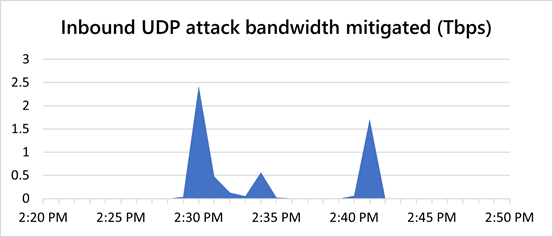
The 2nd largest recorded DDoS attack in history was mitigated the other day… with “Azure DDoS Protection Standard”. It’s a great cost-efficient way to protect organizational assets on the public Internet.

image“The last week of August, we observed a 2.4 Tbps DDoS attack targeting an Azure customer in Europe. This is 140 percent higher than 2020’s 1 Tbps attack and higher than any network volumetric event previously detected on Azure.

Attacks of this size demonstrate the ability of bad actors to wreak havoc by flooding targets with gigantic traffic volumes trying to choke network capacity. However, Azure’s DDoS protection platform, built on distributed DDoS detection and mitigation pipelines, can absorb tens of terabits of DDoS attacks. This aggregated distributed mitigation capacity can massively scale to absorb the highest volume of DDoS threats, providing our customers the protection they need.”


Read more here:

If you can attend, the former CIOs of New York State, Seattle & Redmond are going to be explaining how municipal departments & Information Security organizations can obtain Federal funding for Cybersecurity projects.

clip_image002Unlock your full cyber capability in preparation for Federal Funding

State and local government cyberattacks are increasing every day. As agencies progress in an ever-changing world, they must transform operations through secure cloud solutions as the engine for innovation and efficiency, while delivering trust at scale for their communities.

Microsoft is here to help the government answer the nation’s call on strengthening inter- and intra-agency capabilities. Together, we can help your agency reach not only modernization milestones but also greater collaboration and trust, so we can protect what matters most.

Join us in this webinar where we’ll help you get started on your cybersecurity plan in advance of Federal funding initiatives. Hear from industry experts such as former State CIOs and Microsoft State Government Affairs as you learn how to:

  • Identify considerations when creating a plan to pinpoint and monitor risks.
  • Prioritize actions based on risk.
  • Approach solutions like security information event management (SIEM) and security orchestration automated response (SOAR).
  • Increase cyber protections and gain greater visibility into cloud apps and services to control sessions and protect workloads in real-time.
  • Learn about the integration of information technology (IT) systems used for data-centric computing with operational technology (OT) systems used to monitor events, processes and devices.

Face this new age with a strong cybersecurity strategy and be prepared to garner the funds you need.

Sign up today.

image

Did you know that Project Plans 1, 3, and 5 have two web-based solutions for users called “Project for the Web” and “Project Online”?

Subscribed users of any of the 3 plans have access to both however there’s some vast differences between the two “web apps” that project managers need to know about.

In general:

  1. “Project for the Web” is an innovative solution that enables people to build project plans & publish them online, similar to how “Project for the Desktop” or “Project Professional 20xx” does.
        1. Based on Power Apps, Power Automate, Power BI
        2. Being actively developed & invested in
  2. “Project Online” is a plan & portfolio management solution that enables project managers to view & manage existing plans.
        1. Based on SharePoint Online
        2. Being maintained for security & support

For visual details on the differences between the two, check out this video:

    For written documentation on the differences, review the Service Description of each:

    Posted by: kurtsh | October 12, 2021

    INFO: Windows 11 means “Security”

    imageThe Windows Security Team recent released a massive post that explains what Windows 11 is all about.

    You’ll hear about how Windows 11 is faster… how it’s smarter in how it enables collaboration… how it improves productivity… how it provides a Windows 10 compatible & consistent experience…

    But the biggest & most important value of Windows 11 is it’s security… it’s ability to protect data & secure access, anywhere as a ‘”Zero Trust-ready” operating system.

    As the world has changed over the past 18-months, companies have been wrestling with ways to keep employees and data protected as they support new ways of hybrid working. We built Windows 11 to be the most secure Windows yet with built-in chip to cloud protection that ensures company assets stay secure no matter where work happens.

    Seventy-five percent of software decision-makers feel that the move to hybrid work leaves their organization more vulnerable to security threats.

    We designed Windows 11 for today’s hybrid workplace. With Windows 11, hardware and software work together for protection from the central processing unit (CPU) all the way to the cloud so our customers can enable hybrid productivity and high-quality employee experiences without compromising security.

    To address the increasing sophistication and number of attacks against firmware/hardware, we partnered with manufacturers to create a new class of Secured-core PCs in 2019 and a new security-specific processor in 2020, the Microsoft Pluton, that redefines Windows security at the CPU.

    The new hardware security requirements that come with Windows 11 are designed to build a foundation that is even stronger and more resilient to attacks. Windows 11 isolates software from hardware. This isolation helps protect access—from encryption keys and user credentials to other sensitive data—behind a hardware barrier, so malware and attackers can’t access or tamper with that data during the boot process.

    Read the blog here:

    imageThe Microsoft Digital Defense Report 2021 released today with some interesting findings.  Here are a few:

    • There are more than 25 different kinds of malicious email techniques in addition to phishing.
    • We’ve seen a 50% year-over-year reduction in employee susceptibility to phish after simulation training
    • 20 million devices: This was the number of devices found to use the default password “admin” in just 45 days of signals.
    • Basic security hygiene still protects against 98% of attacks

    To download the report, visit

    imageThis is a phenomenal blog post that describes EVERYTHING about Microsoft 365 logs.

    1. What logs exist
    2. How to enable logging
    3. What levels of audit exist
      (And the licensing requirements for each)
    4. Who can access logs
    5. What kind of lag time exists for different events
    6. How can data be accessed?
    7. Office Management API
    8. Using Azure Sentinel to ingest logs

    And this is just Part 1.  If you need to collect & hunt through Microsoft 365 logs, you need to go through this post.

    imageGet tips for visibility and management of your cloud spend in Azure using your endpoint of choice, from the Azure Cost Management portal, Power BI for custom views and reporting, to API-based integration that feeds cost data into your existing financial system. Matt McSpirit, Senior Program Manager for Microsoft Azure, joins Jeremy Chapman to share how you can configure your Azure environment to meet specific cost reporting needs.

    Whether you’re from the IT team or the finance team, choose from a number of options:

    • Azure Cost Management in the Azure portal– Gives you the most comprehensive access to cost management views and reports.
    • Azure Cost Management Power BI app– Great visibility with pre-built views out-of-the-box to track your Azure spend at the account, subscription, and resource group level.
    • Power BI desktop connector– For more custom reporting, take our base Power BI template files and customize by building your own views.
    • API-based integration– For ultimate control and customization, use APIs directly to integrate the data within your internal apps and financial systems.

    References:

    Watch the overview from Matt McSpirit here:

    imageMicrosoft Power Platform provides a low-code platform for reporting, workflow, automation, and form development. With applications like Power BI, Power Automate, and Power Apps, the platform can be used to analyze data, automate operations, and develop apps. As the use of Microsoft Power Platform increases, organizations need a mechanism to scale solutions, support makers, and ensure compliance. The best tool to get started is establishing a Center of Excellence (CoE).

    Read more about the Power Platform Center of Excellence here:

    image“I’ll put a link to that doc in the chat”

    “Sorry, my internet is terrible, I’ll put my question in the chat”

    “That GIF from Amy in the chat is hilarious”

    If these phrases sound familiar to you, you’re not alone – people the world over use the chat function in Microsoft Teams and other video-calling services every day. But we could ask: why post messages in parallel to the main conversation? Does it improve or worsen the meeting experience? And crucially, what can we do to make it more effective?

    Why do people chat – and is it a good thing for meetings?

    Read more about the research into this question at the link below:

    « Newer Posts - Older Posts »

    Categories