Posted by: kurtsh | September 2, 2022

INFO: Azure Cloud Center of Excellence

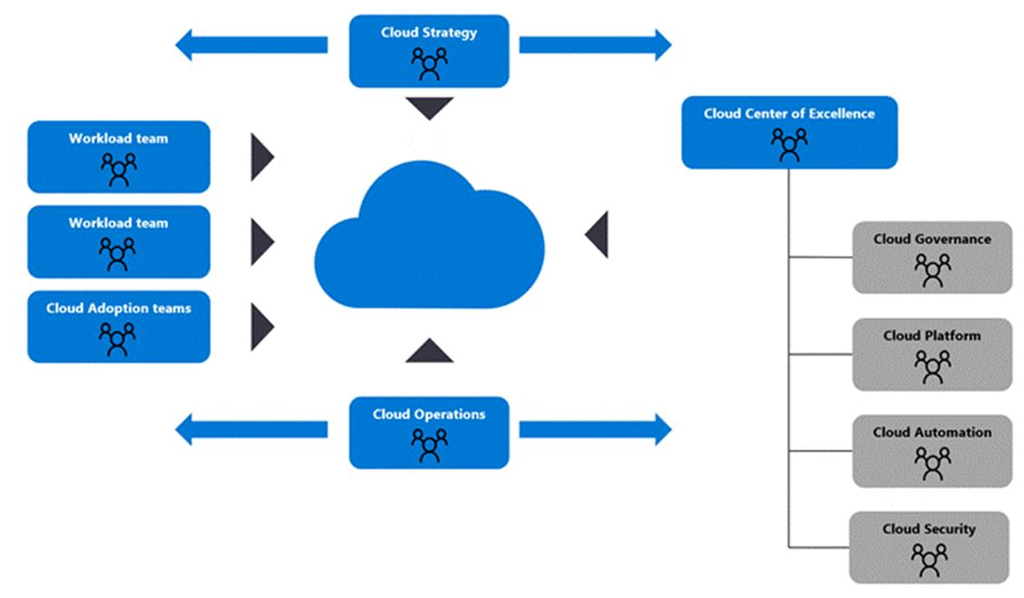
imageThe following documents the specific requirements & tasks oriented around a Cloud Center of Excellence.

  1. Cloud Adoption Framework (CCoE Model)
    https://docs.microsoft.com/en-us/azure/cloud-adoption-framework/organize/cloud-center-of-excellence
  2. IT Team structures for CCoE
    https://docs.microsoft.com/en-us/azure/cloud-adoption-framework/organize/organization-structures
  3. Org alignment for CCoE
    https://docs.microsoft.com/en-us/azure/cloud-adoption-framework/get-started/org-alignment

Microsoft also has a very prescriptive services offering from Microsoft Consulting Services that assists customers with the planning & assembly of their organization’s Cloud Center of Excellence for Azure.  (I should know – I’ve seen the documents & the outcomes of the engagements) Service offerings also exist for Power Platform & Microsoft 365/Modern Work.

Contact your account team for details.
Posted by: kurtsh | August 28, 2022

INFO: Why Windows Server on Azure?

I’m asked frequently what makes hosting Windows Server workloads in Azure more compelling than other cloud providers.

Here’s some of the many benefits that are only available when customers host Windows Server in Azure:

  1. COST (STANDARD) – The unique “Azure Hybrid Use Benefit” Azure customers have allows them to transfer their Windows Server Standard licenses from their Enterprise Agreement (or Software Assurance subscriptions) to use in Azure, reducing cloud VM licensing spend by ~40%… this is not available on AWS or any other public cloud platform. (https://azure.microsoft.com/en-ca/pricing/hybrid-benefit/)
  2. COST (DATACENTER) – Additionally, customers using Windows Server Datacenter Edition cores licensed on an Enterprise Agreement can uniquely use those same Datacenter core licenses BOTH ON-PREMISES & IN-AZURE SIMULTANEOUSLY. This is only available in Azure. (https://docs.microsoft.com/en-ca/azure/virtual-machines/windows/hybrid-use-benefit-licensing)
  3. INTEGRATION – NEW native Windows Server automated configuration management (aka “Azure Automanage”). NEW native Windows Server Management “single pane of glass” (aka “Azure Portal Windows Admin Center”… only available in Azure. (Azure Automanage & Windows Admin Center in the Azure portal)
  4. PERFORMANCE – Windows Server workloads are faster – particularly SQL Server – when run on Azure. https://azure.microsoft.com/en-ca/blog/faster-and-cheaper-sql-on-azure-continues-to-outshine-aws/
  5. SECURITY – Extended Security Updates (Security Patches) for 2008 & 2012 available at no cost… only on Azure (https://www.microsoft.com/en-us/windows-server/extended-security-updates?rtc=1)
  6. INNOVATION – Windows Server has advanced Azure-specific capabilities including:
        1. high-availability “hotpatching” (patching with zero downtime/no reboots)
        2. “ultra-scale up” capabilities (48TB RAM, 64 sockets, 2048 logical procs, etc.)
        3. “SMB over QUIC” (ultra high speed SMB-based file transfer)

          … only available on Azure. (Windows Server 2022 Azure Edition now in Public Preview)

  7. TRAINING – Customer with direct representation from Microsoft that are enrolled in the Microsoft Enterprise Skills Initiative can participate in unique Windows Server classes for running workloads on Azure – at no cost – including:
    1. AZ-800 – Administering Windows Server Hybrid Core Infrastructure
    2. AZ-801 – Configuring Windows Server Hybri8d Advanced Services

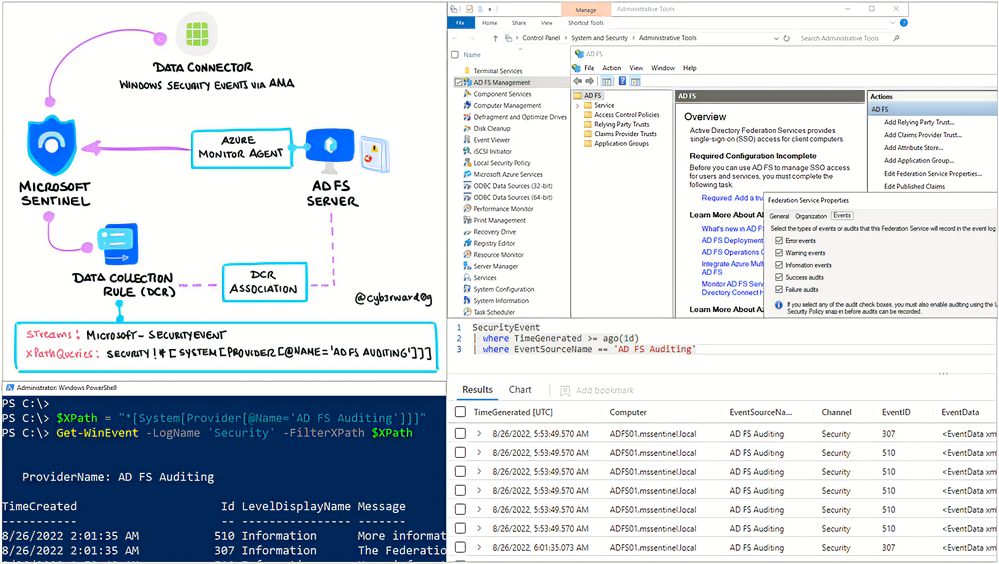
imageFrom the Microsoft Sentinel tech community:

Microsoft’s identity solutions span on-premises and cloud-based capabilities. These solutions create a common user identity for authentication and authorization to all resources, regardless of location. We call this hybrid identity and one of the authentication methods available is federation with Active Directory Services (AD FS).

Active Directory Federation Service (AD FS) enables Federated Identity and Access Management by securely sharing digital identity and entitlements rights across security and enterprise boundaries. AD FS extends the ability to use single sign-on functionality that is available within a single security or enterprise boundary to Internet-facing applications to enable customers, partners, and suppliers a streamlined user experience while accessing the web-based applications of an organization.

In this post, I will show you how to enable AD FS security auditing (based on Microsoft documentation) and how to collect and ship AD FS event logs to a Microsoft Sentinel instance.

Read this very detailed, step-by-step article here:

Posted by: kurtsh | August 28, 2022

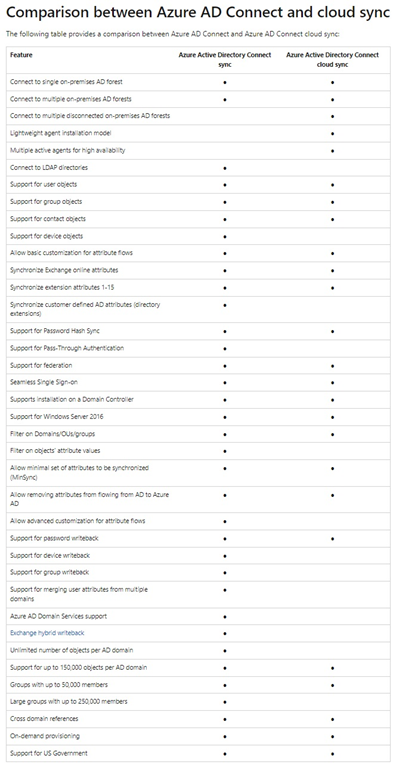
INFO: Azure AD Connect vs Azure AD Connect Cloud Sync

AADConnectVSAADCloudConnectWhat’s the difference between AAD Connect and Cloud Sync?

The following illustration was created by Tom Cutting.  He writes:

You may have both at the same time, great for high availability of password hash sync to the cloud.

Cloud sync is also great for merger and acquisition situations where some identities are required in the cloud but not connected to the domain that hosts your primary DirSync instance (and you don’t want to use AAD Guest Accounts).

For more details on Azure AD Connect vs Azure AD Connect Cloud Sync, read the following & look up the table comparing each sync solutions capabilities:

image

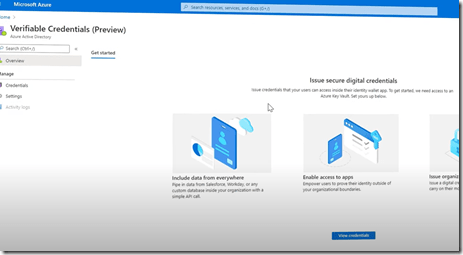
imageMicrosoft Entra Verified ID is now live! Azure AD customers can now issue, request, and verify credentials to represent proof of employment, education, or any other claim.

But what is decentralized identity? How does it give you more control over your digital identity and keep your information on the internet safer? This video explains in short what decentralized identity is and how it can replace usernames and passwords to verify you are who you say you are quickly and easily.

image

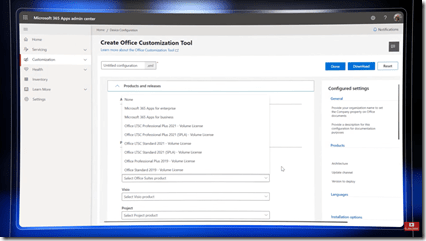
imageOffice 2016 & 2019 won’t be supported for connecting to Microsoft 365 services, including Exchange Online, starting Oct 2023 as documented here:

This means, as of this writing, your organization has a little more than 1 year to migrate off of “Office 2016/2019” and onto “Microsoft 365 apps” to continue to access Exchange Online (Outlook), OneDrive for Business (Word/Excel/PowerPoint) & SharePoint Online from the desktop office suite.

MOVING TO MICROSOFT 365 APPS
Learn how to move on to Microsoft 365 apps (formerly known as “Office 365 Pro Plus”, a.k.a. the version of the Microsoft Office suite that comes with Office 365 E3+) today.

image

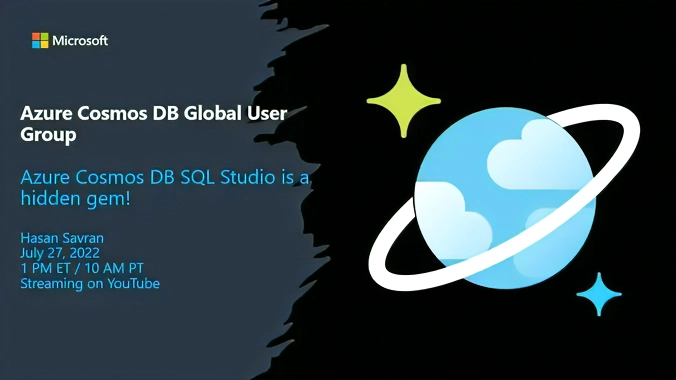
imageCheck out this Meetup with special guest Hasan Savran: “Azure Cosmos DB SQL Studio is a hidden gem, waiting to be discovered by you!”

From Hasan:

Azure Cosmos DB SQL Studio is a free tool to query Cosmos DB directly from VsCode. I built it for CosmosDB Community. Please join us to see in action. I will be happy to get your feedbacks and ideas to make it even better. I hope to see you there!

Register today!

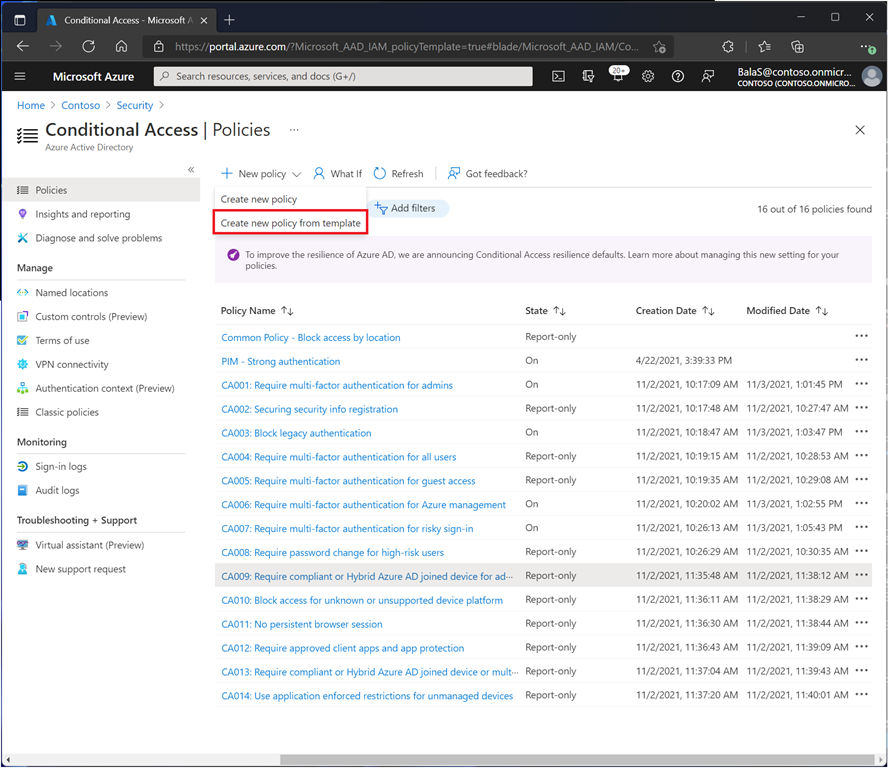
imageIt should never be enough that a user that has a user name & a password immediately gets to access to resources in your infrastructure.

  • Should we require MFA?
  • Should they be working from a IT-managed device?
  • Do they need to be in the United States?  Can they be connecting in from Russia or North Korea?
  • Does their PC have to have the latest anti-malware on it?
  • Can they have an unpatched computer to connect in?

Enterprises with Azure Active Directory have great power over whether or not authenticated users get access to resources.  Here are some common Conditional Access policies set by Azure AD administrators.

Note: Conditional Access policies requires at least Azure Active Directory Premium P1 licensing for all users in your organization.

Read more about Common Conditional Access policies here:

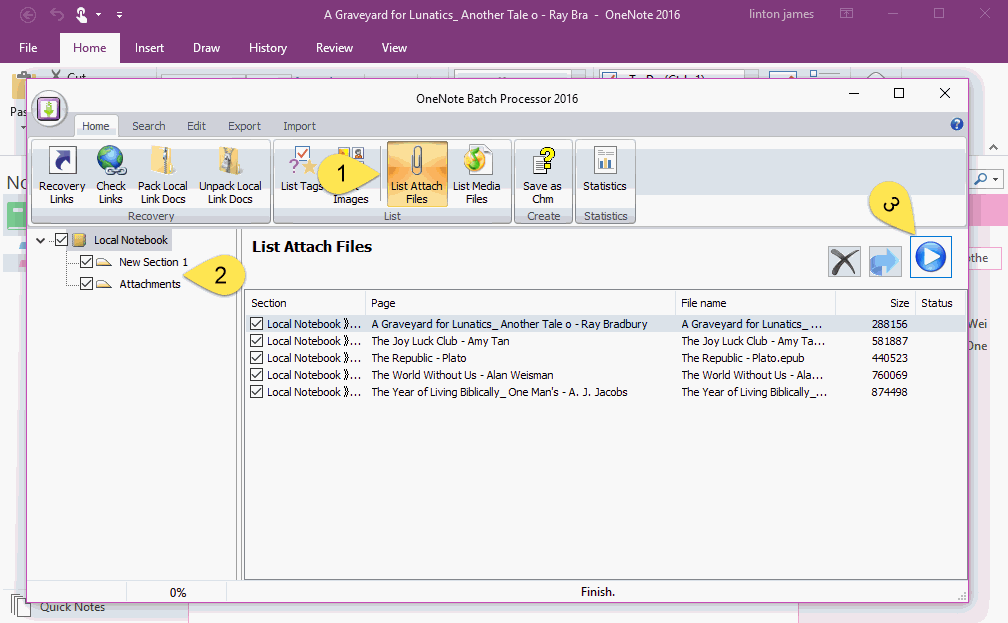
imageQ: Have you ever run into Notebook/Section size limits of OneNote?

At some juncture, OneNote stops syncing when a Notebook or a Section is too large. (I think the limit is 2GB) 

Usually it’s because of attachments or media files you have in your pages. The problem is… how do you know what pages have the biggest attachments on them so that you can clean them up/delete them to make space?

ONENOTE BATCH TO THE RESCUE!
Here’s a tool called "OneNote Batch" that works against OneNote Desktop & will sort through & find:

  • All your attached files & allow you to sort them by largest to smallest

  • All your media files & allow you to sort them by largest to smallest

I bought the tool ($28) but the demo version is free & perfect for one-time discovery of the big attachments & media files in a notebook you have that are making it too big to sync through OneNote.

Posted by: kurtsh | July 16, 2022

RELEASE: OneNote search extension from PowerToys Run

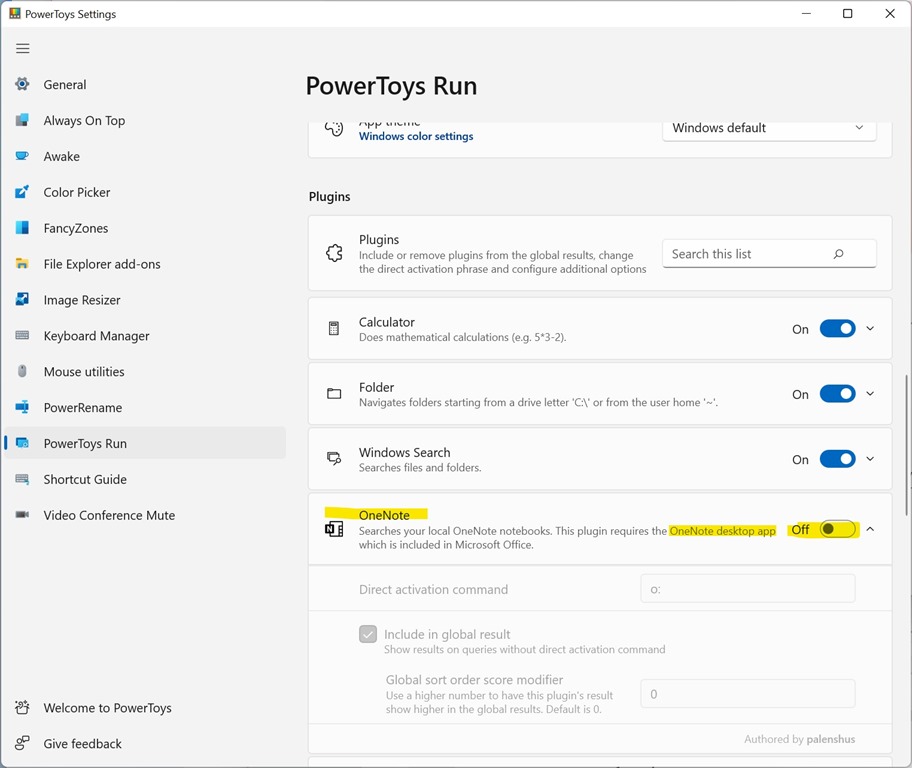
PowerToysOneNoteYay! Microsoft PowerToys now has a OneNote search extension for the PowerToys Run tool:

  1. Download PowerToys .60 from Github at https://github.com/microsoft/PowerToys/releases/tag/v0.60.0
  2. Turn ON the OneNote extension from the PowerToys Settings panel.
  3. Hit Alt-Space & type:
    O:<stuff you want to search for>

Done!  And it’s free!
(Note: This only works with OneNote for Desktop)

« Newer Posts - Older Posts »

Categories