Posted by: kurtsh | December 9, 2022

INFO: Why Windows 11 for Enterprise-sized Organizations

I used to get asked the question, “Why should we be deploying at Windows 11? over Windows 10”

  • Speed/Performance & Visual UI
    End users love Windows 11.  Applications that users depend on every day simply run faster on Windows 11

    Tools like Outlook, Teams, Edge, Chrome, even OneNote are all noticeably faster because ‘multithreaded operations’ are executed & handled much better at a CPU level. 

    Apps have been publicly benchmarked by folks as much as 20% faster simply by upgrading to Windows 11.

    Visually, the OS’s user interface is quicker & smoother – this is deliberate for reducing eye fatigue.  A large part of this is because the internal screen animation & movement frame rate is natively higher.  The result is that the Start button, window movement, taskbar… all appear more fluid.

    The UI also benefits from Windows 11’s improved multi-threaded performance making application response snappier.  It’s a noticeable improvement for users, helping to make long periods of work easier.

  • Management
    Your desktop IT team is going to love Windows 11.  OS updates are 40% smaller than on Windows 10 – meaning:

    1. 40% faster deployments
    2. 40% less bandwidth required to distribute updates
    3. 40% less storage required on every desktop
    4. 40% less annoying to end users

    Also, Windows 11 only does major releases once a year.  Major OS updates only happen once – not twice – making Windows 11 channel updates far less stressful for IT teams.
  • imageSecurity
    This is the real reason why your organization needs Windows 11.  Malware writers & hackers aren’t focused on OS “buffer overruns” or even traditional application vulnerabilities like macro payloads:  Criminals are attacking desktop hardware vulnerabilities.  Physical attacks through Direct Memory Access on USB & Thunderbolt ports.  Remote attacks that modify UEFI & BIOS boot. And they’re happening now. 

    The only way to protect against these attack vectors is through close integration between the OS & hardware.  This protection has to originate at an Operating System level and that’s what Windows 11 is quietly designed to do. 

    Windows 11 protects against the next generation wave of hardware vulnerabilities and this is the reason Microsoft requires 8th gen Intel architecture & a TPM 2.0 chip at a minimum for installing Windows 11.  These hardware technologies give Windows 11 the ability to protect organizations from the next generation of attacks on your infrastructure.

    We’ve published a Windows 11 Security Guide that is 65 pages long that goes over all the work that’s been done in Windows 11 alone to protect organizations.   The threat is real and institutions need to start piloting – not testing – Windows 11 now. 

  • DOWNLOAD: Free eBook, “Windows 11 Security Book: Powerful security from chip-to-cloud”
    https://kurtsh.com/2021/10/05/download-free-ebook-windows-11-security-book-powerful-security-from-chip-to-cloud/
Posted by: kurtsh | November 16, 2022

EVENT: Windows Server Summit 2022

WindowsServer2022So Windows Server 2022 Azure Edition is awesome & is also ‘generally available‘.

Windows Server 2022 Azure Edition has the following features – only available when running in Azure!(https://learn.microsoft.com/en-us/windows-server/get-started/whats-new-in-windows-server-2022)

  1. Hotpatching, part of Azure Automanage, is a new way to install updates on new Windows Server Azure Edition virtual machines (VMs) that doesn’t require a reboot after installation.
  2. SMB over QUIC uses the QUIC protocol (UDP-based) instead of TCP in Windows Server 2022 Datacenter: Azure Edition, Windows 11 and later to access data on file servers running in Azure without a VPN, directly from the desktop.
  3. Azure Extended Network enables you to stretch an on-premises subnet into Azure to let on-premises virtual machines keep their original on-premises private IP addresses when migrating to Azure.

Additionally, one of my favorite features available in all editions of Windows Server is SMB compression.  It does real-time compression of file transfers that can reduce transfer time by upwards of ~80% for uncompressed data like documents, VHDs, etc. (See Ned Pyle previews SMB Compression – YouTube for a demonstration)

Tell a friend! Then register for the…

Windows Server Summit 2022:
Tuesday, December 6, 2022 9:00 AM–10:30 AM Pacific Time

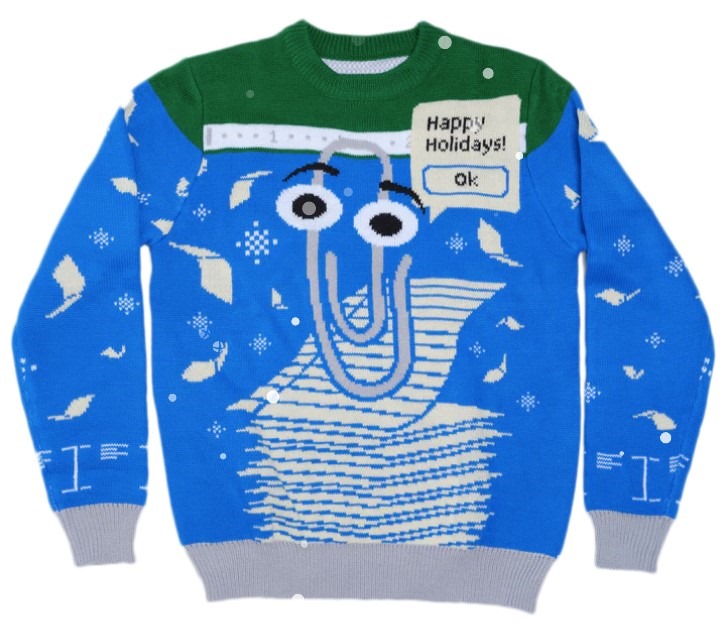
Just released: "#Windows Ugly #Sweater: #Clippy Edition" (Get it while you can! It’ll sell out fast!) #microsoft

ClippySweater

Also just released: "#AgeOfEmpires Ugly Holiday #Sweater" #microsoft

AgeSweater

Posted by: kurtsh | November 16, 2022

RELEASE: “Games for Work” app for Microsoft Teams

Games-for-Work-2

Microsoft today announced new social gaming functionality inside Microsoft Teams called "Games for Work".

Build Work Connections Through Play

Today, I am excited to introduce the Games for Work app,* developed by Microsoft Casual Games, an Xbox Games Studio.** Now, you can easily add a game in the context of where work happens: in Microsoft Teams meetings. Choose from a selection of favorite casual games including Microsoft IceBreakers, Wordament, Minesweeper, and Solitaire—all easy to play in quick, interactive, and multi-player versions (from 2 to 250 players). They are safe for work (verifiably “E” rated) and ad-free. To address the various needs of teams, each game within the app emphasizes a different element of team building.

Available to Microsoft Teams Enterprise & Education subscribers only. Works for both desktop & mobile & it’s ad-free!

(I stole this from Eric M.’s post because it was such a good reference.)

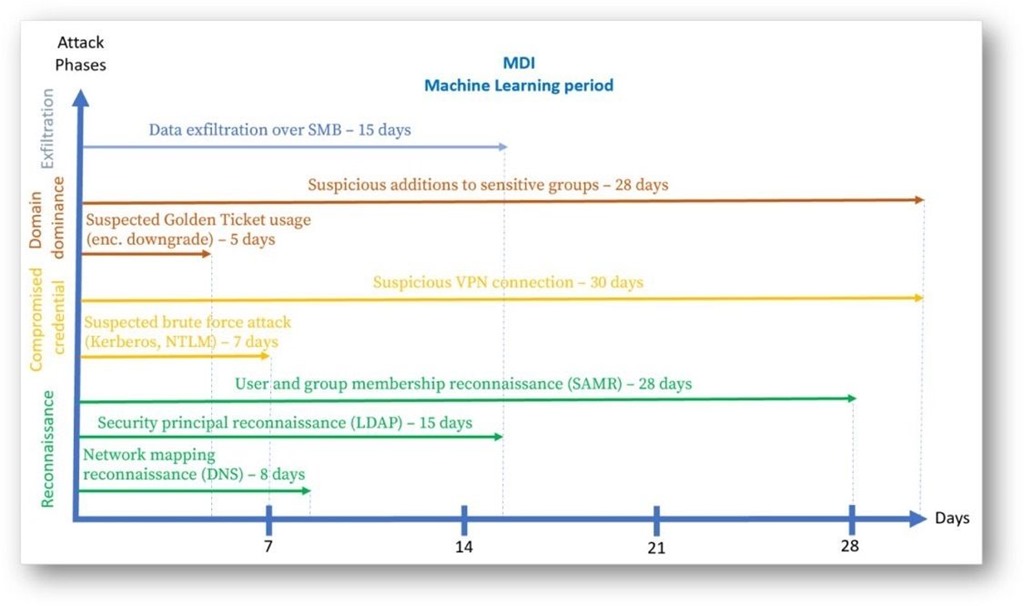
MMDI Machine Learning Periodsicrosoft’s Active Directory Monitoring solution started as Advanced Threat Analytics, migrated to the cloud as Azure Advanced Threat Protection, and then graduated into the Defender for Identity product that is deeply integrated with the other M365D products such as Defender for Endpoint, Defender for Cloud Apps, and Azure Active Directory Identity Protection.

It’s important to understand that configuring an AD service account and installing the MDI sensor msi does not complete the deployment. If you stop there, your sensor will fail to detect malicious activity that it could because key installation steps were missed.

Key things to consider when deploying MDI:

  • Advanced Audit Policy that meets MDI’s auditing requirements is critical
  • Disable LSO on VMware DC’s that show health alerts
    Allowlist/bypass yourdomain.atp.azure.com TCP 443 traffic from SSL intercept/proxy
  • Make sure that communication isn’t blocked for localhost, TCP port 444
  • MDI takes 30 days to baseline the environment for behavioral alerts (pictured)
  • Never use the same gMSA for the monitoring & action accounts
  • Make sure that SAM-R required permissions are configured for Lateral Movement Path detections
  • You do not need to purchase Npcap licenses
  • You can use the Azure service tag AzureAdvancedThreatProtection in NSG/Azure Firewall rules
  • The monitoring gMSA account must be granted the Log on as a service permission

Resources:

Posted by: kurtsh | November 1, 2022

NEWS: Azure Virtual WAN simplifies networking needs

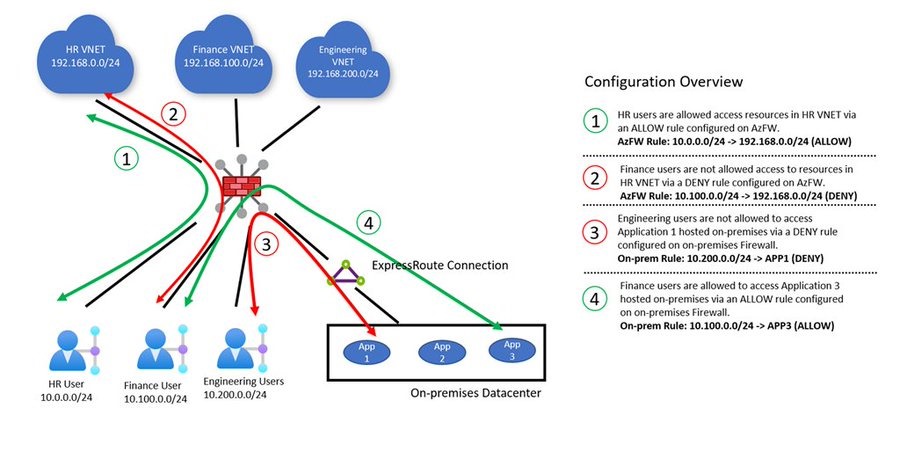
FgCne3IX0AA9CRgToday we are excited to make announcements in multiple areas of Azure Virtual WAN (vWAN), networking as a service that brings networking, security, and routing functionalities together to provide a single operational interface.

As enterprises increasingly adopt the cloud while reducing their costs, IT teams looking to consolidate, accelerate, or even revamp their wide area network should consider Azure Virtual WAN.

You don’t need to have all these use cases to start using Virtual WAN—you can get started with just one. With ease of use and simplicity built in, vWAN is a one-stop shop to connect, protect, route traffic, and monitor your wide area network.

The following areas have key announcements:

  • Remote user connectivity (also known as point-to-site VPN)
  • Routing
  • Branch connectivity (also known as site-to-site VPN)
  • Private connectivity (also known as ExpressRoute)
  • Third-Party Network Virtual Appliance Integrations

Read more about the announcements here:

imageMicrosoft Intune is excited to announce enhanced Windows Defender Firewall security capabilities that allow for reusing group settings to target devices and users. Notably, the new settings now support the use of Fully Qualified Domain Name (FQDN) rules. These new capabilities simplify management and provide more advanced controls to configure Firewall rules, allowing admins to reuse setting groups across policies. Admins are able to create and manage groups that contain properties that can be reused across policies, which includes properties for:

    • Remote IP address ranges
    • Fully Qualified Domain Name (FQDN) definitions and auto-resolution

Read about is below:

imageWe are pleased to announce today the latest features for Microsoft Project that will enable your teams to track goals, manage tasks better, leverage agile support for your projects, balance team workloads, enable Planner users to try and buy Project, and more.

Get the latest below! Also, the Ignite 2022 on-demand session that includes Project for the web: Enhance a new way of work with Microsoft 365 is live now!

Read more at:

imageMicrosoft 365 E5, A5, F5, and G5 and Microsoft 365 E5, A5, F5, and G5 Security customers can get a data grant of up to 5 MB per user per day of Microsoft 365 data ingestion into Microsoft Sentinel.

Microsoft 365 E5, A5, F5, and G5, and Microsoft 365 E5, A5, F5, and G5 Security customers can receive a data grant of up to 5MB per user per day to ingest Microsoft 365 data. This offer includes the following data sources:

  • Azure Active Directory (Azure AD) sign-in and audit logs
  • Microsoft Cloud App Security shadow IT discovery logs
  • Microsoft Information Protection logs
  • Microsoft 365 advanced hunting data

The data grant will be calculated automatically and applied to your bill, covering the cost of up to 5 MB of data ingestion per user per day.

In addition to this data grant, the following Microsoft 365 data sources are always free for all Microsoft Sentinel users:

  • Azure Activity Logs
  • Office 365 Audit Logs (all SharePoint activity and Exchange admin activity)
  • Alerts from Microsoft Defender for Cloud, Microsoft 365 Defender, Microsoft Defender for Office 365, Microsoft Defender for Identity, Microsoft Defender for Endpoint, and Microsoft Defender for Cloud Apps.

1Calculation based on pay-as-you-go prices for Microsoft Sentinel and Azure Monitor Log Analytics for US East region. Exact savings will depend on benefit utilization and customer’s effective price after any applicable discounts.

Posted by: kurtsh | October 14, 2022

OFFER: Microsoft Defender for Cloud Newsletter

imageWe have a new Microsoft Defender for Cloud newsletter available for customers.

The newsletter highlights updates, events & other “Defender for Cloud” centric communications.  This months’ newsletter for example highlights:

  • The new “Defender Cloud Security Posture Management (CSPM)”
  • Attack path analysis and contextual security capabilities in Defender for Cloud
  • Agentless scanning for Azure and AWS machines
  • The new “Microsoft Cloud Security Benchmark”
  • The new “Defender for DevOps”
  • Microsoft Ignite sessions on-demand

To enroll in the newsletter, visit:

« Newer Posts - Older Posts »

Categories