imageSome organizations have users that switch computers often and require the use of Microsoft 365 Apps such as Word, Excel, PowerPoint, etc.  Each time they switch computers, one of their 6 license activations are used… until there are no more activations are left.

If this becomes a problem for your users, the user that’s “maxed out” their Microsoft 365 Apps installations may “deactivate previous device installations” that have been used on their own.
 
Deactivate an installation of Office – Microsoft Support

If you have an Microsoft 365 subscription, you can sign out of Office on a PC or Mac remotely from any web browser to deactivate the installation. Because Office will sign you out of devices automatically to stay within your sign-in limit, there’s no longer a need to use this process to free up installs. For more info, see How sign in works in Microsoft 365.

Note: Signing out of Office doesn’t uninstall Office, remove Office documents, or cancel your Microsoft 365 subscription.

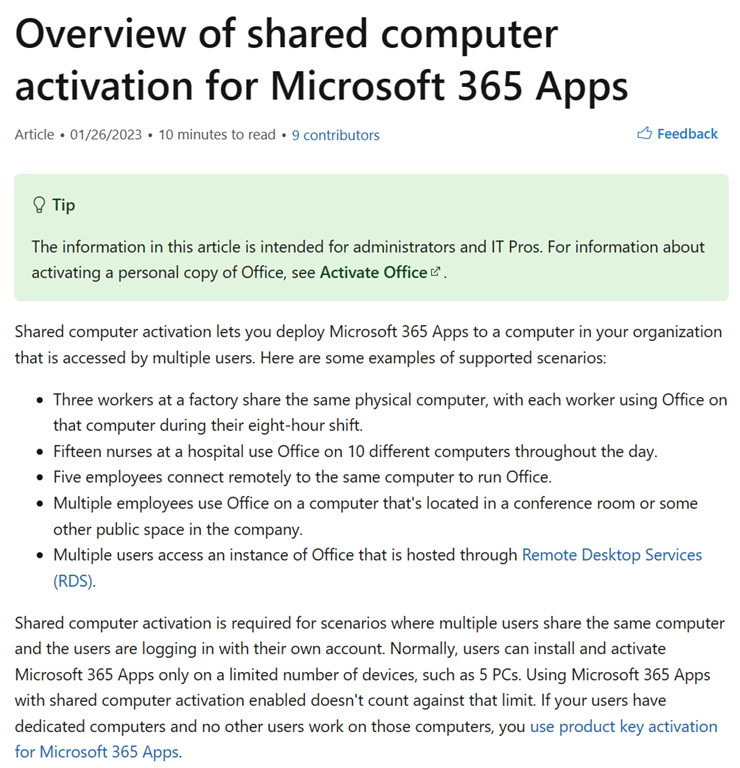
Alternatively, you may leverage Microsoft 365 Apps via “Shared Computer Activation”.
 
Overview of shared computer activation for Microsoft 365 Apps – Deploy Office | Microsoft Learn

Shared computer activation lets you deploy Microsoft 365 Apps to a computer in your organization that is accessed by multiple users. Here are some examples of supported scenarios:

  • Three workers at a factory share the same physical computer, with each worker using Office on that computer during their eight-hour shift.
  • Fifteen nurses at a hospital use Office on 10 different computers throughout the day.
  • Five employees connect remotely to the same computer to run Office.
  • Multiple employees use Office on a computer that’s located in a conference room or some other public space in the company.
  • Multiple users access an instance of Office that is hosted through Remote Desktop Services (RDS).

Shared computer activation is required for scenarios where multiple users share the same computer and the users are logging in with their own account. Normally, users can install and activate Microsoft 365 Apps only on a limited number of devices, such as 5 PCs. Using Microsoft 365 Apps with shared computer activation enabled doesn’t count against that limit.
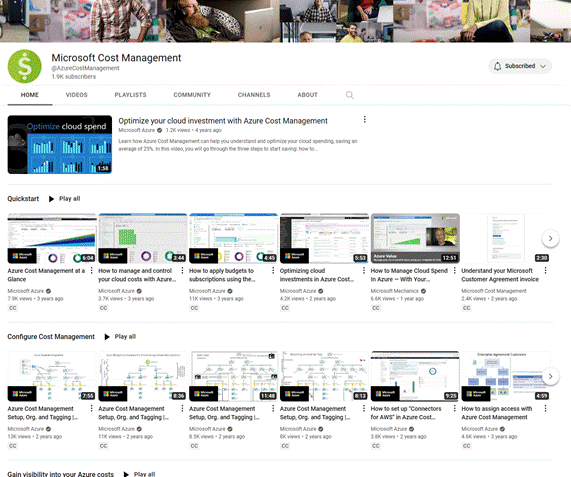
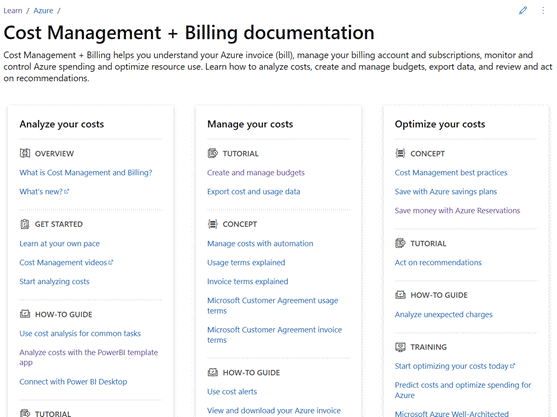
For folks looking for information on how to use Azure Cost Management, Here’s some self-service, on-demand content for you and your team to take advantage of to get started:

OPTIONAL – For customers with Unified Support
There is a fantastic proactive offering that has a Customer Engineer train you on the usage of the Cost Management service.

  • “AZURE COST MANAGEMENT PLANNING” workshop through Unified Support
    Most of my customers take the 5-day Azure Cost Management workshop that Unified Support offers (a proactive offering) because it gets you access to a Customer Engineer who – on the West Coast – is an absolute wizard.

    Contact your Unified Support Customer Success Account Manager for details and the datasheet for the engagement.

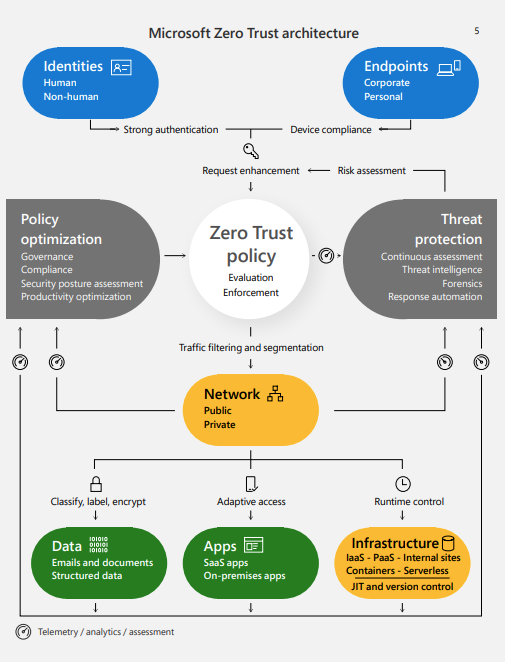
imageCreate a Zero Trust adoption plan that accommodates your organization’s unique risks and capabilities. With this flexible playbook, get foundational action items that help you strengthen security across six key risk areas.

Download The Comprehensive Playbook for a Zero Trust Security Strategy to:

  • Identify small changes that can make big improvements to your security.
  • Understand how deeper integration of key security pillars can simplify policy enforcement.
  • Learn how Zero Trust can increase efficiency and productivity in security posture management.

Get the playbook here:

imagePlease be aware of the upcoming retirement of Microsoft Software Assurance Benefits (SAB) “24/7 Problem Resolution Incidents”. We will fully retire the “24×7 Problem Resolution Support” benefit from Software Assurance for all Microsoft customers effective February 1, 2023.

  • New SAB 24×7 PRS incidents won’t be allocated starting February 1st, 2023. Customers will continue to earn SAB 24×7 PRS incidents until January 31st, 2023, to transfer towards their Support contract.
  • Customers’ available SAB 24×7 PRS incidents must be transferred to their Support contract using the current transfer process before February 1st, 2023. Any unused incidents will expire.

For more information, please see:

Please contact your Microsoft Customer Success Account Manager for more information.

If you’re responsible for Azure Active Directory & use Azure AD Multi-factor Authentication… important notice:

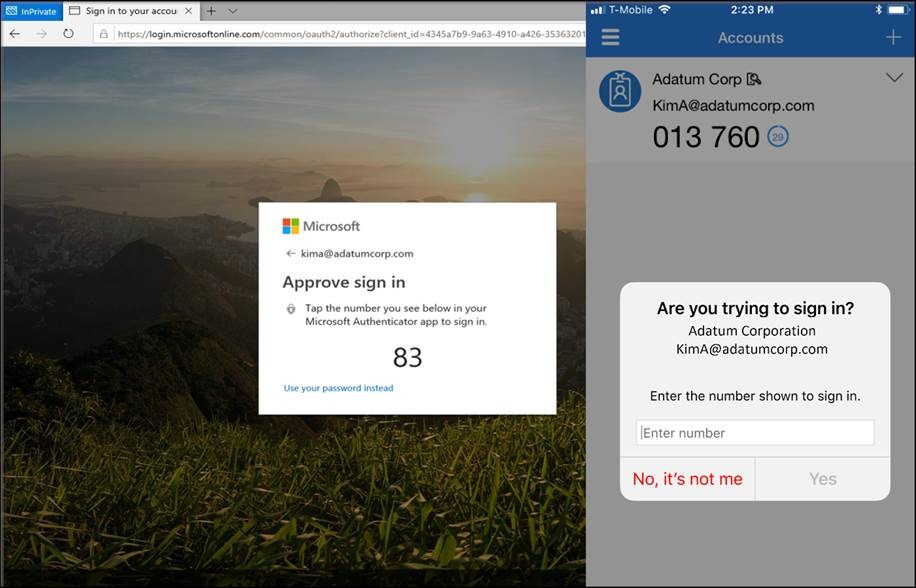
HOWTO: Mitigating MFA authentication spamming with Azure AD MFA Number Matching
You may have heard recently about a technique used by bad actors called “authentication spamming” or “MFA phishing”.  It’s a method by which bad actors rapidly send MFA authentication messages to an end user in the hopes that they will “get annoyed” and eventually simply “approve” the authentication request to make it go away… allowing the bad actor access to your network.  (The technique is described in this article by our Director of Identity Solutions, Alex Weinart, here: Defend your users from MFA fatigue attacks)

clip_image001Solution: Azure AD MFA Authenticator Number Matching
If you are using Azure AD Multi-factor Authentication, we at Microsoft have implemented a technology in Azure AD MFA called “number-matching” which has dramatically helped to mitigate “authentication spamming” (MFA phishing) attacks while making it available for everyone in the world to use free of charge. We highly recommend enabling number matching ASAP for improved sign-in security.

Mandatory Enforcement – COMING FEBRUARY 27TH, 2023
We will be removing the admin controls and enforce the number match experience tenant-wide for all users starting February 27, 2023. i.e. Your staff will be required to use "number matching" when using Microsoft Authenticator as of March 1, 2023, so please investigate the implementation of number matching to eliminate authentication phishing in your organization immediately.

HOWTO: Deploy Azure AD MFA Number Matching
The following is a step-by-step guide on how to implement MFA number-matching on Microsoft Azure Active Directory & Microsoft Authenticator.

Assistance with Configuration
If you need assistance with getting this configured, contact your Microsoft Unified Support Customer Success Acct Mgr or your FastTrack Manager.

Posted by: kurtsh | January 26, 2023

NEWS: Microsoft & OpenAI “ChatGPT”

imageThere’s been a lot of news about the next-generation capabilities of ChatGPT.  If you’re trying to figure out what ChatGPT is, the good news is that it’s super easy to understand and get started.

  • WHAT IS IT? 
    ChatGPT is a services from “OpenAI” that leverages it’s GPT-3 family of large language models.
  • HOW IS IT USEFUL? 
    It’s used with chatbots to deliver incredibly natural, powerful conversations.  It is a generational leap for artificial intelligence based chats.
  • WHAT IS "’GPT’? 
    Generative Pre-trained Transformer – a advanced language model that leverages relies on deep learning for human-like responses using publicly available datasets.  They call the solution “ChatGPT” because it uses the GPT language model.

What is Microsoft’s relationship with ChatGPT?
If you are leveraging Microsoft technology today, Microsoft has a multi-billion dollar partnership with OpenAI, the basis of ChatGPT, and is it’s largest founding partner.  As such:
  • Microsoft Azure will be the exclusive cloud provider for OpenAI & exclusive licensee for the GPT-3 language model used in ChatGPT.
  • Microsoft has released Azure OpenAI Service, an enterprise-class delivery of OpenAI capabilities.
  • Microsoft intends on leveraging OpenAI services, including ChatGPT, throughout it’s entire cloud portfolio including Microsoft 365, Azure & Dynamics 365.

Getting started with ChatGPT:

In order to get going with ChatGPT & all OpenAI services, sign up at the site below:

Posted by: kurtsh | January 26, 2023

NEWS: Microsoft & OpenAI extend partnership

imageMicrosoft & OpenAI recently announced has a multi-billion dollar partnership with OpenAI as it’s largest founding partner. 

As such:

  • Microsoft Azure will be the exclusive cloud provider for OpenAI & exclusive licensee for the GPT-3 language model used in ChatGPT.
  • Microsoft has released Azure OpenAI Service, an enterprise-class delivery of OpenAI capabilities.
  • Microsoft intends on leveraging OpenAI services, including ChatGPT, throughout it’s entire cloud portfolio including Microsoft 365, Azure & Dynamics 365.

Read more about the new partnership extension here:

imageHoping your organization stays under the radar & waiting for bad actors to test your defense & take advantage of your vulnerabilities is a scary approach to security. Proactive threat hunting gives your organization the upper hand and doesn’t necessarily require additional headcount or roles.

The Microsoft Security Experts, “Threat Hunting Survival Guide” is a 31 page eBook (PDF) that reviews why organizations should invest in proactive thread hunting, and how to use threat hunting beyond the endpoint.

The book goes over:

  1. The difference between commodity malware & human-operated attacks
  2. How to identify signs of human-operated attacks in your environment
  3. How to prepare for basic thread scenarios
  4. How to develop your own thread hunting program
  5. How Microsoft can assist with “Microsoft Defender Experts for Hunting” – a discrete service available today that Microsoft has available to extend your team of experts & reduce risk with more accurate detection.

Download the eBook here:

clip_image002If you’re interested in a cool example of how ChatGPT will affect many aspects of IT, take a look at this recently published article about integrating the service with “Microsoft Sentinel”.

For example, Microsoft Sentinel, given a set of conditions, can leverage ChatGPT to identify the right steps to resolve an incident to notify the people responsible in conversational English & expedite resolution.

clip_image002Next month, Microsoft will be permanently disabling the “IE11 desktop app” on Windows 10.

  • This will be done through an "Edge Update" (not a Windows Update) on February 14, 2023.
  • Microsoft Edge ‘IE Mode’ will continue to provide managed IE11 compatibility for organizations that require it after this date.

For more information, please refer to the information below:

« Newer Posts - Older Posts »

Categories