If you’ve invested in Azure Active Directory & Microsoft Intune, you’re in luck! LAPS is back… and guess what it’s using? Smile

imageIntroducing Windows Local Administrator Password Solution with Microsoft Entra (Azure AD)
Local Administrator Password Solution (LAPS) is a technology that’s orchestrated “password rotation” for Local Administrator accounts on Windows desktops & servers for more than a decade.

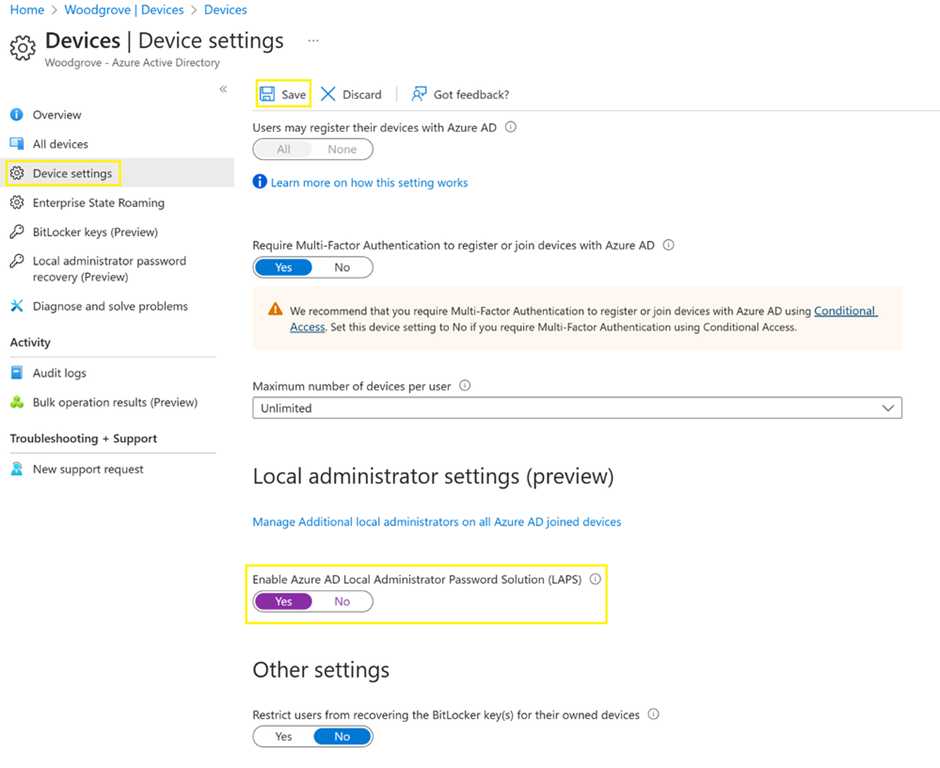
Welp, the future of LAPS has arrived and it now backs up local administrator passwords to Azure AD, while password rotations & policies are configured remotely using the Microsoft Intune portal.

And good news:  The client-side agent is already built into Windows 10, Windows 11, Window Server 2019 & above.

Read more about the new public preview of “Windows Local Administrator Password Solution” below:

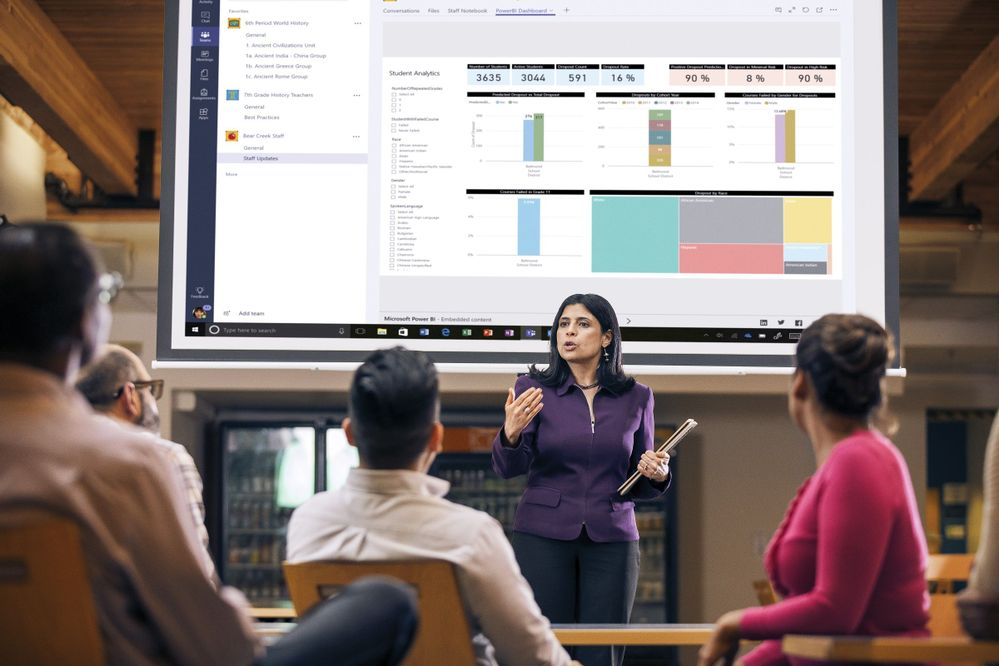
Looking for training on Power BI?  There’s absolutely no shortage of availability!

imagePower BI events & webinars

For Unified Support customers only
We also provide more advanced workshops through Unified Proactive Offerings using pre-paid proactive hours/credits that your organization may have invested in through their Unified contract. 

Please reach out to your appropriate Customer Success Account Manager for scheduling any these offerings:

  • Power BI Assessment (2-days)
  • WorkshopPLUS – Data AI Business Analytics with Power BI (3-days)
  • WorkshopPLUS – Data AI Advanced Data Analytics with Power BI (2-days)
  • WorkshopPLUS – Data AI Reporting Services and Power BI Report Server (3-days)
  • Activate Business Analytics with Power BI (3-days)
  • Power BI Clinic (3-days)

Read more here:

imageNow available!

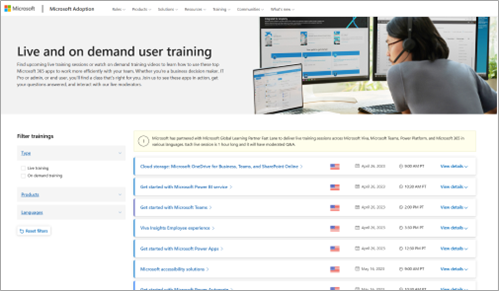
Live & On-demand User Training
Find upcoming live training sessions or watch on demand training videos to learn how to use these top Microsoft 365 apps to work more efficiently with your team. Whether you’re a business decision maker, IT Pro or admin, or end user, you’ll find a class that’s right for you. Join us to see these apps in action, get your questions answered, and interact with our live moderators.

The site where these Microsoft 365 trainings are posted is below.

NO COST, END USER TRAINING FOR MICROSOFT 365
This is all END USER training available at no additional cost that we recently made available and will continually schedule every month. Each training is instructor-led, 1 hour long and has moderated Q&A. For example, here’s what we’ve already posted for Microsoft Teams:

We also have end user trainings for:

  • Power BI Service
  • Viva Insights Employee experience
  • Power Apps
  • Accessibility
  • Power Automate
  • SharePoint Online
  • Viva Engage
  • Viva Insights for Managers & leaders
  • Viva Learning

We just made an announcement yesterday re: Universal Print you may be interested in.

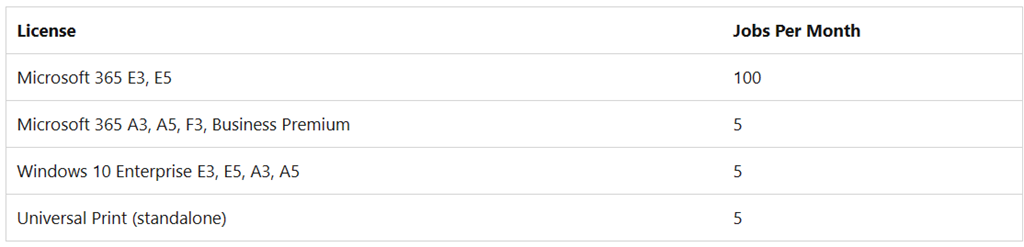
imageBeginning on May 1, 2023, customers with a Microsoft 365 E3 or E5 plan will get 100 print jobs per month attached to every license

As an illustration, consider the following: previously, a company with 1,000 Microsoft 365 E3 licenses received 5,000 print jobs, provided with of the Windows E3 license included in Microsoft 365. This example company will receive 100,000 print jobs from its Microsoft 365 licenses, beginning May 1.

For more information:

imageDiscover how to drive business impact and unlock your team’s full potential at the first-ever Microsoft Viva Summit.

Join Corp VP Jared Spataro, Kathleen Hogan, Emily He, Kirk Koenigsbauer, Josh Bersin, Stacia Sherman Garr, Diane Schwarz on April 20th to gain insight into this new era of work and learn about the latest solutions designed to help leaders build empowered, engaged, and productive organizations.

  • Hear Microsoft leaders and industry experts share the latest research insights and speak about fundamental shifts in the workplace.
  • Experience a technology showcase on Microsoft Viva innovations that can provide AI-powered insights and experiences to help empower and engage your workforce.
  • Attend panel discussions to discover expert insights and gain inspiration from your peers.

Register below:

imageMicrosoft Pre-Day at RSA is an exclusive opportunity to meet Microsoft Security business and engineering leaders, to have early access to announcements and product news, and to network with your security peers across industries, including executive leaders and decision makers.

Join us for interactive panels with Microsoft Security executives, a keynote from Microsoft Security Engineering leadership, a first look at news from Microsoft Security Research, and a hosted evening reception.

Microsoft Pre-day offers a more intimate venue for connecting with experts to discuss the solutions and strategies that are shaping the security market and influencing the security posture of organizations of all sizes.

  • Discover an AI-powered future
  • Meet Microsoft Security and engineering leaders
  • Learn about the latest product news
  • Network with your security peers across industries

To request an invitation to attend Microsoft Pre-Day at RSA, please register below:

imageWe’re excited to announce the Microsoft’s Public Sector Productivity Summit for our customers on Government Cloud Community (GCC).

During this event, we’ll share fresh content tailored to help enhance employee experience and productivity to drive real innovation in your organization.

Sessions will include:
• Start Fresh with Enhanced Communication Strategy
• Employee Engagement – Viva Connections and Insights 
• Winning with Microsoft Teams Voice
• Enhance Approval Processes with Teams Integration
• Teams and Collaborative Apps: The Teams Apps story!  
• Optimizing Hybrid Work and What is Next?

Date/Time:
Tuesday, March 28, 2023 at 11:00 AM –
Thursday, March 30, 2023 at 3:00 PM

Registration:
https://msevents.microsoft.com/event?id=3684264388

#msadvocate #ProductivitySummit #m365 #productivitytools #microsoftteams #microsoftteamsVoice #collaborationtools #productivity

imageJoin us for Microsoft Cloud Native Day to explore how the power of modern application development can help meet your changing business needs. Learn to ship faster, operate with ease and scale confidently.

From Azure Kubernetes Service to Cosmos DB and Azure OpenAI, you will hear from Microsoft experts insights and guidance on how to leverage innovative cloud services to supercharge your cloud native application development!

Agenda:

  1. Welcome and Introduction
  2. AKS Must Know (aka AKS 101)
  3. Microservices Made Easy with Azure Container Apps and Dapr
  4. Build Data-Intensive and Intelligent Applications with Azure OpenAI and Cosmos DB
  5. Q&A

Date/Time:
29 March 2023, 9:30 AM – 12:30 PM CET
(Yes, this is 1:30AM – 4:30AM PST.  I’m so sorry.)

Registration:
https://mktoevents.com/Microsoft+Event/386949/157-GQE-382?wt.mc_id=AID3057417_QSG_SCL_636516

#aks #kubernetes #azureai #openai #cosmosdb #cloudnative #ai #microsoftwe #microsoftadvocate

When you use Site Recovery, you incur charges for:
[from the documentation]

  1. The Site Recovery license is per protected instance, where an instance is a virtual machine or a physical server. (Either $16/mo or $25/mo as of 3/15/23)
  2. Storage cost is incurred for the Site Recovery replica of storage in the target location. A snapshot taken on this replica storage is used to create a new target storage disk upon test failover or failover. Overall storage cost is hence, based on replica of storage and the number of disaster recovery drills conducted in a year.
  3. Storage transactions are charged during steady-state replication and for regular virtual machine operations after a failover or test failover.
  4. Outbound data transfer cost is also called as egress and is charged only when the traffic leaves an Azure region. Hence, these charges are applied when you replicate an Azure virtual machine from one region to another. Azure Site Recovery compresses the data before you transfer. Hence, egress is charged for the compressed replication data.
  5. Recovery points created by Site Recovery are snapshots taken for the replica storage. These snapshots are charged based on the consumed capacity. For more information, see Managed Disks pricing.
  6. Costs are also incurred for the virtual machine compute capacity and is only applied at the time of test failover and failover. This cost is usually zero provided there’s no active disaster recovery drill or no actual disaster.
  7. For Azure virtual machine protection, Site Recovery mimics the source storage type on target side. For example, if you protect a virtual machine in Azure with disks in storage accounts, then Site Recovery uses a storage account in the target side to store replication data. In another case, if a virtual machine in Azure uses managed disks, then Site Recovery creates an ASR replica disk in the target that corresponds to each source disk.
  8. For VMware/physical machines, Site Recovery creates an ASR replica disk in the target that corresponds to each source disk. All new replications from March 2019 onwards use managed disks for both replication and failovers. Managed disk cost is computed on provisioned capacity. For more information, see Managed Disks pricing.
  9. For Hyper-V machines, Site Recovery creates and uses a storage account for replication. By default, the test failover or failover happens on a storage account. However, it provides an option to failover to managed disks if required. In this case, managed disks are created at the time of failover.

For detailed cost estimation, visit:

imageReview the Azure Site Recovery Deployment Planner cost estimation report for disaster recovery of Hyper-VM/VMware to Azure

Posted by: kurtsh | March 10, 2023

TRAINING: Azure Cost Management

Here’s Microsoft’s Azure Cost Management & Billing Resources for folks learning about their invoicing.

« Newer Posts - Older Posts »

Categories