Posted by: kurtsh | June 4, 2010

BETA: BizTalk Server 2010 beta now available

image Catching up with product announcements.  Gotta stop screwing around on Facebook & Twitter. 😉

BizTalk Server 2010 offers significant enhancements to help integrate heterogeneous Line-of-business systems with Windows .NET and SharePoint based applications to optimize user productivity, gain business efficiency and increase agility .

BizTalk Server 2010 allows .Net developers to take advantage of BizTalk services right out of the box to rapidly build solutions that need to integrate transactions and data from applications like SAP, Mainframes, MS Dynamics and Oracle. Similarly SharePoint developers can seamlessly use BizTalk services directly through the new Business Connectivity Services in SharePoint 2010. BizTalk Server 2010 includes new data mapping & transformation tool to dramatically reduce the development time to mediate data exchange between disparate systems. It also provide a new single dashboard to manage performance parameters and streamline deployments from development to test to production.

BizTalk 2010 includes new, scalable Trading Partner Management (TPM) model with a graphical interface for flexible management of business partner relationships and efficient on-boarding process. BizTalk Server 2010 also provides extended connectivity to IBM systems with Host Integration Server.

For more information about the Beta, visit:

image Did you know that Software Assurance has some very special benefits for customers that virtualize their IT environment? Come to this webcast and find out the details of how to make sure you take advantage of these licensing benefits to save your organization money.

EVENT OVERVIEW:

  • SESSION 1:
    Software Assurance Overview
    (9am Pacific, 10am Mountain, 11am Central, 12pm Eastern) – 60 minutes

    This session will cover the basics of SA benefits available; how to activate and consume the benefits to meet the planning, deployment, and training needs of your organization.

  • SESSION 2:
    The Virtues of Virtualization with Software Assurance
    (10am Pacific, 11am Mountain, 12pm Central, 1pm Eastern) – 60 minutes

    Virtualization! Virtualization can be defined as “the abstraction of computer resources”, but what does that mean to you? How does Software Assurance help? Join this session to learn about important recent announcements that can help your organization leverage Virtualization as part of your Software Assurance agreement.

WHEN:
Friday, June 04, 2010 9:00 AM – Friday, June 04, 2010 11:00 AM

REGISTRATION:
Please contact me for registration details if you are a customer of mine.

image In addition to the upcoming “How Microsoft does IT” webcast around deploying Windows 7, there’s also this list of resources that might be useful.

Work Smart Productivity Guides for End-users
(All Work Smart content by Microsoft IT)

vista_logo I know this will be relevant to a bunch of you.  Wanna see how it is that we at Microsoft deployed Windows 7 across all 250,000+ clients that we have?

TechNet Webcast: How Microsoft Does IT: Deploying Microsoft Windows 7 (Level 300) 
IT Pro Webcast, June 15 at 9 a.m. Pacific / 12 pm Eastern (Register here)

Technical Case Study
Learn about Microsoft IT’s experience in deploying Microsoft Windows 7, including details about installation scenarios, deployment and support metrics, feature benefits based on Microsoft IT’s experience, and also shares recommendations for a successful deployment.

Event Overview
Join us for this webcast to learn about Microsoft IT’s experience in deploying the Windows 7 operating system. In this webcast, we discuss details about Windows 7 installation scenarios, deployment and support metrics, and feature benefits based on Microsoft IT’s deployment experience. We also share recommendations for a successful Windows 7 deployment.

Presenter: Robert Van Winkle, Microsoft IT Senior Lead Program Manager, Microsoft Corporation
Robert Van Winkle is a senior lead program manager in Microsoft IT where he drives "dogfood" efforts and the internal deployment of Windows operating systems at Microsoft. Robert is passionate about delivering solutions that are client scenario-focused and deliver a consistent user experience. Prior to this role, Robert led the Client Hardware team that was responsible for establishing and delivering hardware standards for Microsoft. Robert has worked at Microsoft for more than 14 years, and he has a bachelor’s degree in economics from the University of Houston.

REGISTRATION:
https://msevents.microsoft.com/CUI/WebCastEventDetails.aspx?EventID=1032452083&EventCategory=4&culture=en-US&CountryCode=US

clip_image001

Join Neudesic for a free 1-day deep dive program that will prepare you to deliver solutions on the Windows Azure Platform. The region’s best Azure experts will teach you how to work in the cloud through training, discussion, review of real scenarios, and hands on labs. Snacks and drinks will be provided; however, we advise you to make your own lunch arrangements prior to the event. You will also need to bring a computer loaded with the software listed below.

For more information please visit www.azurebootcamp.com

What you need to bring:
During the boot camp you will have opportunities to practice what you learn with labs. Having all of your software ready will be necessary to dive into the hands-on experience. The lab files package will be given to you during the event. If you want to have everything loaded into a virtual PC, that would be even better

In order to run these labs you will need to bring:

REGISTRATION:  Los Angeles Azure Boot Camp
http://cl.exct.net/?qs=48558f981f4226a7d7c4081e67664216a946031f50e95c28e279bec40c576dcb

For questions regarding the Azure Boot Camps, please contact:
meredith dot meade at neudesic dot com

image

imageMicrosoft is holding a special event featuring Cirque du Soleil in Los Angeles for the unveiling of Project Natal—”an extraordinary new way to play”.

The event will go from 7–9 P.M., June 14, 2010, at the Galen Center in L.A. and is invitation only.

People selected to attend will be able to invite four friends, compliments of Xbox 360. Invitations will be sent to Windows Live ID’s associated with Xbox Live Gold Accounts.  If you are selected, don’t wait—RSVP today! Tickets are limited, and you must confirm your attendance by May 28, 2010.

UPDATE:  5/24/10 10:12PM
Looks like they’re doing a broadcast live on (of all places) MTV on June 15th at 12:30PM Pacific Daylight Time.
http://www.xbox.com/en-US/press/2010/0513-mtvpartnership.htm

image

Posted by: kurtsh | May 24, 2010

RELEASE: Windows Phone Ringtone Collection

imageGot a Windows Phone?  Wondering if there’s any decent ringtones available for you?  You’re in luck!

80 high quality ringtones have been posted to our Total Access web site and are available for Windows Phone Insiders.  And there’s some real doozies listed that I know you’ll probably enjoy including:

  • Dot Matrix Printer
  • Dial Up Modem
  • Chainsaw
  • Halo 3 – Fight to the Finish
  • Raining
  • Motown

image

The entire collection is available online and is accessible from your phone as well.

Posted by: kurtsh | May 23, 2010

INFO: Locking down your Facebook profile

image With all the fervor over Facebook’s consistent lack of respect for people’s informational privacy, I thought it appropriate to point to the resources I’ve been sharing with friend, customers, and coworkers.

  • Facebook Search
    In the worse cases, people that accept the defaults and fail to lockdown their Facebook profiles effectively expose virtually all their personal & profile information to the Internet.  This includes all their post and status updates.  This is a search engine that basically allows people to search specifically for keywords in these people’s Facebook accounts.  Search for phrases like, “drunk” or “embarrassing” or any number of other inappropriate things that people are posting publicly without their knowledge.
    http://youropenbook.org
  • Map of Facebook privacy switches
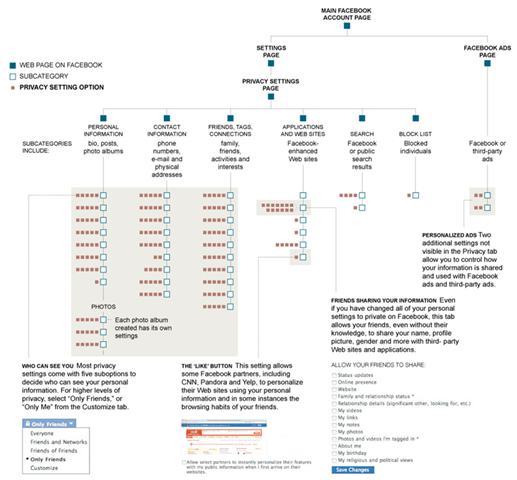
    This graphics depicts all the switches that one needs to consider locking down when it comes to Facebook privacy.  EVERY “solid brown square” represents a setting within Facebook that should be checked or unchecked in order to protect one’s privacy.  This is a perfect demonstration of how complicated Facebook has DELIBERATELY made it for someone to protect their privacy on the site.
    http://cache.gawkerassets.com/assets/images/4/2010/05/facebookpriv.jpg
  • ReclaimPrivacy Facebook Lockdown Tool
    This has been a fantastic tool that’s only recently be released.  It’s script that enables you to automatically scan your Facebook profile and determine if you have settings that you need to lockdown.  It’s a little complicated however it requires that you ‘drag & drop’ a link from the page into your Favorites (the link contains a Javascript command that executes the scan) and once you’ve done that, you go to Facebook and click on the ‘scan’ link you created within Favorites.  This will tell you automatically if you have holes in your privacy and how to lock them down.
    http://reclaimprivacy.org

image Here’s my current list of must haves.

  • Windows Live Writer
    Many people use web based interfaces for blogging, but there’s nothing out there that demonstrates how valuable an installable software client can be better than Windows Live Writer.  A small but extremely useful, single purpose ‘fat client’ tool for blogging, Windows Live Writer is easily the most often used blogging tool amongst bloggers that works for not just Windows Live Spaces and Blogger blogs but also Sharepoint, WordPress, and other 3rd party blog systems.   And it makes offline blogging a breeze.
    http://get.live.com/writer/overview
  • Windows Live Mesh
    An amazing technology, Live Mesh provides you with the ability to synchronize file folders across the Internet and simultaneously store the same content in the cloud, providing you with access to the same data on each synched computer and also while on the road through the cloud.  Two additional capabilities make Live Mesh special:  You are able to sync folders to Windows Mobile devices to provide over-the-air replication.  You are also able to remotely control desktops participating in Live Mesh using a remote control agent designed to provide simple desktop controls.
    http://www.mesh.com
  • CCleaner (v2.31)
    CCleaner is our system optimization, privacy and cleaning tool. It removes unused files from your system – allowing Windows to run faster and freeing up valuable hard disk space. It also cleans traces of your online activities such as your Internet history. Additionally it contains a fully featured registry cleaner. But the best part is that it’s fast (normally taking less than a second to run) and contains NO Spyware or Adware!
    http://www.ccleaner.com 
  • Cropper (v1.93)
    Cropper is a very flexible (and free!) screen capture application that provides area capture to BMP or copies to the clipboard for easy usage in documents.  Requires .NET Framework.
    http://blogs.geekdojo.net/brian/articles/Cropper.aspx 
    http://cropper.codeplex.com/
  • SyncToy (v2.0)
    SyncToy is an easy to use, highly customizable program that helps users to do the heavy lifting involved with the copying, moving, and synchronization of different directories. Most common operations can be performed with just a few clicks of the mouse, and additional customization is available without additional complexity. SyncToy can manage multiple sets of folders at the same time; it can combine files from two folders in one case, and mimic renames and deletes in another case. Unlike other applications, SyncToy actually keeps track of renames to files and will make sure those changes get carried over to the synchronized folder.
    http://www.microsoft.com/downloads/details.aspx?familyid=C26EFA36-98E0-4EE9-A7C5-98D0592D8C52&displaylang=en
  • SugarSync
    Not so much a free utility but a free service (with the opportunity to upgrade).  SugarSync provides 5 things that are very valuable:  1) Free 2GB of storage online with no file size limitation, no bandwidth limitation, 2) Both public & secured file sharing, 3) Single instance storage amongst your files & other Sugarsync users (i.e. if someone else has already uploaded a given file to the cloud, you don’t need to spend the time to upload it… it’ll just appear, 4) Ongoing synchronization with desktops, and 5) Windows Mobile client for viewing & accessing files.  (No sync is available like with Live Mesh)  You can also upgrade your free service to a paid service – $50/year will provide 30GB of storage.
    http://www.sugarsync.com
  • Video Cache View
    After watching a video in a Web site, you may want to save the video file into your local disk for playing it offline in the future. If the video file is stored in your browser’s cache, this utility can help you to extract the video file from the cache and save it for watching it in the future.  It automatically scans the entire cache of Internet Explorer and Mozilla-based Web browsers (Including Firefox) and finds all video files that are currently stored in it. It allows you to easily copy the cached video files into another folder for playing/watching them in the future. If you have a movie player that is configured to play flv files, it also allows you to play the video directly from your browser’s cache.
    http://www.nirsoft.net/utils/video_cache_view.html
  • FLV Viewer
    Looking for an easy way to play FLV (Flash Video) files downloaded from YouTube and other video sites? Get the free Applian FLV Player. It’s easy to use, and you can view videos at 1x, 2x or even full screen. Download this fully functional software for FREE now!
    http://www.shareasale.com/r.cfm?b=85813&u=313402&m=10638&urllink=&afftrack=
  • SDP Downloader
    This Free version of SDP Downloader can download the following protocols, remember this is for Windows Media Streaming only:
    – HTTP v1.0 streaming protocol – sometimes referred to as MMSH.
    – HTTP progressive (simple http download)
    – MMS, MMST and MMSU over both TCP and UDP transport protocols.
    It can also enable you to preview the stream while downloading – using your favorite existing media player, download Live and Pre recorded videos and music straight to your hard drive like a video recorder.
    http://sdp.ppona.com/
  • MaxMax (v0.981)
    Windows 7 is great however the fact that it doesn’t enforce a true sidebar like Windows Vista did is really annoying.  A true sidebar ensures that no window ever covers up sidebar applications ensuring that their information is always available on the desktop.  What MaxMax does is ensures that application windows, when set to “maximum” do not expand beyond the boundaries of a traditional sidebar on the right, ensuring that any gadgets that you’ve placed there remain visible even when applications are maximized on the desktop.
    http://www.kmtools.win-os.pl/omaxmax.php?lang=ang
  • LogMeIn Free
    LogMeIn is an amazing service that’s FREE.  It’s a web service that provides individuals with secured access into computers they need to remote control.  Using a a highly optimized protocol, screen response time is extremely fast and connections are established in a secure manner, leveraging local login usernames and passwords.  Interestingly enough, Logmein also provides the ability to “power on” computers that have been turned off and have a wired Internet connection if the machine supports wake-on-LAN.  The service is also designed around “IT support” and to help you service computers you are responsible for – such as your parents, your customers, or your home computers.
    http://www.logmein.com
  • SpaceMonger 2.11 (or 1.4)
    SpaceMonger generates a 2 dimensional map of your hard drive to see what directories and files are consuming the most space.  Great for clean up.  The 1.4 version is free but unsupported and old.  The 2.11 version is much faster but only available for free for 30 days until they want you to pay $25 for it.  (Personally I think this is WAY overpriced for what the tool does relative to other solutions but I ended up buying it anyway to support the developer)
    http://www.sixty-five.cc/sm/v1x.php
  • Teracopy 1.22
    Teracopy is a file copy tool that optimizes execution of large file transfers (.VHD virtual machines, .ISO disc images, etc.) between attached storage such as USB/eSATA hard drives.  It assumes that the bottleneck in the file copy is the drive performance and ensures that the drive is writing from the cache and never starved for data from the source by expanding the local memory dedicated to the copy.  Great for copying large GB files from one drive to another – not good for network-based copies.
    http://teracopy.com
  • RichCopy 4.0 (216)
    RichCopy is a file copy utility for multi-file network transfers.  It assumes that the bottleneck in the file copy is the network and specifically spawns multiple threads to copy multiple files in parallel instead of copying files one-after-the-other (serially) to maximize network bandwidth.  Great for copying directories over a network connection – not good for “single large file transfers” between drives.  (See Teracopy)
    http://technet.microsoft.com/en-us/magazine/2009.04.utilityspotlight.aspx?pr=blog
  • Wizmouse
    WizMouse allows the user to use the scroll wheel on a window by simply hovering the mouse over it without clicking on it to change the context.
    http://antibody-software.com/web/software/software/wizmouse-makes-your-mouse-wheel-work-on-the-window-under-the-mouse/
  • 7sidebar Gadget (v1.30)
    Longing to have the original sidebar available in Windows Vista?  Can’t seem to get one that works with BOTH Flash/Silverlight-based gadgets as well as allowing for ‘flyout menus’?  Your prayers have been answered.  The 7sidebar is actually a desktop gadget that allows you to contain other desktop gadgets in it.  It prevents windows from ‘maxing out’ over your gadgets so you always have your gadgets visible on your desktop.
    http://nes.bplaced.net/sidebar7.html
  • DUMeter (4.16)
    This is the one thing I’m listing that’s NOT free.  I haven’t found very many bandwidth meters that meet my criteria for accurate metering.  DUMeter to date is the only one that I’ve ever been decently satisfied with.  It sits on top of your desktop always on top.  It can meter one or all of your network adapters.  It is ACCURATE and very easy to see when bandwidth is being used.  It shows you all the TCP connections you currently have and WHO those connections are with.  It even comes with a ‘gadget’ version that allows you to view the bandwidth graph/data in your sidebar.  The product has two major annoyances however:  1) It’s pricey.  A bandwidth meter that costs $25?!?  Yep.  And I bought it, if that tells you anything.  2) It’s gadget doesn’t work on x64 Windows.  It doesn’t even install.
    http://www.dumeter.com
  • KnockOut (v1.3)
    KnockOut is a Outlook-killer, as in, if Outlook is hung, KnockOut will kill it along with Word if necessary, since Word is often used as a mail editor.  Additionally, you can easily start a new mail, contact, meeting, task, etc. by right clicking KnockOut in the System Tray.
    http://sunflowerhead.com/software/knockout/
  • Windows Virtual PC
    Windows Virtual PC is the latest Microsoft virtualization technology. You can use it to run more than one operating system at the same time on one computer, and to run many productivity applications on a virtual Windows environment, with a single click, directly from a computer running Windows 7.
    http://www.microsoft.com/downloads/details.aspx?displaylang=en&FamilyID=2b6d5c18-1441-47ea-8309-2545b08e11dd
  • Microsoft Security Essentials
    Very simply put – this is the best antivirus product that you can consistently put on your personal Windows-based PCs.  Security Essentials provides protection that consistently beats the bigger names like Symantec & McAfee yet is 100% FREE.  It provides real-time protection that guards against viruses, spyware, and other malicious software. It’s simple to install, easy to use, and always kept up to date so you can be assured your PC is protected by the latest technology. And for your parents, it’s easy to tell if your PC is secure — when you’re green, you’re good.  It’s that simple. Microsoft Security Essentials runs quietly and efficiently in the background so that you are free to use your Windows-based PC the way you want—without interruptions or long computer wait times.
    http://www.microsoft.com/security_essentials/

image  The next generation Hotmail is due to be released in July or August.  With the next release, users will see a number of improvements.

  • Security will get stronger with encryption.
  • Phone over-the-air sync with Exchange ActiveSync for email, contacts, and calendar.
  • 10GB of attachments in a single message through Skydrive linking
  • Send instant messages & text message through Hotmail to your Messenger contacts
  • Outlook integration for mail, calendar, and contacts
  • Photos can be viewed from within the message preview window in slide show mode (leverages Silverlight) pictures will be automatically uploaded and stored in Sky Drive and displayed through the message. 
  • You Tube and Hulu videos can be played from within the message too; keeping users within the context of their inbox. 
  • Big improvements for message management are coming as well with threaded conversations, filtering, social network summaries, and more. 
  • Of course, there will be integration with Office web apps for viewing and editing attached documents. 

For more information on the new Hotmail coming this summer, visit:  http://windowslivepreview.com/hotmail/overview/

Here are several articles already released:

« Newer Posts - Older Posts »

Categories