imageReleased last December, TMG is the next generation of Internet Security and Acceleration (ISA) Server 2006.  It is a secure web gateway that allows employees to safely and productively use the Internet without worrying about malware and other threats.  TMG provides multiple layers of continuously updated protections against the latest Web-based threats, including URL filtering, antimalware inspection, and intrusion prevention.  Enhancements in TMG Service Pack 1 (Available for download here):

Improved reporting features

  • New user activity reports to monitor Web surfing information
  • Improved look and feel for all TMG reports

Enhancements to URL filtering

  • User override for access restriction on sites blocked by URL filtering, allowing more flexible and easier deployment of web access policy
  • Override for URL categorization at the enterprise level
  • Customized site access denial notification pages to fit an organization’s need

Enhanced branch office support

  • Simplified deployment of BranchCache at the branch office (for Windows Server 2008 R2 users), using Forefront TMG as the Hosted Cache Server
  • Forefront TMG and a read-only domain control can be located on the same server, reducing TCO at branch offices

Support for publishing SharePoint 2010

[taken from Forefront blog]

Posted by: kurtsh | June 30, 2010

RELEASE: Expression Encoder 4 (FREE)

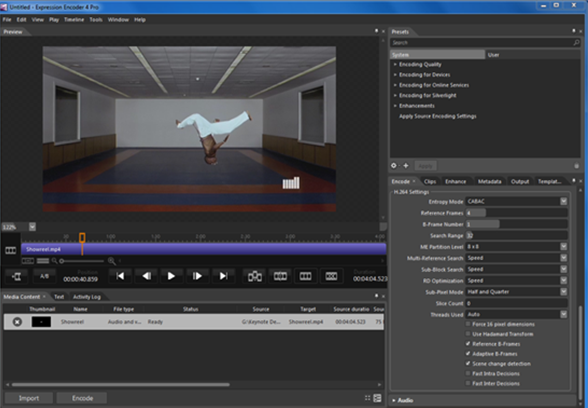
imageExpression Encoder is an advanced audio/video-encoding and live-broadcasting application especially suited for generating content that takes full advantage of the rich graphic and interactive capability of Microsoft Silverlight playback scenarios. You can also generate Windows Media video and audio files that are optimized for other web playback scenarios, or appropriate for playback on portable devices.

For more information about what else is new in this release, see What’s New in Expression Encoder 4.

Note: This free version of Expression Encoder 4 does not include support for live IIS Smooth Streaming and H.264 encoding. To use these features, upgrade to Expression Encoder Pro.

Help us improve Expression Encoder by reporting any technical issues.
For more insight into Expression Encoder, please see the Expression team blog.

clip_image001

Anyone remember Microsoft Bootvis?  That OEM tool that Microsoft never actually released to the public but end users used it anyway to analyze their boot up sequence for Windows XP?  Then we went and released the Windows Performance Toolkit… which was difficult enough to use that many people avoided it altogether.

MEASURING BOOT PROCESSES
Introducing Soluto.  Soluto is a 3rd party utility that installs on your computer (Windows XP/Vista/7 (32bit & 64bit)) and runs at boot time.  It times the boot sequence as your computer is coming up. It then indexes and measures each process that executed and tells you what order drivers and services are loading at and specifically how long each takes.

RATIONALIZING WHAT’S LOADING
What’s more interesting about Soluto however is that it gives you the ability to understand the importance of each process.  It leverages a central web-based database called the “PC Genome” which is designed to help people understand which processes are important and which aren’t. Based on this information you can ascertain which processes should load and which should be deferred to a later time – like when the PC is idle. You’re able then to set each process to specifically DEFER loading until later or DISABLE them altogether, giving you better insight & control over what it is that your PC is doing, now that OEM drivers and 3rd party software have been installed on your computer.

REDUCING YOUR BOOT TIMES
At the end of the process, you may find that you have cut your boot up times in HALF simply by cleaning out boot-time junk that you previously had no knowledge of.  Remember that this isn’t the junk that’s in STARTUP or RUN in the Registry: These are the processes that load at boot time. 

Posted by: kurtsh | June 28, 2010

BETA: Windows® Server 2008 R2 Security Baseline

imageThe beta version of the Windows® Server 2008 R2 Security Baseline is now available!

Meet your business-critical needs and elevate the security of Windows Server 2008 R2 with this new security baseline. It combines best-practice guidance with the Security Compliance Manager (SCM) tool to help you plan, deploy, and monitor the security of your Windows Server 2008 R2 servers. Preview this new security baseline, and get the knowledge to effectively deploy and monitor your security baseline for Windows Server 2008 R2 faster and easier.

This beta security baseline for Windows Server 2008 R2 is formatted for easy import using SCM. You must first join the program (https://connect.microsoft.com/InvitationUse.aspx?ProgramID=5758&InvitationID=SOLC-2WBV-24MY&SiteID=715) and then use the Download link found in the upper left hand corner of the Connect page. You will find detailed instructions about how to import the download file into SCM on the program description page.

If you are not already a member of the beta program, click here to join.

For members, click here to go to the program description page.

Please send any questions or comments to the Solution Accelerators security team: Secwish@microsoft.com.

imageVisual Voicemail Update 1.1.12.9 is available for Verizon HTC Touch Pro 2 owners.

Download the .CAB below directly to your device through IE or Opera and double click on the file.
http://mobile.vzw.com/download/vvm/Rhodium/VVM65_Pro_1.1.12.9.CAB

(It still works on MR0/Original 6.1 ROM)

image Exchange Server 2007 Service Pack 3 was just made available.

Microsoft Exchange Server 2007 Service Pack 3 (SP3) has been designed specifically to meet the challenges facing our customers and to help address the needs of all the different businesses and organizations utilizing our Exchange Server 2007 enterprise messaging system.

Exchange Server 2007 SP3 is a mission-critical communications tool that enables employees to be more productive and access their information anywhere and anytime while providing a messaging system that enables rich, efficient access to e-mail, calendar items, voice mail, and contacts.

For administrators, Exchange Server 2007 SP3 provides further flexibility with the addition of Windows Server 2008 R2 support for server roles and Windows 7 support for the Exchange management tools. These additions, along with enhancements for the advanced protection options against e-mail security threats, such as spam and viruses and the tools which help manage internal compliance and high availability needs provide Exchange administrators with the tools they need to manage their Exchange 2007 environments efficiently.

Clean installations of Exchange 2007 SP3 on a new server are possible by using this download in the same manner as you would install Exchange 2007 RTM, Exchange 2007 SP1 or Exchange 2007 SP2.

The Exchange Server 2007 SP3 bits are available online in 11 languages and on two platforms (32/64bit). The accompanying documentation includes: Release Notes and What’s New in Exchange Server 2007 SP3.

As highlighted in the EHLO blog post by KevinAl a moment ago Ask and you shall receive – Exchange 2007 SP3 w/support for Windows Server 2008 R2 Now Available, this service pack was created in response to strong customer demand for Windows Server 2008 R2 support for Exchange 2007. In addition to the newly supported OS, this service pack also provides updates to a number of core components and the re-introduction of the password reset functionality within OWA for customers using Windows Server 2008 and Windows Server 2008 R2.

clip_image002For you Verizon HTC Touch Pro 2 users:

Looks like the Verizon Touch Pro 2 just received a maintenance ROM update called ‘MR2’. Still a bit early to know all the changes, but so far it looks to be some subtle, under the hood type fixes as opposed to a whole new "experience":

  • "This is a general software upgrade for the XV6875 that updates VZ Navigator, Contact Cards and the Time Stamp"

So shall we play "what else is different"? If you find anything, hit us up in comments.

You can grab the ROM update right here from PCD.
http://www.pcdphones.com/phone_downloads.aspx?bid=128&cid=1&mid=356&carrier=VerizonWireless

image Product(s): Hyper-V,Microsoft technologies.

Audience(s): IT Decision Maker,IT Generalist.

Duration: 60 Minutes

Event Overview

The Microsoft Offline Virtual Machine Servicing Tool (OVMST) provides guidance and automated tools to keep your offline virtualized environment up to date with the latest updates and safe from attackers. The Offline Virtual Machine Servicing Tool now supports Microsoft Hyper-V Server 2008 R2, Microsoft Virtual Machine Manager (VMM) 2008 R2, Microsoft System Center Configuration Manager (SCCM) 2007 Service Pack 2 (SP2), and Windows Server Update Services (WSUS) 3.0 SP2. OVMST 2.1 also supports updates to Windows 7 and Windows Server 2008 R2 virtual machines. In this  webcast, we provide an overview of the features in Offline Virtual Machine Servicing Tool 2.1, and we preview the key features for the next version of the tool.

Presenter: Gargee Sharma, Program Manager, Microsoft Corporation

What is Hilo?

Project “Hilo” is an effort to tell the story of building high performing, responsive rich Windows applications using C++. We will do this by walking you through our own experience of building some sample applications which we believe provide differentiated user experiences. We will tell you everything from setting up the development environment to taking advantage of the feature set of Windows 7.

The Samples

The first of these sample applications is a photo browser that implements a touch-enabled user interface for browsing photos on your computer. We call it the Hilo Browser.  Below is a screenshot:

hilo_vcblog_screenshot

This application illustrates how to take advantage of the following Windows functionalities:

  • Direct2D: For high performance and high-quality rendering of graphics.
  • Windows Animation Manager: To give the application a unique personality and to improve the user experience.
  • Windows Touch: To provide a more natu
  •  

  • ral user interface through which the user can just “point” and “do”.
  • Libraries: To enable the application to provide users with a single, coherent view of their files.
  • Shell API: To navigate the images, to optimize by using the pre-built thumbnail cache and also to provide folder icons from their actual content.

You can download the source code for this application from the Hilo Code Gallery Page.

Over the coming weeks, we’ll be publishing a series of articles on MSDN Library (here) that will provide the walkthrough promised above. The introductory article is already up.

If you have questions or comments about the sample code, the usage of technologies or anything in general, please feel free to let us know through the Hilo Discussions Page.

You can also follow Hilo updates on Twitter @projecthilo.

We’ll soon be publishing the next article in the series, which will describe in detail how to prepare your development environment for Windows development.

[taken from the Visual C++ blog]

image We’ve released a digital copy of the Windows Server 2008 R2 Hyper-V Component Architecture Poster

The poster is a great visual tool to help in the understanding of the key features and components of the Hyper-V in Windows Server 2008 R2. It highlights key Hyper-V components including:

  • Architecture
  • Virtual Networking
  • Virtual Machine Snapshots
  • Live Migration
  • Storage Interfaces
  • Storage Types
  • Storage Location and Paths
  • Import and Export

This large-format poster provides practical visual depictions of the Windows Hypervisor, live migration process, cluster shared volumes architecture, VMQ data paths, disk storage I/O path, and much more.

You can use this poster in conjunction with the previously published Windows Server 2008 and Windows Server 2008 R2 component posters (see http://go.microsoft.com/fwlink/?LinkId=193499 and http://go.microsoft.com/fwlink/?LinkId=179116).

DOWNLOAD:  Hyper-V Component Architecture Poster
http://www.microsoft.com/downloads/details.aspx?displaylang=en&FamilyID=5567b22a-8c47-4840-a88d-23146fd93151

« Newer Posts - Older Posts »

Categories