Posted by: kurtsh | August 26, 2010

RELEASE: Exchange Server 2010 SP1 now available

image Rather than reinvent the wheel, here’s the Exchange product groups announcement of SP1 from their blog:

The Future of Exchange Starts Here: Exchange Server 2010 SP1 Is Now Available

You have been eagerly waiting, and we have been working hard over the summer to deliver the latest Exchange Server 2010 enhancements as soon as possible. I am extremely happy to announce the availability of Exchange Server 2010 Service Pack 1, ready for download here.

We released the SP1 beta at Tech Ed North America in June. We also shared some of the SP1 enhancements in Yes Virginia, there is an Exchange Server 2010 SP1 back in April. Since then, almost 500,000 SP1 mailboxes have gone into production in Technology Adoption Program (TAP) customer environments.

Rather than recap all the SP1 features, I want to let a few of our Exchange TAP customers tell you what they loved.

[READ MORE AT: http://msexchangeteam.com/archive/2010/08/25/455861.aspx]

  • Download
  • What’s new
  • Release notes
  • Prerequisites
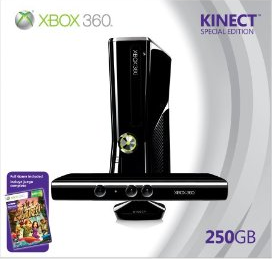
  • image If you’ve ever used the XBox 360 Kinect for any decent amount of time and thought about what it’s potential is, you surely have thought about the “spellcaster” scenario where through a mixture of voice/verbal commands and hand gestures one could literally cast a spell within an Xbox 360 game providing all the realism that fantasy game players have wanted for so long.

    Well, it’s being worked on.  Meet Harry Potter & the Deathly Hallows for Xbox 360 Kinect:

    The new game is an adaptation of the upcoming movie, Harry Potter and the Deathly Hallows (Part 1) and it lets you perform spells with just your hands. For example, players can use stupefy, expelliarmus, protego, windgardium leviosa, and others by moving their arms and hands in particular motions. (No actual magic wand is required).

    For Harry Potter fans, this one’s going to be a must-have.  For everyone else, there are plenty of other Kinect titles to choose from. You can keep track of the growing list here.

    [READ MORE AT: http://on10.net/blogs/sarahintampa/Magical-Kinect-Demoed-by-Harry-Potter-Actors/]

    The photo above is an actual screen shot of the game in progress per the Electronic Arts web site at http://harrypotter.ea.com/UK/

    image The latest release in the Security Compliance Manager Baseline Beta review program is a new security baseline for Microsoft® Exchange Server 2007.

    This resource is an exciting new addition to the security baselines released earlier this year that can be used in combination with the Security Compliance Manager tool. The Exchange Server 2007 Security Baseline represents some of the most prescriptive and detailed security guidance to date from Microsoft for Exchange Server 2007. It works within the Security Compliance Manager tool, which allows you to use automated tools based on Windows PowerShellTM to set, customize, and monitor computers running Exchange Server 2007 for compliance with organizational policies.

    Once you’re a member, use the Download link in the upper left hand corner of the page. For detailed instructions about how to import the downloaded file into the Security Compliance Manager tool, refer to the program description page: https://connect.microsoft.com/content/content.aspx?ContentID=17624&SiteID=715

    Note: The Microsoft Exchange Server 2007 Security Baseline requires Security Compliance Manager (SCM) v1.1. If you are running SCM v1.0, you must upgrade SCM before importing the baseline. Otherwise, the import process will fail.

    Security Compliance Manager Baseline Beta Review Program
    The Security Solution Accelerators team is developing new baselines and settings, all of which are designed to help your organization plan and deploy security baselines with ease and confidence. These new baselines and supporting best-practice guidance are available as part of the Security Compliance Manager Baseline Beta review program. The scope of this program includes baselines for Exchange Server 2007, Office 2010, SQL Server® 2008, SQL Server 2008® R2, and Windows Server 2008® R2; and setting packs for Windows® 7 and Internet Explorer® 8.

    The beta releases in this program are formatted to be imported for use in the Security Compliance Manager tool, which released in early 2010. This powerful tool provides guidance to work with other tools and features of Microsoft products to help you plan, deploy, and monitor your security baselines. The tool enables you to access and automate all of your organization’s baselines in one centralized location, balancing your needs for security and functionality.

    To learn more about the Security Compliance Manager tool, visit the TechNet Library: http://go.microsoft.com/fwlink/?LinkId=113940

    To download the tool, click here: http://go.microsoft.com/fwlink/? LinkId=182512

    Posted by: kurtsh | August 26, 2010

    DOWNLOAD: Windows Server Architecture Posters

    image Remote Desktop Services Component Architecture Poster
    This poster provides a visual reference for understanding key Remote Desktop Services technologies in Windows Server 2008 R2. It explains the functions and roles of Remote Desktop Session Host, Remote Desktop Virtualization Host, Remote Desktop Connection Broker, Remote Desktop Web Access, Remote Desktop Gateway, RemoteFX and Remote Desktop Licensing.

    Windows Server 2008 R2: Hyper-V Component Architecture
    This poster provides a visual reference for understanding key Hyper-V technologies in Windows Server 2008 R2. It focuses on architecture, snapshots, live migration, virtual networking, storage, and import/export.

    Windows Server 2008 R2 Feature Components Poster
    This poster provides a visual reference for understanding key technologies in Windows Server 2008 R2. It focuses on Active Directory Domain Services, Hyper-V, Internet Information Services, Remote Desktop Services (including Virtual Desktop Infrastructure (VDI)), BranchCache, and DirectAccess technologies. In addition, updates to core file services and server management are illustrated. You can use this poster in conjunction with the previously published Windows Server 2008 Component Posters.

    Windows Server 2008 Component Posters
    These two posters, originally published in the July 2007 issue of TechNet Magazine, provide a strong visual tool to aide in the understanding of various features and components of Windows Server 2008. One poster focuses exclusively on powerful new Active Directory technologies, while the other provides a technical look at a variety of new features available in Windows Server 2008 (such as Server Core, Network Access Protection, and more).

    image Windows Server 2008 R2 Virtual Hands On Lab:
    BranchCache, Remote Desktop Services, Direct Access, and Power Management

    Overview
    Windows Server 2008 R2 provides a productive server platform because it offers cost-effective virtualization, power saving capabilities, and a superior experience for end users. In this Hands-on Lab we will focus on the Windows Server 2008 R2 features that enable Administrators to streamline access to data and applications, especially from remote locations: BranchCache, Remote Desktop Services and Direct Access. We will also review how IT administrators can better measure and manage power consumption. Topics include:

    • Branch Cache
    • Publishing application using Remote Desktop Services RemoteApp
    • DirectAccess and Power Management

    Register Now:
    This special, no charge training event will fill quickly and space is limited, so be sure to register as soon as possible to reserve your seat.
    This is a private training.  If you are a customer of mine, please contact me for registration information.

    What is a virtual hands-on-lab:
    This isn’t your typical IT class. A hands-on lab online is an invite only event that combines LiveMeeting with a virtual lab. Attendees and presenters login from anywhere. Attendees watch a brief LiveMeeting presentation, then spend most of the time getting hands-on experience working through all, or just self-selected modules of the entire lab – at their own pace, and receive real–time, personal, one-on-one attention from the presenter. In addition, there’s a proctor available for technical support and to answer more attendee questions.

    Date:
    September 1st 2010

    Time:
    9:00am – 1:00pm Pacific Time

    Location:
    Virtual Hands On Lab Classroom.

    Target Audience:
    IT Pro, IT Manager

    Before the Event:

    image Microsoft SQL Server Migration Assistant (SSMA) for Access is a tool for migrating databases from Microsoft Access to SQL Server 2005, SQL Server 2008 and SQL Server 2008 R2. SSMA 2008 for Access also supports migrating to SQL Azure.

    SSMA for Access converts Access database objects to SQL Server database objects, loads those objects into SQL Server, and then migrates data from Access to SQL Server. You can also link Access tables to SQL Server tables so that you can continue to use your existing Access front-end applications with SQL Server or SQL Azure.

    SSMA for Access supports migration from Access 97 and higher to any edition of SQL Server.

    Requirements for the SSMA for Access:

    • Microsoft Windows Installer 3.1 or a later version.
    • The Microsoft .NET Framework version 2.0 or a later version. The .NET Framework version 2.0 is available on the SQL Server product media. You can also obtain it from the .NET Framework Developer Center Web site.
    • The ability to access the computer that hosts the target instance of SQL Server.
    • DAO provider version 12.0 or 14.0. You can install DAO provider from Microsoft Office 2010/2007 product or download it from Microsoft web site.
    • Microsoft SQL Server Native Client (SNAC) version 10.5 and above for migrating to SQL Azure. You can install SNAC from Microsoft SQL Server 2008 R2 product or download it from Microsoft web site (SQL Server 2008 R2 Feature Pack).
    • At least 1 GB RAM.

    DOWNLOAD: Microsoft SQL Server Migration Assistant for Access v4.2
    http://www.microsoft.com/downloads/details.aspx?FamilyID=5abe098d-c7e1-46c6-994a-09a2856eef0b&displaylang=en

    Posted by: kurtsh | August 26, 2010

    No, I am not ditching my blog

    image I seriously think I caught that salmonella thing when I ate at a bunch of small dishes at a restaurant downtown that I won’t mention.  The incident left me sick enough that I had to cancel a weeks worth of meetings while trying to get back on my feet.

    Lemme tell you – I wouldn’t wish that experience on my worst enemy.

    Then I had a offsite business meeting Mon-Wed this week so I’ve been simply unable to post for 10 days.

    But I’m back.  So here we go again.

    image Recently we released 3 new papers that may be of interest to folks in security.

    • Vulnerability Management at Microsoft whitepaper (July 2010)
      Vulnerabilities are weaknesses in software that enable an attacker to compromise the integrity, availability, or confidentiality of that software.  Microsoft uses a process to investigate and release security updates that address vulnerabilities in the software it produces.

      In this paper you’ll learn about this process and how Microsoft uses a multipronged approach to help its customers manage their risks.  This approach includes three key elements: (1) High quality security updates – using world class engineering practices to produce high quality security updates that can be confidently deployed to over a billion diverse systems in the PC eco-system and help customers minimize disruptions to their businesses; (2) Community based defense – Microsoft partners with many other parties when investigating potential vulnerabilities in Microsoft software. Microsoft looks to mitigate exploitation of vulnerabilities through the collaborative strength of the industry and through partners, public organizations, customers, and security researchers.  This approach helps to minimize potential disruptions to Microsoft’s customers’ businesses; (3) Comprehensive security response process – employing a comprehensive security response process that helps Microsoft effectively manage security incidents while providing the predictability and transparency that customers need in order to minimize disruptions to their businesses.

      DOWNLOAD the free Vulnerability Management at Microsoft whitepaper (July 2010) now

    • MSRC Progress Report ( July 2010)
      Find out how three programs launched by the MRSC in August 2008 have helped customers, partners and third-party software developers improve the security of users of Microsoft software. The three programs – Microsoft Active Protections Program (MAPP); Microsoft Exploitability Index, and; Microsoft Vulnerability Research (MSVR) – collectively share more information with partners and customers.

      DOWNLOAD the free MSRC Progress Report (July 2010) now

    • The Microsoft Vulnerability Research Program (July 2010)
      The Microsoft Vulnerability Research (MSVR) program, launched in 2008, leverages Microsoft knowledge and experience in securing software to help other software and hardware vendors deal with vulnerabilities reactively as well as develop proactive internal programs to improve the overall security of their products. This whitepaper explains how MSVR works with software and hardware vendors around the world and reports progress made to date.

      DOWNLOAD the free Microsoft Vulnerability Research Program whitepaper now

    Posted by: kurtsh | August 16, 2010

    WEBCAST: Visio 2010 Core Concepts Tips & Tricks

    clip_image001

    Microsoft Office Visio 2010 is rich with new tools to assist in creating rich, data-connected diagrams faster and easier than ever before.

    With this Tips and Tricks session you will gain the insight and insider information to quickly and easily create, edit, maintain, and publish Visio diagrams as well as visualize your important corporate data and processes. You will learn shortcuts for productivity, techniques for high quality presentation and tools for collaborative use of your mission-critical diagrams.

    Speakers:

    Mr. David A. Edson, M.Arch., MCP, Microsoft Visio MVP CTE / Director of Consulting Services, Visibility.biz David A. Edson was trained as an Architect, holding degrees in both Architecture and Architectural History. Dave first began utilizing Visio and became a Visio employee, with its introduction in 1992. Dave has spent the last several years traveling all over the world training other developers in the use of both Visio and VBA as a development and solutions platform. Dave continued his evangelism efforts for Microsoft as a Technical Product Manager within the Developer Tools Division, focusing on Visual Studio for Applications, and VBA. Dave is currently the Director of Consulting Services and CTE with Visibility.biz. Dave was the recipient of the Microsoft 2006, 2007, 2008, and 2009 MVP (Most Valued Partner) award in recognition of his outstanding achievement in support of Visio technology, and Visio customers. Dave is also a Microsoft Certified Professional (MCP) in Data Visualization

    Matthew Rodeman has over 18 years of software industry experience which include 9 years at Microsoft. Prior to Microsoft, Matt worked for Visio for 2½ years and 5 ½ years with Autodesk where he learned CAD for the Architectural and Civil Engineering industry. Matt is now President and founder of Tips & Techniques L.L.C which provides an alternative to traditional software training. Our focus is to provide technical demonstrations and presentations to companies who can benefit from learning about visual application tools to help streamline and document their technical business processes.

    Registration:
    If you are a customer of mine, please contact me for details on dates/times/registration.

    clip_image001Microsoft would like to invite you to join us for a breakfast discussion at the new Microsoft Store in Mission Viejo featuring Microsoft Business Intelligence and Ad Hoc Reporting.

    Microsoft Business Intelligence (BI) Solutions build on your existing technology investments so employees gain access to accurate, up-to-date information for better, more relevant decision-making.  Our BI Solutions integrate the strengths of SQL Server, SharePoint and Office on a single platform to empower informed decision-making that moves your business forward.   During this two hour discussion, you can expect the following:

    • A discussion around Microsoft BI Solutions
    • Demonstration of Ad Hoc Reporting
    • Guidance on how you can get started

    Breakfast Discussion featuring Microsoft Business Intelligence and Ad Hoc Reporting

    Date & Registration:  Please contact me if you are a customer of mine for further details.
    Time:  8:00 AM – 10:00AM
    Location: Microsoft Mission Viejo Store

    The Shops at Mission Viejo
    578 The Shops at Mission Viejo
    Mission Viejo, CA 92691
    Phone: (949) 325-6100

    In addition to being entered into a raffle for some great Microsoft prizes, we are also offering a friends and family 10% discount on all Software and 5% off everything else in the MS Store on the day of the event!

    « Newer Posts - Older Posts »

    Categories