Posted by: kurtsh | September 25, 2010

RELEASE: Virtual Machine Servicing Tool 3.0

image Virtual Machine Servicing Tool 3.0 helps you reduce IT costs by making it easier to update your offline virtual machines, templates, and virtual hard disks with the latest operating system and application patches—without introducing vulnerabilities into your IT infrastructure.

This Solution Accelerator includes the following components:

  • Brief Overview. Available online only on Microsoft TechNet. Summary for business and technical managers that briefly explains how this Solution Accelerator can fit into an organization’s IT infrastructure management strategy.
  • VMServicing_x64 and VMServicing_x86. Setup files for the tool, for 64 bit and 32 bit versions of Windows with Microsoft® System Center Virtual Machine Manager (VMM) 2008 or 2008 R2.
  • Virtual Machine Servicing Tool Getting Started Guide. Provides information about how the tool works, explains prerequisites for the tool, and describes how to install and configure the tool.
  • VM_Servicing_Tool_3.0_Release_Notes.rtf. Notes provide information about this release, describe known issues in the tool, and include feedback instructions.

DESCRIPTION:
The increasing use of virtual machines—for purposes ranging from support of older operating system environments to power savings—has created new challenges for IT.

In particular, virtual machines may be left offline (stored in a non-operating state) for extended periods of time, which conserves resources when the server capacities of the virtual machines are not needed or frees up physical computing resources for other purposes.

However, offline machines, templates, and virtual hard disks do not automatically receive operating system, antivirus, or application updates that would keep them compliant with current IT policy. An out-of-date virtual machine may pose a risk to the IT environment. If deployed and started, the out-of-date virtual machine might be vulnerable to attack or could be capable of attacking other network resources.

Therefore, IT groups must take measures to ensure that offline virtual machines, templates, and virtual hard disks remain up-to-date and compliant. At present, these measures involve temporarily bringing the virtual machine online, applying the necessary updates, and then storing it again.

Benefits

VMST 3.0 helps you more effectively—and safely—manage the workflow of updating you offline virtualization environment. Using VMST 3.0, you can now service:

  • Offline virtual machines in a SCVMM library.
  • Stopped and saved state virtual machines on a host.
  • Virtual machine templates.
  • Offline virtual hard disks in a SCVMM library by injecting update packages.

DOWNLOAD: Virtual Machine Servicing Tool 3.0
http://www.microsoft.com/downloads/en/details.aspx?FamilyID=8408ECF5-7AFE-47EC-A697-EB433027DF73&displaylang=en

clip_image001

We want to extend a special invitation to our SQL Server customers to attend the PASS Summit 2010 conference, Nov. 8-11, in Seattle, WA – hosted by the Professional Association for SQL Server.

PASS Summit 2010 is the must-attend event for anyone interested in getting the most out of their SQL Server and BI investments, and we’re pleased to offer a special discount to our most valued customers: $200 off the Full (3-Day) Summit registration prevailing rate if you register by November 7, with the Microsoft discount code.

Make sure you also include my name and email address under the “Did you hear about PASS Summit 2010 from a Microsoft contact” question during registration and your name will automatically be entered in a draw for a DELL Streak – the new and highly sought after high-tech smart phone and tablet computer hybrid! Find out more about the contest details.

PASS Summit features the most knowledgeable and dynamic SQL Server and Business Intelligence (BI) speakers in the industry. Microsoft will be out in full force to share best practices, tips, techniques, and strategies. From technical sessions to “Ask the Experts” Lounge to the CSS First Aid Station and hands-on labs, you’ll have direct access to the Microsoft developers, engineers, and support teams who create and support the mission-critical features your business depends on.

You can find details about PASS Summit 2010 at http://www.sqlpass.org/summit/na2010/. Remember, register by Nov 7 with the Microsoft discount code for your $200 in savings and don’t forget to add my name and email as the referrer and you could go home with a new Dell Streak!

I encourage you not to miss this opportunity to save on this exceptional SQL Server and BI event. Hope to see you in Seattle!

DISCOUNT CODE:
Please contact me if you are a customer of mine for information about our PASS Summit discount code.

clip_image001

Hi guys.  I have the opportunity to offer a limited number of my customers a COMPLIMENTARY PASS to the 7th International Cloud Expo in Santa Clara, CA on November 1-4th, courtesy of Microsoft, a Platinum Plus Sponsor.

The Cloud Computing Expo (http://cloudcomputingexpo.com/) labels itself as “The Only Enterprise IT Event in 2010 Covering the Entire Scope of the Cloud Computing Spectrum”. The conference description is as follows:

Cloud Expo was announced on February 24, 2007, the day the term "cloud computing" was coined. That same year, the first Cloud Expo took place in New York City with 450 delegates. This coming November 2010, Cloud Expo is returning to Santa Clara with more than 5,000 delegates and over 100 sponsors and exhibitors.

"Cloud" has become synonymous with "computing" and "software" in two short years. Cloud Expo is the new PC Expo, Comdex, and InternetWorld of our decade. By 2012, more than 50,000 delegates per year will participate in Cloud Expo worldwide.

The cloud is certainly a compelling alternative to running all applications within a traditional corporate data center. But moving from theory into practice is where things get complicated, and this is where attending a top industry event like Cloud Expo comes in.

No one can take full advantage of cloud computing without first becoming familiar with the latest issues and trends, which is why the organizing principle of the 7th International Cloud Expo on November 1-4, 2010, is to ensure – through an intensive four-day schedule of keynotes, general and breakout sessions, and our bustling Expo Floor – that attending delegates leave the Santa Clara Convention Center with abundant resources, ideas and examples they can apply immediately to leveraging the Cloud, helping them to maximize performance, minimize cost and improve the scalability of their Enterprise IT endeavors.

Delegates will leave 7th Cloud Expo with dramatically increased understanding of the entire scope of the cloud computing spectrum, from storage to security.

The Santa Clara Convention Center is the only place to be November 1-4, 2010, if you build, sell or purchase applications or infrastructure delivered as a cloud service. End users, IT professionals and vendors alike are all encouraged to participate.

WHO SHOULD ATTEND:
Senior Technologists including CIOs, CTOs, VPs of technology, IT directors and managers, network and storage managers, network engineers, enterprise architects, communications and networking specialists, directors of infrastructure Business Executives including CEOs, CMOs, CIOs, presidents, VPs, directors, business development; product and purchasing managers.

COMPLIMENTARY REGISTRATION:
If you are interested in taking advantage of this offer (valued at $2500):

  1. Contact me – if you are a customer of mine – for a registration code.
  2. Visit the Cloud Expo registration page at:
    https://www3.sys-con.com/cloud2010west/registernew.cfm?a1=gold
  3. Under registration choices, enter the registration code I provided to you.
    This will provide you with a Golden Pass which provides full conference access including all 4 days of conference sessions at the Cloud Computing Conference and Expo as well as the Virtualization Conference & Expo. Additionally, Gold Pass registration includes: Welcome Reception on Day 2, and refreshment breaks, collectible conference bag and access to all conference sessions including all technical sessions, the exhibit floor, keynotes, vendor technology presentations, and SYS-CON.TV Power Panels.
  4. Follow the remainder of the registration instructions.

image If you intend on attending CES 2011 for the expo, you need to register ASAP – and before September 30th.

FREE registration to the Las Vegas Consumer Electronics Expo – Jan 6-9, 2011 – is available until the end of the month by using Registration Code “LC2”.  After this the cost is $100 for online registration – $200 for onsite registration. 

The Consumer Electronics Expo web site is http://www.cesweb.org.

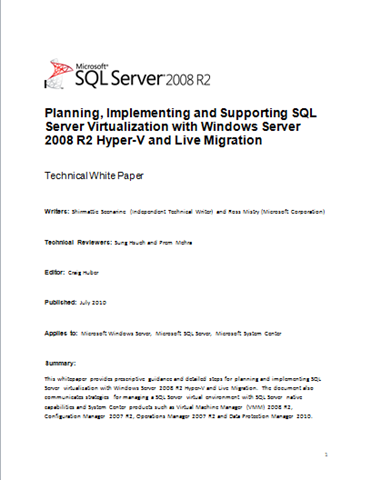
imageThis white paper provides prescriptive guidance and detailed steps for planning and implementing SQL Server virtualization with Windows Server 2008 R2 Hyper-V and Live Migration. 

The document also communicates strategies for managing a SQL Server virtual environment with SQL Server native capabilities and System Center products such as Virtual Machine Manager (VMM) 2008 R2, Configuration Manager 2007 R2, Operations Manager 2007 R2 and Data Protection Manager 2010.

Posted by: kurtsh | September 24, 2010

OFFER: Save 25% on TechNet Subscription Professional

ts3Save25Save 25% on TechNet Subscription Professional
With an annual subscription, you can evaluate more than 70 full-version Microsoft software titles such as Windows 7 and Office 2010 without time or feature limits. But hurry, the offer ends October 31, 2010. Use promo code TNITQ413.

image Developers, we’re pleased to announce another free offering: Moving to Microsoft Visual Studio 2010 (Microsoft Press, 2011; 336 pages), written by Patrice Pelland, Pascal Paré, and Ken Haines.

Here’s a little bit about the authors: Ken Haines is a software development engineer at Microsoft, working in the Consumer and Online Division. He has a passion for distributed applications in the cloud and strives to help customers and partners find the right solution for their needs. Pascal Paré has worked at Microsoft since 2006, where he has held positions as a software engineer on both development and testing teams. Patrice Pelland is a principal development manager at Microsoft, working in the Consumer and Online Division. He leads a development team that is focused on innovation and incubation across all Microsoft consumer products.

Moving to Microsoft Visual Studio 2010 was written with three audiences in mind:

Part I is for developers moving from Visual Studio 2003 to Visual Studio 2010.

Part II is for developers moving from Visual Studio 2005.

And Part III is for developers moving from Visual Studio 2008.</!–ENDFRAGMENT–>

Please see this post for an extensive description of the book’s content, including “Who Is This Book for?,” “What Is the Book About?,” and “How Will This Book Help Me Move to Visual Studio 2010?” (Note that the links in that post are to a draft preview version of the book. Links to the final and complete book appear immediately below in this post.)

clip_image002

If you haven’t seen this, this is an very impressive web site that leverages Silverlight & Microsoft Live Labs Pivot technology to graphically show the front pages of over 1000+ Sharepoint-based Internet facing Web Sites throughout the world. 

You can select criteria to rapidly filter and “re-pivot” around the following sorting categories:

  • Country (US, UK, Japan, Canada, etc.)
  • Industry (Healthcare, Financial, Prof Services, Manufacturing, Entertainment, etc.)
  • Rating (1-5)
  • Platform (MOSS2007, WSS v3, SPS2010, SPF 2010)
  • When Added (i.e. “age”)

As you filter, the images of the web sites reorganize themselves in a visually appealing manner to the eye. Live Pivot makes sorting and sifting through data a pleasant task for end users.  Give it a look see and at the very least, share it with other Sharepoint users so they can see how many people aren’t just using Sharepoint but using it as the basis of their External Web sites for its content management, search, and other out-of-the-box capabilities that minimize custom development.

image

We’re excited to introduce Microsoft Lync, the new name for the next generation of our real-time communications products, known until today as Communications Server and Communicator. 

Lync Server 2010 ushers in a new connected experience transforming communication into an interaction that is more collaborative, engaging and accessible from any location with internet connectivity. A single interface unites voice, IM, audio-, video-, and web-conferencing into a richer, more contextual offering and a single identity makes it easier and more efficient for users to find contacts, check their availability and connect with them.  Lync Server 2010 works consistently with Microsoft Office, enriching the experience of familiar applications like Microsoft Outlook, Microsoft Word, Microsoft SharePoint, and more.

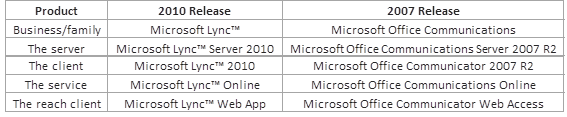
For folks looking to understand the “rebranding” analogies, here’s a table:

image

image Some interesting features to look forward to:

  1. Switch between your head-set and phone in the middle of a call with device switching.
  2. Gotta run? Leave the office and take your call with you on your mobile phone.
  3. Select multiple people and click to make a group call, and then drag-and-drop someone into the conference from Outlook.
  4. Connect with family while you’re travelling – start a high-definition voice and video conversation with a Windows Live Messenger user.
  5. Hush that annoying meeting participant.   When someone is causing bad audio on the conference call, Lync will identify which phone to mute to improve quality – and productivity.

Public Announcement is available here:

Release Candidate download available here:

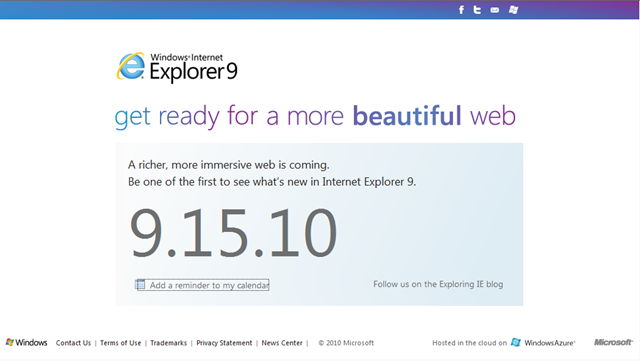
image We’ve been pretty tight lipped about this but Internet Explorer 9’s BETA is launching on September 15th.

The event will be in San Francisco and available for viewing online at http://www.beautyoftheweb.com.

Ed Bott’s got a post about the event or at least what he knows/surmises about what to expect.

« Newer Posts - Older Posts »

Categories