image I know at least one of you is in full deployment mode around Office 2010.  With that in mind, here are some poignant resources for educating the end user community around how to use Office 2010 relative to the previous Office. (XP?!?  Yecch.)

NOTE:  Each lesson has its own Silverlight-based video training & Quick Reference Card – for example:  “Word”

THE TRAINING PACKAGES
There’s a couple packages of content that are designed to be all-inclusive training material packages.  The first item is a 65MB collection of professionally done “leave-behinds”, “quick reference sheets”, etc. … for EVERY Office 2010 product. The second item is targeted at getting the IT dept to better understand Office 2010 and includes evangelism materials like posters, placards, email templates, etc.

image MSDN events presents:  Entity Framework 4
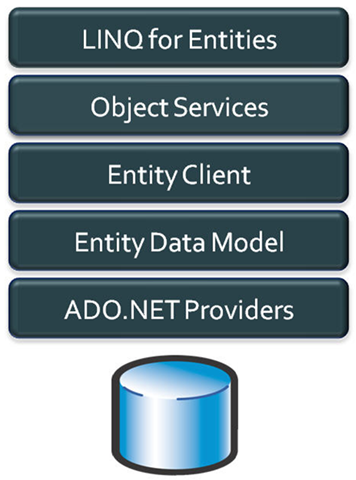
You are not going to want to miss this half-day event where Rob Bagby will be illustrating how to take advantage of the Entity Framework 4 in your applications.  The event will be split across 3 sections and will be demo-driven.

Part I: Modeling, Mapping and Relationships
In part I, Rob will start with an overview of Entity Framework 4.  He will then delve into modeling and mapping with the EF.  He will cover how you can create a “conceptual” or “application-centric” model within the framework to meet the needs of your application.  He will also cover relationships in the Entity Framework, including the new Foreign Key relationships in Entity Framework 4.

Part II: Querying the Model
In part II, Rob will provide an overview of your querying options in the Entity Framework.  He will discuss your querying options in Entity Framework 4, including the following:

  • Entity SQL – What, how and why you might choose to use it
  • Query Builder Methods – What they are
  • LINQ to Entities – LINQ to Entities Overview; Method-Based Syntax vs. Query-Based Syntax
  • Stored Procedures – Read and Write
  • Views, Defining Queries – Composable items

Part III: Updating the model and Real-world functionality (given time)
In Part III, Rob will discuss working with Object Services to track changes and perform persistence.  This section will include a discussion of the new templates in Entity Framework 4 aimed at working in disconnected environments: the POCO template and the Self-Tracking Entities template.  Given time, Rob will illustrate how the EF supports functionality that real-world applications require such as concurrency, validation and transactions.

Date/Time:
Tuesday, September 21, 2010 1:00 PM – Tuesday, September 21, 2010 5:00 PM
Welcome Time: 12:30 PM

Location:
Microsoft Los Angeles Office 
333 S Grand Ave Suite 3300
Los Angeles California 90071

Parking in Los Angeles:
Parking will not be hosted for this event. Discounted parking is available at Joe’s Auto Parks (Lots 220 and 240) located on the corner of Hope and Gen Thaddeus Kosciuszko Way (lot address: 220 S. Hope Los Angeles CA 90071). Fees are $12.00 (cash only) for the full day.

Please note that Joe’s Auto Park is an unaffiliated, independent vendor and that Microsoft is in no way liable for any negligence or any damage that may be incurred by attendees who utilize this parking facility.

Registration:
If you are a customer of mine, please contact me for registration details.

image Can We Bust This Myth? “It’s impossible to upgrade a Windows XP computer to Windows 7”
In this fun and interactive session we’ll look at different ways to move your Windows XP machine to Windows 7, keeping user data and settings in place, and ensuring the required applications are installed in the process.  We’ll look at the different methods available to help with this daunting task.  Will the MYTH be busted?  Can it be done in under 75 minutes?  Of course it can, that’s why we’re having this session!

Automate your Windows 7 deployment using the MDT 2010
You don’t just have a handful of machines to deploy, you have hundreds.  And, you want to be able to automate your Windows 7 deployment.  The Microsoft Deployment Toolkit offers a configuration database that allows methodological automation of deployment configurations based on a number of criteria, allowing you to configure the automatic assignment of properties based on the target computer location, make and model, and computer values. You can also assign Roles to those methods that contain further configurations.  In this session we’ll take a deeper look that how we can use this capability in the MDT 2010 and simplify your organizations deployments.

Date/Time:
Tuesday, September 21, 2010 8:00 AM – Tuesday, September 21, 2010 12:00 PM
Welcome Time: 7:30 AM

Location:
Microsoft Los Angeles Office 
333 S Grand Ave Suite 3300
Los Angeles California 90071

Registration:
Please contact me if you are a customer for registration details.

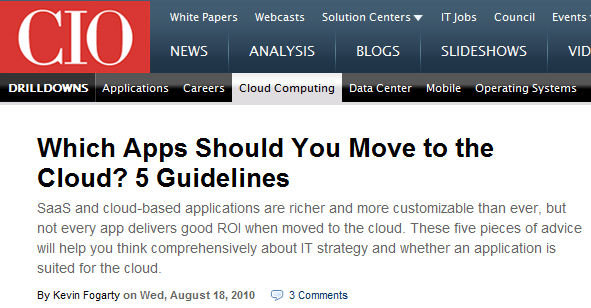
image CIO Magazine recently published an article discussing the motivations of executives in the area of cloud computing.  An interesting point became evident.

“…Business agility, not cost savings, is the leading reason U.S. companies are interested in cloud computing, according to a survey of 500 senior-level IT and business-unit managers Sand Hill released in March. Forty nine percent of respondents listed business agility as their most important goal; 46 percent listed cost efficiency. The No. 3 response — freeing IT resources to focus on innovation — got less than half that support, with 22 percent.”

Posted by: kurtsh | August 30, 2010

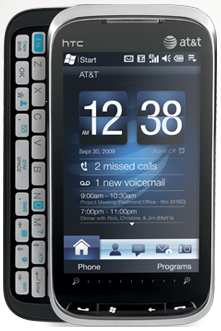
RELEASE: AT&T Tilt 2 Update available for download

image AT&T Tilt 2 Update available for download
http://www.wmexperts.com/att-tilt2-official-update-available

HTC Tilt 2 (AT&T) ROM Update 2.10.502.4 | 08.30.2010
This software update is intended for the HTC Tilt 2 for AT&T only and users should not load or attempt to load this version on any other device as it may cause serious issues/damage.

Please note that during the update process, the device will be Hard Reset and anything that is NOT part of the Operating System (contacts, calendar, music, etc) will be permanently deleted; always make a point of backing up your device’s data on a regular basis!

What’s included:

  • HTC Sense replaces TouchFlo 3D
  • Ability to Format the SD Card directly in the device
  • Inconsistent Caller ID function Hotfix
  • TILT 2 Freezes in SMS application Hotfix
  • Phantom SMS/MMS Count Hotfix
  • Overall improvement in the devices stability/operation

DOWNLOAD:  HTC Tilt 2 (AT&T) ROM Update 2.10.502.4
http://member.america.htc.com/download/RomCode/HTC_Tilt2_ATT/HTC_Tilt%202_2.10.502.4.exe

The Remote Desktop Services Migration Guide is now live on TechNet.  This document provides guidance for migrating the Remote Desktop Services role services in Windows Server® 2008 R2 and for Terminal Services in Windows Server 2008 to Remote Desktop Services in Windows Server 2008 R2.

This migration guide contains step-by-step instructions for migrating the following role services:

  • Remote Desktop Session Host (RD Session Host)
  • Remote Desktop Virtualization Host (RD Virtualization Host)
  • Remote Desktop Connection Broker (RD Connection Broker)
  • Remote Desktop Web Access (RD Web Access)
  • Remote Desktop Licensing (RD Licensing)
  • Remote Desktop Gateway (RD Gateway)

The migration guide provides an overview of the Remote Desktop Services migration and what will be migrated for Remote Desktop Services role services, tasks that apply to migrating all the role services, and the migration process.

image We have just released the Expression Encoder Screen Capture codec as a separate download package.

This will to allow users to playback screen capture output files (XESC) on machines without having to install Expression Encoder on the machine.  Installing the package will install and register the codec so the files can be played back in the Windows Media Player.  You can find the download package here.

AND A NEW BUILD OF EXPRESSION ENCODER
Additionally, there is a new build of Expression Encoder which fixes some screen capture issues.  Some machines with Expresion Encoder 4 Pro were incorrectly limiting the screen capture time limit and we had an issue with XESC files being played back in the Windows Media Player on 64-bit Vista and Windows Server 2008.  

In order to upgrade, simply grab the newest version of the free Encoder (available here) and install over the current one. The version number will go from 4.0.1639.0 to 4.0.1651.0. Note that there is no need to uninstall the older version, setup will upgrade it for you. Please also take note that those international versions already have the fixes mentioned above, so there is no need to upgrade them.

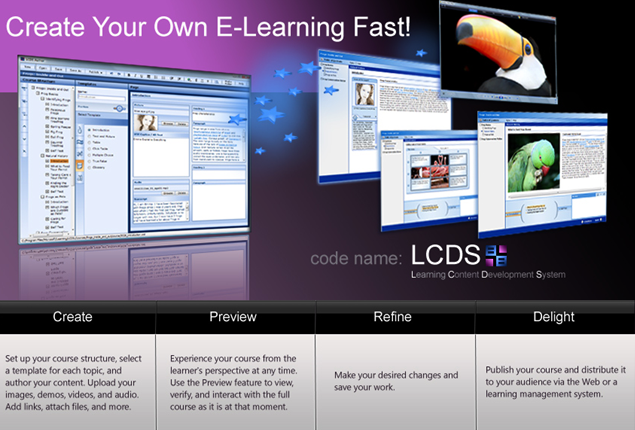
image The Microsoft Learning Content Development System (LCDS) is a free tool that enables you to create high-quality, interactive, online courses. The LCDS allows anyone to build e-learning courses by completing the easy-to-use LCDS forms that seamlessly generate highly customized content, including interactive activities, quizzes, games, assessments, animations, demos, and other instructionally engaging elements.

New v2.5 features include:

  • LCDS authoring is 64 bit–compatible
  • E-learning created is compatible with Firefox 3.5.9 and Firefox 3.6.3
  • New Silverlight 4 Media Player for animations that includes closed captioning and full screen option
  • Enhanced keyboard accessibility for the sort and tile games, adventure interactivity, and Voice of the Expert element
  • LCDS authoring and e-learning created are completely Microsoft Silverlight 4.0–compatible
  • Content is now permitted at the Lesson level

Also available on the site are seven localized LCDS v2.3 versions: Brazilian Portuguese, Chinese Simplified, Russian, Hindi, Polish, Turkish, and Spanish.

Posted by: kurtsh | August 30, 2010

BETA: Windows Phone Developer Tools

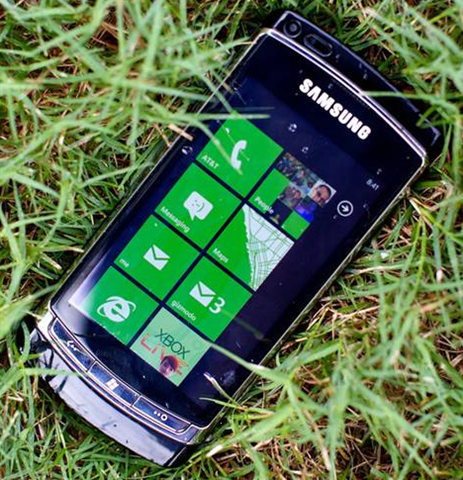
image This is somewhat old news but it’s worth noting considering the vast number of applications and titles being released for Windows Phone 7.  It’ll become more an more apparent as time goes on just how incredibly huge the Windows Phone development community is but for now, just know the following points:

  1. Xbox 360 & Xbox Live Development Community
    Every Xbox 360 & Xbox Live game developer uses the same tools today to develop for the Xbox as are used to develop for Windows Phone 7.  Porting games from Xbox Live Arcade in particular is a easy transition for developers to make and otherwise sell their games in a completely green field group of customers in precisely the same manner in which their games are sold today:  On a Microsoft Marketplace.

    …and best of all, the Windows Phone 7 display resolution & processor is actually BETTER than what the original Xbox had.

  2. Microsoft Developer & Platform Evangelist Team
    Developer & Platform Evangelism is a group of very smart individuals that exist worldwide and concentrate on helping independent developers use Microsoft development tools to build products that leverage our platforms such as Windows, Windows CE/Embedded, Silverlight, Windows Azure, Windows Phone, etc. 

    The DPE guys at Microsoft were given marching orders more than a year ago to turn their a huge amount of their attention & focus to Windows Phone 7 developers, away from virtually every other area – except for cloud development.

The current Windows Phone Developer Tools Beta includes the following:

  • Visual Studio 2010 Express for Windows Phone Beta
  • Windows Phone Emulator Beta
  • Silverlight for Windows Phone Beta
  • Microsoft Expression Blend for Windows Phone Beta
  • XNA Game Studio 4.0 Beta

And of course the release tools will be available for download soon.

imageUPDATE 9/17/12:
Well, the changed their domain name for some reason, but here 2 years later, the program is still available and in v 1.7.1 (back in 2010 it was 1.3.7).  There’s now a paid version of the app available that does very precise comparisons and adds some other functionality.  I bought the paid version.  It’s useful software.

———————-
ORIGINAL POST:
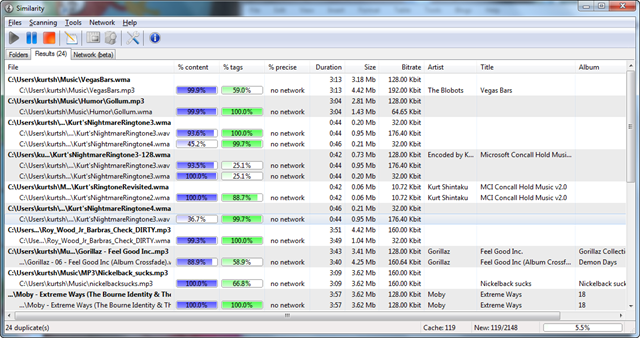
“Similarity” is an interesting tool for Windows that I heard about on Paul Thurrott’s podcast.

WHAT IS IT?
It compares all the music files in your library to each other in a search to find duplicates.  What makes it special however is that it doesn’t compare tags or titles or the metadata.  Instead it looks at the wave form and compares it to other waveforms it finds.

This effectively finds songs that may be labeled differently but otherwise are the same music file as another.  It more importantly, can distinguish between different file formats (WMA, MP3, OGG, etc.) and different recording resolutions (128kbps vs 192kbps, etc.)

WARNINGS
One thing I noticed is that it only appears to compare the first part of the music file.  For example, I have some music that is identical to each other in the first 20 seconds but change later in the file – it miscatagorized these and identified them as all duplicates.

Also, avoid the temptation to simply “install & run” the tool without any configuration.  There is a “network database” that the tool depends on for comparing file signatures.  It requires that you create a network login for the tool to use the database over the Internet.  Without this feature, the tool isn’t nearly as accurate as one would like.

FREE!
It’s free – so why not give it a try?  It discovered 219duplicates 20% into my very first run, representing about half a gigabyte of duplicate music.

« Newer Posts - Older Posts »

Categories