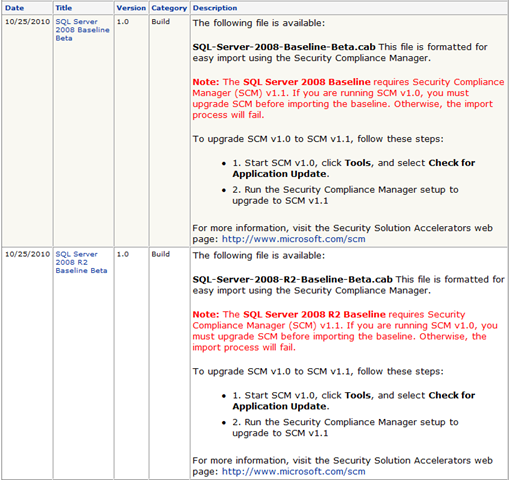
imageWe’re happy to announce the most recent releases in the Security Compliance Manager Baseline Beta Review Program—new security baselines for SQL Server® 2008 and SQL Server® 2008 R2.

These resources are the latest additions to the security baselines released earlier this year that can be used in combination with the Security Compliance Manager tool. These security baselines provide you with free Microsoft-recommended solutions to meet today’s security challenges. The baselines are designed to work with the Security Compliance Manager tool, which allows you to use automated tools based on Windows PowerShell™ to set, customize, and monitor computers running SQL Server 2008 and SQL Server 2008 R2 for compliance with organizational policies.

These baselines will be available for beta review through December 2010.

Note: The security baselines for SQL Server 2008 and SQL Server 2008 R2 require Security Compliance Manager (SCM) v1.1. If you are running SCM v1.0, you must upgrade SCM before importing the baseline. For complete upgrade instructions, please download and read the SCM Release Notes file:

For new users, please download the Security Compliance Manager from the Microsoft Download Center:

To download the beta releases of the security baselines for SQL Server 2008 and SQL Server 2008 R2, join the Security Compliance Manager Baseline Beta Review Program in Microsoft Connect: http://go.microsoft.com/fwlink/?LinkId=202872

Once you’re a member, use the Downloads link on the left hand side of the page. For detailed instructions about how to import the downloaded file into the Security Compliance Manager tool, refer to the program description page: http://go.microsoft.com/fwlink/?LinkId=202873

Security Compliance Manager Baseline Beta Review Program
The Security Solution Accelerators team is developing new baselines and settings, all of which are designed to help your organization plan and deploy security baselines with ease and confidence. These new baselines and supporting best-practice guidance are available as part of the Security Compliance Manager Baseline Beta Review Program. The scope of this program includes baselines for Microsoft® Exchange Server 2007, Office 2010, SQL Server 2008, SQL Server 2008 R2, and Windows Server® 2008 R2; and setting packs for Windows® 7 and Internet Explorer® 8.

The beta releases in this program are formatted to be imported for use in the Security Compliance Manager tool, which released in early 2010. This powerful tool provides guidance to work with other tools and features of Microsoft products to help you plan, deploy, and monitor your security baselines. The tool enables you to access and automate all of your organization’s baselines in one centralized location, balancing your needs for security and functionality.
To learn more about the Security Compliance Manager tool, visit the TechNet Library: http://go.microsoft.com/fwlink/?LinkId=113940

To download the tool, click here: http://go.microsoft.com/fwlink/?LinkId=182512

Win a 32 GB Zune HD!
If you haven’t already, please take a moment to provide us with valuable feedback. We want your input on the next set of features we are developing for the Security Compliance Manager. The survey is open through November, 15, 2010, and three respondents will win a 32 GB Zune HD. Take the survey now: https://connect.microsoft.com/Survey/Survey.aspx?SurveyID=11730&SiteID=715.

image

Register today to increase efficiency and maximize your technology resources with Dell and Microsoft virtualization and collaboration solutions.

You can bring people from your organization to attend either a virtualization or collaboration track and discover the value of Dell hardware with Microsoft technology solutions.

Dell and Microsoft are committed to simplifying IT by delivering and supporting technology infrastructure choices that help improve reliability, increase energy efficiency, and reduce overall IT life-cycle costs. We partner with customers to help resolve their technology challenges through a broad range of innovative offerings that could include migration/deployment services, hardware to support your IT environment and software.

Agenda:

TRACK 1: Taking the Client and Data Center Virtual
Learn the value of transforming your client and datacenter environments with familiar interfaces and common management consoles, an environment combining Hyper-V R2 and Microsoft System Center Virtual Machine Manager 2008, Desktop Optimization tools can deliver cost, service-level and agility benefits while reducing the complexity of combining solutions from various vendors.

TRACK 2: Communication and Collaboration
In the business world, nothing compares to a face-to-face meeting. Problems are solved quickly. Decisions are made with clarity. And nothing is misinterpreted. Wouldn’t it be great to maintain that simplicity in spite of the fuel prices, geographic barriers and rigid schedules that make it difficult for in-person discussions? Connect your workforce like never before through communications and collaboration services from Dell.

We can help you:

  • Secure and gain anytime, anywhere access to email
  • Add phone and video conferencing capabilities to your desktops and laptops
  • Easily share information across your organization
  • Improve productivity by integrating all your communications tools into a single console
  • Convert, archive and distribute printed documents
  • Working together is now easier than it’s ever been. Boost productivity today with our communications and collaboration services.

Please join Dell and Microsoft for these highly productive sessions and learn how to reduce costs and increase productivity with ease!

  • Los Angeles, CA
    November 10, 2010
  • San Diego, CA
    November 12, 2010

REGISTRATION:
Please contact me if you are a customer of mine, for more information about how to register for this event.

image

Hands On Lab Online: System Center Virtual Machine Manager 2008 Hands On Labs Online

Overview
For IT professionals managing virtual infrastructures, System Center Virtual Machine Manager 2008—a member of the System Center family of system management products—provides a straightforward and cost-effective solution for unified management of physical and virtual machines, Performance and Resource Optimization (PRO) for dynamic and responsive management of virtual infrastructure, consolidation of underutilized physical servers, and rapid provisioning of new virtual machines by leveraging the expertise and investments in Microsoft Windows Server technology.

During this Two-Part Online Lab, we will cover:

Part 1: November 18th

Introduction to System Center Virtual Machine Manager (SCVMM) 2008

  • Configure a default installation of SCVMM, then add host computers and virtual machines
  • Manage the virtual machines, which run on both Hyper-V and Virtual Servers, by making configuration changes, and moving virtual machines between host systems
  • Perform the steps for Quick Migration and use Windows PowerShell to automate common configuration tasks

Advanced System Center Virtual Machine Manager (VMM) 2008

  • Work through the advanced  configuration and tool set that SCVMM provides, including the Self-Service portal, and working with the Library

Part 2: December 1st

Configuring Citrix XenDesktop with System Center Virtual Machine Manager and Hyper-V

  • Simulate deploying multiple virtual desktops to work through all the steps required to implement Citrix XenDesktop using System Center Virtual Machine Manager and Hyper-V

Registration
This special, no charge training series will fill quickly and space is limited, so be sure to register as soon as possible to reserve your seat.

For more information about registration, contact me if you are a customer of mine.

What is a virtual hands-on-lab?
This isn’t your typical IT class. A hands-on lab online is an invite only event that combines LiveMeeting with a virtual lab.  Attendees and presenters login from anywhere. Attendees watch a brief LiveMeeting presentation, then spend most of the time getting hands-on experience working through all, or just self-selected modules of the entire lab – at their own pace, and receive real–time, personal, one-on-one attention from the presenter.  In addition, there’s a proctor available for technical support and to answer more attendee questions.

Dates
Part 1:  Thursday, November 18th
Part 2:  Wednesday, December 1st

Time: 9:00am – 11:00pm PST

Target Audience:  IT Pro w/System Center Virtual Machine Manager 2008 experience

Before the Event:

Posted by: kurtsh | October 26, 2010

TRAINING: Windows 7 Virtual Hands On Lab Series–Dec 15th

image

Virtual Hands On Lab Online: Windows 7 Deployment

Overview
This Windows 7 Deployment Series will give you the technical knowledge and skills to migrate and deploy Windows 7 in your environment.  To get more information on the topics covered, or to register see the information below:

Learn to Deploy Microsoft Windows 7 in Your Enterprise

  • Introduction to Deploying Windows 7 using the Windows Automatic Installation Kit
  • Getting Started with Microsoft Deployment Toolkit 2010
  • Zero Touch Installation using Microsoft Deployment Toolkit 2010 and System Center Configuration Manager

Registration:  This special, no charge training series will fill quickly and space is limited, so be sure to register as soon as possible to reserve your seat.

Please contact me for registration details if you are a customer of mine.

What is a virtual hands-on-lab:
This isn’t your typical IT class. A hands-on lab online is an invite only event that combines LiveMeeting with a virtual lab.  Attendees and presenters login from anywhere. Attendees watch a brief LiveMeeting presentation, then spend most of the time getting hands-on experience working through all, or just self-selected modules of the entire lab – at their own pace, and receive real–time, personal, one-on-one attention from the presenter.  In addition, there’s a proctor available for technical support and to answer more attendee questions.

COURSE:  “Learn to Deploy Microsoft Windows 7 in your Enterprise”

  • Date:  Wednesday, December 15th, 2010
  • Time for Lab:  9:00am – 1:00pm Pacific Time
  • Location: Virtual Hands On Lab Classroom. 
  • Target Audience:  IT Pro, IT Manager

Before the Event:

clip_image001

image

Microsoft invites you to an exclusive training opportunity:

Microsoft® Office Communications Server 2007 R2 Virtual Hands-On Lab
Learn about some of the features in Office Communications Server 2007 R2 in this hands-on lab online.

Lab Part 1: Thursday Nov 4th

  • Installing and Using Office Communicator 2007 R2:  In this lab exercise, you will install Office Communicator 2007 R2, configure the clients, add contacts, and then see some of the new features of Office Communicator 2007 R2, including call delegation, team calls and application sharing.
  • Installing and Configuring Communicator Web Access R2:  The management at Litware, Inc. has decided to deploy Communicator Web Access to their employees. Microsoft Office Communicator Web Access 2007 R2 enables you to provide Office Communications Server services – such as instant messaging, audio conferencing, and desktop sharing – to users who prefer to (or might need to) use a Web-based client rather than Office Communicator.

Lab Part 2: Friday Nov 5th

  • Installing and Configuring Group Chat Functionality and enabling users for Group Chat Console: In this lab exercise, you will install and configure the Group Chat server to take advantage of this new functionality. Microsoft Office Communications Server 2007 R2 Group Chat server is an extension of Office Communications Server infrastructure.
  • Configuring and Using Conferencing in Office Communications Server 2007 R2: To further improve employee productivity and to decrease travel costs, Litware Inc. wants to install Office Live Meeting 2007 and it’s Office Outlook Add-in to facilitate conferencing using Office Communications Server 2007 R2 on-premise conferencing capabilities.

Course Modules:

Part 1

  • Installing and Using Office Communicator 2007 R2
  • Installing and Configuring Communicator Web Access R2

Part 2

  • Installing and Configuring Group Chat Functionality and enabling users for Group Chat Console:
  • Configuring and Using Conferencing in Office Communications Server 2007 R2:

Who Should Attend:
Attendees should be IT Professionals who are responsible for managing, installing and deploying networking, messaging, conferencing and voice-over-IP technology.

Prerequisites:
To get the most from this course, you will need knowledge of Exchange Server 2003 or 2007 Architecture and installation.

What is a virtual hands-on-lab:
This isn’t your typical IT class. A hands-on lab online is an invite only event that combines LiveMeeting with a virtual lab.  Attendees and presenters login from anywhere. Attendees watch a brief LiveMeeting presentation, then spend most of the time getting hands-on experience working through all, or just self-selected modules of the entire lab – at their own pace, and receive real–time, personal, one-on-one attention from the presenter.  In addition, there’s a proctor available for technical support and to answer more attendee questions.

Lab Environment System Requirements:

We recommend you test your system here: http://test.vlabcenter.com/hv/default.aspx

Windows

Only Microsoft Windows XP, Windows 2000, Windows Server 2003, Windows Server 2008, Windows Vista, and Windows 7 are supported.


Microsoft Internet Explorer 6 or later

Due to the complex requirements of presenting these Virtual Lab sessions over the internet, only Microsoft Internet Explorer 6 or later are supported.


Screen resolution of 1024 x 768

The Virtual Lab sessions are best viewed at a screen resolution of 1024×768 or greater. Otherwise you may experience clipping of content.


Cookies Enabled

You must have cookies enabled to run these Virtual Lab sessions.


ActiveX Control

The Microsoft "VMRC" ActiveX control is required by this site. If you do not have it installed/enabled, you will be asked to when launching the Virtual Lab.


Firewall

Connecting to the Virtual Lab sessions require that you have port 443 open. Please see your network administrator for assistance.

Register Now:  This special, no charge training event will fill quickly and space is limited, so be sure to register as soon as possible to reserve your seat.

Please contact me for further details on how to register if you are a customer of mine.

Four webcasts are coming in November – all about Microsoft’s Cloud offerings:

  • Microsoft Server and Cloud Infrastructure – System Center, Azure and the Private Cloud
  • Introduction to SQL Azure
  • Transforming Your Communications Infrastructure with Microsoft Exchange Online
  • Windows Intune: Microsoft Cloud Services for PC Management and Windows 7 Enterprise

If you’re interested in learning about how moving to Microsoft’s cloud products can save you & your organization licensing, maintenance, and operating costs, check these sessions out over the coming weeks, where you’ll be able to ask questions online and get up to speed really quickly on a baseline of Cloud technologies available.

——————

image

We’re guessing no one in your office describes webcasts as ‘gripping’ or ‘the rollercoaster thrill rides of the season.’ But we know what gets you excited. This on-going series of webcasts designed to improve your business will undoubtedly provide you with the ammunition necessary to make your business thrive.
Join us in November and December for these webcasts and more as part of our valuable Microsoft Grow Webcast series ‘can’t miss’ online events that tackle the issues that matter most to YOU and your business. Learn from the pros how to better run your organization.

Because it’s everybody’s business to save, innovate, and grow.

  • 11/9/10 11:00 AM – The Microsoft Server and Cloud Infrastructureimage – System Center, Azure and the Private Cloud
  • 11/10/10 11:00 AM – Introduction to SQL Azure
  • 11/16/10 11:00 AM – Transforming Your Communications Infrastructure with Microsoft Exchange Online
  • 12/7/10 11:00 AM – Windows Intune: Microsoft Cloud Services for PC Management and Windows 7 Enterprise

REGISTRATION:
If you are a customer of mine, please contact me for details on how to register and participate in these webcasts.

imageThe MED-V team is excited to announce the Microsoft Enterprise Desktop Virtualization 2.0 public beta.

You’ll also want to check out the Windows for your Business Blog where we’ll give you guidance to help make the business case for Windows 7 and MED-V.

MED-V 2.0 enables Microsoft’s enterprise customers to migrate to Windows 7 while still leveraging existing legacy Windows XP line of business applications, including those based on Internet Explorer 6. MED-V 2.0 provides a seamless user experience while reducing overhead and simplifying management for IT Professionals.

Maintain Business Continuity

  • Unblock Windows 7 Migration due to application incompatibility: As enterprises adopt Windows 7, they find that most applications “just work.” They upgrade others, retire some, and use tools like the Microsoft Application Compatibility Toolkit as part of their migration strategy. MED-V solves “the last mile” of application compatibility for those applications that must run on Windows XP.
  • Redirect legacy web applications to Internet Explorer 6: Seamlessly redirect websites or individual web applications to Internet Explorer 6.
  • Remediate application incompatibility after migration without losing productivity: Enterprises can migrate to Windows 7 now, taking advantage of power savings, security benefits, or the opportunity to move to a 64-bit platform, without losing access to the applications they rely on to stay productive.

Easy to use

  • Streamlined sign-on to the MED-V workspace: Users can save their passwords for seamless sign-on to the MED-V workspace.
  • Seamless integration with local documents and network printers: Legacy applications work just like locally installed applications when it comes to opening, saving and printing documents.
  • A familiar user experience with Windows 7 UI integration: Windows. Applications. Documents. That’s what users want to interact with – not MED-V. MED-V 2.0 is integrated with the Windows 7 user interface, making application compatibility “just work.”

Simplified IT Management

  • Full integration with SCCM for deployment, patching and application delivery: In MED-V 2.0 there’s no dedicated management infrastructure to deploy. MED-V workspaces are deployed using existing Electronic Software Delivery (ESD) systems. MED-V workspaces can wake-to-patch or to receive software deployments. Full SCCM integration allows NAT-configured MED-V workspaces to communicate with the same SCCM sites and distribution points as the host PC.
  • Faster, simpler deployment with automated configuration: The MED-V Workspace Packager creates silent, self-contained packages that are ready-to-deploy.
  • Keep MED-V images thin by provisioning applications with App-V: MED-V and App-V are better together.

Register on Connect and download the beta today!

imageMicrosoft Security Intelligence Report, Volume 9

SIRv9 covers the period January to June 2010. In addition to the usual analysis of cyber threat trends, the report includes some of the most insightful and detailed intelligence on botnets. It uses data collated via a number of Microsoft services, products and tools, including the Malicious Software Removal Tool (MSRT), Bing, Forefront security products, Microsoft Security Essentials and Internet Explorer. In all, SIRv9 contains information from more than 600 million computers worldwide. In a departure from previous versions, SIRv9 will be delivered primarily as an online resource, making it more searchable and comparable with earlier versions.

http://www.microsoft.com/security/sir/default.aspx

Posted by: kurtsh | October 21, 2010

RELEASE: System Center Configuration Manager 2007 R3

imageAnnounced at the Microsoft Management Summit earier this year with a Q4CY target System Center Configuration Manager 2007 R3, available October 14, includes power management features that help customers maximize savings from energy-efficient desktops and laptops, as well as the rights to use System Center Mobile Device Manager for managing Windows Mobile devices.   Configuration Manager 2007 R3 also serves as a management foundation for the upcoming Forefront Endpoint Protection 2010 release, allowing organizations to manage and protect their client infrastructure in a single interface.

The software has not posted as of yet and may  take a week or two before it hits the Volume License site. Please note that this is a (R) release – not a service pack and requires Software Assurance to have the right to use.  The current Service Pack level is still SP2.

clip_image002Ray Ozzie posts the Windows 1.0 Press Kit to DOCS.COM

http://docs.com/8NAK (6.1MB)

——————

So full of WIN.

There’s a table comparing Windows to other competitors in the market during that time such as TopView & GEM.

The entire press document was created on Microsoft Windows 1.0 using Windows Write.  Egad.

It boasts about “breaking through the 640k barrier” and “standardizing on a shared driver model for peripherals like the Hercules Graphics card, IBM CGA and EGA adapters and printers such as Okidata 192, Epson FX-80s, IBM Proprinters, and HP 7470A plotters.  It also talks about the “Mouse Systems mouse”.  Remember that thing?  With the reflective plate?

clip_image004

Wow.  Good times.

(And apparently, we’ve been using Wag Ed for PR for a lot longer than I imagined.)

« Newer Posts - Older Posts »

Categories