Posted by: kurtsh | July 14, 2011

RELEASE: SQL Server 2008 R2 Service Pack 1

imageSQL Server 2008 R2 Service Pack 1(SP1) is now available for download. SQL Server 2008 R2 service packs are cumulative updates and upgrade all service levels of SQL Server 2008 R2 to SP1. This service pack contains the cumulative updates of SQL Server 2008 R2 cumulative update packages 1 thru 6. You can use these packages to upgrade any of the following SQL Server 2008 R2 editions:

    (1) SQL Server 2008 R2 Datacenter Edition
    (2) SQL Server 2008 R2 Enterprise Edition and Developer Edition
    (3) SQL Server 2008 R2 Standard Edition
    (4) SQL Server 2008 R2 Web Edition
    (5) SQL Server 2008 R2 Workgroup Edition
    (6) SQL Server 2008 R2 Express Edition

Note : To upgrade SQL Server 2008 R2 Express Edition, obtain the SP1 version of Express Edition or Express Edition with Advanced Services.

What’s New in SQL Server 2008 R2 Service Pack 1 ?

  • Dynamic Management Views for increased supportability: sys.dm_exec_query_stats DMV is extended with additional columns to improve supportabilities over troubleshooting long-running queries. New DMVs and XEvents on select performance counters are introduced to monitor OS configurations and resource conditions related to the SQL Server instance.
  • ForceSeek for improved querying performance
    Syntax for FORCESEEK index hint has been modified to take optional parameters allowing it to control the access method on the index even further. Using old style syntax for FORCESEEK remains unmodified and works as before. In addition to that, a new query hint, FORCESCAN has been added. It complements the FORCESEEK hint allowing specifying ‘scan’ as the access method to the index. No changes to applications are necessary if you do not plan to use this new functionality.
  • Data-tier Application Component Framework (DAC Fx) for improved database upgrades:
    The new Data-tier Application (DAC) Framework v1.1 and DAC upgrade wizard enable the new in-place upgrade service for database schema management. The new in-place upgrade service will upgrade the schema for an existing database in SQL Azure and the versions of SQL Server supported by DAC. A DAC is an entity that contains all of the database objects and instance objects used by an application. A DAC provides a single unit for authoring, deploying, and managing the data-tier objects. For more information, see Designing and Implementing Data-tier Applications.
  • Disk space control for PowerPivot
    This update introduces two new configuration settings that let you determine how long cached data stays in the system. In the new Disk Cache section on the PowerPivot configuration page, you can specify how long an inactive database remains in memory before it is unloaded. You can also limit how long a cached file is kept on disk before it is deleted.
  • Fixed various issues:
    This update fixes many knowledge base issues that are listed in this Master KB article .
    For a detailed list of new features and improvements that are included in SQL Server 2008 R2 SP1, review the What’s New Section in Release Notes.

imageWindows Thin PC is now generally available to our Software Assurance customers for download from the Microsoft Volume Licensing site.

Taken from the Windows Team Blog announcement:

As VDI deployments continue to grow, customers told us they needed an easy way to repurpose their existing PCs as thin clients, leading to the evolution of Windows Thin PC. Windows Thin PC helps reduce the cost of VDI at the endpoint, enabling IT with an enterprise ready platform to provide end users with an excellent thin client experience through the many unique features offered on their repurposed PCs. Some of these features include:

  • RemoteFX support, which ensures that users have a local-like virtual desktop experience.
  • Write Filters that improve security by preventing any writes to the deck.
  • BitLocker and AppLocker features that help strengthen the device for enterprises.
  • FEP support, which makes it possible to use a common set of malware protection tools for your desktops and thin clients.

[taken from http://windowsteamblog.com/windows/b/business/archive/2011/07/01/here-s-the-skinny-windows-thin-pc-available-for-download-today.aspx]

For more detail on what is in Windows Thin PC’s RTM release, visit:
http://windowsteamblog.com/windows/b/business/archive/2011/06/07/windows-thin-pc-rtms.aspx

Posted by: kurtsh | July 13, 2011

RELEASE: Office 2010 Service Pack 1

imageYeah, I’m late on this.  But I’ve been busy and major service packs demand a careful examination.

The major fixes can be read about here:
http://support.microsoft.com/kb/2460049

Some things that caught my eye;

  • EXCEL: Improves the overall stability, performance and backward compatibility with earlier versions by addressing bugs that affect lots of users.
  • OUTLOOK: Outlook 2010 SP1 includes Office 365 support.
  • WORD: When you copy some Excel data that includes cells and a chart, and then paste them as a linked Excel Worksheet Object (OLE) object in a Word document, the size of the chart may not be correct. Or, the chart may be corrupt
  • POWERPOINT: Fixes an issue in which an incorrect animation state occurs after you browse through all the slides.

DOWNLOAD:
Download the Service Pack for your edition of Office.

CHANGE WORKBOOK:
A workbook is available that lists the issues that are fixed by this service pack.

Microsoft Office 2010

Service Pack 1 is now available for the 2010 family of products, including Office, SharePoint, Project Server, FAST, Search Server, and Groove Server.

For more on deployment, see these articles:

Posted by: kurtsh | July 13, 2011

BETA: SQL Server Code Name "Denali" CTP3

Microsoft SQL Server Code Name 'Denali'
SQL Server Code Name “Denali” Community Technology Preview (CTP3) provides the foundation to the cloud-ready information platform and will help customers unlock breakthrough insights across the organization and quickly build solutions that extend data across on-premises and public cloud backed by capabilities for mission critical confidence.

  • Deliver required uptime and data protection with AlwaysOn
  • Gain breakthrough & predictable performance with Project Apollo
  • Help enable security and compliance with new User-defined Roles and Default Schema for Groups
  • Rapid data discovery with Project Crescent
  • Deliver credible, consistent data with SSIS improvements, a Master Data Services add-in for Excel, and new Data Quality Services
  • Optimize IT and developer productivity across server and cloud with Data-tier Application Component (DAC) parity with SQL Azure and SQL Server Developer Tools code name “Juneau” for a unified dev experience across database, BI, and cloud functions

Download SQL Server Code Name "Denali" CTP3
http://technet.microsoft.com/en-us/evalcenter/hh225126.aspx?wt.mc_id=nlc-f-us-Mba-TEC_93_1_7

This guy Jeff Loucks wrote a blog post that I really think deserves some recognition… because, cripes, if I couldn’t figure out how to do this.  And I work for the damned company.  [insert cranial smoke here]

[taken from Jeff’s post]
Have you ever wondered how to change the default address book in Outlook when you are using Exchange. If you have ever sent an email and tried to find your contacts using the To: button you know that by default the Exchange Global Address Book is the first source of contacts. What a pain.

I always find it difficult to locate where to change the default so I thought I would post it in case you are looking. I know I will come back to this post because even after having found it, I still can’t remember how to do it. It is just one of those things that has never been intuitive.

Additionally:

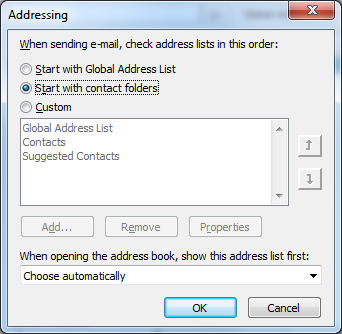
  • Have you ever found that Outlook 2010’s “Suggested Contacts” got referenced before your actual Contacts list?  “Suggested Contacts” as you likely know, often has basically empty contact entries in it.
  • Have you ever discovered that your “Contacts” list was for some reason not being referenced when resolving names?

SOLUTION:
The secret lies in this dialog box:

image

The question is:  How the heck do you get there?

Check out Jeff’s post for the answer to that question:

Posted by: kurtsh | July 5, 2011

INFO: Using WiDi on the Samsung Series 9

I wanted to use WiDi on my Samsung Series 9.  WiDi is an Intel specific technology that enables one to wirelessly transmit both the video & audio of their display to a HD television at 1080p.  The TV needs to be either equipped with a WiDi receiver built in or it needs to have a WiDi receiver attached to it.

Here’s the instructions for using the Intel WiDi functionality.
http://www.intel.com/support/wireless/wtech/iwd/sb/CS-031109.htm

imageNEEDS A NEW WIFI+BT+WIDI ADAPTER
This is the weird part about the Samsung Series 9:  They list WiDi as a feature however the wireless network adapter I got in my unit was a Broadcom BCM943225HMB Wifi N Bluetooth mini PCI-e Card.  This does not work with WiDi even though the rest of the hardware does.

To use WiDi, it’s not enough to just have an Intel processor/chipset with WiDi support on it.  You have to also have an Intel Wireless Adapter with WiDi support. WiDi in our case, requires an Intel Centrino Advanced-N 6230 (~$30) or similar Intel Wireless Networking adapter with WiDi support.  I believe that most people would specifically need to get the 6230 model because it’s the PCI-E mini card from Intel that supports WiDi and both Wireless 802.11b/g/n AND Bluetooth.  The 6200 and prior models lack Bluetooth, which I assume is a requirement for people that want to use Bluetooth UC headsets, mice, tethering, etc.

Like I said, my Samsung Series 9 shipped with a Broadcom 802.11b/g/n WLAN+BT PCI-E Mini Card so to get this to work, I would need to open the case and swap out the socketed Broadcom PCI-E mini card with the newly acquired Intel 6230. 

And while I was in there, I might also add 4GB more of RAM into the extra DIMM slot.

clip_image002

The Samsung Series 9 has a large, revolutionary new multitouch ClickPad that supports gestures, multi-touch actions, etc.  However it’s configuration for many people needs to be adjusted.

These are the changes I made to improve the ClickPad experience for myself.

————-

Q: Have you ever had to drag-and-drop a file, email or a folder using the ClickPad & found the cursor to be incredibly imprecise?

The following instructions will stabilize your control over the mouse using the ClickPad.

  1. Click Start-Control Panel-Mouse
  2. Click “Device Settings” tab
  3. Click the “Settings” button
  4. Click “SmartSense” & click the ‘gears’ icon
  5. Slide “SmartSense” all the way to the right
  6. Slide “Filter Activation Time” all the way to the left
  7. [OPTIONAL] Check “Restrict Tapping to zone”
    [OPTIONAL] Shrink the zone in the Advanced Filters window to something smaller
    (Note these optional settings don’t matter if you disable tapping/follow the instructions below for PROBLEM #2)

EXPLANATION:
Because there’s no discrete left-click button, the pad will often recognize a “left click” (a click of the bottom left part of the ClickPad) as mouse movement on the screen.  It’s difficult to get any kind of precision when both your thumb clicks and the fingers are detected as “moving the mouse”.   I was once dragging and dropping a large folder within Outlook to another location and accidentally dropped it in the wrong location because the mouse had moved when I “clicked”.  Took me a while to figure out where it had gone.

WHY?
The issue is that Samsung Series 9’s ClickPad is configured by default to be a bit too sensitive for me.  Any light brush movement on my part would cause the cursor to wiggle, making it inaccurate for many purposes and it doesn’t detect accidental touches very well through it’s default configuration.  Turning up this functionality to max solves a lot of problems.

———————-

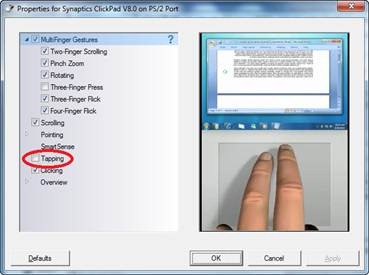
clip_image004Q: Have you ever been typing and seen the cursor just suddenly jump somewhere else?

The following instructions will disable the ‘tap to click’ functionality eliminating any possibility that an accidental touch will move the cursor elsewhere.  Very useful when you find that the cursor seems to randomly move to other locations in your emails or written documents based on accidentally touching the ClickPad.

  1. Click Start-Control Panel-Mouse
  2. Click “Device Settings” tab
  3. Click the “Settings” button
  4. Uncheck “Tapping” completely.
  5. Click OK
Posted by: kurtsh | July 2, 2011

NEWS: Microsoft & GPU Compute over HPC

‘Ever heard of “GPU Compute”?

Microsoft is doing a ton of work in this space.  GPU Compute where we leverage High Performance Computing (HPC) models to schedule jobs to a GPU and gains some pretty significant efficiencies.  

“In this co-processing model, the compute intensive portions of an application use the parallel computing capabilities of the GPU, while the sequential part of an application’s code runs on the CPU.”

This has huge ramifications for particular industries:

clip_image001

For more information:

You read that right.

clip_image002

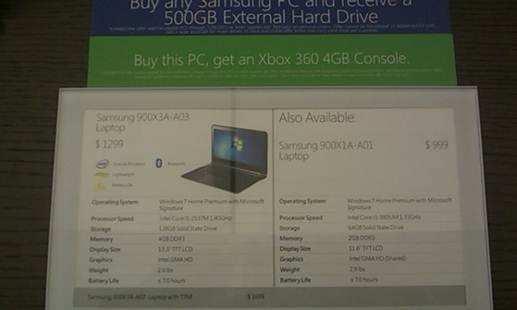
At the Microsoft Store launch at Century City here in Los Angeles, I discovered something.  The thinnest Windows laptop on the market – thinner than a MacBook Air – has been SERIOUSLY discounted at the Microsoft Store:

Samsung Series 9 -  900X31-A03

  • 128GB SSD
  • 4GB DDR3 RAM
  • 13.3” TFT LCD
  • …$1299  (The A03 specifically lacks a TPM chip)
    (Also $999 for the 64GB SSD/2GB RAM model) 

Additionally, the purchase in the store also nets you:

  • FREE Xbox 360 4GB Console
  • FREE Samsung 500GB External Hard Drive
  • FREE AMC movie tickets (2) to see Transformers: Dark of the Moon (Only at Century City store)

This appears to be an in-store-only price drop that they quietly applied and haven’t advertised.  Don’t know if it’s at other stores but for anyone looking to get another laptop for spouses or relatives, this is a spectacular price.  Compare this with the webstore price of $1449 or the $1600 price tag on Amazon.

« Newer Posts - Older Posts »

Categories