Some of you know I track our quarterly & annual earnings.  I even shared a sanitized version of my spreadsheet one year I think.

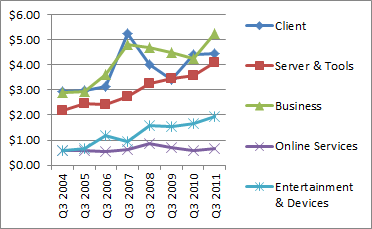
Here’s a snapshot of Microsoft REVENUE (i.e. money generated) year-over-year in Q3 FY11:
image

As you can see, there really hasn’t been much of a dip in overall sales of Windows.  Business division revenue (Office & Dynamics) burst out of the gate to lead all divisions due to Office 2010 purchases and what I assume is the long awaited upgrade availability of Dynamics CRM 2011.  Server & Tools continues to chug along consistently as expected and while Entertainment & Devices continues to grow with the market acceptance of Xbox 360 & Kinect, Online Services revenue is actually up (but barely relative to the other divisions) relative to last year with Bing’s marketshare growth.

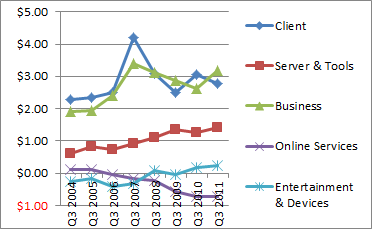
Here’s a snapshot of Microsoft INCOME (i.e. profit) year-over-year in Q3 FY11:
image

This is obviously a little more interesting because it take into account expenditures.  Contrary to what’s being said in the media, Windows didn’t so much as lose sales as much as its operating costs increased (marketing, development, etc.) likely to sustain mindshare & momentum through to Q4.  Meanwhile Business division’s increases in revenue translated directly to increases in profit.  Server & Tools continues to grow consistently alongside revenue growth just as Entertainment & Devices does. 

Online Services however has a BIG sucking sound coming from it in the Operating Income department.  This of course is because of the massive operating costs associated with Microsoft’s datacenters & our bet on cloud services such as Office 365 & Windows Azure.  Until Office 365 is released or we finish building the datacenters out (Microsoft owns 4 of the 10 largest datacenters in the world), I don’t anticipate this getting better but it’s all strategic investment in an area of technology that as a company, we are betting the farm on, possibly more so than any other initiative we have at Microsoft.

imageYes, this is an excuse.  I realize that there are people that somehow or another find my musings interesting – stuff that was never intended beyond my customer base.

And I’m fully cogniscent of the fact that not much has gone up on this blog and I’m sorry.  Basically, the net net is that I got into an accident that caused a head injury, had a family emergency that took me off line for a few weeks and subsequently came down with the flu.  Nice ‘eh?

Suffice it to say, I have a MOUNTAIN of raw information to process and post.

And believe me – if I had minions like in Despicable Me, I’d totally use them to process this crap.  I’ve got internal stuff, external stuff, stuff I’ve favorited on Twitter.  Stuff from RSS feeds I’ve collected.  Just STUFF.  And I just need a couple 5 hour Energy Drinks and about 96 uninterrupted hours to go through it all.

But that ain’t gonna happen.  ‘Cause I’ve got kids and I work for the company that never sleeps.

So, please bear with me.  I’ll get this junk out as quickly as I can.  In the meantime, here’s some of the Twitter junk that I have to process:

  • Ribbon Hero 2 : Microsoft has turned Office into a Game!: If you’re going to spend time immersed in the inner wo… http://bit.ly/fAXPnD
  • Didn’t know my eyebrows could raise this high. Firefox evangelist switches to Bing. Google search "completely useless" http://bit.ly/feymD3
  • Microsoft releases Microsoft Safety Scanner, a free on-demand antivirus tool: Microsoft has just released an on-… http://bit.ly/fDAnAk
  • Microsoft announces IE10 Platoform Preview at MIX11 http://bit.ly/gPJjBT
  • There for all to see was a statement by the Department of Justice contradicting Google on one of its basic FISMA claims http://is.gd/l2vrBZ
  • RT must read @MSFTnews: US court unseals documents revealing gov rejection of Google’s claim on security certification. http://bit.ly/epzOr5
  • Intel Unveils New Atom "Oak Trail" Processor for Tablets http://bit.ly/eVSoUl
  • Download Windows 8 Clock Screensaver for Windows 7: Inspired by Microsoft’s next version of the Windows operatin… http://bit.ly/gZxGrJ
  • DaRT 7 Beta Now Available http://bit.ly/ifCIth
  • Management and Security Enhancements for Enterprise Customers with DaRT and MBAM http://bit.ly/hxD4yB
  • Are all WP7 phones created equal? WP Bench benchmarking software released http://bit.ly/fX72Bz
  • Remove trial software with Slim Computer program http://bit.ly/g1BqZ9
  • Via IntoWindows: IE9 Tweaker Plus: Personalize Internet Explorer 9 Browser http://goo.gl/fb/VLZsv

[artwork taken from http://leomanlapera.deviantart.com/art/Minion-despicable-me-195086389 – yes, it’s so pretty and well done, I wanna make sure that the author gets credit]

[I’m late posting this.  It was sitting in my drafts.  I thought I’d posted this months ago.  Sigh.]

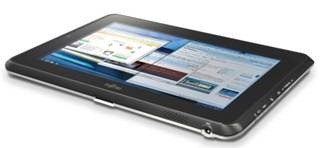
clip_image002Considering how little attention she gives to Windows on Tablets, (sob) you know this has got to be reasonably exciting if Mary Jo Foley actually decided to write about it on her “All About Microsoft” blog.  Yay!

The Quick Rundown:

  1. INCLUDES BOTH CAPACITIVE MULTITOUCH & ACTIVE DIGITIZER
    This means you can use both your finger on the screen to manipulate screen content and a built-in stylus for entering data via handwriting or otherwise.
  2. BUILT-IN TRUSTED PLATFORM MODULE CHIP
    This is the only Slate device running Windows 7 that has a TPM chip in it, which can provide native DirectAccess (Secure VPN-less connectivity to corporate Intranets) and rich AES-secure BitLocker Drive Encryption.
  3. 10 HOUR BATTERY LIFE
    This is also has a ludicrous 10hr battery life with a super-speed 32 or 64GB SSD drive & a highly efficient Intel Oaktrail chipset that enables high performance 1080p full screen video without killing battery life.

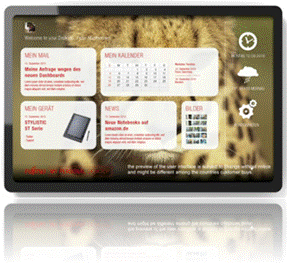
Fujitsu Stylistic Q550 Tablet Specs

  • clip_image004Runs Windows 7 Professional
  • Ships with Fujitsu touch friendly UI
  • Capacitive Multitouch Screen surface
  • Optional Active Digitizer / Pen stylus and UI layer
  • 10-inch display with 1366 x 768 pixels resolution
  • Powered by an Intel Z670 Oak Trail processor
  • 2GB of RAM, and 64GB SSD
  • Front- and rear-facing cameras
  • Extended 10 hour 4-cell removable battery
  • USB port
  • TPM security chip
  • Optional 3G Cellular Networking
  • Weight of about 1.5kg
  • Digital fingerprint recognition system on board
  • Smartcard reader for authentication
  • Comes with two different docking stations
  • Starting price at $799 (increases for optional components)

Other good articles:

Posted by: kurtsh | April 27, 2011

INFO: Acer Iconia Tab W500… starting at $549

clip_image002

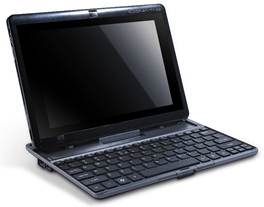
Another Windows 7-based slate device has hit the market – this time from Acer. The Acer Iconia Tab W500 is a lightweight 2.14lb slate WITH A DETACHABLE KEYBOARD.

Let me repeat that: What makes this unit unique is the keyboard is detachable via a magnetic linking mechanism. Don’t let the photo to the right fool you – this device is a Windows 7-powered SLATE all the way & the keyboard can remain detached and in your laptop bag just for when you need it.

Awesome.

This device is built around:

  • Dual-core AMD C-50 “Fusion” processor
    (with AMD Radeon HD 6250 integrated graphics)
  • 10.1-inch LED-backlit display (1280×800)
  • 2GB of DDR3 RAM
  • 32GB solid state drive
  • 802.11b/g/n WiFi & Bluetooth 3.0
  • SD memory card slot
  • 2 USB 2.0 ports
  • an HDMI port
  • Ethernet jack
  • Both front-facing and rear-facing Webcams
  • Optional 3G wireless

Uniquely, the device comes with high quality Dolby Stereo speakers & of course the screen is a glassy capacitive multitouch display.

clip_image004More importantly:

1) PERFORMANCE: It gets general 2.8 performance rating purely on the basis of the CPU which is still above par for this class of device but everything else scores VERY HIGH in the 4.5-5.9 range. It’s NEW graphics acceleration provides full 1080p video & it’s capable of playing even the harshest graphical applications – including the game “Crysis”. For those that don’t understand what that means, here’s an English translation: “This device kicks butt.”

2) BATTERY LIFE: The unit is rated by the manufacturer to run 6 hours on a single charge running business applications & when tested gets a solid 4.5-5hrs of battery life running full motion 1080p video. Way more than enough for Outlook, Adobe Flash 10.2, Dynamics CRM, Internet Explorer 9.0, and the occasional game of Plants vs Zombies.

Great review of the device here on our Windows Team Blog:

A SIMPLER WAY TO CREATE HIGH-QUALITY BUSINESS APPLICATIONS FOR THE DESKTOP AND THE CLOUD

imageMicrosoft Visual Studio LightSwitch gives you a simpler and faster way to create high-quality business applications for the desktop and the cloud. LightSwitch is a new addition to the Visual Studio family. Visit this page often to learn more about this exciting product.

QUICKLY CREATE HIGH-QUALITY BUSINESS APPLICATIONS

With LightSwitch, you can build custom applications that rival off-the-shelf solutions. Get a head start by using pre-configured screen templates that give your application a familiar look and feel. LightSwitch also provides prewritten code and other reusable components to handle routine application tasks, along with helpful step-by-step guidance. However, if you need to write custom code, you can use Visual Basic .NET or C#. You can deploy to the desktop, browser, or cloud to share your application with others more easily without the cumbersome installation processes.

EASILY ACCESS EXISTING SYSTEMS AND DATA

Applications created with LightSwitch support exporting data to Microsoft Office Excel for fast and easy sharing and reporting. You can also attach your application to existing data sources, which makes it easy to collect, analyze, and reuse information from a variety of data sources including Microsoft SQL Server, Microsoft SQL Azure, SharePoint, Microsoft Office Access (post-Beta), and other third-party data sources.

BUILD FOR TODAY, PREPARE FOR TOMORROW

With LightSwitch you can create custom applications for the way you do business. Keep your technology and business options open, while building a practical yet scalable application that matches your current needs now and in the future. The pre-built templates and components in LightSwitch are fully extensible, so you can get the specific functionality your application demands. In addition, your application can grow to meet the increasing demands of popular applications using the Microsoft Windows Azure Cloud Hosting option.

EXTEND YOUR APPLICATION WITHOUT HAVING TO REDESIGN IT

With LightSwitch you can create custom applications for the way you do business. Keep your technology and business options open. Visual Studio LightSwitch includes a lot of pre-built components for the most common business application tasks; however, there will be times when you will want more custom functionality. LightSwitch applications are flexible enough to support extensions for templates, data sources, shells, themes, business data types and custom controls. Get extensions from component vendors or develop them yourself using Visual Studio Professional, Premium or Ultimate.

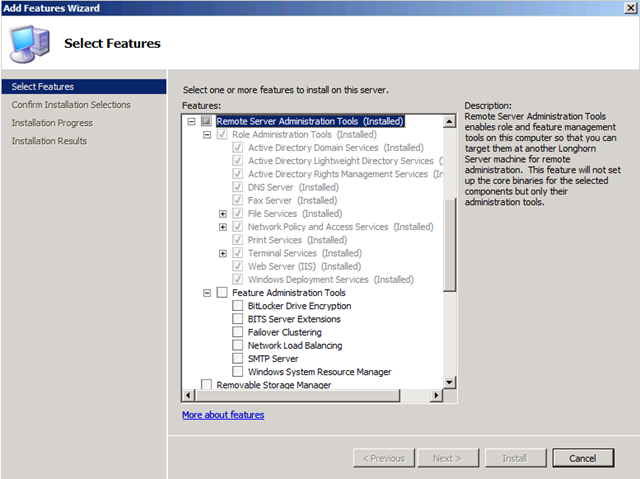
imageWARNING: **Remote Server Administration Tools for Windows 7 with SP1 can be installed ONLY on computers that are running the Enterprise, Professional, or Ultimate editions of Windows 7 or Windows 7 with SP1.**

Remote Server Administration Tools for Windows 7 with SP1 enables IT administrators to manage roles and features that are installed on remote computers that are running Windows Server 2008 R2 with SP1 or Windows Server 2008 R2 (and, for some roles and features, Windows Server 2008 or Windows Server 2003) from a remote computer that is running Windows 7 or Windows 7 with SP1.

It includes support for remote management of computers that are running either the Server Core or full installation options of Windows Server 2008 R2 with SP1, Windows Server 2008 R2, and for some roles and features, Windows Server 2008. Some roles and features on Windows Server 2003 can be managed remotely by using Remote Server Administration Tools for Windows 7 with SP1, although the Server Core installation option is not available with the Windows Server 2003 operating system.

This feature is comparable in functionality to the Windows Server 2003 Administrative Tools Pack and Remote Server Administration Tools for Windows Vista with Service Pack 1 (SP1).

Posted by: kurtsh | April 19, 2011

NEWS: AT&T… they finally released it.

Hallelujah. I don’t think I need to say anything more than this, right?  A picture is worth a thousand words. 

image

Yes, AT&T finally released the NoDo update for Windows Phone 7 on their Samsung Focus, their LG Quantum, and I assume the HTC Surround – although I don’t know anyone that owns one of those.

Not that I was pining for this thing like some people were (cripes, some people are whiny) but I do think that the sound of people sighing with relief with AT&T’s release of the update is similar to the sound of a pressure release valve being opened.  And of course there’s a certain amount of satisfaction attained by finally getting this thing on there to speed things up, improve marketplace search, add cut & paste, etc.

BTW:  Here’s a list of what we’ve published is in NoDo – the first update for Windows Phone 7.  I say “what we’ve published” because as I understand it there’s over 75 actual significant changes made but many of them are developer oriented or optimizations of some sort that they simply didn’t bother articulating:

imageWanna check out Office 365? 

It’s now available in Beta form – just sign up at the URL below. 

WHAT WAS OFFICE 365 AGAIN?
Office 365 provide customers with the following application services… hosted in Microsoft’s datacenters:

  1. Exchange Online 2010
  2. Sharepoint Online 2010
  3. Lync Online 2010

Additionally, as part of SharePoint Online 2010, the following web-based applications are available:

  1. Word Web Access
  2. Excel Web Access
  3. PowerPoint Web Access
  4. OneNote Web Access

WHAT’S SO SPECIAL ABOUT OFFICE 365?
Office 365 takes the pain out of application service delivery for your company.  All the major IT management & maintenance headaches become Microsoft’s job – not yours – allowing you to concentrate on administration tasks focused on your business.

  1. ALWAYS AVAILABLE.  How does built-in redundancy sound to you?  Most companies don’t or CAN’T plan or budget for clusters or failover availability but with Office 365, everything is geo-clustered by default. 
  2. ALWAYS PATCHED.  No more “patch Tuesday” for you.  We take care of the patching process.  Your services always run with the latest patches & security updates. 
  3. ALWAYS SECURED.  Worry not.  Your services config, ports, and architecture are locked down & constantly reviewed with the same security practices, technology, & processes that Microsoft’s best & biggest Office 365 customers have including Coca Cola & JP Morgan.
  4. ALWAYS BACKED UP.  Tired of budgeting & planning for backup?  Kiss backup licenses, storage/tape, schedules, and services goodbye with Office 365.  We keep everything backed up at regular intervals to disk to ensure high speed recovery along with 24×7 phone support when you need to “get that document back”.
  5. ALWAYS PROTECTED.  Worrying about antivirus/antispam is a thing of the past.  Leveraging Microsoft’s industry leading Forefront Security for Sharepoint, Exchange, and Lync Services, along with Forefront Online Protection for Exchange, protection services for all your Enterprise applications are taken care of.  No extra charge.
  6. ALWAYS SCALABLE.  Forget about having to “buying more servers for the farm”.  You’re using Microsoft’s massive Office 365 implementation now, which provides near limitless scalability that will grow as your business grows.
  7. ALWAYS AD-INTEGRATED.  Can you say “single sign-on”?  With Active Directory Federation Services support, users login to their workstations in the morning and NEVER have to log in to any Office 365 services.  Passthrough authentication:  It’s beautiful thing.
  8. ALWAYS MOBILE.  No need to ‘mobile-ify’ your services.  It’s already been done for you with Office 365, providing mobile synchronization for phones to Exchange, mobile access to SharePoint services, etc.
  9. ALWAYS GUARANTEED.  Money.  That’s right.  99.9% FINANCIALLY BACKED Service Level agreements.  Documented.  And none of this, “We’ll give you service credit B.S.”  If something goes down, we write checks.
Posted by: kurtsh | April 18, 2011

RELEASE: Bing Business Portal

Lack of awareness can sink a business concept—especially for local business owners. With people using paper directories less and online search more—even for local listings—a lack of online visibility could be devastating.

The all-new Bing Business Portal can fix that.

The Bing Business Portal does three important things:

  1. Creates a basic business listing with contact information
  2. Provides a platform from which business owners can highlight features and services, and reinforce brand recognition by adding photos and logos
  3. Entice customers with deals that can be seen in Bing search results, on mobile devices and on the business’s Facebook page

Best of all, the Bing Business Portal is free.

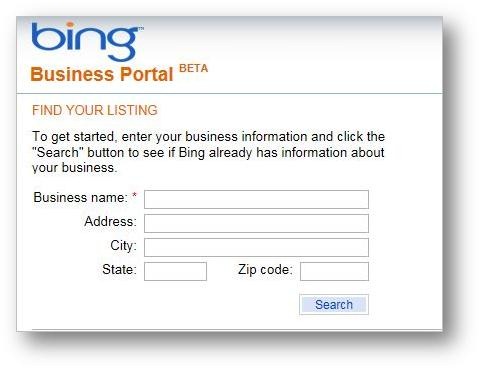
There are two basic ways to get started. If the business was listed on the Bing Local Listing Center (LLC), they can claim their listing and get started. If not, businesses can start from scratch here.

clip_image001

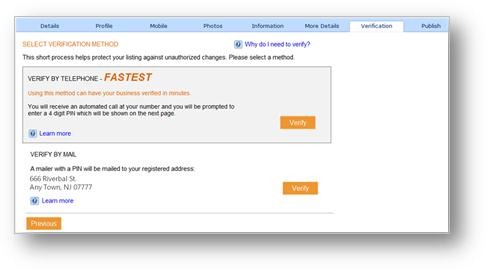
To claim an existing listing, click on the link on the local listing page or visit the Bing Business Portal page and claim the listing via phone or PIN.

clip_image002

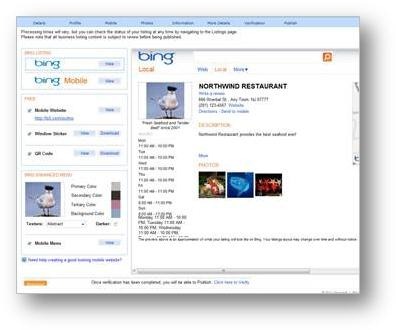
From there, businesses can add all of the fun features that help potential customers make better informed decisions. Add logos, photos, hours and payment options. Speak multiple languages? Mention it. Preferred parking? Highlight it. Does the business cross over into multiple categories? Select them. Then add links to the business Website, Facebook page and Twitter URL.

clip_image003

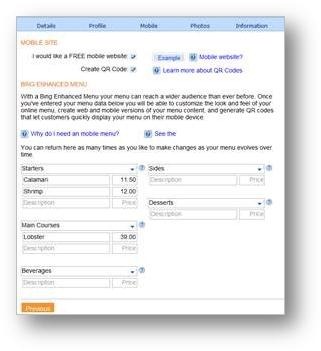
Restaurants and pubs can upload menus—and also have the option to create a mobile menu that customers can view from their mobile devices. They can even add categories and keywords to help refine the search and generate traffic.

clip_image004

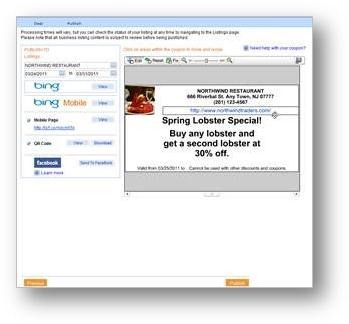
And, because customers love a great deal, the Bing Business Portal enables business owners to create discount coupons, promotions or rebates. Simply use the Deal Editor to specify a category, a type (dollar amount, dollars off, percentage off, etc.) and add some descriptive information to help sell it in—like photos, an expiration date and disclaimer information—and then promote it for free on Bing search results, as well as on the business’s listing page and its Facebook page.

clip_image005

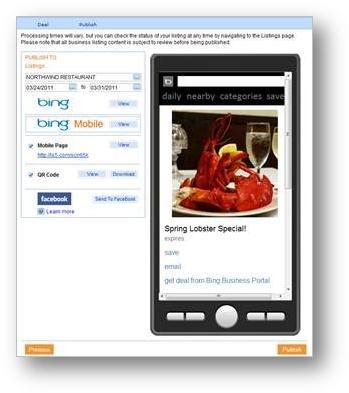
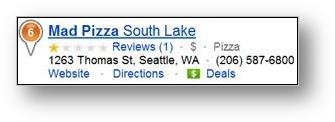
Any business that has a deal also will be highlighted on the Bing desktop search results, as well as the deal tab from the Bing for Mobile homepage.

clip_image006

clip_image007

clip_image008

Posted by: kurtsh | April 17, 2011

No, this blog’s not dead.

imageTo address the big pink elephant in the room, no, this blog is not dead.  I recently had some personal issues that took me completely out of the world of computing for a week but I’m back and will be posting again shortly.

Thank you for your patience and understanding. 

At least most of you.

« Newer Posts - Older Posts »

Categories