Posted by: kurtsh | December 8, 2011

TOOLS: eBooks & References for PowerShell 2.0

Powershell2Unfortunately, there are no “freely available” eBooks on PowerShell 2.0 from Microsoft.  The two current books that we have available on version 2.0 are below.

We do have an OLDER PowerShell eBook available (1.0) for download here, which includes demo files and code:

In the meantime, you may want to review the following FREE eBooks on PowerShell v2.0:

imageAlso DZone created this quick reference chart for PowerShell users:

Posted by: kurtsh | December 6, 2011

RELEASE: Microsoft Assessment and Planning Toolkit 6.5

imageThe Microsoft Assessment and Planning (MAP) Toolkit is an agentless, automated, multi-product planning and assessment tool for quicker and easier desktop and server migrations. MAP provides detailed readiness assessment reports and executive proposals with extensive hardware and software information, and actionable recommendations to help organizations accelerate their IT infrastructure planning process, and gather more detail on assets that reside within their current environment. MAP also provides private and public cloud planning assessments, and server utilization data for Hyper-V server virtualization planning; identifying server placements, and performing virtualization candidate assessments, including ROI analysis for server consolidation with Hyper-V. Other significant new features in MAP 6.5 include the discovery of active Windows devices, Software Usage Tracking for Forefront Endpoint Protection (FEP), and the discovery of Oracle instances on Itanium-based servers with HP-UX to assist in the planning of migration to SQL Server. Learn more.

MAP is one of the tools provided by the Microsoft Solution Accelerators team. The Microsoft Assessment and Planning Toolkit, Microsoft Deployment Toolkit, and Security Compliance Manager provide tested guidance and automated tools to help organizations plan, securely deploy, and manage new Microsoft technologies—easier, faster, and at less cost. All are freely available, and fully-supported by Microsoft. Learn more.

For home users and users with a few computers to migrate, use the Windows 7 Upgrade Advisor to understand the readiness of your computer for Windows 7.
The MAP Toolkit includes the following components:

  • Microsoft_Assessment_and_Planning_Toolkit_Setup.exe. Installation package containing the tool, release notes, Getting Started Guide and toolkit help (chm file).
  • readme_en.htm. Available as a separate download. Provides information to read before installing the MAP Toolkit, including installation prerequisites and known issues.
  • Getting_Started_Guide.en.doc. Provides information about toolkit installation, environment preparation, and assessment scenarios supported by toolkit wizards and the UI.
  • MAP_Training_Kit.zip. Available as a separate download. Contains sample databases and training materials.
  • MAP_Sample_Documents.zip. Available as a separate download. Contains sample reports and proposals.

DOWNLOAD: Microsoft Assessment and Planning Toolkit 6.5
http://www.microsoft.com/download/en/details.aspx?displaylang=en&id=7826

imageA former customer came up with this one.  They’re just discovered one of the drawbacks of deploying Office Standard 2010 instead of licensing Office Professional Plus 2010.

WHEN USING OFFICE 2010…
If you want users to be able to easily use the “Managed E-Mail Folders & Retention Policy” features of Exchange 2010 & you want the user to be able to view the Online Archive/Managed Folders within the user interface of the Outlook 2010 client software – you must have Outlook Professional 2010.  As I understand it, the Managed folders aren’t even supposed to visually appear in Outlook Standard 2010, much less Outlook 2007. 

Please note that this software is above and beyond Exchange Server 2010 Enterprise CALs.  The “Managed E-Mail Folders & Retention Policy” features are described as such:

  • Provide a secondary location for users to store their email messages and manage their mailbox quota with new online managed folders.
  • Take advantage of new Retention Policy so IT admins and records managers can provide users with policies stipulated how long items should be retailed.

WHAT ELSE IS MISSING IN OUTLOOK STANDARD 2010?
Additionally, the following features are also missing in Outlook Standard 2010, and require Outlook Professional 2010 to take advantage:

  • Create IRM-protected documents and email messages.  Grant access & editing permissions and apply policy templates to protected content
  • Apply policy statements to email messages before sending.
  • See Meeting Schedules & SharePoint MySite activities (new document postings, status updates) through Outlook 2010’s Social Connector
  • Complete InfoPath 2010 email forms in Outlook 2010.
  • Initiate IM & voice direction from Office application through integration with OCS.

DOCUMENT: “Office 2010 Suite Version Comparison Guide”
http://download.microsoft.com/download/E/A/8/EA8E6423-3DFE-4FEF-8482-D48B016A7C03/Office2010SuiteandVersionComparisonGuide.pdf

LICENSING: License requirements for Personal Archive and retention policies
http://office.microsoft.com/en-us/outlook-help/license-requirements-for-personal-archive-and-retention-policies-HA102576659.aspx

imageWindows Server 2008 R2 provides a productive server platform because it offers cost-effective virtualization, power saving capabilities, and a superior experience for end users.

In this Hands-on Lab we will focus on the enhancements made to PowerShell, the new Scripting Language for the Windows Platform, will help you automate management tasks in local and remote computers. You also learn how to configure IIS 7.5 on Server Core in order to run ASP.NET applications. Finally you will learn how you can use PowerShell and the new AD administrative Center to Manage Active Directory.

During this lab, we will cover:

  • Server Management and PowerShell V2: This command-line shell and scripting language helps IT professionals achieve greater productivity when managing their systems. We will review some of the 240 CmdLets available and how the new PowerShell Integrated Scripting Environment will make it easier to run cmdlets both locally and remotely.
  • Deploying and Managing ASP.NET Using IIS 7.5 on Server Core: You will learn how to install and configure IIS 7.5 on a Windows Server 2008 R2 – Server Core instance in order to run ASP.NET applications.
  • Active Directory and Server Manager Remoting: In this lab you will leverage the AD Administrative Center to make changes to user accounts. You will also learn how to use PowerShell to make changes to AD. Finally we will show you how you can simplify the management of the servers on your network with the new remoting capability found in Server Manager.

Date: Tuesday, January 31, 2012

Time: 9:00am – 1:00pm Pacific Time

Location: Virtual Hands On Lab Classroom.

Target Audience: IT Pro, IT Manager

Registration: To register, please contact me for more information if you are a customer of mine.  This special, no charge training series will fill quickly and space is limited, so be sure to register as soon as possible to reserve your seat.

What is a virtual hands-on-lab:
This isn’t your typical IT class. A hands-on lab online is an invite only event that combines LiveMeeting with a virtual lab. Attendees and presenters login from anywhere. Attendees watch a brief LiveMeeting presentation, then spend most of the time getting hands-on experience working through all, or just self-selected modules of the entire lab – at their own pace, and receive real-time, personal, one-on-one attention from the presenter. In addition, there’s a proctor available for technical support and to answer more attendee questions.

Before the Event:

imageWindows Server 2008 R2 provides a productive server platform because it offers cost-effective virtualization, power saving capabilities, and a superior experience for end users.

In this Hands-on Lab we will focus on the Windows Server 2008 R2 features that enable Administrators to streamline access to data and applications, especially from remote locations: BranchCache, Remote Desktop Services and Direct Access. We will also review how IT administrators can better measure and manage power consumption.

During this lab, we will cover:

  • Implementing BranchCache: This new feature shipped in Windows Server 2008 R2 and Windows 7, provides IT Pro with two options to setup a Branch Office Caching infrastructure:
      • Distributed Cache, is ideal when there isn’t a server at the branch office.
      • Hosted Cache, is a better option when there is a server at the branch Office.
  • Publishing application using Remote Desktop Services RemoteApp: Learn how Remote Desktop Services can help you to deploy applications and how to use the RemoteApp Manager to publish a new application to the Web Portal and also control user access to an application.
  • Direct Access and Power Management: Learn how DirectAccess makes it easier for users to securely access corporate data without having to establish a VPN. You will also learn how leverage Group Policy to manage power settings in servers and desktops.

Time: 9:00am – 1:00pm Pacific Time

Location: Virtual Hands On Lab Classroom.

Target Audience: IT Pro, IT Manager

Registration:
Please contact me for registration details if you are a customer of mine.  This special, no charge training series will fill quickly and space is limited, so be sure to register as soon as possible to reserve your seat.

What is a virtual hands-on-lab:
This isn’t your typical IT class. A hands-on lab online is an invite only event that combines LiveMeeting with a virtual lab. Attendees and presenters login from anywhere. Attendees watch a brief LiveMeeting presentation, then spend most of the time getting hands-on experience working through all, or just self-selected modules of the entire lab – at their own pace, and receive real–time, personal, one-on-one attention from the presenter. In addition, there’s a proctor available for technical support and to answer more attendee questions.

Before the Event:

image

Virtualization has become a critical component in all sizes of IT infrastructures, from SMBs to the enterprise. Not so long ago businesses were reluctant to virtualize mission-critical applications and servers like SQL Server, Exchange, and SharePoint; however that has now changed.

New Solutions for Managing Virtualized Application Environments

New virtualization technologies and solutions can help you address requirements for simplified management, increased application availability and infrastructure flexibility.

How We Can Help

Join us for a free one-day workshop with keynote speaker Michael Otey and experts from EMC, Brocade, and Microsoft. Whether you’ve already taken steps towards virtualizing your mission-critical applications or if you are just getting started, this event will provide significant tips and information to make the journey a successful one. This technical event will get you face-to-face with independent experts and your peers so you can successfully implement virtualization to its fullest.

imageYou will learn…
  • About new tools that help you implement a robust and cost-effective platform for your mission-critical applications
  • How to leverage the capabilities in your storage and network infrastructure to optimize your virtualized applications
  • Best practices for migrating physical application servers to virtual servers
  • How to maximize performance, minimize storage, and increase the availability of your mission-critical applications

The day will end with a Q & A panel moderated by Michael Otey that will provide a forum for participants to interact with the presenters and ask questions pertaining to their own businesses and virtualization efforts. The panel will include virtualization experts from EMC, Brocade, and Microsoft.

REGISTRATION:
http://forms.windowsitpro.com/forms/Mission-Critical-Hyper-V-2?EMCRSID=EPPartnerMicrosoft_Irvine_M1S1

image

As taken from The Windows Club:

Auslogics, the Australian software developer house famously known for their Auslogics Disk Defrag, has published an eBook aimed at helping users "speed up" their computers; and to get people to read it, and thank them for their support, Auslogics is giving out this eBook, called Turbo Windows – The Ultimate PC Speed Up Guide, for free.

Turbo Windows – The Ultimate PC Speed Up Guide is 174 pages long and I have not read it yet and may never will so I can’t really say how good (or bad) this guide is. However, based off Auslogic’s stellar reputation, I am sure there are at least some nifty tricks tucked away inside these 174 pages.

According to Auslogics, Turbo Windows – The Ultimate PC Speed Up Guide is a "limited edition" and will only be available for a limited number of downloads. So grab this while you can.

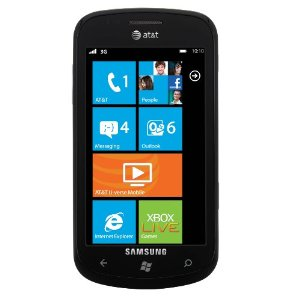
imageFor the past year, there’s a been a ton of questions about what MicroSD Flash Card will properly work in the Samsung Focus Windows Phone 7.

WHY?
The Samsung Focus is a special Windows Phone 7 device in that it has a user-accessible MicroSD Flash slot that will allow the user to expand the storage on the phone.  This comes with 2 VERY BIG caveats:

  1. ACCESS LATENCY
    The MicroSD Flash card used must have minimal Access Latency.  This should not be confused with the memory card class or “access speed”.  The precise details behind this are a little blurry and I don’t believe well documented however as I understand it the MicroSD Flash card used needs to have a very low latency for access response times.  There is apparently no way to determine this performance before purchasing and no means by which people can guarantee that they are getting a memory card that will work without testing it themselves.  Just because you have a Class 10 memory card doesn’t mean it will work.
    …so yes, this means that this is a crapshoot.  I’m told that even specific brands & card models can vary, so just because one card works for one person, doesn’t mean that another card purchased by someone else will work for another.
  2. INSTALLABLE AT INITIAL BOOT
    The MicroSD Flash card must be installed before the phone is first turned on.  It cannot be added after.  If the phone is turned on, it needs to be hard reset (SETTINGS –> ABOUT –> RESET) in order to recognize the memory.  The reason for this is the memory is actually aggregated/combined with the 8GB of storage that is already onboard.  So if one adds 16GB of MicroSD Flash, the total memory on the device that is recognized is 24GB.

imageSO WHAT’S UP WITH THIS POST?
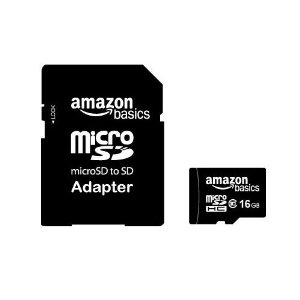
I recently found an awesome little MicroSD Flash card directly from Amazon.com.  It’s a 16GB Class 10 MicroSD Flash card that is cobranded as an Amazon Basics card and I bought it to give it a try in my Samsung Focus.

I’m happy to say that I’ve tested a couple of these cards now on two different Samsung Focus’ and they both worked brilliantly

And I didn’t just install the card, reset the phone, and go “Whoa.  It worked.”  I actually made sure that I USED THE CARD. I really loaded up the device (and thus, the installed card) with 20GB of data – i.e. I made sure that I used the storage that I’d installed and had a great experience.  No slow down in device performance, no laggy response time when accessing media files or applications that I downloaded.

Just expanded storage.

WHERE DO I GET THE CARD?
I got the card from Amazon.com at the link below for $32.99.  It may sound a little pricey for this capacity of storage but I assure you that this is not only a good deal for a Class 10, high performance MicroSD Flash card, but it’s also a great deal for a card that has worked (at least for me) to expand the Samsung Focus.

Just thought some of you would like to know what memory card worked for me.

Yesterday something weird happened.  I pulled out my OEM Samsung Series 9 DC power adapter from my laptop bag (the adapter that came with the laptop initially) and plugged it in… only to discover that it didn’t ‘stick’ firmly into the laptop’s power port.  The power adapter’s DC jack that I normally plug into the laptop’s power port loosely hung in there and while it did in fact start to charge the laptop, it easily fell out of the port when anything touched the power cable.  I initially used electrical tape to hold the jack into the power port, if you can believe that.

This is a problem if you’re, say, sitting on a couch with your laptop and need to have it plugged in.  Having the power adapter fall out of the port easily is not cool because you kinda depend on the port to charge your device while you’re working on it.

I examined the Samsung Series 9’s power port and I found that with a magnifying glass and a mag light, sure enough, a metal connector that normally holds the power adapter jack in place in the laptop appeared to not do it’s job any more. 

Honestly, I have no idea how to fix this.

WHY ARE YOU WRITING ABOUT THIS?
Good news!  I found a workaround.  It’s kinda lousy but I think it’s worth writing about in case others run into this. 

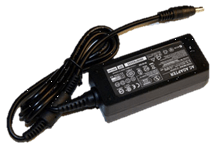
I found a 3rd party power adapter for the Samsung Series 9 that STILL WORKS when the laptop’s power port is “loosened”.  It’s a backup power adapter that I bought off of eBay for $19 and I referred to it in a previous post about the Samsung Series 9 accessories available on the Internet.

Besides the fact that it holds in place, even when my original OEM power adapter doesn’t, it’s good to have a backup power adapter in the event I lose the original.

I guess, given that it’s Thanksgiving, that I should be thankful that I have a power adapter that still connects into my laptop so that I can post this blog entry while travelling… but it is something of a bummer being that I really liked the old power adapter’s portability.

Oh well.  Happy Thanksgiving everyone.

Posted by: kurtsh | November 24, 2011

HOWTO: Opt out of Verizon Wireless’ New Privacy Changes

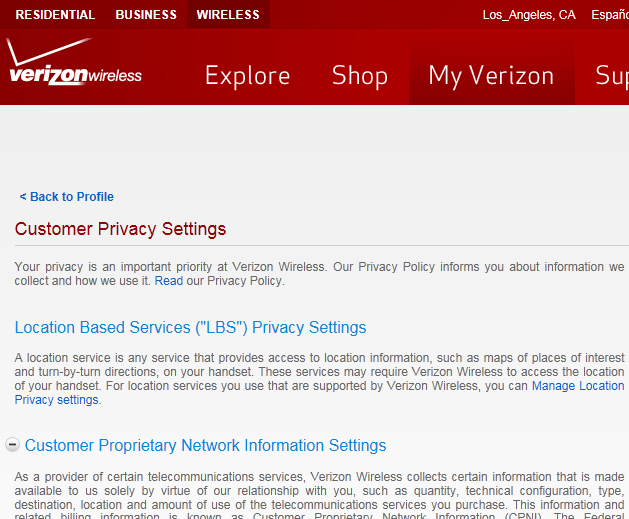
imageSo Verizon announced a bunch of new Customer Privacy Settings.  It’s been covered on Engadget and other sites however how to actually OPT OUT of these new tracking mechanisms and privacy violating rules aren’t covered very well any where.

If you’re a Verizon Wireless customer, sign in to your account at http://www.vzw.com then go to:  https://wbillpay.verizonwireless.com/
vzw/secure/setPrivacy.action
.

It should take you to a page with a bunch of options as depicted in the snapshot above and in the details below. 

TURN OFF THE SETTINGS YOU DON’T FEEL COMFORTABLE WITH.

Your privacy is an important priority at Verizon Wireless. Our Privacy Policy informs you about information we collect and how we use it. Read our Privacy Policy.

Location Based Services ("LBS") Privacy Settings

A location service is any service that provides access to location information, such as maps of places of interest and turn-by-turn directions, on your handset. These services may require Verizon Wireless to access the location of your handset. For location services you use that are supported by Verizon Wireless, you can Manage Location Privacy settings.

Customer Proprietary Network Information Settings

As a provider of certain telecommunications services, Verizon Wireless collects certain information that is made available to us solely by virtue of our relationship with you, such as quantity, technical configuration, type, destination, location and amount of use of the telecommunications services you purchase. This information and related billing information is known as Customer Proprietary Network Information (CPNI). The Federal Communications Commission and other regulators require the Verizon Companies to protect your CPNI.
Verizon Wireless shares information among our affiliates and parent companies (including Vodafone) and their subsidiaries unless you advise us not to. Sharing this information allows us to provide you with the latest information about our products and services and to offer you our latest promotions.

Business & Marketing Reports

Verizon Wireless may use mobile usage information and consumer Information for certain business and marketing reports. Mobile usage information includes the addresses or information in URLs (such as search terms) of websites you visit when you use our wireless service, the location of your device ("Location Information"), and your use of applications and features. Consumer information includes information about your use of Verizon products and services (such as data and calling features,device type, and amount of use) as well as demographic and interest categories provided to us by other companies (such as gender, age range, sports fan, frequent diner, or pet owner). We will combine this information in a manner that does not personally identify you. We will use this information to prepare business and marketing reports that we may use ourselves or share with others. We may also share Location Information with other companies in a way that does not personally identify you. We will allow these companies to produce limited business and marketing reports. See our Frequently Asked Questions for more information about these reports.
You have a choice about whether we use your information for these reports.

Relevant Mobile Advertising

When you use your wireless device, you often see advertising on websites and apps. Using the postal address we have for you and certain consumer information such as your device type, language preference and demographic and interest categories provided to us by other companies (such as gender, age range, sports fan, frequent diner, or pet owner), we will determine whether you fit within an audience category that an advertiser is trying to reach. This means ads you see may be more relevant to you. We will not share any information that identifies you personally. See our Frequently Asked Questions for more information about relevant mobile advertising.
You have a choice about whether we use this information for relevant mobile advertising. Please note that you will receive mobile ads whether you participate or not, but under the program, ads may be more relevant to you.

« Newer Posts - Older Posts »

Categories