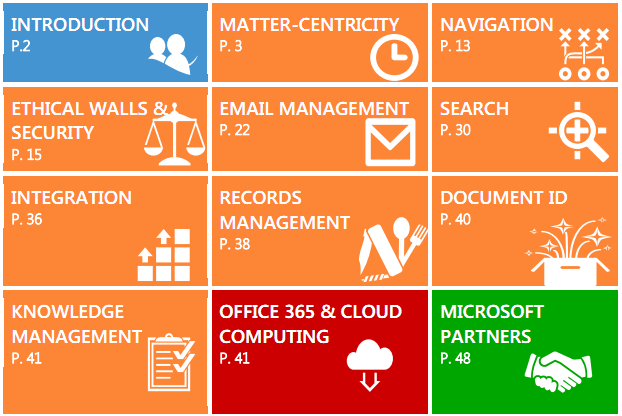
imageThis report provides an overview of critical legal Document Management System requirements, along with an explanation of how Microsoft products address those requirements.
We’ve also identified gaps in functionality and highlighted partners that can provide enhanced functionality to meet your legal needs.

We have focused on requirements that are specific to legal DMS, rather than covering the basic requirements of a standard document management system, which are easily satisfied with Office apps and SharePoint 2010.

imageI got asked today by an Enterprise customer:

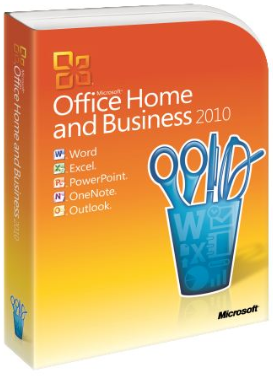
“Why should we buy Office Standard 2010?  Office Home & Business 2010 looks like the same thing but without Publisher 2010, and we don’t need Publisher 2010.”

The important thing to understand is that the difference between “Office Home & Business 2010” & “Office Standard 2010” is much more than “Publisher 2010”.

  • Office Standard 2010 is an Enterprise-class productivity suite designed for worldwide deployment & Enterprise integration.
  • Office Home & Business 2010 is a consumer/small business-grade suite designed for a single PC installation.

Here are some of the issues to consider:

  1. NO VOLUME LICENSING
    Enterprise customers licensing Office usually want to purchase it on volume to get the best discount for their volume purchase. Office Home & Business is a consumer purchase & cannot be licensed via Volume Licensing – i.e. there is no Select pricing.  Office Home & Business is a retail/OEM package SKU created primarily for consumers to purchase at a retailer like Best Buy/Costco for use on their home PC usually to complement the business edition they use at work – not for deployment in an Enterprise.  Office Standard is available for purchase through Volume Licensing and thus available for volume discounting & volume deployment.
    http://office.microsoft.com/en-us/buy/office-2010-volume-licensing-suites-comparison-FX101825637.aspx
  2. NO ENTERPRISE SOFTWARE DISTRIBUTION
    Enterprise organizations need to understand that Office Home & Business has no processes available for architecting an Enterprise deployment.  It cannot be feasibly deployed in volume via enterprise distribution technologies like System Center or Altiris due to a lack of volume activation technology.  There is no mass distribution packaging for this edition and more importantly, there is no volume activation/single Enterprise activation key available for this edition.  Each copy of Office Home & Business needs to be installed by hand (or come tied to a PC) and manually activated using an UNIQUE individualized activation key for each PC & this key essentially comes out of the retail package.
    Office Standard has many well-defined volume deployment processes available to it as well as volume activation for the entire enterprise using a single activation key for an elegant Enterprise deployment installation/image.
  3. NO OFFICE WEB APPS
    In WAN connected environments, minimizing the need to download/upload entire documents to editing & viewing is becoming increasingly important. Additionally, with the variety of devices in use by users today, being able to render Office documents through standards compliant platform agnostic browsers is important since it enables usage on connected iPads & other non-Windows platforms.
    Office Standard 2010 features the licensing rights to use Office’s web-based/HTML-based counterparts hosted internally on SharePoint Server, for individuals that want to access documents within a web browser.  This provides the convenience of reading/editing documents without downloading the file locally from a server and enables multi-person editing.  If the Office license is on Software Assurance, the user will have Office Roaming Use Rights and can access their documents via a HTML web browser over “Office Web Apps” on companion devices like iPads, Android Tablets, Macintoshes, etc.  without any additional licensing.  Office Home & Business does NOT have this licensing right & cannot use server-based Office Web Apps in any capacity.
  4. NO SUITE CUSTOMIZATION OR ENTERPRISE MANAGEMENT
    Most Office 2010 deployments require customization to ensure that the installation reflects the needs of the organization. This includes hundreds of functions and capabilities, not the least of which being setting the default saved document format is (.DOC, .DOCX, ODF, etc.), the security settings for permitting the opening of macros/documents, privacy settings such as document metadata, etc. Office Standard 2010 has the ability to modify these feature settings for enterprise deployments using the Office 2010 Customization Tool.  It also has the ability to use Group Policy templates to globally manage Office 2010 settings using Active Directory.  Office Home & Business does not have the technical ability to use the Office Customization Tool for customizing the Office suite for deployment (only volume licensed editions are capable), nor are Group Policies configurable for enterprise management use based on its terms of use.
    http://technet.microsoft.com/en-us/library/cc179097(office.14).aspx
  5. NO MULTILANGUAGE SUPPORT
    In order to support localized languages such as Spanish, French, German, etc., Office has Multilanguage Packs available for it that are installable. Office Standard 2010 has this available to it if it is covered by Software Assurance under volume licensing. Office 2010 Home & Business does not have Multilanguage Pack support in any capacity as this is exclusively a feature for Office Standard or Professional Plus.
  6. TECHNICAL FEATURE DIFFERENCES
    The technical difference between Office Home & Business 2010 & Office Standard 2010 as I stated earlier is more than just “Publisher 2010”.   The following technological features exist in Office Standard 2010 and are subsequently missing in Office Home & Business 2010:

    1. Information Rights Management & Policy Features
      IRM safeguards digital information from unauthorized use through integration with Windows Rights Management Services (RMS) for Windows Server. It gives users the ability to define exactly who can open, modify, print, forward, and/or take other actions with documents and e-mail messages.  Office Standard has the ability to consume and read IRM-protected content in Outlook, Word, Excel, and PowerPoint.  Office Home & Business do not have this capability in any of its products.
    2. Contextual access to business & social networking
      The social networking features of Office Standard provides a people-centric view of your company, including messages, meeting schedules, attachments, and SharePoint activities—such as the posting of status updates directly within Outlook.  It allows Office Standard users to connect to popular social networking sites to get news from customers, prospects, and partners.  Office Home & Business does not provide this social networking capability in any of the applications.
    3. Integrated Enterprise Content Management
      Office Standard provides secure access to business information through operability with SharePoint.  It includes differentiated capabilities from integrated document workflow and to smart templates that populate document metadata and easy access to rich client/server capabilities within the Backstage view.  Office Home & Business does not provide any integration or access with SharePoint at all.
    4. Publishing of data insights
      Office Standard can publish worksheets with strong fidelity to the Web, and create Web databases with Excel Services and Access Services through SharePoint 2010. The Report Center helps ensure that all users have access to the same version of critical business information.  Office Home & Business does not provide these ad-hoc numeric/financial analysis capabilities.
    5. Unified instant messaging, presence, and voice
      Office Standard allows users to easily communicate with others in different locations or time zones using familiar Office tools. Lync and Lync Server as well as Communicator and Office Communications Server operate with popular Office programs to provide a range of different communication options, including instant messaging (IM), phone, and voice, video, or Web conferencing.  Office Home & Business provides no integration with Lync, Office Communicator, and other Microsoft unified communications technologies.
Posted by: kurtsh | February 27, 2012

DOWNLOAD: Skype for Windows Phone… posted today

Skype for Windows Phone… posted today.

clip_image002Skype for Windows Phone

Imagine talking to friends, family, and colleagues anywhere in the world, and seeing them as if they’re in the same room. That’s Skype.

  • Make and receive voice/video calls and instant messages to anyone else using Skype, whether on a Windows Phone, iPhone, iPad, Android phone, Mac, PC or television.
  • Use your Skype account for free at home, at work, or on-the-go (WiFi connection or mobile data plan required).

BETA DISCLAIMER:
NOTE: This is a pre-release (beta) product and you may come across occasional bugs and issues. Please tell us what you think, we would love to have your feedback.

DOWNLOAD: 
http://www.windowsphone.com/en-US/apps/c3f8e570-68b3-4d6a-bdbb-c0a3f4360a51

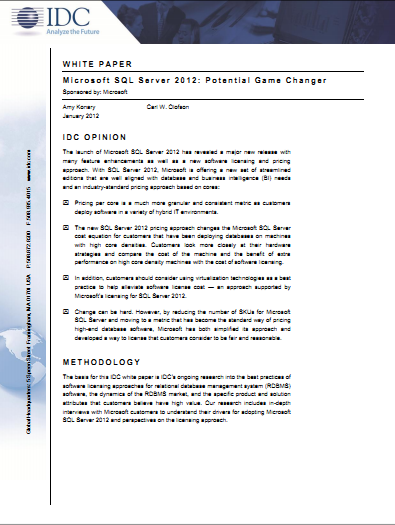
imageThis IDC white paper provides a summary of the new product features of Microsoft SQL Server 2012 as well as the licensing changes that accompany the new release.

This white paper also focuses on the changes to customers’ IT environments – specifically cloud, virtualization, and multicore – that are contributing to shifts in the ways that database software is being deployed and valued.

This white paper provides recommendations for enterprises that are considering adopting Microsoft SQL Server 2012.

Download the report here:
http://download.microsoft.com/download/D/A/E/DAE18CF3-F15E-4670-A81D-EF277440F9EC/IDC_White_Paper_Microsoft_SQL_Server_2012_Potential_Game_Changer_January2012.pdf

Posted by: kurtsh | February 25, 2012

WHITEPAPER: TechNet Magazine–January 2012

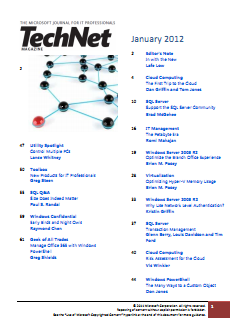
imageThe January edition of TechNet magazine was posted.  As usual, there’s a series of great technical articles on a wide range of topics related to Microsoft technologies.  Here’s the January topics list:

  • Editor’s Note: In with the New by Lafe Low
  • Cloud Computing: The First Trip to the Cloud by Dan Griffin and Tom Jones
  • SQL Server: Support the SQL Server Community by Brad McGehee
  • IT Management: The Petabyte Era by Romi Mahajan
  • Windows Server 2008 R2: Optimize the Branch Office Experience by Brien M. Posey
  • Virtualization: Optimizing Hyper-V Memory Usage by Brian M. Posey
  • Windows Server 2008 R2: Why Use Network Level Authentication? By Kristin Griffin
  • SQL Server: Transaction Management by Glenn Berry, Louis Davidson and Tim Ford
  • Cloud Computing: Risk Assessment for the Cloud by Vic Winkler
  • Windows PowerShell: The Many Ways to a Custom Object by Don Jones
  • Utility Spotlight: Control Multiple PCs by Lance Whitney
  • Toolbox: New Products for IT Professionals by Greg Steen
  • SQL Q&A: Size Does Indeed Matter by Paul S. Randal
  • Windows Confidential: Early Birds and Night Owls by Raymond Chen
  • Geek of all Trades: Manage Office 365 with Windows PowerShell by Greg Shields

ONLINE:  TechNet Magazine: January 2012
http://technet.microsoft.com/en-us/magazine/hh751303.aspx

DOWNLOAD: TechNet Magazine: January 2012
http://download.microsoft.com/download/E/4/C/E4CDC30B-0DE6-494F-B8B0-0A3753A7A64D/January2012.pdf

Alright – so I’m late… really late… on this one.  It turns out that Office 2011 for Macintosh has full support for Rights Management Services in Windows Server 2008 R2.  The same technology that Enterprises have enjoyed for years on the Windows platform.

imageFor those of you who don’t know what “Rights Management Services” is, think of a solution that:

  • Encrypts email messages, .DOC/.XLS/.PPT files, web pages using AES-256 bit
  • Allows “usage policies” to adhere to the encrypted mail/doc/page such as:
      • Disallow ‘forwarding’
      • Disallow ‘printing’
      • Disallow ‘copy & pasting’
      • Disallow ‘screen capture’
      • Disallow reading after a specified date (a.k.a. timebombing content)
      • Logging of access of content (centrally auditing who reads the content)
  • Enables indexing of encrypted content on SharePoint sites
  • Provides robust enterprise level key management (i.e. allows you to recover content via super users)
  • Extended access outside of the corporate firewall via Internet web services
  • etc.

Yeah.  Pretty cool ‘eh?  Well now Macintoshes can read the same content if they are participants in Right Management policies.

Here’s the guide for deploying RMS on Macs:

The Rights Management Service blog (or at least the main support engineer’s blog) has a blurb on this:

Posted by: kurtsh | February 25, 2012

BETA: PowerShell v3 Technical Guide (CTP2)

For those looking for a jumpstart to the all-new PowerShell v3, (now with a GUI) check out this Wiki we started.

imageThis page is designed to be a starting point for PowerShell V3 knowledge. If adding to this page please create all new wiki’s starting with "Powershell V3".

PowerShell V3 is the latest version of PowerShell. Currently, PowerShell V3 is at an early stage of development with Community Technology Preview 2 being released. CTP1 is included in the developers Preview of Microsoft Windows 8 client and Server and is also available as a download for installation on WIndows 7 and Server 2008 R2 systems.

The Powershell team blogged about CTP2 when it was released

Table of Contents

WIKI: PowerShell v3 Technical Guide
http://social.technet.microsoft.com/wiki/contents/articles/4725.powershell-v3-guide-en-us.aspx

imageThis download contains product documentation for System Center 2012 – Service Manager.

System Center 2012 – Service Manager provides an integrated platform for automating and adapting your organization’s IT service management best practices, such as those found in Microsoft Operations Framework (MOF) and Information Technology Infrastructure Library (ITIL). It provides built-in processes for incident and problem resolution, release management, service request fulfillment, change control, and asset lifecycle management. In addition, Service Manager includes reports and advanced analytics using OLAP data cubes for its data warehouse.

WHITEPAPER: System Center 2012 – Service Manager Product Documentation
http://www.microsoft.com/download/en/details.aspx?id=27850

imageSystem Center Advisor is a cloud service that enables IT pros to assess their server configuration and proactively avoid problems, while helping support staff to resolve issues faster by accessing current and historical configuration data, all with the security features that meet their needs. Additionally, System Center Advisor helps reduce downtime by providing suggestions for improvement, and notifying customers of key updates specific to their configuration.

Benefits

  • Proactively Avoid Problems
      • Increase awareness around the state of server deployment through assessment of configuration, and alerts for configuration-related issues.
      • Resolve issues before they become critical through ongoing assessments of the server environment for undetected configuration issues.
      • Assess and understand server configurations from virtually anywhere with from a secure cloud service with security features that meet customer needs.
  • Resolve Issues Faster
      • Decrease time to resolve issues by easily viewing configuration changes over time with historical data.
      • Decrease time to resolve issues with the ability to share server configuration data with internal support staff or Microsoft Customer Support Services.
      • Accelerate problem solving with instant access to step by step guidance , self-help information and community forums related to identified issues.
  • Help Reduce Downtime and Improve Performance
      • Increase performance and availability of servers by understanding configuration state and receiving suggestions for improvement to help ensure availability.
      • Help reduce server downtime by getting notifications for key updates specific to the configuration of the server environment.
      • Increase collaboration between IT professionals through centralized data of an organization’s deployment configurations.

Requires Software Assurance
System Center Advisor is available as a benefit of Software Assurance for supported entitled server products. This service brings new support and maintenance value to Software Assurance coverage at no additional cost. For additional information on purchasing software assurance, please visit http://www.microsoft.com/licensing/software-assurance/default.aspx.

Customers can sign up today for a free 60-day trial at http://www.systemcenteradvisor.com

imageI got the following question from a volume licensing customer:

  • “Where’s Windows XP Multilanguage User Interface pack?”

The Windows XP Multilanguage User Interface (MUI) pack installs over volume licensed versions of Windows XP Professional. 

It reconfigures the Windows user interface for the language of the user logged in.  One machine can provide an English, French, Spanish, Japanese, and Arabic interface and the language can change depending on the user that is logged in.  (Note: Windows XP MUI usage requires Volume licensing & Windows Client Software Assurance.)

The software download for the MUI is somewhat hidden.  To locate the Windows XP MUI download on the VLSC website:

  1. Sign in to the VLSC site at https://www.microsoft.com/licensing/servicecenter/ using your Windows Live ID.
  2. Click on downloads and Keys
  3. On the Left hand side check off the Box that states Archive.
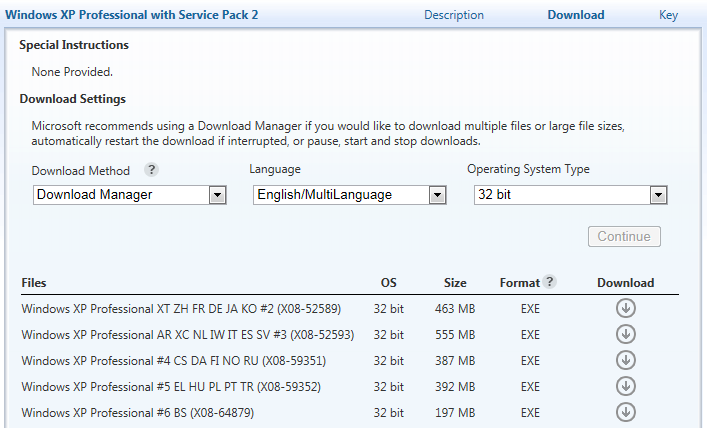
  4. Locate the download labeled as Windows XP Professional with Service Pack 2 and then click on the download button to the right of the product name.
  5. Here you will need to choose your download settings. You will need to change the Language from English to English/ Multilanguage.

There will be multiple options for you to download depending on the language you are looking for.

(Note: You specifically have to go into “Windows XP Professional with Service Pack 2” – not Service Pack 3.)

« Newer Posts - Older Posts »

Categories