Posted by: kurtsh | February 14, 2012

RELEASE: Microsoft Outlook Configuration Analyzer Tool

The Outlook Configuration Analyzer Tool (OCAT) was developed by a pair of support engineers at Microsoft. These support engineers have over 30 years of combined experience in supporting Microsoft Office, Microsoft Outlook, and Microsoft Exchange Server. Based on their support experience, they compiled a set of detection rules that look for Outlook configurations that have historically been possible sources of problems.

To wrap these rules into a useful framework, the same infrastructure first used by the Microsoft Exchange Best Practices Analyzer was chosen for the development and final implementation of OCAT.

The end-result of this work is shown in the following figure.
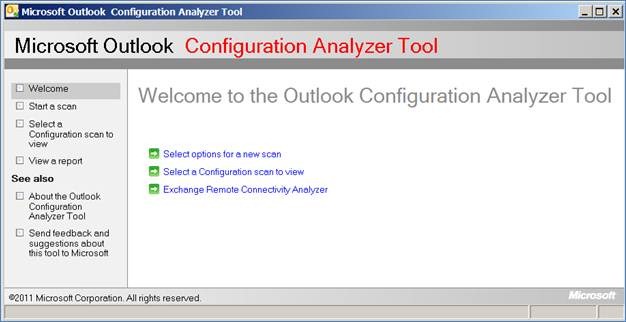
clip_image002

You can use this first version of OCAT to do the following:

  • Scan your computer
  • Open a previously run scan on your computer
  • Import a scan from another computer
  • Use several reporting formats to view the scan results
  • Start the Exchange Remote Connectivity Analyzer tool
  • Send feedback to the OCAT team

These features are discussed in detail in this document.

We expect that OCAT will eventually be updated to include new functionality that includes automatic updating of OCAT to download new detection rules. You can follow the OCAT team on Twitter clip_image004 to receive news of any publicly available OCAT updates.

Support for OCAT
There is no available support for OCAT. This tool is provided as-is.

If you encounter any problems when you use OCAT, you can send a detailed email message to OCATsupp at microsoft dot com. We appreciate your feedback. However, we cannot reply to your email message. We will review your feedback and determine whether any changes or issues can be incorporated or fixed in a later version of OCAT.

image

This user guide shows step-by-step instructions for how to register, view account details, download products and more from the Microsoft Volume Licensing Service Center (VLSC). It also includes screenshots, technical support information, and a glossary.

  1. Overview of Volume Licensing Service Center
  2. About Administration Tasks on the VLSC
  3. Viewing Licensing Summary and Relationship Summary Information
  4. Using the Downloads and Keys Page
  5. Using the Subscriptions Page (MSDN, Expression, TechNet, Online Services)
  6. About Microsoft Software Assurance for Volume Licensing
  7. Creating and Managing OLS License Reservations

WHITEPAPER:  Microsoft Volume Licensing Service Center (VLSC) User Guide (3.3MB, 69pgs)
http://www.microsoft.com/download/en/details.aspx?displayLang=en&id=10585

imageWell, apparently no one knows we released System Center Advisor.  ARRRRGH!

QUICK VERSION:  System Center Advisor is a no-charge benefit for Software Assurance customers.  Technically, it’s an agent that installs on some or all of your servers that reports information to a Microsoft-hosted cloud service.  That information is analyzed similarly to a Best Practice Analyzer and identifies areas of improvement or areas that are not following best practices.  These best practices are updated frequently since the service exists in the cloud.  Access to the reporting on these best practices against your servers is handled securely on an admin web site at http://systemcenteradvisor.com

Today, Microsoft announced the general availability of System Center Advisor (formerly Microsoft codename ‘Atlanta’) enabling IT Professionals to proactively avoid server configuration problems by assessing static, runtime and operational data to identify potential issues that cause outages or poor performance.

System Center Operations Manager is great at alerting you to server issues as they happen, enabling you to quickly respond – but what if you could actually prevent server configuration problems before they ever impact your server’s performance or availability?

System Center Advisor is a cloud service hosted on Windows Azure that regularly analyzes your servers’ configuration, drawing on the wisdom and experience of Microsoft support staff and its countless interactions with IT professionals to automatically highlight server configuration problems and their solutions for Windows Server and SQL Server. You check for any recommendations by logging into the Advisor portal. You also have the option of email alerts and recommendations delivered directly to your inbox.

Posted by: kurtsh | February 13, 2012

INFO: Gartner Group research on Microsoft Licensing

imageSoftware asset managers often ask Gartner for advice on where to start with regard to Microsoft Licensing.  We have licensed – for a limited time – several Gartner Group reports for public consumption at no cost to you.  This research will help prioritize tasks and allocate time to initial assessments as you start to establish important areas of process improvement activity.

imageRead more from Gartner, IDC, and Forrester at the Volume Licensing Site:
http://www.microsoft.com/licensing/about-licensing/value-of-volume-licensing.aspx

Posted by: kurtsh | February 13, 2012

WHITEPAPER: “Building The Untethered OrganizatiOn”

image

There’s an interesting whitepaper of sorts published on Microsoft.com called the “Untethered OrganizatiOn”.  It focuses on the value of providing employees with mobility & and strengths of concepts like telecommuting & VPN like technologies such as DirectAccess.

Here’s an excerpt:

Are executives at communications giant Sprint Nextel leaders or followers when it comes to workplace flexibility? The answer de-pends on your point of view.

Sure, the Overland Park, Kan.-based company is a trailblazer in em-powering one-time desk jockeys to work whenever and wherever they choose, whether that’s home, a customer site, the office, or almost anyplace else with Internet access. But when decision-mak-ers rolled out the Sprint Mobile Workforce initiative back in 2004, it was at least partially in reaction to changes that employees were implementing on their own.

“We’ve always been big proponents of flexible work arrange-ments,” says Scott Woodrome, a strategy manager at Sprint Nextel. “But one reason we launched the Sprint Mobile Workforce program was because people were already working where they wanted, when they wanted, and how they wanted.”

Sensing an opportunity, the company decided to embrace rather than resist that trend. It pulled together a project team of IT, HR, and facilities leaders, along with representative front-line employees. It deployed a sophisticated unified communications solution based on Microsoft Office Communications Server (now Microsoft Lync) and Microsoft Exchange Server, so workers could connect from anywhere via Web-based telephony, online conferencing, instant messaging, and e-mail. And it gave its office sites a top-to-bottom makeover, replacing fixed desk assign-ments with a smaller set of unassigned work stations that employees could use temporarily whenever they came in from the road.

The impressive results have included some $9.3 million a year in communications savings, $30 million a year in real estate savings, and a workforce that’s not only happier but significantly more productive too. “People just get more done when they don’t have to spend time on things like commuting and business travel,” Woodrome observes.

Sprint Nextel’s experiences are but one example of an ongoing revolution currently transforming the world of work. Call it the rise of the untethered organization. For centuries, most office work-ers have done their job in the same place, at the same time, in the same way, with the same tools day after day. Today, however, corporate employees are less and less tied to a specific desk, device, or location. And as businesses are increasingly discovering, that greater freedom to roam can produce dramatic increases in productivity.

Download the entire document here:

So I was copying files from from a SharePoint web site using Robocopy using UNC conventions:

robocopy "\\sharepointserver\DavWWWRoot\sourcefolder” “targetfolder” /E /Z

…and discovered that there’s a 50MB file size limit on transfers coming from WebDAV file sources like SharePoint folders.  If you are trying to copy files >50MB, they will fail with:

Error 0x800700DF: The file size exceeds the limit allowed and cannot be saved.

There’s a way around this.  Make the following modification and restart the Web Client service

  1. HKEY_LOCAL_MACHINE\SYSTEM\CurrentControlSet\Services\WebClient\Parameters
  2. Set FileSizeLimitInBytes = 4294967295 (decimal)
    (You can make this less, the default is 50000000 bytes, pick somewhere in between if you are worried about setting the max.)

For more information ref to this kb http://support.microsoft.com/kb/900900

image
Learn everything you need to know to start putting powerful network computing and information management strategies to work in your business. One-day local event for Business Leaders, Technology Leaders and Technology Professionals. During this single day event, you’ll receive a high level overview of what Microsoft’s Cloud strategy is and how it can benefit you and your company.

Date:
Tuesday, March 13, 2012 8:00 AM6:00 PM (Pacific Time)

Location:
Anaheim Convention Center
800 West Katella Ave
Anaheim, California 92802
Phone: 949-486-1365
Email: kara dot kadow at quickstart dot com

Registration:
http://cloudconference.quickstart.com/anaheim/register.aspx

imageHow Microsoft IT Takes Initial Steps Toward the Consumerization of IT 

Microsoft IT has supported the consumerization of IT for years at Microsoft and continues to define the balance between hardware/productivity and software/security.

Consumerization of IT has remarkable potential for improving collaboration, productivity, and keeping employees happy with the latest and greatest software and hardware. Microsoft remains a leading software company while at the same time continues to provide its employees with the premier experience from a technology perspective.

Presenters:
Chris Dieringer, Microsoft IT Senior Program Manager, Microsoft Corporation and Paul Selsor, Microsoft IT Field Infrastructure Technology Strategist, Microsoft Corporation

Posted by: kurtsh | February 11, 2012

BETA: Exchange Client Network Bandwidth Calculator Beta

Ever wonder what the bandwidth consumption would be for a given Exchange client, be it desktop, phone, web, etc?

imageI am extremely pleased to announce that the all new Exchange Client Bandwidth Calculator Beta is available for download!!

Over the past 12 months we have been working on a new calculator to help with Exchange client network bandwidth approximation. This new calculator is based on all new prediction data and is designed to work with both Exchange on-premises and Office 365 deployments! (Yes, we know it’s long overdue!)

What does it do?

The brief was concise and simple for this calculator; we wanted to be able to predict the client network bandwidth requirements for a specific set of users. The calculator needed to deal with Outlook, OWA and Mobile Devices, both on-premises and for Office 365 scenarios.

The following clients are included in this Beta; further clients will be added over time.

  • Outlook 2010
  • Outlook 2007
  • Outlook 2003
  • OWA 2010
  • OWA 2007
  • Windows Mobile
  • Windows Phone

For more information, read the blog post:
http://blogs.technet.com/b/exchange/archive/2012/02/10/announcing-the-exchange-client-network-bandwidth-calculator-beta.aspx

SharePoint User Group Announcement

When: February 23, 2012 @ 6pm
 
Where:  Microsoft Store
10250 Santa Monica Blvd.
Los Angeles, CA 90067
Phone: (310) 228-3550
 
What:  Food, Drinks & technical presentation
 
Who:  To Be Determined

Updates:  https://www.facebook.com/LASPUG

LA SPUG is happy to announce its new meeting location! The generous folks at the Century City Microsoft Store have opened their doors to our group! Our inaugural meeting at our new location will take place on February 23rd at 6pm.

Located in the Westfield Mall, our new home includes 3 hours of free validated parking. We will continue to serve food and have a fun new environment for networking and developing our SharePoint skills. Stay tuned for more information about the meeting content, sponsors other news.

We also want to thank and acknowledge Jonathan, Justin, Miguel & QuickStart Intelligence for hosting our meetings since its inception!


This Months Presentation will be announced in a separate blast later this month.  Stay tuned! 

Register Now – http://laspug.eventbrite.com/

——————–

Spugs.org is a central website for SharePoint User Groups and is spearheaded by Justin Slagle and Karuana Gatimu. Each chapter has a Governing Committee of members who are enthusiastic about SharePoint technology and the collaborative experience. Participating users can visit SPUGs.org and see information from all the site chapters facilitating collaboration and continuing education.

The Los Angeles Chapter will be meeting periodically and will have a rotating group of useful speakers with short presentations on focused solutions for SharePoint.

Our mission is to:

  • Provide a vendor neutral space to educate people about SharePoint implementation & adoption
  • Provide regional central gathering places for companies to learn & share their experience
  • Help people learn how to help themselves with on-line and real world resources.
  • Use the collaboration tools available to build a fun and interesting on-line community

« Newer Posts - Older Posts »

Categories