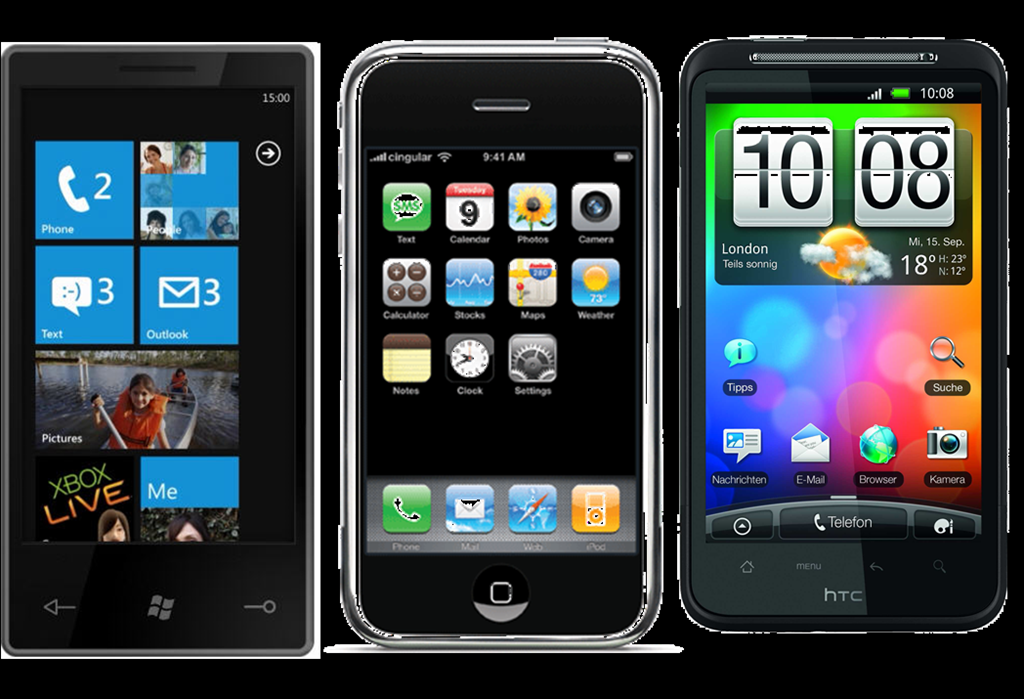
imageMicrosoft’s Ben “The PC Guy” Rudolph flew into CES 2012 this year in Vegas and offered a simple challenge:  Come on by the Microsoft booth and if you think your phone can beat the speed & execution of how things are done on Windows Phone, race us.  If you beat us, we’ll give you $100.

Otherwise, you need to stand in front of the camera, announce your phone model, and declare that you were “smoked by Windows Phone”. 

The tests varied depending upon what the challenger was comfortable with.  Some folks were interested in simply Social Networking tasks like posting to Twitter and Facebook, others wanted network performance tests and still others wanted to look up restaurants and addresses to get directions.

34 challengers came by with a variety of phones including:
(This is just the list of phones I’m positive competed)

  • iPhone 4S
  • Motorola Droid Bionic
  • Palm Pre Plus
  • Samsung Galaxy Nexus
  • Samsung Skyrocket
  • Droid Charge
  • HTC Evo 4T

Here’s a video summary of all the challengers that came by:

Think your phone is faster than Windows Phone? Don’t bet on it.

Final score:  30 wins, 3 losses, 1 tie

And most of the time, they weren’t just beaten… they really were smoked.  For a full recap of all the challenges, check this link out:
http://www.youtube.com/playlist?list=PLE0328D93355727B7&feature=view_all

(Side note: Regarding the 3 losses, all three devices that won were very close… and also subsequently beaten in other tests against other challengers.)

Posted by: kurtsh | January 24, 2012

INFO: Lync 2010 PLUS CAL Grandfathering Policy

Did you know you might be licensed for the Lync PLUS CAL already?

In July 1st, 2009, Microsoft announced that they’d be splitting off the “Voice over SIP/PBX integration” licensing from the OCS Enterprise CAL into a new separate CAL called the “Voice CAL” – later renamed to the “Lync PLUS CAL”.  This had the effect of reducing the cost of OCS/Lync Enterprise CALs but requiring customers to license a new 3rd CAL to get voice-over-SIP/PBX integration.

  • To compensate customers that had already licensed the OCS Enterprise CAL on Software Assurance, Microsoft granted licensing for the Lync PLUS CAL automatically to customers that had made a OCS Enterprise CAL purchase under SA prior to the release of Lync 2010. (Jan 21st, 2011)  The number of Lync PLUS CAL licenses granted were equal to the number of OCS Enterprise CALs owned at that time under SA – these come at no cost.  Beyond this, customers could then get SA on the Lync PLUS CAL to get WAVE 15 licenses.
  • Additionally, if the OCS Enterprise CAL purchase was made prior to July 1st 2009, the customer was entitled to not only the Lync 2010 PLUS CALs but also “Lync PLUS CALs for WAVE 15” coming this year, assuming again that OCS Enterprise was on SA.  This means that for two releases, the customer does not have to pay for anything to get the Lync PLUS CAL.  Not even Lync PLUS CAL SA costs.

Note that the Lync 2010 PLUS CAL is worth $107/CAL retail.  It’s a huge value. (http://lync.microsoft.com/en-us/HowToBuy/Pages/pricing.aspx)
…hence, knowing exactly when you purchased OCS Enterprise CALs on SA is very important.

Here are the documented Lync 2010 PLUS CAL grandfathering rules:

    • Purchased prior to July 1st 2009 and maintain SA:
      • You will receive a perpetual license of Lync Server 2010 Plus CAL at its general availability (GA) date.
      • If you maintain SA on the Office Communications Server ECAL or the ECAL Suite, you will have access rights equivalent to the rights under the Lync Server 2010 Plus CAL for two releases (Lync Server 2010 and release N+1 where N=Lync Server 2010).
      • You may separately renew the Lync Server 2010 Plus CAL SA at your first renewal period post the release N+1 in order to maintain SA benefits of future releases.
    • Purchased after July 1st 2009 and before the release of Lync Server 2010 and maintain SA:
      • You will receive a perpetual license of Lync Server 2010 Plus CAL at its GA date.
      • You may separately renew the Lync Server 2010 Plus CAL SA at your first renewal period post the Lync Server 2010 GA in order to maintain SA benefits of future releases.

Written documentation on this is available here: http://download.microsoft.com/documents/UK/Danmark/partner/ocs/Lync_Server_2010_-_Grandfathering_Reference_Guide_Customer_Ready.docx

NOTE:  Lync 2010 was released for General Availability on 1/21/2011 per the Microsoft Support Lifecycle web site:
http://support.microsoft.com/lifecycle/?p1=15708

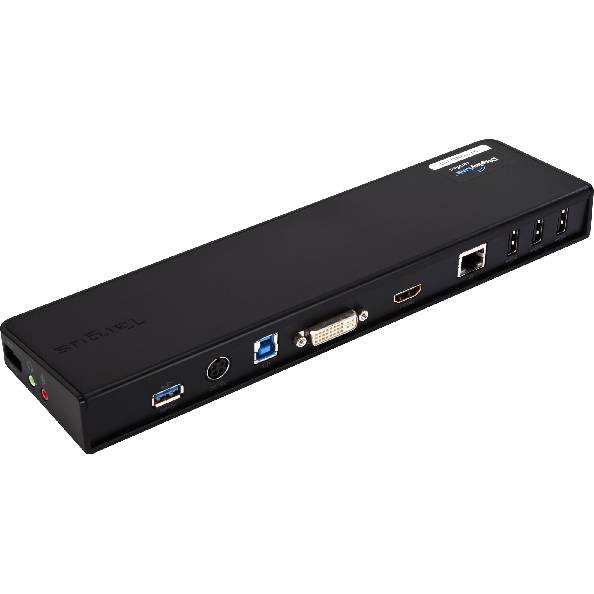
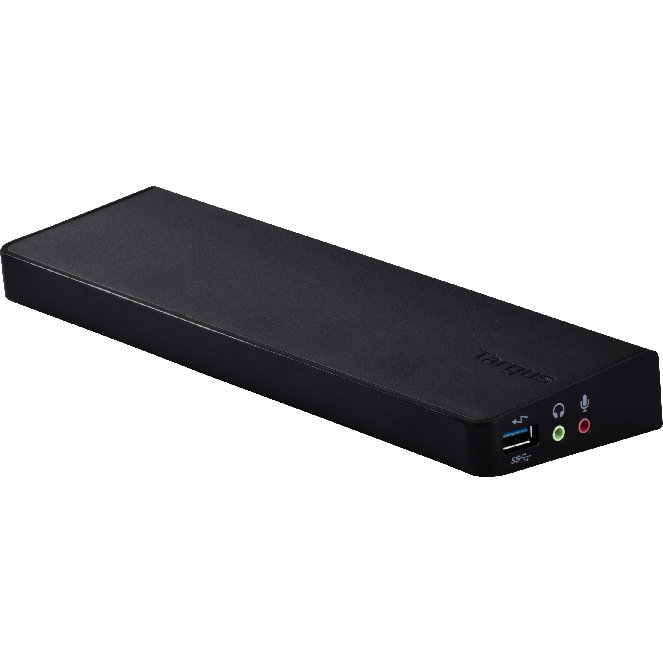
imageI haven’t posted much about CES 2012 because I’m too darned busy.  That being said, I pointed this out to a customer of mine and thought I’d say a few words about this.  This product is FREAKIN’ COOL:

Why is this so cool?  USB 3.0 is not only a super high bandwidth connection to other peripherals – fast enough for video – is UBIQUITOUS.  I haven’t bought a single new laptop/ultrabook that doesn’t have a USB 3.0 port on them.  Meanwhile I haven’t seen EVEN ONE laptop with Lightpeak/Thunderbolt in it.  That tells me who’s gonna win right there.

Here’s what’s on this docking station/port replicator:

Enjoy an increase in speed and more power by utilizing the latest USB 3.0 technology for your workstation. The Targus USB 3.0 SuperSpeed Dual Video Docking Station offers dual video ports that deliver beyond HD video and graphics up to 2048 x 1152(1x DVI-I, 1x HDMI) to two monitors. In addition it includes a DVI to VGA adapter, 1 HDMI to DVI adapter, 2 USB 3.0 ports for your USB 3.0 peripherals and 4 USB 2.0 ports for all of your USB 2.0 items. The docking station also includes a Gigabit Ethernet port, audio In/Out ports to connect speakers and a security lock slot to help secure the dock and avoid theft. A 6A AC adapter and 2ft USB 3.0 cable are also included to help make it easy to connect your device to a complete workstation – including dual monitors, a mouse, keyboard, printer and other peripherals you may need to connect with by simply docking your laptop. The docking station also has two high-powered USB ports, providing extra power and stays on even when the laptop is disconnected.

image

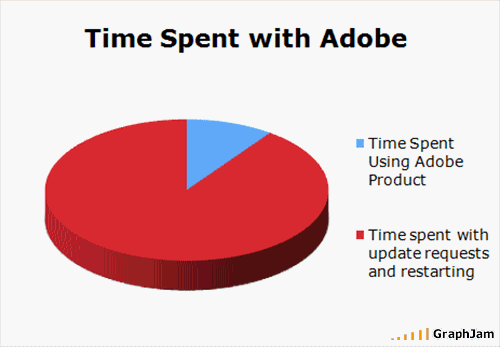
imageWow, this bugged me forever but I never had time to investigate it thoroughly.

  • What do you do if Adobe Flash is clearly installed on your PC but when you go to a site that uses Flash, it says that you need to either “install Flash” or “update Flash to the latest version”?

This had me baffled.  Why?  Because after some quick research, I saw that this could be caused by a Flash update failure and that there were only a few things that you could do to fix the issue:

  1. UNINSTALL/REINSTALL FLASH
    Of course we all try this.  To no avail.  The behavior is the same in the new install and Flash continues to respond as if it’s not installed or needs to be updated.
  2. UPDATE FLASH IN-PLACE
    We all attempt to do an update of Flash once we see this and update over the existing install in the hopes that the problem will go away.  This didn’t work for me.  Ever.
  3. DISABLE HARDWARE ACCELERATION
    This was an interesting one because apparently some machines will exhibit this behavior if it’s an old ATOM machine for example and doesn’t have any graphics acceleration on chip or discrete at all.  The problem is, I see no way to disable HW acceleration manually this if you can’t actually get to a working Flash object at all.

It turns out that there’s a FOURTH thing you can do:

  • UNINSTALL FLASH USING THE SPECIAL UNINSTALL TOOL
    You read that right.  Apparently there is a tool specifically designed to reallyreallyreally uninstall Flash from a system.  Doing a straight uninstall from Add/Remove Programs on your Windows system isn’t enough because the uninstall process doesn’t actually uninstall everything.  It leaves behind registry keys and values, directories, etc.  Not good.

    …in any case, this finally worked for me after I ran it and then reinstalled Flash 11 again.  Hope it works for you too:

    KB: Uninstall Flash Player | Windows
    http://kb2.adobe.com/cps/141/tn_14157.html

Apparently this does stem from the registry keys and values that remain from the previous install.  Before this uninstaller, you had to actually go into the registry and manually delete all these keys and values by yourself per Adobe’s web site during the Flash 9 and Flash 10 days.  Nowadays, if you use the Uninstaller, it automatically cleans things up for you in the registry – which is one of the reasons they produced this tool. 

Here’s a pointer to the uninstallers referred to in the above KB Tech Note (tn_14157):

Download the uninstaller for Flash Player

Download the correct Flash Player uninstaller for your version of Windows. (For assistance with this step, see How to determine whether a computer is running a 32-bit version or 64-bit version of the Windows operating system.)

Be sure that when you’re running it, you have everything shutdown that could possibly be using Flash.  IM programs, browser windows, other apps, etc.

Here are some research articles I flipped through.  But the important was is above:

imagePop quiz. 

“Name one prognostication that the world’s leader in parts and components tracking, the world’s largest technology think tank, and the leader in sourcing marketshare, breadth, & statistics all agree with.”

Time’s up:

  • “Windows Phone will surpass iOS’s marketshare By 2015”

Yup.  For all the hype & ubiquity that you hear and see in around this part of the world for ‘the other guys’, if you keep hearing the same thing from smart people over and over again, it’s probably a good idea to take heed. 

Gartner Group, IDC, and iSuppli all agree that iOS will be the 3rd place marketshare holder by 2015:

That now makes 3 authorities that agree on the same prediction.  For those that are in the “tl;dr” group, wondering “WHY?!?” here’s some things for you to consider:

  • NOKIA.  Nokia’s worldwide presence & expertise as a phone designer & phone distributor gives it a distinct advantage over iPhone.  Some examples include exclusive distribution rights in certain countries, the ability to economize designs faster & more efficiently, the fact that it remains the 2nd largest producer of phones worldwide, second only to Samsung by a thread, and that Nokia is moving all it’s rich mobile services to it’s Windows Phone devices.  And Nokia is exclusively investing it’s technology into Windows Phone.
  • MICROSOFT.  Windows on the desktop will look like Windows on the phone.  The Windows Phone interface is about to become the Windows 8 interface.  Don’t think that’ll make a difference?  Most people attribute iPad’s success with it’s familial connection to iPhone.  This is exactly what Windows Phone is doing.  And if you doubt Windows 8’s coming dominance, consider that 90% of the PC market are Windows OEMs and ONLY SHIP THE CURRENT VERSION OF WINDOWS.  In 2011, over 350 Million PCs shipped with Windows 7 on it, an 8% increase over the previous year.  In 2012, all these shipments will be with Windows 8 on it – PERIOD.  Microsoft doesn’t allow older versions of Windows to ship on OEM PCs.
  • DEVELOPERS.  Windows Phone, in just 1 year will have more developers for it than iOS and Android combined.  How?  Any developer writing to Windows 8 using Microsoft’s developer tools will be able to republish their products for Windows Phone.  The same compiler, the same design tools, and the same skills will provide Windows PC developers with the ability to expand their customer base to Windows Phone users simply by modifying the UI & republishing their touch control app for Windows Phone.
Posted by: kurtsh | January 20, 2012

A note from Kurt… back from CES 2012

imageSorry for the lackluster rate of posting.  I’m just getting back into the saddle after coming back from vacation/CES 2012.  I’m HOPING this weekend I can get at least somewhat caught up and start posting some timely news.

SAME TIME… EVERY YEAR
For those of you who’ve been reading this blog, you know that this happens EVERY YEAR around this time where everything gets backlogged because I have a mountain of email that appeared during my vacation and have to follow up on those before I start on the event notifications, news, and details.

For example, that post I made about the difference between Office 2010 from Volume Licensing vs Office 2010 from Office 365 was a question that came from a customer.  Hence the reason I just republished the research I’d done.

So, hopefully I’ll be able to get back on track in the next week or so.  It’s a little brutal but I think I’ll get there.  But until then, it’s gonna be a trickle based on reactive research and news.

A QUICK NOTE ON CES 2012
But I’ve got a ton of stuff to mention from CES 2012, which wasn’t as much of a bust as many would have you believe.  Here’s some stuff off the top of my head that I noticed:

  1. ULTRABOOKS ARE REAL
    Not real in the sense that they exist, but real in the sense that people loved them.  There was a lot of attention being paid to them in all the booths that showcased them.
  2. USB 3.0 IS GONNA RULE
    I’m sorry Thunderbolt.  There was very little attention paid to Intel’s connective medium versus USB 3.0.  Performance be damned, every Ultrabook I saw had a USB 3.0 port… and no Thunderbolt.  Every major peripheral manufacturer had a USB 3.0 highlight and I couldn’t find much at all re: Thunderbolt/Lightpeak.  The big one for me was a USB 3.0 Port Replicator/Docking Station from Targus which I’ll write a post about later.
  3. MOTION CONTROL IS TRENDY
    Yeah, I know I work for Microsoft and we make Kinect, but that’s not my point:  Every TV booth had some sort of Primesense Motion Control sensor in it that provided an experience that sorta, kinda provided something like Kinect directly on TVs without an Xbox.
    … the problem was, the experience SUCKED.  No, seriously.  The response/reaction time was really slow, the recognition was horribly spotty, and the devices were of very poor quality.  These stations got a lot of attention but I think most walked away with a very poor opinion of the implementations.
  4. NOKIA WAS HUGE
    Nokia’s Lumia 900 won the CNET Best of CES Smartphone, IGN’s Best of CES Smartphone, Laptop Magazine’s “Best of CES” Finalist, ZDNet’s BEst of CES Smartphone, Popular Mechanics “Editor’s Choice”.
    … there’s no question, Nokia’s launch in the US was a smash hit.  You couldn’t get away from the gravity of their launch.  And their booth was completely packed despite only having 3 phones on display.
  5. BUSINESSES WANT WINDOWS 8 TABLETS
    Again, yeah, I’m an MS employee, but you have to take my word for it that every Windows 8 tablet/slate got a ridiculous amount of attention.  In fact, I found it surprising how minimal the reaction was to new Android tablet announcements.  I suppose it makes sense since, in fairness, Android is everywhere so as a result, not very interesting or buzzworthy.
    …that being said, it’s clear that Windows 8 touch control and Metro UI is was very compelling for attendees who seemed to consist a lot of business users.  The booth presentation was packed 7 layers deep – easily the busiest part of the Microsoft booth, even more so than Xbox 360/Kinect or Ultrabooks.
  6. OLED TVs & 4K EQUIPMENT WAS THE VIDEO BUZZ
    The LG OLED 55” TV won Best of CES All around from CNET.  This was because the picture is EXTREMELY vivid… the colors were bright and deep, and the blacks were pitch black.  More so than anything I’ve seen.   And the display was half and inch think or something like that.  It’s thinner than a picture you might hang on the wall.  Crazy.  Also totally pre-production.
    The other thing was 4K.  4K is a TV display resolution that is twice that of HDTV’s 1080p.  There were a lot of demos but there’s not much content at all.  (YouTube has 6 videos in 4K resolution)  So I don’t know where this is going other than… it’s cool?
  7. VEGAS IS HURTING.  BADLY.
    It seems to me that Vegas has had a massive drop in gambling, attendance, and visitors.  Just looking at the casinos in the evenings during the show seemed like an indicator.  The CES conference itself was the largest ever, however the number of people coming through to play in the casino seemed to be minimal.  I had this discussion with a lot of casino hosts, hotel employees, and taxi drivers and apparently the typical attendee just doesn’t play which is tough on revenue.

I’ll write more later.  I have a ton of stuff I brought back.

Posted by: kurtsh | January 18, 2012

INFO: CES 2012 Update for Legal Professionals

image

Some of you know that I take an annual vacation/pilgrimage to the Consumer Electronics Show in Las Vegas to keep up with the latest in technological gadgetry.  This year I’ve personally taken quite a few first hand notes and live tweeted my week long stay there.  (My Twitter account is at https://twitter.com/kurtsh)

imageMore importantly however, if you’re interested in what Law Technology News has to say about CES 2012 this year, they recently posted a summary at the link below that I thought you might be interested in.

A few quick notes about Mr. Doherty’s article:

  • CELLULAR ACCESSORIES
    I found it surprisingly lacking in discussions about innovative cellular phone accessories which I would tend to believe would be important to many legal professionals, and there were a lot of interesting items on display at the show.  For example, the “Plantronics Voyager Pro Plus” headset has ‘ear detection’ which ensures that audio is routed to the paired headset IF AND ONLY IF the user is wearing it on their ear.  Otherwise, audio still plays back from the handset.
    http://www.plantronics.com/us/product/voyager-pro-plus
  • MOBILE VOIP
    The show was chock full of mobile VOIP solutions for the ‘professional-on-the-go’ but there’s no mention of this, some of them were really amazing for the user that has multiple voice communications conduits.  For example, the “Jabra SPEAK 410” has audio for the mobile professional that is better quality than any Polycom tripod I’ve ever used.  It sounds great even playing normal MP3 music through it and the footprint is just a little bigger than a mouse. 
    http://www.jabra.com/na-us/headsetsolutions/pages/jabraspeak410.aspx
  • ULTRABOOKS
    This surprised me.  A lot more attention was paid to Ultrabooks at the show than any other topic – and that included the OLED 55” TVs on display, yet there was barely a mention in the article.  The Dell XPS 13 Ultrabook impressive stats for example, can’t be understated.  It outperforms most Dell notebooks with a form factor, battery life, & price less than most machines today.
    http://ces.cnet.com/8301-33372_1-57353906/dell-finally-gets-into-the-ultrabook-game-at-ces-2012-with-the-xps-13/

This has come up in one of my customers so I thought I’d write a post on it:

There are technical differences, from an IT perspective, between the following software:

  • Office Pro Plus 2010 for Volume Licensing
    (the traditional Office software downloaded/deployed by Enterprises from https://licensing.microsoft.com)
  • Office Pro Plus 2010 for Office365
    (the special Office software that is provided by subscribing to Office 365 E3/E4)

The two are different MEDIA TYPES. (Sort of like the difference between MSDN vs TRIAL vs RETAIL vs VL)  VL & O365 media types offer the same product mix of Word, Excel, etc., (although it seems to be missing Publisher in the default install) however here are some key technical differences between the two:


Office Professional Plus for Office 365

Volume licensed products

Download location

Office 365 portal (at https://portal.microsoftonline.com
/download/default.aspx
)

Volume Licensing Service Center (http://go.microsoft.com/fwlink/p/?LinkId=184280)

Software

Office Professional Plus

Office Standard 2010

Office Professional Plus 2010

Product key and activation

Subscription-based activation

Terms: monthly per user license

Volume licensing technologies:

Key Management Service (KMS): 180 days

Multiple Activation Key (MAK): perpetual activation

When Reduced Functionality Mode (RFM) starts

In 60 days from last activation

MAK: not applicable

KMS: in 180 days

Notification mode

Deployment options

Office 365 portal

Unmanaged and managed options

Unmanaged and managed options

Microsoft Application Virtualization (App-V)

Remote Desktop Services (Terminal Services)

Allowed number of copies

5 active installations on different devices per user

One device per license\activation

Office Professional Plus 2010 for Office 365…

  • … appears in Add/Remove Programs as “Microsoft Office Professional Plus 2010”
    If “Office Professional Plus 2010 for Office 365” is installed on another system that already has ”Office Professional Plus 2010 Volume License Media” installed on it, TWO entries will appear in Add/Remove programs that both read, “Office Professional Plus 2010”.
    http://technet.microsoft.com/en-us/library/gg702620.aspx
  • … doesn’t use a traditional Volume License “Activation Key”.
    It won’t take MAK/KMS keys.  It’s a special media type that installs Office 2010 along with something called the “Office Subscription Agent”. The user is simply required to enter their Office 365 credentials (username/pwd) and the Agent reaches out over the Internet to verify the user account. (i.e. that the user is still subscribed to Office 365) Upon doing so it activates the local copy of Office 2010 for ONE MONTH.
  • … will “connect to Office 365” monthly to validate that an active subscription for the user is still available.
    It’s a special version of Office that checks that the user still has an active subscription license once a month. If it can’t, Office 365’s version of OfficeProPlus2010 goes into “reduced functionality mode” and basically becomes a ‘viewer’ – i.e. no editing or creating new documents.
    http://technet.microsoft.com/en-us/library/gg982959.aspx

HOW DO YOU INVENTORY FOR OFFICE PROFESSIONAL PLUS 2010 for OFFICE 365?
How does one figure out how many copies are deployed?  How do you differentiate between the desktops that have Office Professional Plus 2010 Volume Licensing Media, and Office Professional Plus 2010 for Office 365?

Right now this is the only way I know of:
Office Professional Plus 2010 for Office 365 runs two pieces of software to validate the install against their subscription.  Searching for the Office Subscription Agent (osa.exe) and/or the Office Subscription Agent Notifier (osaui.exe) would be indicators that the desktop is using the Office 365 media. 

Using a Desktop Management solution like SCCM 2007 R3 could pick up the existence of these executables on the desktop to inventory for Office Professional Plus 2010 for Office 365 in your environment.

Posted by: kurtsh | January 9, 2012

NEWS: Soluto’s Roee Adler… on Apple

imageRoee Adler of “Soluto” fame (if you don’t know what that is, you’re probably not a desktop IT guy) wrote a post that I thought was observant & insightful called, “The greatest trick Apple ever pulled was making you think it’s YOUR fault”.

Here’s a quote that seems to have ruffled some feathers:

"People who have a negative experience with an Apple product just suffer in silence, assuming it’s their own fault"

This thing got retweeted all over the Internet so I’m not even going to bother posting a larger snippet here.

Posted by: kurtsh | January 9, 2012

INFO: Installing System Center Service Manager 2012 Beta

imageAlaa Ajweh has written a very thorough post on how to install System Center Service Manager 2012’s BETA release.

Installing System Center Service Manager 2012 Beta Step by Step

Alright folks, the Service Manager has just been released! its time to give it a shot and see what the ins and outs of the products.

I’ve summarized the installation steps for you so you can use this guide to start right away with your lab (this isn’t intended for production environments, more thorough planning should take place). I suggest that you take a quick look at the release notes for SCSM 2012 here

As for the installation, remember the good old days when you had to patch Server 2008 to get the latest System Center (R2, R3 stuff), but Server 2008 R2 worked out of the box just fine because it’s a lovely modern OS? well, hate to break the news for ya, but those days are gone; you better get your Server 2008 R2 SP1 Server running and START PATCHING! (actually 2 Servers) here is what you need:

  1. Go get Hotfix 2600907 for Server 2008 R2 here (needs a restart)
  2. Get the Authorization Manager hotfix here (included in Server 2008 R2 SP1)
  3. Get the Microsoft Analysis Management Objects (X64) which is required by the
  4. management console so it can work with SQL Server Analysis Services (SSAS)
  5. Install Microsoft Report Viewer Redistributable Security Update KB971119 (no links?
  6. yes! its in the Prerequisites folder of the SCSM Media, horray!)
  7. Get .NET Framework 4 (for the Self Service Portal if you need it)

Read the entire post at Ajweh’s Blog:

« Newer Posts - Older Posts »

Categories