Okay.  I work for Microsoft and I’ll fully admit that while I’m pretty good, even I – an employee of Microsoft – have the occasional difficulty recalling off the top of my head what’s in the Core CAL Suite & the Enterprise CAL Suite.
image

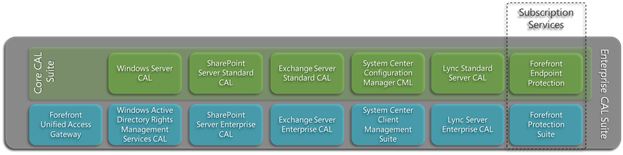
The Core CAL contains:

  1. Windows Server CAL
  2. Exchange Server Standard CAL
  3. SharePoint Server Standard CAL
  4. Lync Server Standard CAL
  5. System Center Configuration Manager Client Management License
  6. System Center Endpoint Protection (SUBSCRIPTION)

The Enterprise CAL Suite:

  1. ALL of the components of the Core CAL Suite (listed above)
  2. Exchange Server Enterprise CAL
  3. SharePoint Server Enterprise CAL
  4. Lync Server Enterprise CAL
  5. Rights Management Services CAL
  6. Forefront Unified Access Gateway CAL
  7. Forefront Protection Suite (SUBSCRIPTION)
        1. Forefront Protection for Exchange
        2. Forefront Protection for SharePoint
        3. Forefront Security for Office Communications Server
        4. Forefront Online Protection for Exchange
        5. Forefront Threat Mgmt Gateway Web Protection Service
  8. System Center Client Management Suite
        1. System Center Operations Manager Client Management License
        2. System Center Data Protection Manager Client Management License
        3. System Center Service Manager Client Management License
        4. System Center Orchestrator Client Management License

Here’s the whitepaper that documents all of this:

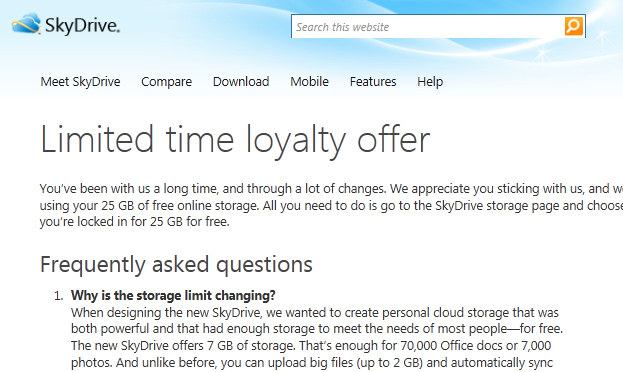
imageApparently, they’re dropping the storage capacity of free Skydrive accounts from 25GB to 7GB.  Yeah… don’t ask.  Our explanation is IMHO weak sauce.  (See the link below) 

I have to assume the change in policy is linked to the fact that someone in Redmond probably anticipates usage of Skydrive to go up in the coming year due to the vastly improved flexibility of Skydrive as a service as well as the coming release of Windows 8.

As such, the “marketing 25GB” ceiling that we set on Skydrive accounts (The limit was in fact real… however, by ‘marketing’ I mean, extremely few people really use 25GB today) actually might be something people use going forward, meaning that they need to account for that 25GB financially in terms of storage costs planning and can’t just use ‘25GB’ as a marketing tool.

That being said, for a limited time, you can visit your EXISTING SKYDRIVE ACCOUNT (you can’t just make one up now – sorry) and you’ll maintain your full 25GB limit.  This way they know who’s really using Skydrive, what accounts are really active, and to what extent it’s being used.  I personally have 4 Skydrive accounts and just upgraded all of them for the full 25GB in under 2 minutes.

Note: All new Skydrive storage accounts moving forward will be capped at 7GB.

In order to upgrade your account, all you need to do is log in to http://skydrive.live.com with your Windows Live ID, and if you’d previously established a Skydrive storage account, you’ll see your ‘directory’ and a link at the top that you can click to upgrade you account to the full 25GB instead of just 7GB.

image

UPDATE 4/21/12 4:40PM:
Amazon defeats EA to wins the AHGL League of Legends Championship, playing for Child’s PlayGG Amazon. 
http://afterhoursgaming.tv/league-legends/

————————

I’ve been dreading having to write this post but I think it has to be done now that the finals are taking place today.

Put simply, season 2 of AHGL has not been kind to Microsoft:

For background on the AHGL:

imageThe After Hours Gaming League is a fun, modern twist to the traditional corporate sports league. Instead of softball or basketball, the AHGL offers corporate teams the chance for some friendly competition on the virtual battlefields of top strategy games. The AHGL is also a fundraiser for charity: corporate teams compete for the chance to donate the $5,000 top cash prize to the charity of their choice.

Season One of the AHGL saw eight high-tech giants—Amazon, Dropbox, Facebook, Google, Microsoft, Twitter, Yelp and Zynga—duke it out on the battlefields of StarCraft II. The tournament Grand Finals were held on the Facebook campus in Palo Alto, California, and broadcast live over Day[9]TV to an audience of over 100,000 live viewers. In an exciting victory, Microsoft won the day for its charity, Amnesty International.

A *certain arch-competitor* of ours didn’t fare as well as us, but at the end of the day, neither of us are in the finals so I guess in the end it doesn’t matter… best of luck to the finals competitors:

Starcraft 2 Finals:
IBM (Youth Service America)
vs
Epic Systems (Doctors Without Borders)
http://afterhoursgaming.tv/starcraft-2-season-2/

League of Legends Finals:
Electronics Arts (Make-A-Wish Foundation®
vs
Amazon (Child’s Play)
http://afterhoursgaming.tv/league-legends/

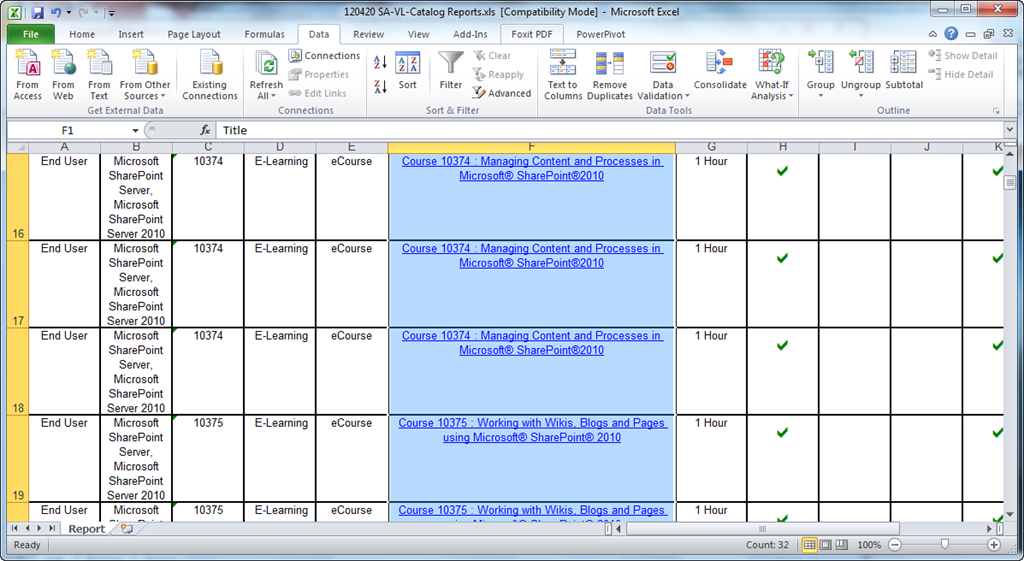
If you have Software Assurance benefits from your agreement with Microsoft, you likely have access to many of the course available on http://www.microsoftelearning.com.  The courses your organization has access to however is a select group of courses that reflect the business technologies that Software Assurance customers typically license – it is not the entire eLearning catalog.  This list of courses that SA customers are eligible for, to date, is around 300+ and growing.

image

You can access this full catalog via the web at the URL below.  The results are hyperlinked to the actual class posted on the Microsoft eLearning web site for your convenience.  You can also export the list if you wish as the list of classes available changes every month or so. http://www.microsoft.com/learning/sa-vl-catalog/savldefault.aspx

Here’s a sample of the first ~20 courses that may be relevant for your end users:

  • Course 10166 : Windows 7 Essentials I
  • Course 10167 : Windows 7 Essentials II
  • Course 10293 : Beginner Skills in Microsoft® Outlook® 2010
  • Course 10294 : Beginner Skills in Microsoft® Word 2010
  • Course 10295 : Beginner Skills in Microsoft® PowerPoint® 2010
  • Course 10296 : Beginner Skills in Microsoft® Excel® 2010
  • Course 10353 : Beginner Skills Training in Microsoft® OneNote® 2010
  • Course 10354 : Beginner Skills Training in Microsoft® Publisher 2010
  • Course 10355 : Taking Content Offline using Microsoft® SharePoint® Workspace 2010
  • Course 10356 : Beginner Skills Training in Microsoft® Visio® 2010
  • Course 10360 : Working with Microsoft® Lync 2010 for Collaboration
  • Course 10373 : Making Decisions using Business Intelligence in Microsoft® SharePoint® 2010
  • Course 10374 : Managing Content and Processes in Microsoft® SharePoint®2010
  • Course 10375 : Working with Wikis, Blogs and Pages using Microsoft® SharePoint® 2010
  • Course 10376 : Finding Content and People using Microsoft® SharePoint® 2010 Enterprise Search
  • Course 10377 : Connecting to People and Resources with My Sites in Microsoft® SharePoint® 2010
  • Course 10378 : Setting Up Projects in Microsoft® Project 2010
  • Course 10379 : Building a Project Schedule in Microsoft® Project 2010
  • Course 10380 : Tracking and Managing Projects in Microsoft® Project 2010
  • Course 10381 : Customizing and Sharing Projects in Microsoft® Project 2010
  • Course 10382 : Beginner Skills in Microsoft® Access® 2010

As for accessing & understanding the usage, we provide all the documentation required for using Software Assurance benefits, including eLearning in the Software Assurance Document library available here:

Key documents that you will want to pay attention to include:

Additionally, you should download the customer QuickStart guide available here:

image

Good released their client for Windows Phone today.

Today, Good Technology is pleased to announce the launch of Good for Enterprise™ for the Windows Phone® platform (aka "Mango").

Good for Enterprise – Windows Phone provides critical security and management features that allow corporate IT to secure and control Windows Phone deployments within your enterprise. IT can rest easy with over-the-air and on-device encryption of enterprise data, complete password policy enforcement, and remote wipe of enterprise data. In addition, IT helpdesk can easily manage and troubleshoot issues with complete visibility of all Windows Phone deployed within your company through a simple, web-based management interface.

Good for Enterprise – Windows Phone capabilities include:

  • Email
  • Contacts
  • Calendar

The Good for Enterprise app can now be downloaded directly from the Windows Phone Marketplace (see links below).

Links to the app on Marketplace:

For a list of Window Phone devices that Good has certified, visit:

Press release:

Posted by: kurtsh | April 17, 2012

NEWS: MMS 2012 available via streaming on-demand!

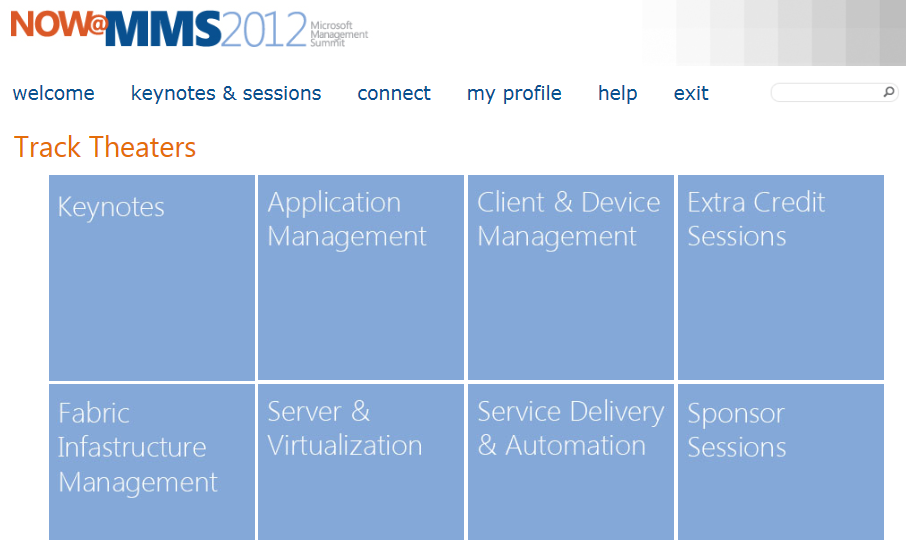
imageWOW.  This is a first.  We are making Microsoft Management Summit (MMS) 2012 content available for free to anyone that registers online to our “Digital MMS” site.

There are over 175 sessions and categories of recorded sessions include:

  • Keynotes
  • Application Management
  • Client & Device Management
  • Extra Credit Sessions
  • Fabric Infrastructure Management
  • Server & Virtualization
  • Service Delivery & Automation
  • Sponsor Sessions

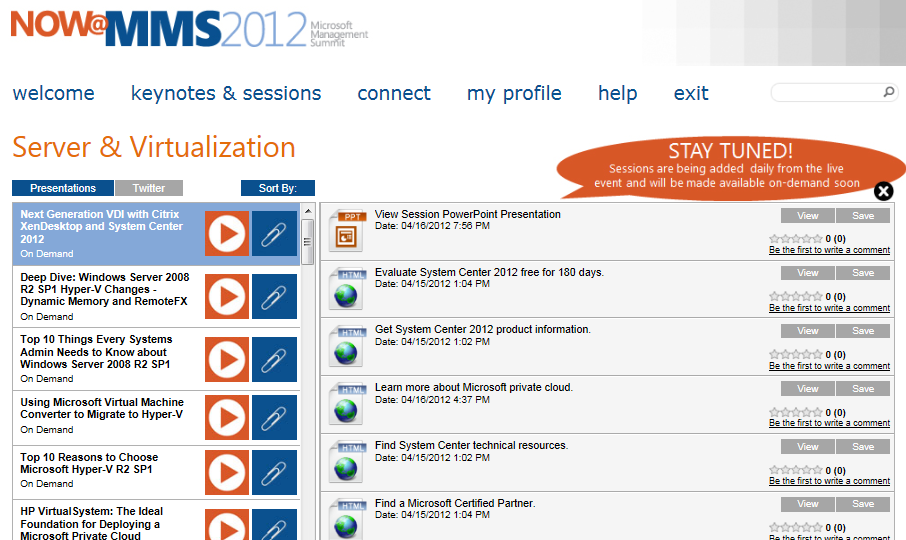
The full session video recording is available via streaming-on-demand as well as all the associated documentation for the session – including the PowerPoint document which is freely downloadable.

imageimage

SESSION CATALOG:
The session catalog for all sessions being delivered is available online at:
http://www.mms-2012.com/topic/list

REGISTRATION:
To register for “Digital MMS” go to:
http://www.mms-2012.com/digitalmms

Posted by: kurtsh | April 13, 2012

WEBCAST: Manually Removing Viruses & Malware

image

Mike Halsey, Microsoft Windows MVP, did a VERY GOOD presentation online about getting rid of malware in the event you or a user of yours is infected.

The sections about strategies for removing malware and tools for malware removal are the most interesting sections.

This presentation is particularly useful because it’s from a 3rd party –i.e. a non Microsoft employee – so he’s comfortable about advocating the use of Ubuntu boot disks, referencing McAfee tools, editing the registry, etc. in addition to highlighting the capabilities of Microsoft System Sweeper BETA.

Available until July 5th, 2012.

imageWe just posted the video recordings of a two-day course that was done for 3000 IT professionals around Microsoft Private Cloud implementation.  As announced by the Microsoft Born To Learn blog, the course was done Feb 21-22 and was a tremendous success.  Please enjoy these video recordings!

Creating and Managing a Private Cloud with System Center 2012 Jump Start
This course makes it clear why Microsoft’s new private cloud solutions, based on System Center 2012 and Windows Server, have garnered so much attention. This 300-level course targets IT Pros and was delivered via live virtual classroom. The HD-quality videos are available now on TechNet Edge, MS Showcase, iTunes and Zune.

imageWhy is this Jump Start a good time investment? Who should watch the video recordings?
This accelerated Jump Start is tailored for IT professionals familiar with Windows Server technologies, Hyper-V virtualization, and the System Center management solutions. The course is designed to provide a fast-paced and technical understanding of how and why Microsoft’s approach to the private cloud delivers scalability, security, flexibility and control. Here are few unique benefits of this course:

  • Students have the opportunity to learn from and interact with the industry’s best cloud technologists!
  • This high-energy, demo-rich learning experience will help IT Professionals understand why Microsoft private cloud solutions are making a splash in the industry.
  • Students will see with their own eyes how Windows Server 2008 R2 and System Center 2012 work together to provide the best combination of security and scale.

COURSE OUTLINE

Day 1: Deployment & Configuration
– Module 1: Introduction to the Microsoft Private Cloud with System Center 2012
– Module 2: Configure & Deploy Infrastructure Components
– Module 3: Configure & Deploy the Private Cloud Infrastructure
– Module 4: Configure & Deploy Service Delivery & Automation
– Module 5: Configure & Deploy Application Management

Day 2: Management & Operations
– Module 6: Monitor & Operate Infrastructure Components
– Module 7: Monitor & Operate the Private Cloud Infrastructure
– Module 8: Monitor & Operate Service Delivery & Automation
– Module 9: Monitor & Operate Application Management

What’s a “Jump Start” Course?
Training specifically designed for experienced technologists whose jobs demand they know how to best leverage new, emerging Microsoft technologies. These advanced courses assume a certain level of expertise and domain knowledge, so they move quickly and cover topics in a fashion that enables teams to effectively map new skills to real-world situations.

Original post at Born to Learn:
http://borntolearn.mslearn.net/btl/b/weblog/archive/2012/04/04/new-videos-released-private-cloud-jump-start.aspx

image

Wow.  A refurbished Vallhalla chipset-based Xbox 360 SLIM for $139.

Includes:

  • 4GB overheat resistant console (Vallhalla chipset)
  • Both Composite & HDMI cables
  • Xbox Audio/Microphone Live
  • Headset Single Black controller.

This is a DEAL.

  • Part Number: XB360-S4GH
  • Processor Type: 3.2 GHz Triple Core IBM PowerPC
  • Installed RAM: 512 MB GDDR3 SDRAM
  • Optical Drive Type: DVD-ROM 12x – Tray
  • Compatible Format: MP3, WMA, DVD Video, JPEG Photo CD
  • Graphic Processor: ATI Xbox 360 – 256-bit – graphics acceleration
  • Video Memory: 10 MB
  • Max. Resolution: 1920 x 1080

Get it from NewEgg.

imageWe’ve all been there.  You have a ton of carefully crafted, exhaustively complete Outlook rules configured and stored server-side in Exchange.  Then one day… you attempt to add one more rule and… you’re out of rules storage.  You might even be unlucky enough to have some of your Outlook rules deactivated.

What happened?
It turns out that there is a limited amount of memory that is allocated for each mailbox’s server-side rules.  The default for most Exchange implementations is 32k.  This can be adjusted up to 256k but it also multiplies the amount of memory requires on the server to operate.  If your IT organization isn’t interested in buying more memory for their Exchange Servers to accommodate greater rules capacity in-memory… and you’re not interested in reducing your rules list size… you’re kinda hosed. 

Or are you?
Today, I learned a trick that will allow you to fit a lot more rules into your mailbox while accomplishing the same thing.  Instead of using the condition sent to people or public group, if you use the condition with specific words in the message header, and match to a short mail alias manually, you can fit a LOT more rules into your allocated server-side rule space.

For example, instead of:

Apply this rule after the message arrives
sent to
Windows Rights Management Champs
move it to the Windows Rights Management Champs folder

…you would create:

Apply this rule after the message arrives
with wrmchamps in the message header
move it to the Windows Rights Management Champs folder

The result would be a rule that accomplishes the same thing but individually takes up a lot less space.  Apparently it has to do with the fact that when you use the “sent to” condition, it uses an X.500 address for the target condition instead of just a small string and the difference in memory usage is dramatic.

Anyway, just thought I’d pass that along.

« Newer Posts - Older Posts »

Categories