Posted by: kurtsh | October 23, 2012

NEWS: Office RTMs!

image

The next release of Office has released to manufacturing!  Per the Office blog:

Moments ago, the Office engineering team signed off on the Release to Manufacturing (RTM) build. This milestone means the coding and testing phase of the project is complete and we are now focused on releasing the new Office via multiple distribution channels to our consumer and business customers.

This is the most ambitious release of Office we’ve ever done. It spans the full family of Office applications, servers and cloud services. The new Office has a fresh, touch friendly design that works beautifully on Windows 8 and unlocks modern scenarios in social, reading, note-taking, meetings and communications. We are proud to achieve this milestone and are eager to deliver this exciting release to our customers.

General availability is planned for the first quarter of 2013. Starting October 19, customers purchasing Office 2010 from local retailers or resellers will receive the new Office for free upon availability. Customers will also see a preview version of the new Office on Windows RT devices, beginning with the Windows 8 launch on October 26.

The money quote for Enterprise customers is here:

“Volume Licensing customers with Software Assurance will be able to download the Office 2013 applications as well as other Office products including SharePoint 2013, Lync 2013 and Exchange 2013 through the Volume Licensing Service Center by mid-November. These products will be available on the Volume Licensing price list on December 1.”

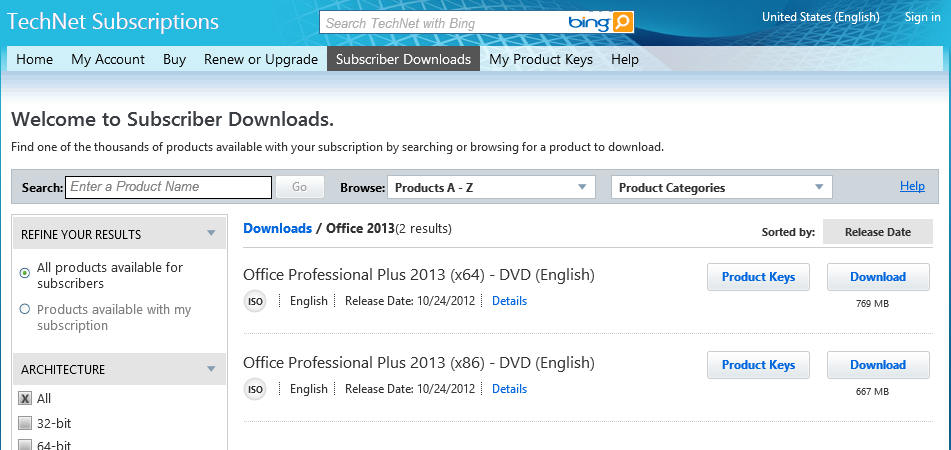
“IT professionals and developers will be able to download the final version via their TechNet or MSDN subscriptions by mid-November.”

Posted by: kurtsh | October 22, 2012

DOWNLOAD: Zune Client Software 4.8

For those of you like me who still have need for the Zune client software for your older Windows Phone 7 or Zune devices on Windows 8, here’s the link to download the 270MB package for the Zune 4.8 client.

After upgrading my very last machine, I’d forgotten that this box was the client that I used to do client sync with on my phone for large downloads so this remained the last piece of client software that I had to install.

Posted by: kurtsh | October 20, 2012

HOWTO: Use Windows 8… as told by a 3-year-old

Here’s an video of a 3-year-old child who will help walk you through the Windows 8 user interface step-by-step:

A 3 year old walks us through Windows 8

In this tutorial, he’ll show you:

  • how to get to the “START screen” 
    (not the “START menu” which he will make clear to you)
  • how to run programs that are installed on Windows 8
  • how to pin applications to the side so that 2 applications may be viewed at the same time on the display
  • how to make applications go full screen
  • how to switch to other running applications
  • how to select & close applications that are running
  • how to close the running foreground application
  • how to get back to the desktop

Yeah.  3 years old.

SurfaceReservationSo as of this afternoon, there were still some reservation passes available for people that wanted to pre-order the Surface. 

Why would you preorder?
Because there’s admittedly only a limited number of units (as you would expect) per store.  Yes, I know the quantity & believe me:  It’s not large. 

Meanwhile, as you’ve probably seen, the Online Microsoft Store is COMPLETELY SOLD OUT of pre-orders for Surface.  And not just that “32GB w/out keyboard” SKU – we’re talking ALL the SKUs, including the “32GB WITH keyboard” & the “64GB w/ keyboard” options.

To make matters more complicated, the store is making preparations for a line before they open the doors in the morning in anticipation of individuals that want to purchase a device.

So, it would suck if you wanted to get a unit on October 26th, only to discover they’re out.  Because the wait moving forward is 3 weeks before the next shipment comes in.

How do you get the reservation pass?
The procedure to get the reservation pass is pretty simple, but it will require a little bit of your time.  In the case of Los Angeles, you need to go down to the store at 10250 Santa Monica Blvd (Westfield Century City Shopping Mall) and ask a Manager or Assistant Manager to get a reservation ticket for a Surface.

Location (Get directions)
  • Westfield Century City
  • 10250 Santa Monica Blvd
  • Los Angeles, CA 90067
  • Phone: (310) 228-3550

Store hours

  • Mon – Sat: 10:00 AM – 9:00 PM
  • Sun: 12:00 PM – 7:00 PM

They will begin the procedure on their computers.  You’ll need to know which SKU you’d like.  (See above for the 3 options)  You’ll need to provide your contact information, and they’ll ring up an official $0 receipt for you to hold onto along with the Blue Surface Reservation Pass card.

October 26th… BEFORE 12 NOON!
Here’s the most important point:  The ticket can only be redeemed BEFORE 12Noon.  In other words, if you get a reservation pass, and don’t come in on October 26th before 12 Noon, the reservation is null & void.

imageTouch gesture support comes to the Microsoft Touch Mouse! Swipe left to reveal the Charms bar.  Swipe right to tab through applications.  Sweet!

Taken from the Download page:

Mouse and Keyboard Center helps you personalize and customize how you work on your PC. Tailor your mouse and keyboard to meet your unique needs and work style. Modify your mouse and keyboard settings to make it easier to use the unique features of most PC apps. View and change basic and application-specific settings for all connected devices in one place. Explore features with pop-up descriptive and “how-to” InfoTips. Includes access to an online How-To/Troubleshooting library. Includes access to an online Healthy Computing Guide for tips on how to work more comfortably on your computer.

Release Notes:

A new application that helps you make the most out of your Microsoft keyboard and mouse.

  • Customize devices from an easy-to-learn Windows 8 interface.
  • Create new shortcuts that make tedious tasks a breeze.

Mouse and Keyboard Center helps you personalize and customize how you work on your PC

  • Tailor your mouse and keyboard to meet your unique needs and work style.
  • Modify your mouse and keyboard settings to make it easier to use the unique features of most PC apps.

Effortlessly transition to Mouse and Keyboard Center from existing device management apps

  • Launch the app from the Windows 8 Start screen.
  • View and change basic and application-specific settings for all connected devices in one place.
  • Explore features with pop-up descriptive and “how-to” InfoTips.
  • Includes access to an online How-To/Troubleshooting library.
  • Includes access to an online Healthy Computing Guide for tips on how to work more comfortably on your computer.

The second “ad” we produced for Surface had some pretty cool dub step music accompanying it. Here’s the video, in case you missed it:

The Surface Movement

That music is now available for download.

imageI’ve been getting this question a lot, even internally here at Microsoft, so to net-net it out:

The differences between Windows RT, Windows 8, and Windows 8 Pro are documented here:

The differences between Surface for Windows RT and Surface for Windows 8 Pro are documented on the Surface specification sheet here:

image

Enterprise software is being reinvented. Be part of the movement to transform business with technology that is built for the enterprise and loved by users.

Join us at YamJam ’12 to see where enterprise social can take you and your company.

  • YamJam ‘12
    October 28-30, 2012
    The Westin St. Francis, San Francisco

Read more at:
https://yamjam.com/

Posted by: kurtsh | October 18, 2012

INFO: Windows 8 Pricing, Promotions, & Update Offer

image

Here’s a quick reference around the pricing & promotions available for Windows 8:

Windows 8 Pricing and Promotions

  • Windows 8 Pro FPP on DVD: $69.99 until Jan 31, 2013, and $199 thereafter.
  • Windows 8 Pro Upgrade from Windows XP, Vista or Windows 7: $39.99 online.
  • Windows 8 Pro Upgrade (for Win 7 PCs purchased prior to Jun 2, 2012): $39.99.
  • Windows 8 Pro Upgrade (for Windows 7 PCs purchased between June 2, 2012, and January 31): $14.99.

Windows 8 Upgrade Offer Registration
Windows Upgrade Offer: Customers who purchase or have purchased an eligible Windows 7 PC anytime between June 2, 2012, and January 31, 2013, are able to buy an upgrade to Windows 8 Pro for only $14.99 (U.S.) beginning October 26.  Registration for the Windows Upgrade Offer is only available to those who buy an eligible Windows 7 PC between June 2 and January 31, 2013.

image

[published October 8th, 2012]

Volume 13 of the Microsoft® Security Intelligence Report provides an in-depth perspective on malicious and potentially unwanted software, software exploits, security breaches and software vulnerabilities (both in Microsoft software and in third-party software).

Microsoft developed these perspectives based on detailed analysis over the past several years, with a focus on the first half of 2012.

« Newer Posts - Older Posts »

Categories