Wanna stop paying for 3rd party cloud storage like BOX, DropBox, etc.?

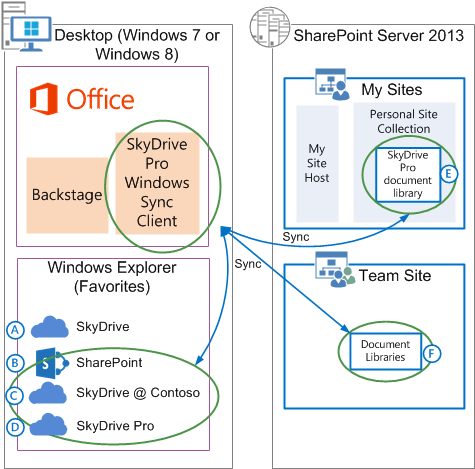
Just posted a few days ago, this is a TechNet article that goes into detail about what SkyDrive Pro is, how it’s architected, and what solutions it addresses.

imagePublished: March 26, 2013

Summary: Learn about SkyDrive Pro, its architecture, and the benefits of using SkyDrive Pro in SharePoint Server 2013.

Applies to: SharePoint Server 2013 Standard | SharePoint Server 2013 Enterprise 

This article helps administrators learn about SkyDrive Pro, the SkyDrive Pro architecture in SharePoint Server 2013, and the benefits of using SkyDrive Pro. Before you read this article, you should be familiar with My Sites. For more information, see My Sites in What’s new in social computing in SharePoint Server 2013.

In this article:

View the article here:
http://technet.microsoft.com/en-us/library/dn167720.aspx

The other day, I stumbled upon two new utilities that I thought were cool enough to write about. 

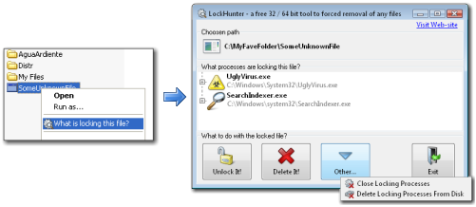
imageLockHunter is a foolproof file unlocker.  It is a free tool to delete files blocked by something you do not know. LockHunter is useful for fighting against malware, and other programs that are blocking files without a reason. Unlike other similar tools it deletes files into the recycle bin so you may restore them if deleted by mistake.

Key Features

  • Shows processes locking a file or folder
  • Allows to unlock, delete, copy or rename a locked file
  • Allows to kill locking process
  • Allows to remove locking processes from hard drive
  • Can unload DLLs from processes
  • Integrates in to Explorer menu
  • It deletes files into the recycle bin, so you may restore them if deleted by mistake
  • Supports both 32 and 64bit Windows

DOWNLOAD: LockHunter – Free Desktop-integrated File Unlocker
http://lockhunter.com/

————————

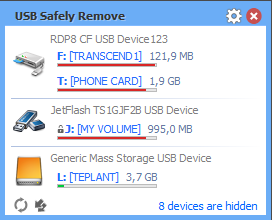
imageAnd then there’s USB Safely Remove, made by the same developer.  This tool is NOT free however I think it’s equally valuable.  I bought it instantly.

USB Safely Remove is an enhanced and hassle-free replacement for Windows safe removal tool. It saves your time and gives you more power on active work with any kind of USB/eSATA devices.

  • It saves time…
      • Displaying what prevents a device from being stopped
      • Safe removal via hotkeys
  • Lets you recognize a device in a snap…
      • The handy menu with device icons
      • Real device names and the ability to rename them
      • Lets you hide devices you never need to stop
  • Extends your portable opportunities…

      • Program autorun on device connection/disconnection
      • Command line for safe removal
  • Does unique things!
      • Hiding drives of empty card reader slots
      • Powers off devices in Vista and Win7
      • Card reader memory cards ejection one-by-one
      • Re-activating a device that just stopped!

DOWNLOAD: USB Safely Remove – 3rd party SysTray Storage Removal tool
http://safelyremove.com/

imageBUILD is coming!

The upcoming BUILD 2013, Microsoft’s Developers Conference was announced on the Official Microsoft Blog, along with all the pertinent details.

BUILD 2013
www.buildwindows.com
Moscone Center
San Francisco, CA
June 26th (9:00AM) -28th (2:30PM)
Registration begins April 2nd at 9AM PDT
Early bird registration $1,595 (1st 500 registrants)
Standard registration $2,095 (all others until sold out)

Follow @bldwin for more information.

For a look at the videos from BUILD 2012, check this out:
http://channel9.msdn.com/Events/BUILD/2012

Read below & see for yourself:

image

How to redeem this offer

  • Visit your local Microsoft store to register or;
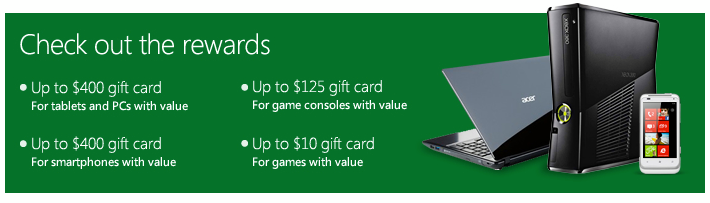
  • Bring in your current device or game software for recycling and receive a Microsoft store gift card for:
    • up to $400 for a smartphone.
    • up to $400 for tablet or PC.
    • up to $125 for a game console.
    • up to $10 for games.
  • See store associate for more detail.

*Valid March 4, 2013 until March 31, 2013. Available in select Microsoft retail stores in US (not including Puerto Rico); not valid Microsoft online store. To be eligible for trade-in, your tablet, PC, phone, game console, or game media, should include device power cord, if available, and device cannot be password protected. Applicable Microsoft store gift-card value will be determined at trade-in, and is subject to Microsoft’s discretion and manager approval. Not valid on prior orders or purchases; cannot be transferred or otherwise redeemed for cash or gift cards. Not combinable with other offers. All trade-ins are final. Other Recycle for Rewards terms and conditions apply. See store associate for details.

Visit the web site for more details:
http://content.microsoftstore.com/store/offers#offer-recycle-rewards

This week there was a lot written in the press about the basic premise that a move to the cloud is dramatic enough without having to deal with significant & time-consuming integration, compatibility, and continuity problems. 

The tl;dr version can be best summarized as, “You get what you pay for”, but there’s more to it than that.  Read on:

Posted by: kurtsh | March 29, 2013

INFO: Training References for Windows 8

imageAre you deploying Windows 8?

Here are a few resources that you’ll want to keep handy for your users.

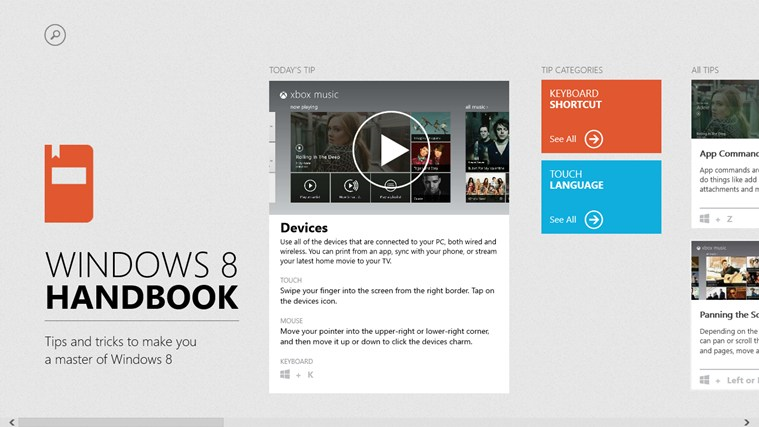
APP: Windows 8 Handbook
http://apps.microsoft.com/windows/en-US/app/windows-8-handbook/283f362e-b936-448f-8379-b66a39698dd9

GUIDE: Windows 8 Quick Reference Book (11.8MB, PDF)
http://www.oemsalescenter.com/ConLib/CustomizerControls/create.aspx?T=&PID=38787&catid=d39e1c00-7c1e-409d-afde-360a607f312d

BOOKS: Windows 8 Plain & Simple (And other MS Press books)
http://shop.oreilly.com/product/0790145338945.do

REFERENCE: QuickStart Card for Microsoft Windows 8 ($4.95)
http://www.brainstorminc.com/for-business/train-by-product/microsoft/windows/windows-8

imageToday, I got asked what the difference was between:

  • TechNet Subscriptions
  • MSDN Subscriptions

TechNet is squarely aimed at IT Professionals.  It provides:

  • the ability to download much of Microsoft’s software library along with Activation keys for a broad array of primarily INFRASTRUCTURE products. 
  • the ability to call Microsoft Professional Support for TWO incidents
  • access to 1 or more “collections” of Microsoft eLearning
  • priority support access to the TechNet Forums – a place to ask technical questions that are monitored by Support Engineers & Product MVPs

The software provided with TechNet Subscriptions is designed for hands-on IT Professionals to evaluate Microsoft software and plan deployments. The software provided in TechNet Subscriptions can be used for evaluation purposes only.  TechNet does not contain any development tools (such as Visual Studio or Expressions), nor does it contain any of our SDKs, platform tools, designer tools, or embedded systems products.  Here is a list of products that are available through TechNet:
http://download.microsoft.com/download/C/7/8/C78DB720-88CB-455E-AA0E-A087CB332A23/TechNet_Product_List.xlsx

MSDN is designed for Developers.  The software provided with MSDN Subscriptions is for design, development, testing, and demonstration of software programs.   It has a lot of older technology as well compared to TechNet to assist developers with regression testing.    It provides:

  • the ability to download most of Microsoft’s software library along with Activation keys for the purposes of development, testing, demonstration.
  • no-charge access to cloud services like Team Foundation Service, Windows Azure,
  • access to 1 or more “collections” of Microsoft eLearning
  • the ability to call Microsoft Professional Support for TWO incidents or FOUR incidents depending on the subscription level
  • priority support access to the MSDN Forums – a place to ask technical questions that are monitored by Support Engineers & Product MVPs

Here’s a list of benefits of MSDN Subscriptions: http://msdn.microsoft.com/en-us/subscriptions/aa718661
More info on MSDN subscriptions:  http://msdn.microsoft.com/en-us/subscriptions/buy.aspx

Both MSDN and TechNet subscriptions are licensed per user.

SOFTWARE:
As far as software goes, there is a 3rd party comparison of the software that is available in each subscription here.  (I can’t guarantee it’s accuracy but it seems like it’s fairly accurate from a faraway glance)
http://geekswithblogs.net/mtreadwell/archive/2011/08/19/146599.aspx

PRICING:

Posted by: kurtsh | March 28, 2013

RELEASE: Office Configuration Analyzer Tool (OffCAT)

imageOn March 8th, we released the Office Configuration Analyzer Tool (OffCAT) to the Microsoft Download Center, replacing Outlook Configuration Analyzer (OCAT), the original diagnostic tool for Microsoft Outlook.

OffCAT was developed by the same team that put together OCAT, so it should be seen as the next generation diagnostics tool for Microsoft Office. There are many new features in OffCAT, but the biggest difference between the two tools is the ability to scan more Office programs than just Outlook.

With OffCAT v1, you can scan Access, Excel, Outlook, PowerPoint, and Word.  With OffCAT, you can take the following actions to help you detect possible problems with your Office programs or the Office programs on other computers you support (in a Help Desk capacity):

  • Scan an Office program configuration
  • Open a previously run OffCAT (or OCAT) scan on your computer
  • Import an OffCAT (or OCAT) scan from another computer
  • Use several reporting formats to view the scan results
  • Send feedback to the OffCAT team
  • Update your OffCAT installation with new detection rules
  • Update your OffCAT installation with new features or application fixes
  • Access resources to help resolve top problems and how-to issues in Office 365
  • Start the Exchange Remote Connectivity Analyzer tool to analyze Outlook connection issues
  • Scan computers using a script that runs a command-line version of OffCAT

Read more about Office Configuration Analyzer Tool at the announcement blog post:
http://blogs.technet.com/b/exchange/archive/2013/03/20/released-office-configuration-analyzer-offcat-tool.aspx

imageIf you’re deploying any amount of Windows Server 2012, you may want to take a look at this addition to our “Best Practices Analyzer in the Cloud” service:

System Center Advisor now supports Windows Server 2012 as well as Microsoft Hyper-V Server 2012 !

By installing the latest version of the Advisor agent on servers running Windows Server 2012 or Hyper-V Server 2012 you will be able to receive configuration analysis for these products.

We hope you can try it out and benefit from the ongoing configuration assessment that Advisor provides.

Later this month we will also be releasing Update Roll-up 3 for System Center Advisor , which will correct a number of bugs on already installed agents.

And in case you didn’t catch our previous post, Advisor is now free !

image

Interested in using Lync for massive scale events?image

This video demonstrates how L+ technology will help you improve ROI on your existing Microsoft Lync licenses. Users can customize, promote, organize, and scale meetings and events beyond the existing Lync capabilities while allowing them to utilize their existing Lync presentation expertise.

Benefits
  • Enhancements add to existing Lync knowledge to increase ROI
  • Maximize the Value of Your Events & Programs
  • Cost effective service for any size event
  • Works with all popular browsers and operating systems
  • Enables attendees to use Macs, iPads, and other mobile devices
  • Deliver large scale events from a standard Lync presentation format
  • Control who can upload and view content and recordings

BLOG POST:
http://blogs.technet.com/b/microsoft_in_education/archive/2013/03/23/high-quality-event-production-with-microsoft-lync-and-event-builder-l.aspx

VIDEO:
https://www.eventbuilder.com/encounter/event_desc.asp?p_event=b029r01k

DATASHEET:
https://www.eventbuilder.com/encounter/getFile.asp?z=7p1c0n&eventID=b029r01k&eventFile=33839745

« Newer Posts - Older Posts »

Categories