Posted by: kurtsh | June 5, 2013

Sorry for the absence…

imageSorry for the absence… but most of you should all know why by now. 

I’ll try to get back in the saddle in the evenings but I’ve been a BIT overwhelmed recently, so much so that it’s kept me away from the ol’ faithful blog.

In the meantime, here’s a comparison ad that we’re running.  This is particularly interesting considering that it’s being demonstrated with current processor technology.  With the massive tsunami coming of next-generation Intel processor-based devices this Summer/Fall that increase battery life to 10-12 hours for full power, x64 processing tablets & touch PCs, incredible graphics acceleration comparable to an Nvidia GT650M & USB 3.0 support… it promises to be a very good opportunity to introduce Windows-based tablets & touch everywhere.

Comparison: iPad vs. Windows 8 Tablet
Posted by: kurtsh | May 31, 2013

INFO: 3rd party Stylus for Surface Pro

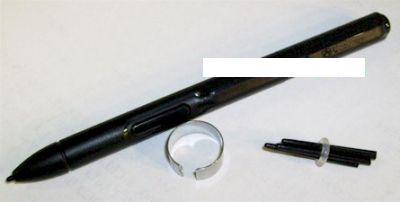
If you need a cheaper stylus for your Surface Pro – one that is small, designed for an WACOM ACTIVE DIGITIZER and not capacitive touch glass, one that has an “eraser” on the end of the pen at the opposite end of the tip, and a right mouse click button along the side, you’re in luck.

How about one for $9.99?

These work with Surface Pro.  They’re conventional Wacom stylii and I’ve bought a few of them as “backup” stylii because at $9.99… y’might as well have a few ‘just in case’ because I use my Surface Pro primarily as a OneNote note-taking or drawing device that synchs with SkyDrive & OneNote in the cloud, constantly updating my other production ultrabook device as well.

image

imageToday, we at Microsoft announced something called the “Worldwide Water Cooler” at http://www.theworldwidewatercooler.com/.

It’s both a survey and an portal of sorts & the focus is on the utility of social collaboration tools to enable the workforce to get work done faster & more efficiently.

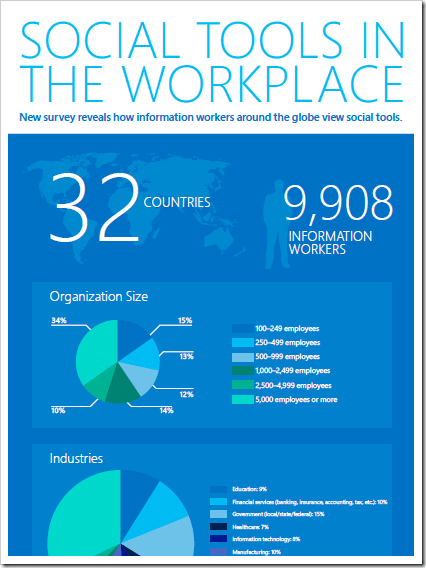
There is also a survey that we commissions with Ipsos that goes over how information works use social tools to get work done:

image

You can download it at:
http://www.theworldwidewatercooler.com/Original_MSFT_Survey_Infographic.pdf

Posted by: kurtsh | May 29, 2013

NEWS: Lync-Skype Connectivity Now Available

image

We’ve officially announced the availability of Lync-Skype connectivity for customers around the world, which includes presence sharing, instant messaging, and audio calling. 

The Skype “Big Blog” has all the details:

Today, we’re excited to announce Skype and Lync customers around the world are now able to connect with each other from across these platforms. With Lync-Skype connectivity, Skype users will now be able to reach a broader network of colleagues, partners and customers who are using Lync, Microsoft’s unified communications platform, connecting them into organizations of all sizes. Lync provides a consistent, single client experience for presence, instant messaging, voice, video and meetings for business productivity and is owned by over 90 of the Fortune Global 100 companies.

Read more at:
http://blogs.skype.com/2013/05/29/skype-and-lync-connecting-the-living-room-to-the-board-room/

UPDATE 9:00AM:
Thanks to Marques Lyons for catching that I posted the Eastern Standard times and forgot the Pacific Standard times.  Thanks Tbone.

image

“E3” – ELECTRONIC ENTERTAINMENT EXPO ‘ANNOUNCEMENT"’
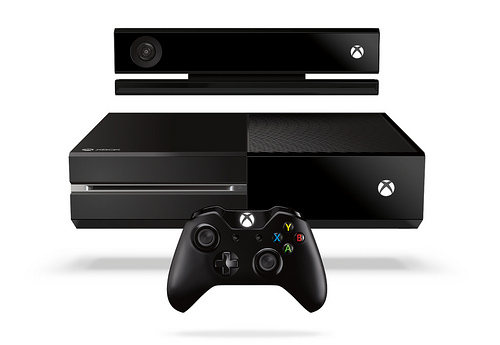
Oh, it’s not over.  If you thought that all Xbox One was, was lightning fast Kinect Voice/Gestures, TV integration, Blu Ray, live NFL interactivity, Skype & Side-by-side apps, “Quantum Break”, Halo the TV Series, & Call of Duty… you’re sorely mistaken.

Silly rabbit.  That was just phase 1:  You didn’t think that that was all we had did you?
Smile

Get ready for the second wave of announcements:  Introducing the E3 live broadcast coming to you from Galen Center just down the street from the Los Angeles Convention Center where E3 is held in just 12 days – June 10th at 9:30AM PST/12:30PM EST.  Yeah, we’re gonna stream it from Xbox.com.  And of course it’ll be available on your Xbox via Xbox Live.  And it’ll also be available live commercial free on SPIKE TV. (See their schedule)

MICROSOFT RETAIL STORE BROADCAST
If you’re interested in visiting a Microsoft retail store, they will be showing the live broadcast in each location the day of the event.  And for the 1st 25 people attending, they’ll get a free 3 months of Xbox Live.  So get down there and join the other gamers… and let the games begin.
https://www.facebook.com/events/162916380553210/?ref=3

Xbox One Anthem
Posted by: kurtsh | May 29, 2013

BETA: Office 2010 Service Pack 2

imageCustomers can download the beta for Office 2010 and SharePoint 2010 SP2. In addition to updates for the desktop and server apps, this beta also includes full-product SKUs of SharePoint and related server products, updated to install on Windows Server 2012.

SP2 consists of updates that improve security and compatibility. For example, SP2 provides improved compatibility with IE 10, Windows 8, Windows Server 2012 and Office 2013.

These server products will be available for download.  You can either install the full-product SharePoint 2010 Beta (with the SP2 fixes integrated into it) or you can apply the Beta SP2 patches to an existing installation of SharePoint. Both alternatives are available in the Beta. If you plan to deploy it on Windows Server 2012, the full-product installation must be used.:

  • SharePoint Server 2010
  • SharePoint Foundation 2010
  • Search Server 2010
  • Search Server 2010 Express
  • Office Web Apps
  • Project Server 2010

The final version of SP2 will be made available later this summer and will not require SP1 as a prerequisite.

https://connect.microsoft.com/office/InvitationUse.aspx?ProgramID=7722&InvitationID=OSP2-DMWP-G97K

Posted by: kurtsh | May 26, 2013

BETA: MAP Toolkit 8.5 Beta Program is now open!

imageThe latest release from the Microsoft Assessment and Planning (MAP) team provides organizations with tools to accelerate their migration to the cloud.

Download the beta materials on Connect:  http://go.microsoft.com/fwlink/?LinkId=219165

Thanks for your ongoing interest and participation in the MAP beta review program. We hope you’ll take the time to preview and provide feedback on the MAP Toolkit 8.5 Beta.

Accelerate your Windows Server 2012 migration with Microsoft Assessment and Planning (MAP) Toolkit 8.5. This latest version of MAP adds new scenarios to help plan your environment with agility while lowering the cost of delivering IT. Included in MAP 8.5 are hardware and infrastructure readiness assessments to assist you in planning the deployment of Windows 8 and Windows Server 2012, preparing your migration to Windows Azure Virtual Machines, readying your environment for Office 2013 and Office 365, and tracking your usage of Windows Server, Lync, SharePoint, and Exchange.

Newly designed user interface
The MAP Toolkit 8.5 Beta features a newly designed user interface which provides a more intuitive user experience. Scenarios have been organized into Scenario Groups to allow quick navigation and display at-a-glance summaries on individual scenario tiles. Details for each scenario can be found in the Scenario Detail Pages along with a checklist of steps needed to maximize your results and enable one-click report generation.

Lync 2013, SharePoint 2013, and Exchange 2013 Usage Tracking Support
Groundbreaking new releases of Lync, SharePoint, and Exchange have been brought to market this year. These products provide IT organizations and their end users greater efficiency, productivity and flexibility than ever before. With the release of the MAP Toolkit 8.5 Beta, the usage tracking scenarios within MAP have been updated to leverage new usage tracking capabilities provided within Lync, SharePoint, and Exchange resulting in less  administrative effort and greater accuracy to collect and report on end user access to these servers.

Enhanced Virtual Machine discovery
Server virtualization has become the standard method for optimizing an organization’s resource utilization, availability, and agility. The MAP Toolkit 8.5 Beta assists in the effort to virtualize with added discoverability of virtual machines for software asset location and reporting to facilitate license compliance for highly virtualized environments. Additionally, the MAP Toolkit now includes enhanced inventory reports which detail the virtual machines discovered, as well as the total number of virtual machines running on each host.

Windows Volume Licensing scenario helps to Identify license status of computers running Windows Vista SP1 and newer
Microsoft Volume Licensing gives you flexible, cost-effective access to the Microsoft products and services that your business is built upon. The MAP Toolkit 8.5 Beta provides the ability to detect and report on the volume license status of client computers in your enterprise so you can rest assured that you are in full compliance with your volume license agreement.

Tell us what you think!
We value your input. Download the beta on Connect and tell us what you think! Send your comments to the MAP team:  mapfdbk aht microsoft dawt com

Availability
This program is now open. The beta review period will run through June 28, 2013.

Tell your friends
To join the beta review program for Microsoft Assessment and Planning (MAP) Toolkit 8.5 Beta, visit Microsoft Connect at: http://go.microsoft.com/fwlink/?LinkId=217916.

Learn more
Visit the MAP home page:  www.microsoft.com/map 
Get the latest news straight from the MAP team:  http://blogs.technet.com/mapblog

image

WHEN: May 29th @ 10am PST

This tour of new features webcast will include the following topics and more:
 Agile Planning
 Quality Enablement
 SharePoint Development
 TFS Enhancements
 Developer Experience

We’re (US West Region Visual Studio Tools DPE Team) excited to showcase these new features. Plus, we’re giving away one (1) brand new Jawbone JAMBOX Wireless Bluetooth Speaker, valued over $150! We hope you can join us!

To register, please select the link below:
https://msevents.microsoft.com/CUI/EventDetail.aspx?EventID=1032551936&Culture=en-US&community=0

image

I have a business “MiFi” – a mobile hotspot – that provides Internet access anywhere I need it.  It’s usually 4G LTE speeds (8.5Mbps down/6.5Mbps up) but sometimes it drops down to 3G speed, giving 2.0Mbps/1.2Mbps max.

THE PROBLEM:  NON-RESPONSIVE
Put simply, the thing drops its connection to the 4GLTE network – or at least stops working.  If I turn the device on and connect to it from my laptop, it will work for a while, then suddenly after some amount of usage, usually after a pause of sorts, I can’t surf the web at all.  Even though the WiFi connection works, it seems to be completely non-responsive.  Most of the same issues I’ve had are documented here:
https://community.verizonwireless.com/thread/700187/

The root cause was hinted at here:
https://community.verizonwireless.com/thread/534516?start=70&tstart=0

Apparently, the device seems to go into a ‘sleep mode’ when there’s no traffic over the connection, and there’s no way to turn off the sleep mode.  The only way to get the connection working is to turn it off and turn it on again.  There also appears to be issues with it getting warm and “halting”.  I’ve updated the firmware and that didn’t fix any of the problems.

imageMY SOLUTION:  MAINTAINING A VPN
A user in the support forums mentioned that his MiFi dies the moment he stops using his stock trading application with generates a lot of traffic.  That was what gave me the idea, “Why not just run something that constantly communicates over the connection?”

That’s sort of what VPNs do.  They establish secure connections and keep the connections alive with occasional traffic.  The session NEVER goes dormant and that’s exactly what it sounded like I needed.  Sure enough, if I establish a VPN using Anonymizer or my company’s VPN solution (Microsoft’s SSTP VPN solution) the connection NEVER, EVER drops. 

This little discovery was downright revolutionary for me.

SOLUTIONS:

  1. CORPORATE VPN
    If your employer has a VPN solution set up, that’s an easy way to establish a VPN solution.  Of course, if you don’t want your employer to monitor your person Internet activity, then this isn’t an option.
  2. ANONYMIZER?
    I pay $79 annually to use Anonymizer, a secure OpenVPN (or L2TP/IPSec VPN) that leverages a random VPN server somewhere around the world.  By rotating the VPN server used & the IP address segment leveraged, it’s a different VPN server every time I connect and clears its logs within 24 hours while providing a 256-bit secure, anonymous connection.  For folks that are tired of being tracked based on your IP address, really ought to sign up for a simple $79 subscription.  The overhead isn’t that bad and it keeps your communications secure – especially over open wireless services like those at coffee shops & hotel networks.
  3. KEEP ALIVE TOOLS?
    In theory, you shouldn’t really need a VPN.  Any HTTP keep alive tool should work.  Ironically, this was a problem a long time ago with DIAL UP connections that would drop – usually associated with America Online connections – so people would run tools to keep their connections up.   I haven’t tested this but you might find this tool works as well as I believe it simulates HTTP/Internet usage.  YMMV.
    STAY ALIVE (FREE)
    http://www.stayaliveonline.com/download.html
Posted by: kurtsh | May 23, 2013

EBOOK: Windows 8 End User Training Brochure

imageThis is a repeat of something I made available earlier.

Windows has been reimagined to be all about you and your style of working. Put what matters most right on your Start screen, and get instant access to your people, apps, sites, and more, so you can spend less time searching and more time doing. No matter what you want to do, you can get it done quickly in Windows 8. Whether you’re collaborating on a large project, preparing for an upcoming conference, or traveling for work, you can use touch, mouse, and keyboard together–seamlessly–to do what you want, the way you want. This brochure will show you how to get around, navigate, manage apps, and personalize in Windows 8.

EBOOK: Windows 8 End User Training Brochure (5.8 MB – 36pg)
http://www.microsoft.com/en-us/download/details.aspx?id=39055

« Newer Posts - Older Posts »

Categories