If you’re interested in Intellectual Property Protection, you ought to read this very carefully because I believe this offer is very disruptive & hugely beneficial to people looking to protect their IP investments.

And if you click through to the original post below, read it to the end where we talk about BYOK:  “Bring-your-own-key”.  Those of you concerned about the NSA & spooky confiscations of your data will really appreciate this part.

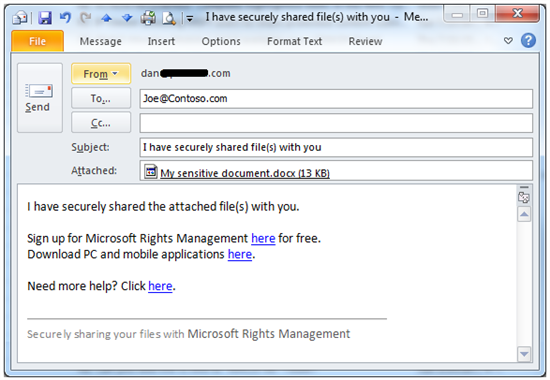
imageRMS enables organizations to share sensitive documents within their organization or to other organizations with unprecedented ease. These documents can be of any type, and you can consume them on any device. Given the protection scheme is very robust, the file can even be openly shared… even on consumer services like SkyDrive™/DropBox™/GDrive™.

Today we’re announcing the preview of SDKs, Apps, and Services, and we’re giving details on how you can explore each of them. If you’d like some background on Microsoft Rights Management, check out this TechEd Talk. I’ll also strongly recommend you read the new RMS whitepaper for added details.

Promises of the new Microsoft Rights Management services

Users:

  • I can protect any file type
  • I can consume protected files on devices important to me
  • I can share with anyone
    • Initially, I can share with any business user; they can sign up for free RMS
    • I can eventually share with any individual (e.g. MS Account, Google IDs in CY14)
    • I can sign up for a free RMS capability if my company has yet to deploy RMS

ITPro:

  • I can keep my data on-premise if I don’t yet want to move to the cloud
  • I am aware of how my protected data is used (near realtime logging)
  • I can control my RMS ‘tenant key’ from on-premise
  • I can rely on Microsoft in collaboration with its partners for complete solutions

These promises combine to create two very powerful scenarios:

  1. Users can protect any file type. Then share the file with someone in their organization, in another organization, or with external users. They can feel confident that the recipient will be able to use it.
  2. ITPros have the flexibility in their choice of storage locale for their data and Security Officers have the flexibility of maintaining policies across these various storage classes. It can be kept on premise, placed in an business cloud data store such as SharePoint, or it can placed pretty much anywhere and remain safe (e.g. thumb drive, personal consumer-grade cloud drives).

The RMS whitepaper offers plenty of added detail.
Read more about this new service here:

imageGot SharePoint Online/Office 365?  Well, guess what? 

25GB PER USER – UP FROM 7GB
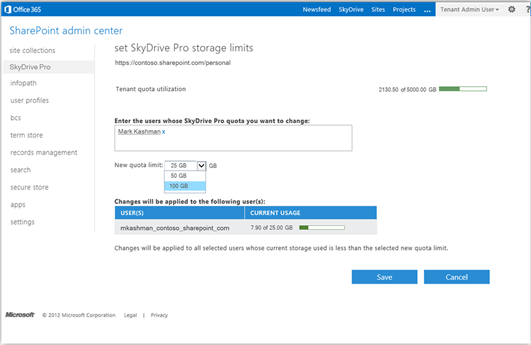
We just gave you a full 25GB of online storage per user.  That’s right – by virtue of SkyDrive Pro & SharePoint Online’s storage, we now provide users with 25GB of free storage – up from 7GB.

And there’s more news.

SHIFT USER QUOTA – UP TO 100GB
Administrators of SharePoint Online/Office 365 can shift storage allocations to users that need more than 25GB.  Allocations of 50GB or 100GB may be granted by administrators – and the storage quota comes from the tenant’s overall pool of storage.  And you can bulk allocate these shifts to up to 25 users at a time.  So if say, 18 people need 100GB of storage, you can shift them to a 100GB in just a few keystrokes.

And yes, there’s even more news.

2GB FILES NOW AVAILABLE – UP FROM 50MB
…And we’re also increasing the overall file upload limit in SharePoint Online to 2 GB/file – up from 50MB. 
…And recycle bin file retention is now 90 days – up from 30 days.
…And we now automatically version files by saving the last 10 versions of a file that stored in SkyDrive Pro.

Yeah, these a big changes & all Office 365 users with SharePoint Online will benefit from these increases in capability we’ve provided.  Read more about these changes here:

This is sort of well documented on the Internet however in a slightly different context so I thought it might be helpful to describe my situation for others searching for a similar issue:

PROBLEM:
Adobe Flash was INCORRECTLY RENDERING graphics & and displaying a BLACK SCREEN for Flash video on my machine.

BACKGROUND:
I’m running Windows 8 Enterprise Edition with Internet Explorer 10.  One day, I booted up my Lenovo ThinkPad X1 Carbon Touch and discovered that, despite the “Flash is installed correctly” web page working on Adobe.com, following Flash scenarios didn’t work:

  • Web pages with YouTube videos embedded within them failed to display the video, while the audio worked correctly.
  • Web pages with complex Flash objects rendered incorrectly and showed graphics in the wrong places, with buttons failing to work, basically making them unreadable and unusable.

Note:  This is in contrast with other folks on the Internet where Flash doesn’t even appear to be installed AND pages request that “Adobe Flash must be installed to view this content”.

SOLUTION:
There’s two solutions.  A quick fix & a longer term one:

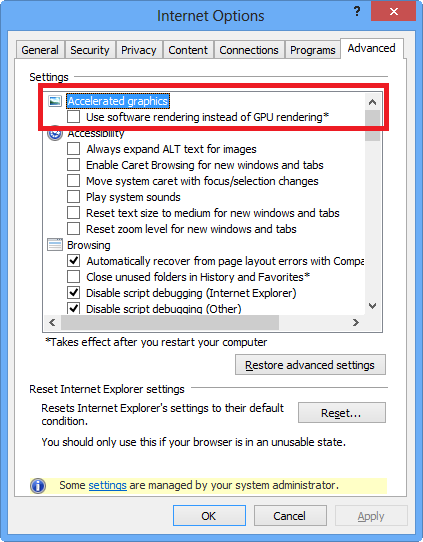
  1. imageDISABLE HARDWARE ACCELERATION WITHIN INTERNET EXPLORER
    This solution is referenced on online forums when web pages state that Flash doesn’t appear to be “installed”.  This solution however ALSO works/applies when Flash does appear to be present for use by web pages however doesn’t render graphics & video correctly for the user.  Strange as it may seem, hardware acceleration is a parameter within Internet Explorer that affects the performance of Flash as a plug in. 

    If you check “Use software rendering…”, you effectively disable the GPU’s usage in IE & should find that Flash suddenly works for everything:  Playback works fine within embedded YouTube videos & rendering should work fine with complex vector graphics based Flash apps on the web.

  2. UPGRADE LENOVO THINKPAD X1 CARBON DISPLAY DRIVERS
    The strange behavior exhibited by Flash when hardware acceleration is in use is a symptom of poorly written display drivers in use for the Intel integrated GPU. 

    Once the drivers are updated to version 9.17.10.2875 (Apr 19, 2013), the issues within Flash disappear and you can re-enable hardware GPU acceleration within Internet Explorer 10.
    http://support.lenovo.com/en_US/research/hints-or-tips/detail.page?&DocID=HT074689

Posted by: kurtsh | August 20, 2013

EVENT: CES 2014 Early/Free Registration ends Aug 31st

imageHeads up: CES 2014 Early (FREE) Registration ends Aug 31. If you’re planning on coming, y’better get on it!

Note re: badge process this year.

2014 Badge Process:
Please note we have implemented a new and efficient badge pickup process and will no longer be mailing badges in advance of the event. All attendees can pick up badges on-site at over 25 locations. More information on how to get your badge on-site will be provided in your confirmation email and on CESweb.

2014 Pricing and Cancellation Policy:

  • Registration Fee Structure:
    • Free through August 31
    • $100 from September 1, 2013 through January 1, 2014
    • $200 from January 2, 2014 through January 10, 2014
  • Cancellation Policy:
    • Cancellations for paid registrations received in writing on/before December 27, 2013, are refundable, minus a $50 processing fee. After December 27, 2013, cancellations are subject to the entire fee. If you do not cancel by December 27, 2013, and do not attend International CES, you are still responsible for payment. You may substitute the name of one registrant for another at any time.

clip_image002For Surface Pro:

AppyMouse: Free on-screen “touchpad” for controlling the mouse pointer & provide precision while working in the Desktop.

I’ve been using this little app.  It’s a surprisingly good app that’s such a no-brainer… you have to wonder why someone hadn’t thought of it before.

Go get it! 

Slow & steady…

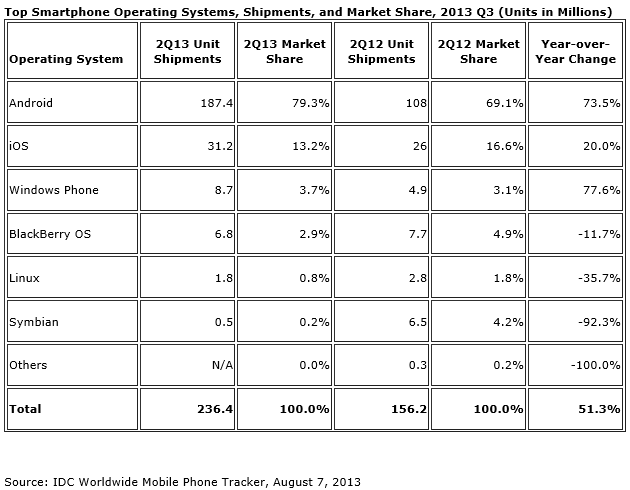
imageFRAMINGHAM, Mass. August 7, 2013 – Despite beating Wall Street expectations in terms of shipment volumes, Apple’s share in the worldwide smartphone operating system market posted a year-over-year decline during the second quarter of 2013 (2Q13). Meanwhile, Android and Windows Phone both managed slight increases during the same period. According to the International Data Corporation (IDC) Worldwide Quarterly Mobile Phone Tracker, vendors shipped a total of 236.4 million smartphones in 2Q13, up 51.3% from the 156.2 million units shipped in 2Q12. Second quarter shipments grew 9.3% when compared to the 216.3 million units shipped in 1Q13.

"The iOS decline in the second quarter aligns with the cyclicality of iPhone," says Ramon Llamas, Research Manager with IDC’s Mobile Phone team. "Without a new product launch since the debut of the iPhone 5 nearly a year ago, Apple’s market share was vulnerable to product launches from the competition. But with a new iPhone and revamped iOS coming out later this year, Apple is well-positioned to re-capture market share."

"Last quarter we witnessed Windows Phone shipments surpassing BlackBerry and the trend has continued into the second quarter," said Ryan Reith, Program Manager with IDC’s Mobility Tracker Programs. "Nokia has clearly been the driving force behind the Windows Phone platform and we expect that to continue. However, as more and more vendors enter the smartphone market using the Android platform, we expect Windows Phone to become a more attractive differentiator in this very competitive market segment."

…

Read more at:

Posted by: kurtsh | August 7, 2013

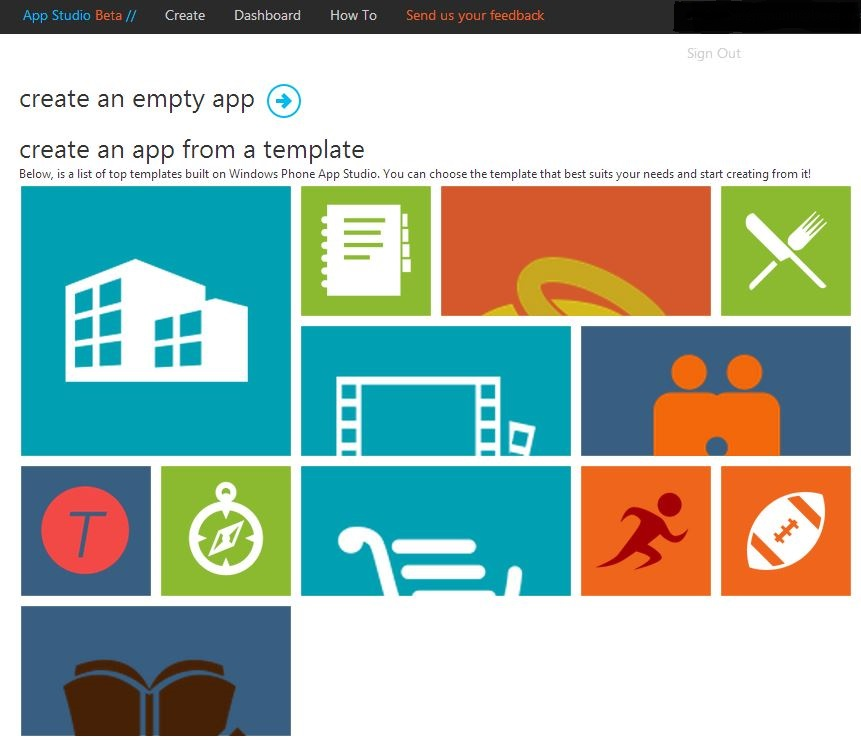
BETA: Windows Phone App Studio available!

Wanna start building profitable Windows Phone apps?  The new Windows Phone App Studio is now available in beta!

imageReady. Set. Go. Done!

We know you – the savvy developer filled with great ideas but not enough time. If only you had a way to quickly build and test your latest innovations. With the Windows Phone App Studio, you do!

The Windows Phone App Sudio lets you swiftly build apps for immediate publishing, testing, and sharing with clients, co-workers, and focus groups. Need to make changes or try variations? With the App Studio it’s a snap!

And when you’re ready to add advanced programming features, the Windows Phone App Studio generates your source code – a feature no other app-builder tool provides. Get with the program!

NOTE: Windows Phone App Studio requires an Invitation Code.  In order to get an invite, email “studio aht microsoft daht com”.

UPDATE 8/8/13 9:36AM:
Here’s a couple photosynths of the event.

WP_20130807_001-SMALL1WP_20130807_032-SMALL1

———————
ORIGINAL POST:
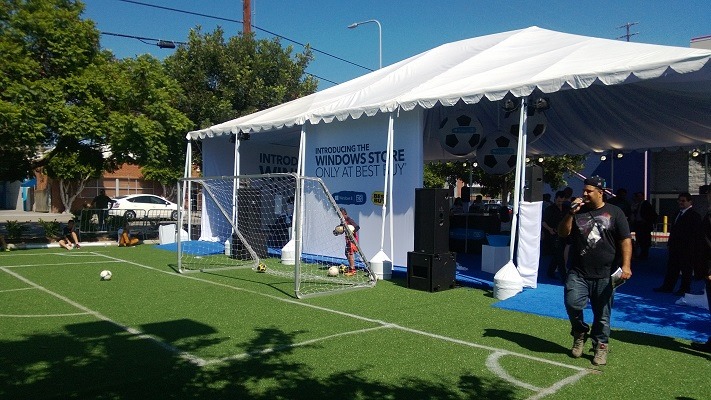
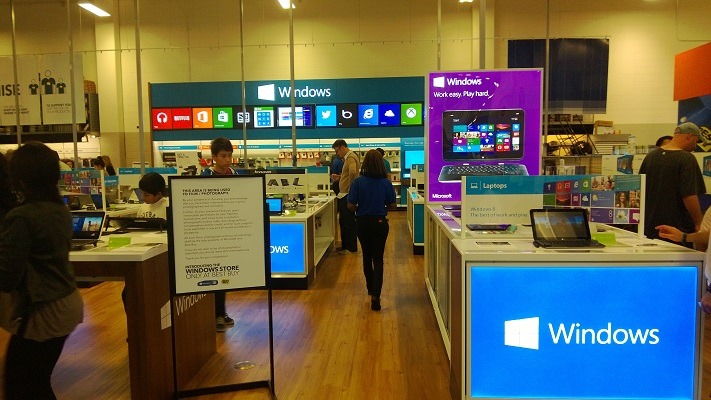
For those of you watching the rollout of the "Windows Stores" at Best Buy, here’s the big launch today in West LA.

imageIntroducing the Windows Store – Only at Best Buy

Join us Wednesday, August 7 for the Windows Store Launch at the West LA Best Buy Store from 10AM to 5PM. Enjoy Windows 8 product demos, food and beverages, live DJ, giveaways and offers.

3PM-5PM
The first 200 customers to demo a Windows 8 device in the Windows Store will receive a wristband for a chance to meet Clint Mathis and Mauricio Cienfuegos, two tickets to an upcoming LA Galaxy game, and a free signed soccer ball.

5PM – 7PM
Personal appearance with Clint Mathis, former U.S. Men’s National Team and LA Galaxy player and Mauricio Cienfuegos, former El Salvador Men’s National Team player and Galaxy player.

The first 200 customers to demo a Windows 8 device in the West L.A. Best Buy store starting at 3pm on August 7th will get a wristband for the opportunity to meet Clint Mathis and Mauricio Cienfuegos, two tickets to an upcoming LA Galaxy game and
an autographed soccer ball. Wristbands are limited in quantity and available on a first-come, first-serve basis. Limit one (1) wristband/autograph per person, while supplies last. No personalization. Not responsible for lost, mutilated or stolen wristbands. Talent appearance subject to availability and change. Sponsors do not guarantee the talent appearance or the opportunity to receive an autograph

LOCATION:
11301 W Pico Blvd
Los Angeles, CA 90064
Phone: 310-268-9190

imageBrand new training available for System Center 2012 R2 including videos & PowerPoint download:

View this Jump Start to learn what’s new with System Center 2012 R2. Discover the new capabilities in infrastructure provisioning and monitoring, automation and self-service, IT service management, and application monitoring.

Microsoft Senior Technical Evangelist Symon Perriman and several other presenters show how the next version of System Center delivers an end-to-end cloud management stack through advanced integration with Windows Server 2012 R2 and Windows Azure.

Free from Microsoft Press – a 248 page, eBook in ePub & PDF format.

imageThis book is aimed at test engineers, managers, developers, and folks interested in understanding the changing world of test. Over the last several years, software testing has changed a great deal. In the past, test plans were on paper, filed away and out of sight. Today they are—or can be with Visual Studio—living documents, as manual and automated tests are integrating into the test workflow supported by the test infrastructure.

Today you no longer have to set up physical boxes; instead you can set up and automate virtual environments composed of virtual machines to meet your testing environment needs. With Visual Studio and Team Foundation Server, the pain of dealing with a heterogeneous test infrastructure is reduced, the cost and effectiveness of testing a product is improved, and regression testing becomes cost effective instead of a nightmare.

Knowing how to test is important, but understanding how this new infrastructure is changing the business of testing and software delivery is critical. Today’s businesses require nimble teams that can support continuous delivery and deal with updates and bugs in an agile fashion. It’s what your customers have come to expect.

In this guide, we follow a team as they move from a conventional approach to testing towards one more suited to the needs of present-day development. We see how they address the costs and the pain of their old methods by adopting the testing infrastructure of Visual Studio 2012.

« Newer Posts - Older Posts »

Categories