One of the things that Microsoft has aspired to make available for all our products & services is a clearly defined roadmap for what capabilities we plan on releasing & when so that our Enterprise customers can plan, budget & set expectations appropriately.
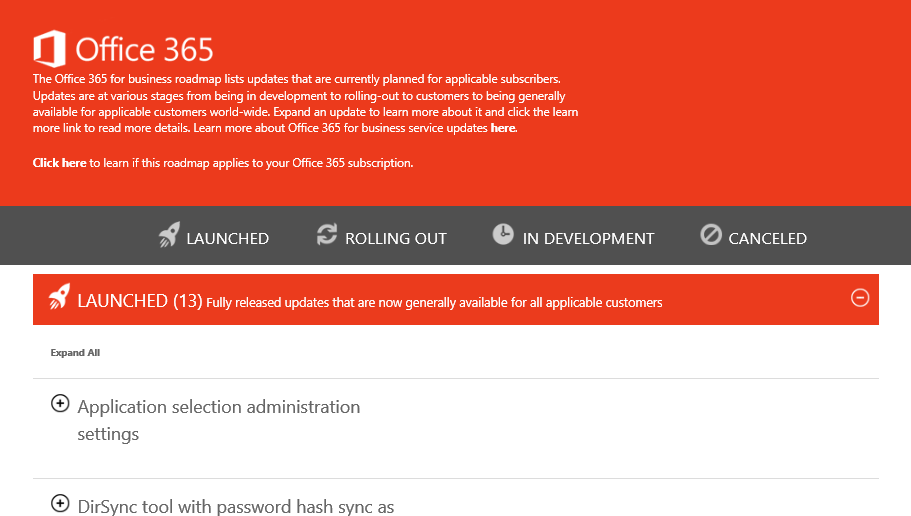
Today, we released the Office 365 Roadmap:
The Office 365 for business roadmap lists updates that are currently planned for applicable subscribers. Updates are at various stages from being in development to rolling-out to customers to being generally available for applicable customers world-wide. Expand an update to learn more about it and click the learn more link to read more details. Learn more about Office 365 for business service updates here.
The Office Online Services description contains a wealth of valuable information for any organization deploying Office 365. It provides IT with the information necessary to help explain the differences between Office Online and Office 365 Pro Plus.
For example: Table: “Word, Excel, OneNote, and PowerPoint feature availability across offers”
Also: Table: “Supported file types for Office Online”
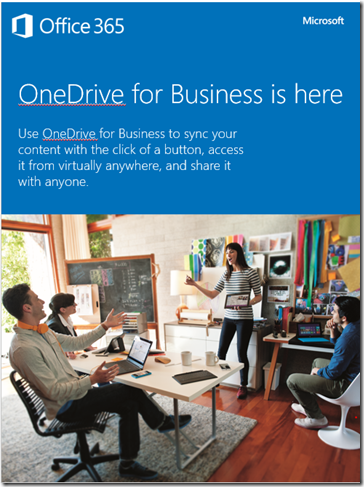
Office 365 Change Management Guide for the Enterprise There’s also the Change Management Guide for the Enterprise, which describes a proven, four-phase process that organizations have used to drive up new technology adoption and maximize their return on investment. A comprehensive set of samples and templates let you build a customized set of project planning documents and user awareness materials based on your specific organization’s needs. Included in this download package:
Office 365 Change Management Guide for the Enterprise:
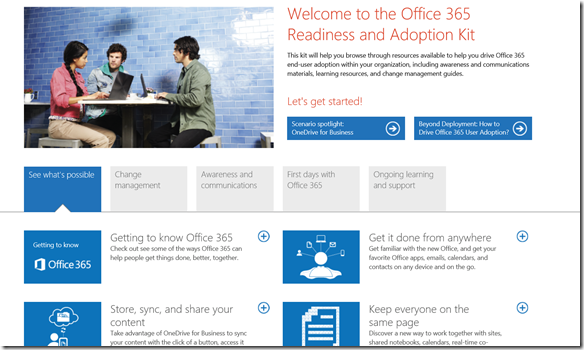
Office 365 Readiness & Adoption Kit Finally, this is a pre-bundled web site you can deploy on your intranet which contains all of the materials above in a nice neat web site package.
[I’m way late on posting this but I need to have it here for later reference.]
Today, we are excited to announce that Microsoft Desktop Optimization Pack (MDOP) 2014 is now available for download. For those of you who aren’t familiar with MDOP, it’s a suite of virtualization, management and security technologies available as a subscription for Software Assurance customers that helps maximize the benefits offered by Windows.
MDOP 2014 includes Microsoft BitLocker Administration and Monitoring tool (MBAM) 2.5, which represents a substantial update to our BitLocker management solution, as well as a spring update for Microsoft Application Virtualization (App-V) 5.0 SP2. This update is available for download here and includes a number of significant product innovations focusing on virtualized desktop scenarios.
For more detail on the improvements made in MDOP 2014, visit the Windows blog and the Springboard blog.
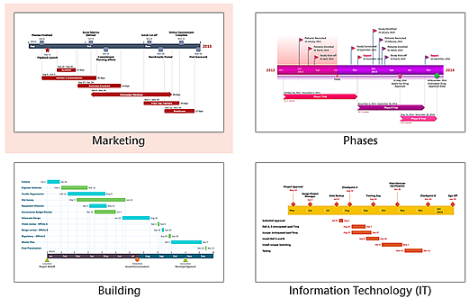
Are you in IT? Do you have to prep PowerPoint’s that present, among other things, your project timeline? Do you find yourself handcrafting Gantt charts and modifying them every time there’s a slip in schedule?
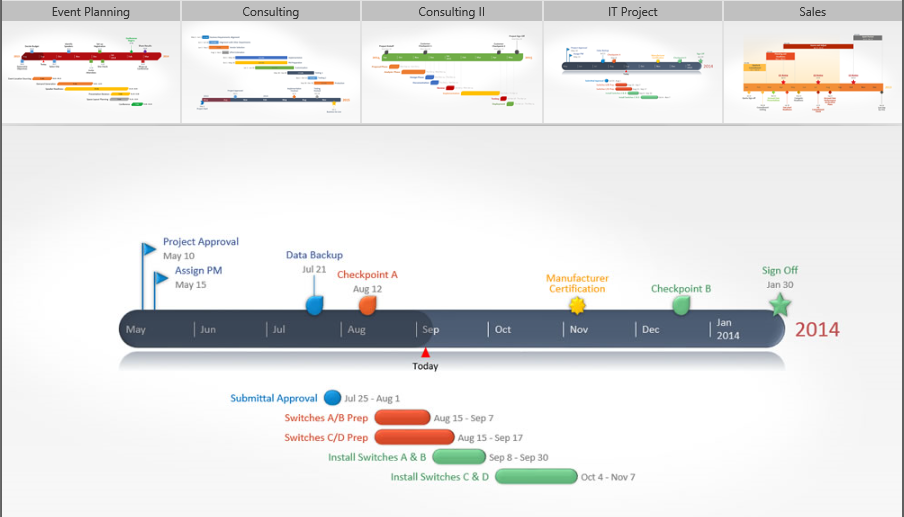
No longer! Here’s a 3rd party tool that I use with PowerPoint 2013 (also works with 2007/2010) called “Office Timeline 2013”. And it’s free.
The above photo is an example of the kind of timeline you can generate and insert into your PowerPoint presentation through a quick wizard. They have different templates, different chart types, different use cases, etc.
If you like it, you might want to copy & paste timeline data from Excel… and that’s where the “Plus” version comes in which is NOT free, however it’s probably going to be worth you dollar at $39 just to keep in your arsenal of secret IT professional tools.
In case you’re not familiar with RMS, here’s a quick overview of a little bit of the value it provides organizations:
Protecting an email & attachment with AD RMS
Due to increased regulation, the Consumerization of IT (CoIT) and the “Bring Your Own Device” (BYOD), the explosion of information with dispersed enterprise data, the Social Enterprise and its applications enabling new collaboration, analytics scenarios, etc. enterprises of all sizes are facing growing needs to protect sensitive information. At the same time, enterprises have a need to securely share that same information amongst appropriate employees and other individuals within and outside the corporate network.
The NEW Microsoft Rights Management service (RMs) offering (microsoft.com/rms) provides the capability to create and consume protected content such as e-mail and documents of any type. Such a capability is available as a standalone subscription (for your on-premises infrastructure with the Microsoft Rights Management connector) or is part of the Office 365 Enterprise subscription, natively integrated with Exchange Online, SharePoint Online, and Microsoft Office to apply persistent protection to the content to meet the business requirements of your organization.
The Microsoft Rights Management suite is implemented as a Windows Azure service. Beyond the available RMS enlightened applications on the market, it comprises a set of Microsoft Rights Management sharing applications that work on all your common devices, a set of software development kits, and related tooling. By leveraging Windows Azure Active Directory, the cloud-hosted Microsoft Rights Management service acts as a trusted hub for secure collaboration where an organization can easily share information securely with other organizations without additional setup or configuration. The other organization(s) may be existing Microsoft Rights Management service’s customers but if not, they can use a free Microsoft Rights Management for individuals capability.
The whitepapers available as part of this download covers the various aspects of the offerings and provide in-depth information to evaluate or use the Microsoft Rights Management service and its components. For an overview of the NEW Microsoft Rights Management service offerings, see the whitepaper NEW Microsoft Rights Management service.
[UPDATED 7/4/14] So what’s to know about Surface Pro 3, hmm?
Ultra-Thin: 0.36” – 30% thinner than the 11” MacBook Air and the thinnest laptop running an Intel Core processor
Ultra-Light: 1.76 pounds – lighter than the lightest MacBook Air
Larger Screen: 12” display, 38% more viewing area than Surface Pro 2
Stunning ClearType Full HD Display: 2160 X 1440 screen resolution, 3:2 aspect ratio and multi-touch input
Breakthrough Surface Pro Type Cover: New magnetic double-fold hinge for more lap stability
Larger Trackpad: 31% larger with a new, smooth glass-like feel
Multi-angle kickstand: Adjustable, continuous kickstand with up to 150 degrees of viewing
All-new Surface pen: Precise & pressure sensitive fountain pen-like experience with one-click access to OneNote
A lot more! Just read some of the reviews:
MASHABLE: “Microsoft Surface Pro 3 Is the Best Everything Device Ever Made” ”…as everything devices go, the Surface Pro 3 scores very high. The point isn’t to be the best at any singular task — it’s to negate the need to carry, and even own, multiple devices that do pretty close to the same thing anyway. For the Surface, redundancy is the enemy.” http://mashable.com/2014/05/30/microsoft-surface-pro-3-review/?utm_cid=mash-com-Tw-main-link
YAHOO: “Smart, Versatile Surface Pro 3 Can Do It All — Maybe Even Lift the Windows 8 Curse” ”Surface Pro 3 is thinner, lighter, and bigger-screened than its predecessors. Its kickstand is infinitely flexible now; its keyboard, trackpad, and pen are much improved… If this marvel of engineering doesn’t lift the Microsoft hardware curse, I don’t know what its designers are supposed to do.” https://www.yahoo.com/tech/if-you-had-to-be-a-tragic-mythological-figure-86496376264.html
ZDNET: “Surface Pro 3: A brilliant, quirky, nearly flawless laptop replacement” ”It’s a solidly built, well-engineered device, and you will pay a premium price for that build quality and engineering… You can spend less for a portable PC, but in general you’ll get inferior build quality, lower screen resolution, and less capable hardware.” http://www.zdnet.com/surface-pro-3-a-brilliant-quirky-nearly-flawless-laptop-replacement-7000030024/
SLASHGEAR: “Surface Pro 3 Review” ”Thing is, this may not just be hot air: bigger but lighter, faster but slimmer, the Surface Pro 3 might well be the hybrid Microsoft has been promising all this time. More importantly, it could well convince me – as an unabashed Mac and iPad user – that the Surface Pro 3 is now competitive… I’m frankly astonished by how attached to the Surface Pro 3 I’ve become in the time I’ve been using it.” http://www.slashgear.com/surface-pro-3-review-31331212/
HOTHARDWARE: “Surface Pro 3 Review” “…we said that performance, build-quality, and the user experience all matter when evaluating a product. Well, the Surface Pro 3 has the performance and build-quality to easily earn a recommendation. Microsoft has also nailed the user experience–everything the Surface Pro 3 was designed to do, it does well, and it is easily one of the more attractive portable devices we have used.” http://hothardware.com/m/Reviews/Microsoft-Surface-Pro-3-Review/default.aspx
WINSUPERSITE: “Microsoft Surface Pro 3 Review: Third Time’s the Charm” ”If you were on the fence because previous Surface Pro devices were too small, too thick, or just "off" in some vague way, take a look at Surface Pro 3. This is a well-made, nicely designed device that really does live up to its promise. And if you’re looking to replace a laptop or Ultrabook, Surface Pro 3 absolutely deserves some consideration. Surface Pro 3 is highly recommended.” http://winsupersite.com/mobile-devices/microsoft-surface-pro-3-review
GIZMODO: “Surface Pro 3 Hands On: A Laptop Replacement That Just Might Work” “The typically wonderful Surface design is in full effect here. This sucker is a pleasure to hold and behold. The angular edges still melt into your palms, and this sucker is thin and light enough that it’s easily one-handable, though you might not want to try it for more than a few minutes. The new, improved fan that Microsoft touted during its announcement no doubt makes this smaller form-factor possible, and it is impressive; I couldn’t tell if the fan was on or off when I was playing around with it.” http://gizmodo.com/surface-pro-3-hands-on-a-laptop-replacement-that-just-1579032058
THE VERGE: “Microsoft Surface Pro 3 review – This Tablet Wants to Replace Your Laptop” ”It took three iterations for the hardware to live up to Microsoft’s original vision for the Surface, but now it finally does. If you believe that Windows 8.1 hasn’t taken off because the hardware hasn’t been good enough, the Surface Pro 3 removes that argument from the table. It’s simply hard to identify areas where it can get radically better.” http://www.theverge.com/2014/5/23/5743416/microsoft-surface-pro-3-review
CHIP CHICK: “Microsoft Surface Pro 3 Review – As Good as Windows 8 Gets” “The Best Windows 8 Device Yet: No one can compete with its combination of superb design, build quality, versatility and performance. Throw in an amazing display and the oh, so usable Pen, and the Surface Pro 3 is indeed the best Windows 8 device on the market.” http://www.chipchick.com/2014/06/microsoft-surface-pro-3-review.html
TECHNOBUFFALO: “Surface Pro 3 Review: A Laptop/Tablet Hybrid You’ll Actually Want To Buy ” ”9/10 Editor’s Choice: The Surface Pro 3 is the best way to experience Windows 8, and a big step toward Microsoft’s laptop/tablet future.” http://www.technobuffalo.com/reviews/surface-pro-3-review/
RAY FRENDEN: (Reputed artist for Nike, Nickelodeon, Burton, etc) “Microsoft’s Surface Pro 3 vs. Wacom’s Cintiq Companion: Which portable drawing tablet reigns supreme for digital artists?” It’s going to take a fantastic piece of hardware to unseat the Companion’s position as my alpha dog for art creation. The Surface Pro 3 is a fantastic piece of hardware… A few years ago, no device akin to either of these options was mature enough to even consider for professional work. These two hardware juggernauts slugging it out spur innovation. No matter which device “wins,” ultimately we, as artists, are in a better place. But let me ease your mind. No matter which piece of art hardware you choose, you haven’t made a bad choice. Both are good in different, complimentary ways. http://frenden.com/post/90779846937/microsofts-surface-pro-3-vs-wacoms-cintiq-companion
BETANEWS: “Microsoft’s Surface Pro 3 is better than Apple’s MacBook Air – here’s 5 reasons why” ”Overall, both the Surface Pro 3 and MacBook Air are great laptops — the Surface Pro 3 is simply better. For the money, you are getting more features and access to more apps and programs. Even though the MBA overall is solid, the fact that Apple in 2014 can sell its customers a laptop without a touchscreen is beyond me. Not to mention, the display quality is so poor in comparison to the Surface Pro 3, that it is hard to believe they are both being sold in the same year. As someone who has spent a lot of time with the Surface Pro 3, I can assure you it is the real deal.” http://betanews.com/2014/06/17/microsofts-surface-pro-3-is-better-than-apples-macbook-air-heres-5-reasons-why/
TABLETPCREVIEW: “Microsoft Surface Pro 3 Review” ”The Microsoft Surface Pro 3 is a premium device and an exceptional piece of hardware. Performance is top notch, and when coupled with a keyboard cover and pen, it’s the most productive tablet on the market. The display is fantastic, and though its size and aspect ratio can make things a bit unwieldy, it’s mitigated by its light build, near-perfect balance, and increased screen real estate.” http://www.tabletpcreview.com/tabletreview/microsoft-surface-pro-3-review/
TECHRADAR: “Microsoft Surface Pro 3 review: Is Redmond’s latest tablet the laptop killer?” ”Everything about the Surface Pro 3 design screams style and thoughtfulness. Microsoft took the entire Surface Pro 2 back to the drawing board with this revision. Between its bigger, sharper screen and thinner, lighter magnesium frame, nearly every box has been checked in crafting a superior product.” http://www.techradar.com/reviews/pc-mac/tablets/microsoft-surface-pro-3-1249750/review
GIZMAG: “Review: Microsoft Surface Pro 3” “Gizmag highly recommends the Surface Pro 3 to anyone looking for the best evidence yet that the same device can not only be both laptop and tablet, but can kick some serious ass while doing it.” http://www.gizmag.com/surface-pro-3-review/32688/
FAST COMPANY: “Microsoft’s Surface Pro 3: The Tablet That Could Finally Get You To Ditch Paper” ”The coup d’grace, however, is the simplest, most basic thing found on the entire device. When the Surface is in sleep mode and you click the button on top of the pen, the tablet will launch straight into a blank screen for jotting down notes by hand. It may seem dumb, but it takes a formerly involved process (unlock tablet, find app, launch app, write), and turns it into a thoughtless, frictionless process that takes all of a half-second.” http://www.fastcodesign.com/3030909/microsofts-surface-pro-3-the-tablet-that-could-finally-get-you-to-ditch-paper
Comments Off on NEWS: The media weighs in on Surface Pro 3
Want to gain an edge in your technical career? Industry insiders suggest that over 70% of businesses now run at least two virtualization platforms in their IT environment. That’s why IT pros who understand multiple platforms are invaluable to their companies and clients.
Here’s your chance to upgrade your Microsoft Virtualization skills for FREE! We’re hosting an online technical workshop specifically for VMware IT professionals. Seasoned experts will demonstrate key scenarios and technologies from Microsoft and VMware.
This event will help you to:
Ramp up your knowledge of Microsoft virtualization technologies
See how your existing VMware skillset translates in a Microsoft environment
Compare and contrast the key Microsoft and VMware technologies
Leverage available Microsoft tools to help manage a VMware environment
Explore some of the new technologies in Windows Server 2012 R2, Hyper-V Server 2012 R2, and System Center 2012 R2
In preparation for the event, we strongly recommend that you download the free, full-featured version of Microsoft Hyper-V Server 2012 R2.
TIME/DATE: Thursday, June 26, 2014 9:00 AM (PDT) – 12:30PM (PDT)






















 kurtsh
 Kurt Shintaku's Blog

You must be logged in to post a comment.