imageOoh. Free eBook!

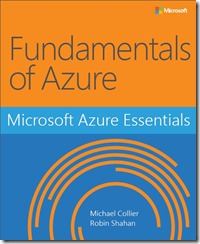
We’re happy to announce the release of our newest free ebook, Microsoft Azure Essentials: Fundamentals of Azure (ISBN 9780735697225), by Michael S. Collier and Robin E. Shahan. This is the first ebook in Microsoft Press’s free Microsoft Azure Essentials series. Future ebooks will cover specific Azure topics, such as Azure Machine Learning, Azure Automation, and others.

Introduction

Microsoft Azure is Microsoft’s cloud computing platform, providing a wide variety of services you can use without purchasing and provisioning your own hardware. Azure enables the rapid development of solutions and provides the resources to accomplish tasks that may not be feasible in an on-premises environment. Azure’s compute, storage, network, and application services allow you to focus on building great solutions without the need to worry about how the physical infrastructure is assembled.
This ebook covers the fundamentals of Azure you need to start developing solutions right away. It concentrates on the features of the Azure platform that you are most likely to need to know rather than on every feature and service available on the platform. This ebook also provides several walkthroughs you can follow to learn how to create VMs and virtual networks, websites and storage accounts, and so on. In many cases, real-world tips are included to help you get the most out of your Azure experience.
In addition to its coverage of core Azure services, the ebook discusses common tools useful in creating and managing Azure-based solutions. The ebook wraps up by providing details on a few common business scenarios where Azure can provide compelling and valuable solutions.

Who should read this ebook

This ebook focuses on providing essential information about the key services of Azure for developers and IT professionals who are new to cloud computing. Detailed, step-by-step demonstrations are included to help the reader understand how to get started with each of the key services. This material is useful not only for those who have no prior experience with Azure, but also for those who need a refresher and those who may be familiar with one area but not others. Each chapter is standalone; there is no requirement that you perform the hands-on demonstrations from previous chapters to understand any particular chapter.

Assumptions
We expect that you have at least a minimal understanding of virtualized environments and virtual machines. There are no specific skills required overall for this ebook, but having some knowledge of the topic of each chapter will help you gain a deeper understanding. For example, the chapter on virtual networks will make more sense if you have some understanding of networking, and the chapter on databases will be more useful if you understand what a database is and for what you might use one. Web development skills will provide a good background for understanding websites, and some understanding of identity will be helpful when studying the chapter on Active Directory.

This ebook might not be for you if…
This ebook might not be for you if you are looking for an in-depth developer or architecture-focused discussion on a wide range of Azure features, or if you are looking for details on other public or private cloud
platforms.

Download the eBook below:

Posted by: kurtsh | February 12, 2015

RELEASE: Office for Mac 2011 14.4.8 Update

imageQuite silently, we’ve released the Office for Mac 2011 14.4.8 Update. 

This update provides the latest fixes for Office for Mac 2011. These include the following:

  • Functionality in Microsoft PowerPoint for Mac 2011
    This update fixes an issue in which you cannot manipulate textboxes by using the keyboard in PowerPoint for Mac 2011 if you are using different input methods.
  • Functionality in Microsoft Outlook for Mac 2011
    This update fixes an issue that causes repeated password prompts for Office 365 Exchange Online accounts.
  • Functionality in Microsoft Outlook for Mac 2011
    This update fixes an issue that causes messages to be displayed incorrectly when you import certain .pst files that have Rich Text Format (RTF) encoding.

Weird how this isn’t even on the Office for Mac blog.

image

Communications and Media Global Outlook 2014-2017 provides insight into the Microsoft and partner technologies that are being developed for communications and media companies to drive positive change and address new trends.

Topics around mobile, cloud and the Internet of Things are covered in the technology roadmap and regional perspective sections of the guide.

A comprehensive directory section also provides business information about some of the innovative technology suppliers in the industry, helping you to make positive technology decisions for your own company.

Here’s a glimpse at the contents:

  • Page 14: Technology Roadmap: “Devices & Studios”
  • Page 18-: Regional Perspectives, “The continuing rise of digital”
        • Page 20: North America
        • Page 22: Europe, Middle East, Africa
        • Page 24: Asia-Pacific
        • Page 26: Latin America
  • imagePage 77: ESPN
    ”Sports media group ESPN joins the Windows 8 platform with the help of NV Interactive”

Get it here:

imageUPDATE 2/11/15 10:30AM
Oh, it’s here alright.  My phone is downloading it as I type!  Key posts about the update:


ORIGINAL POST 2/11/15 9:00AM
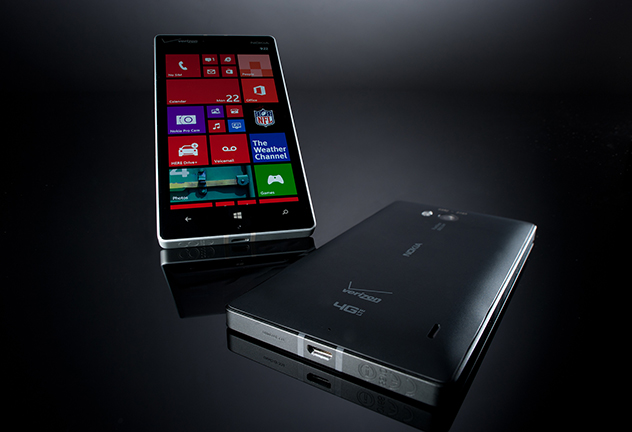
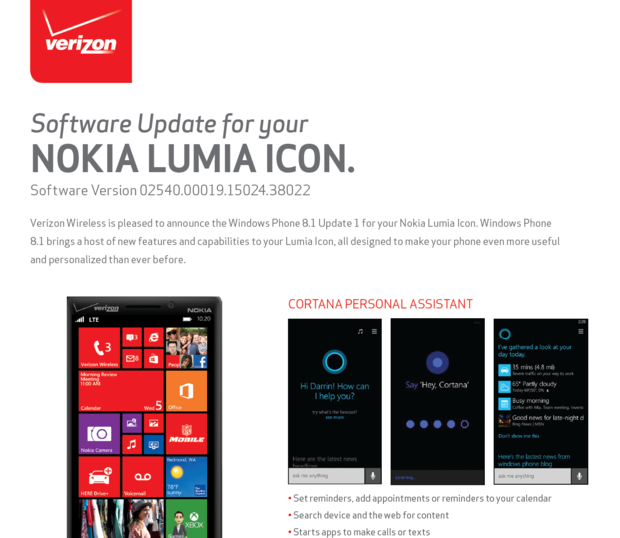
imageWOW.  If you’re a Verizon Nokia Icon user and been paying attention to the recent social chatter, the Windows Phone 8.1.1 + “Denim” firmware update was semi-announced/leaked as of last night.

Per Daniel Rubino of Windows Central:

HOLY… Lumia Icon + Denim update is ALMOST here. Verizon announced it. Likely due tomorrow. windowscentral.com/verizon-publis… pic.twitter.com/lV2KN0JnvL

Since I have the Windows Phone 8.1 Developer Preview installed, I’ve personally been getting ready to reset my phone and back it down to the old Windows Phone 8.0 to get the upgrade.

Lo and behold, today, Joe Belfiore tweeted:

“Hey #Icon users… thanks for being patient!  Denim is arriving today, but sit tight. You WON’T need to reset & use recovery tool to get it.”

Mind blown.  I did not expect to have a seamless upgrade from the WP8.1 Dev Preview to the production version from Verizon. 

Everything is awesome.  Can’t wait to upgrade to this… so many features that will be unlocked with this release, like Miracast wireless display “casting”.

image

We’ve launched a new quarterly magazine titled OnWindows, covering the latest news, views and insights from Microsoft, our partners, and customers.

OnWindows provides commentary on industry solutions and in-depth customer interviews across the Communications & Media, Financial Services, Manufacturing & Resources, Retail, and Public sectors.

The digital edition is available now to read online or download. 

This month’s issue is 132 pages long and 83.9MB in size.  Highlights include:

  1. Business in the cloud: How the cloud computing revolution is transforming business as we know it
  2. Hybrid: the next wave in cloud
  3. Supporting the cloud (having a backup plan)
  4. Michael Dell speaks: Dell’s top priorities
  5. IDC on the Internet of Things

Click below to read more:

Posted by: kurtsh | February 10, 2015

INFO: The New “Windows SA Per User” licensing

imageWith the release of “Enterprise Cloud Suite” per user licensing, customers can now get Office 365 E3, Enterprise Mobility Suite, and Windows SA Per User licensing for every user in their organization at an attractive price.

Now, this “Windows SA Per User” licensing is a big deal:  Microsoft has never licensed Windows this way before.  It gives the licensed user the right to use Windows on any device, be it desktop, laptop, tablet, or virtual machine.

INCREASED FLEXIBILITY FOR VDI SCENARIOS
Importantly, Windows SA Per User licensing also gives VDI users more flexibility.  Historically, if a corporate device is licensed for Windows on Software Assurance (per device), the primary user may access VDI instances of Windows ONLY from that specific licensed Windows PC/device – not from any other corporate device.

With Windows SA Per User licensing, the licensed user is licensed to access VDI instances of Windows from any corporate device – as well as any home device.

MORE ON WINDOWS SA PER USER
If you’re interested in understanding the scenarios in which this can be a more economical & flexible means of running Windows in your organization, grab this datasheet.

Posted by: kurtsh | February 9, 2015

HUMOR: As seen on our Redmond campus…

WindowsGeekXing

There’s stuff like this all over the place in Redmond if you look close enough.  This one is just a little obvious.  Our corporate HQ is sorta like a giant ‘Where’s Waldo’ of geekiness that interestingly no one talks much about… most cuz everyone’s too busy doing geeky work stuff.
Smile

UPDATE 3/9/15: DON’T FORGET THE AZURE CREDIT
I forgot to mention a really epic benefit of MSDN Platforms subscription.  Once you’ve got access to all this software… where are you going to install and test it?

Turns out that that the “MSDN Platforms” subscription also provides the subscriber with a whopping $100/month credit to use Microsoft Azure.  This allows you to not only stand up server VMs in Microsoft’s cloud, you can also install any server product you require on them through your MSDN Platforms sub.

Read the following for more information:
http://azure.microsoft.com/en-us/pricing/member-offers/msdn-benefits-details/
ORIGINAL POST 2/19/15:
As a tech, I realize that for many like myself, TechNet was an invaluable resource for having the flexibility to use in a lab – including for the purposes of security testing.  The alternative, MSDN subscriptions, has often been too expensive for the traditional Technet subscriber, in that the subscription editions that included “comparable” evaluation/testing software were simply too expensive.  (http://www.visualstudio.com/
products/how-to-buy-vs
)   For example:  The lowest edition with Operating Systems, Server products, etc. is Visual Studio Premium, priced at a $6,100 MSRP.

ENTER “MSDN PLATFORMS”
One solution may be a “MSDN Platforms subscription”. (http://www.visualstudio.com/products/msdn-platforms-vs) We released a subscription a little more than a year ago, called MSDN Platforms – exclusively for Volume License customers –  that you may wish to look at as it contains most of the operating systems & server products that were in TechNet, including:

  • Windows
  • SQL Server
  • Dynamics
  • Exchange
  • SharePoint
  • Other server products:
        • Lync Server
        • System Center &
          Windows Embedded Device Mgr
        • Windows Server
        • Multipoint Server
        • Project Server
        • BizTalk Server
        • Forefront products (incl Identity Mgr)
        • …and more.

It does not however contain Office, nor does it include Visual Studio development tools itself. (http://www.visualstudio.com/en-us/products/msdn-subscriptions-vs)

Generally, I believe it costs roughly ~$1000/year which puts it in the ballpark of the higher end TechNet Plus subscriptions which was ~$700/year.  You will notice in the snapshot below however that as I mentioned before, we do not allow general consumers to purchase the MSDN Platforms subscription:  It is purchasable only by Volume Licensing customers, and thus requires a volume licensing agreement & a volume license reseller to enroll an organization.
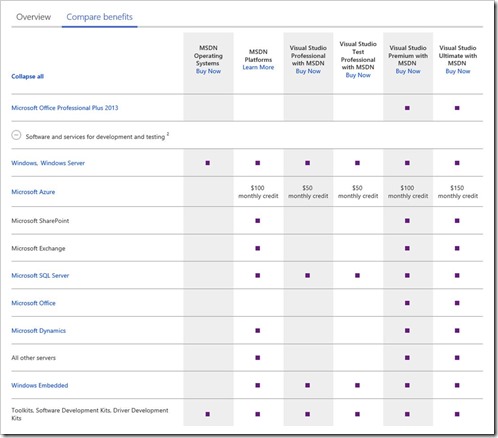
clip_image002

(Taken from http://www.visualstudio.com/en-us/products/msdn-subscriptions-vs )

For more information on this option, read the following links:

(Note: Volume licensing is only for individuals that commit to purchasing Microsoft-licensed products in quantity. For more information on how volume licensing works, click here.  Click here to see what volume licensing program your organization may qualify for.  Click here to find a volume license reseller.)

image

As a follow up to the launch of Outlook for iOS and Android, the team and we wanted to give everyone a deeper look into Outlook from an IT point of view. We know people are interested in hearing more about the app’s architecture, security, and administrative controls, so I’ve provided more detail in the document link below.

Note: To download the document below or review the YamJam “transciption”, you will need to be a member of the Office IT Pro network on Yammer.  Read about how to join the network here: https://kurtsh.com/2014/07/08/news-join-the-office-365-technical-network-free/

As it states, there was also a YamJam (a mass text-based social discussion on the Yammer social service) that took place on February 4, 2015 in the Exchange IT Pro Yammer group.  If you’re interested in reviewing the threads of the YamJam about Outlook for iOS, please see the following URLs:

imageHappy dance!

The visionary designer behind Adobe just joined Microsoft to lead the design of our most important products, including Office 365.

This couldn’t have been cheap.  This is the kind of of hire we get when we target expertise for R&D, but now it’s product centric.  I like the commitment to great design.  Read about it after the jump.

« Newer Posts - Older Posts »

Categories