Posted by: kurtsh | July 7, 2015

BIO: Phil Spencer – The Guy Behind Xbox

I found this bio of Phil Spencer in the media assets site and thought it was interesting enough to post.  Wow.  He’s been around at Microsoft for a long time.

Phil Spencer

Head of Xbox

imageAs Head of Xbox, Phil Spencer leads the teams responsible for games and entertainment at Microsoft across Xbox, Windows, Surface and Windows Phone. His global creative and engineering teams are transforming the way people play around the world by pushing the boundaries of creativity and technical innovation.

A 25-year veteran of Microsoft, Spencer has been with Xbox from the beginning. Now responsible for Xbox including Xbox Live and Microsoft Studios, Spencer has been instrumental in building a community of more than 95 million Xbox owners and over 48 million Xbox Live members in 42 countries. His influence on blockbuster franchises such as “Halo,” “Gears of War,” “Fable” and “Forza Motorsport” opened up Xbox to other inventive entertainment offerings including a landmark partnership with the NFL and collaborating with Academy Award-winning director Steven Spielberg to bring a “Halo” TV series to life. Under Spencer’s direction, Microsoft acquired Mojang AB, maker of the popular videogame “Minecraft,” in 2014, furthering Xbox’s mission to lead gaming and premier entertainment at the company.

Spencer previously served as general manager of Microsoft Studios and Microsoft Game Studios EMEA, working with the European development community. Before that, he held various roles across Microsoft within Microsoft Encarta, Microsoft Money, Microsoft Works and Microsoft Picture It!

Spencer has a bachelor’s degree from the University of Washington and currently serves on the boards of the First Tee of Greater Seattle and the Entertainment Software Association. He lives in Bellevue, Washington with his wife and two daughters.

imageTwitter: @XboxP3

Gamertag: P3

Posted by: kurtsh | July 6, 2015

INFO: Xbox Wire Factsheets & Assets from E3 2015

imageIf you attended E3 (or saw the broadcast) and was wondering… “Hey, where can I get more detailed info on those games?”

It turns out we have it all at a place called the Xbox Wire Media Assets library.  And it’s a treasure chest of great stuff.  Videos, factsheets, photos, screenshots, logos, etc.  (Great for blogging!)

image(Weird that they don’t make this stuff more readily available… especially considering us geeky types that are into gaming are all OCD about our hobbies.  I once created a indexed Excel spreadsheet that laid out all the optional weaponry for my character class & populated it with the statistical buff characteristics of each pience, for an MMORPG I was playing simply to identify & plan for the imagemost optimal configuration for each NPC encounter… and the sick thing is, there are bunch of people reading this right now thinking, “Feh. Such an amateur. I do that for every MOD release, dude.  Go back to the kiddie table.”)

Anyway, here’s the stuff they distribute to the media:

imageFor example, here’s the “Fact Sheet” for Halo 5: Guardians:

Enjoy!

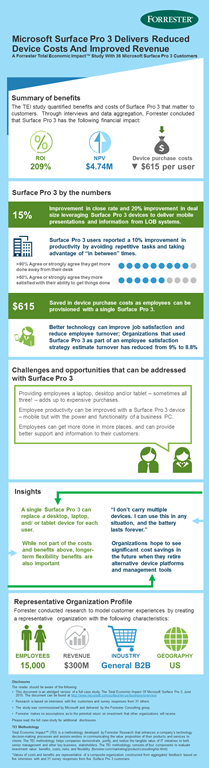
Forrester Research has written a Total Economic Impact study around the ownership of Surface Pro 3. 

The study is available for download in the links below however the following infographic summarizes Forrester’s findings:

Surface Pro 3 TEI Infographic FINAL 061915

Download the study & the summary below:

Also, here are the following documents for Surface Pro 3 itself, for reference:

Posted by: kurtsh | July 6, 2015

INFO: Preparing for Office 2016 for Mac

imageWith the coming release of Office 2016 for Mac, the following resources are available for folks diving into the new product for their users.

Posted by: kurtsh | July 6, 2015

RELEASE: Skype for Business for Windows Phone

imageToday we’re pleased to announce the availability of the Skype for Business app for Windows Phone.

Most people who have the Lync 2013 app on their Windows Phone will be automatically updated to the new Skype for Business app, but here are the particulars depending on which version of Windows Phone you use:

  • If you have a Windows Phone 8.1 and higher but do not have the Lync 2013 app, you can download the new Skype for Business app in the Windows Store.
  • imageIf you have Windows Phone 8.1 and higher and currently have the Lync 2013 mobile app, the new Skype for Business app will replace your existing app and tile automatically.
  • If you have Windows Phone 8.0, you will continue to use Lync 2013 or Lync 2010, which remains compatible even if your organization is running the new Skype for Business Server.

Download at:

Read more at:

imageEveryone running Windows 7, 8, 8.1 & 10 needs to upgrade to Internet Explorer 11.  Customers have until January 12, 2016 which leaves, at the time of this post, 6 months remaining.  The deprecation of versions prior to IE11 was announced back in August 2014 by Roger Capriotti, Director of Product Development for Internet Explorer:

…After January 12, 2016, only the most recent version of Internet Explorer available for a supported operating system will receive technical support and security updates. For example, customers using Internet Explorer 8, Internet Explorer 9, or Internet Explorer 10 on Windows 7 SP1 should migrate to Internet Explorer 11 to continue receiving security updates and technical support. For more details regarding support timelines on Windows and Windows Embedded, see the Microsoft Support Lifecycle site.

(This has been repeated by most media outlets here, here, here, here, here, here, and here, so hopefully, as a savvy IT professional, this does not come as a surprise to you.)

Windows 10 browsing
Now that that’s out of the way, here’s guidance around what to do about browser compatibility & the direction you should move your users toward – specific to customers looking to move to Windows 10.  It includes:

  • Enterprise guidance
  • Internet Explorer 11
  • Microsoft Edge

Read about your options and what to do here:

imageWith four weeks to go before Windows 10 is generally available, Terry Myerson ‒ EVP, Windows and Devices Group (WDG) disclosed new information about customer upgrades, VL availability and a new Enterprise Trial download in his latest blog post:

News Summary:

imageThe question was asked recently:

What do we do to get to Windows 10 if we’re using Windows 7 Enterprise Edition?

I got the following information from Microsoft Devices Solution Specialist, Nathan Mercer:

Active Software Assurance customers have rights to Windows 10 Enterprise through new version rights. 

Customers on Enterprise Edition without active SA have three options:

  • Revert to underlying Windows Pro Edition, and take advantage of the free upgrade to Windows 10 Pro.  This requires installing original OEM Pro media, or using the Volume Licensing “Pro” image if they have the rights and access.
  • Purchase Windows Upgrade & Software Assurance through Volume Licensing to access Windows 10 Enterprise Edition w/ full rights
  • Purchase a Windows 10 Enterprise Upgrade w/o SA for rights to the Windows 10 Enterprise Long Term Servicing Branch

Additional information including upgrade editions is available on the Windows 10 Specification page:

WANT.  Coming this July 29th…

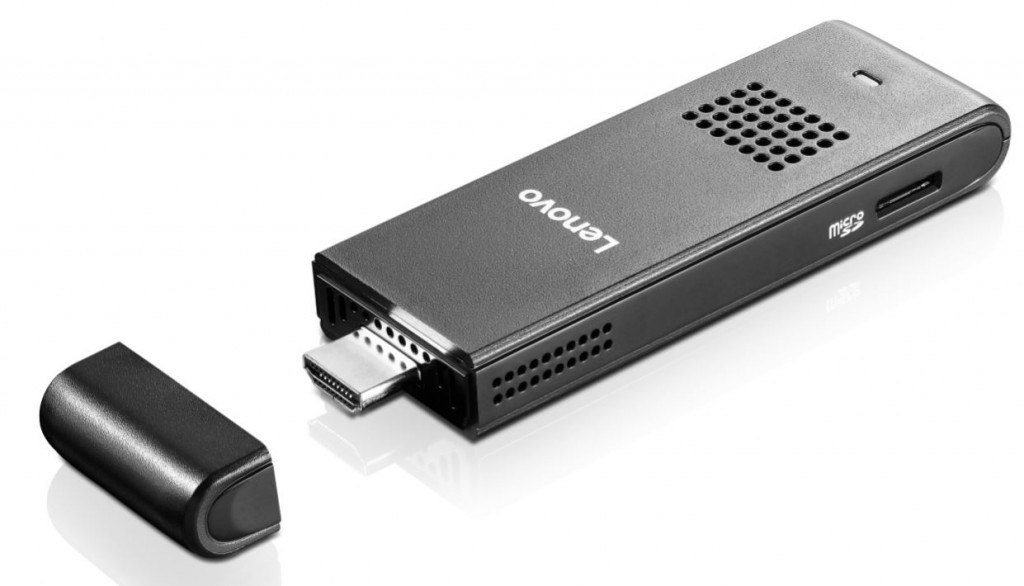
imageToday, Lenovo announced their first compute stick, the Lenovo ideacentre Stick 300. Designed for consumer usage in the home and on-the-go, the new pocket-sized compute stick is powerful enough for entertainment and web browsing, while affordable enough for existing PC owners to justify owning a second or third mobile PC option. The ideacentre Stick 300 features an Intel Atom Processor Z3735F and the familiarity of Windows, initially shipping with Windows 8.1 but will be eligible for a free upgrade to Windows 10 starting July 29.

The ideacentre Stick 300 expands the mobile computing experience and options for savvy shoppers and is suitable for use in the home, dorm or office, while simultaneously offering portability and convenience for travelers. For the wallet friendly starting price of US $129, this plug and play technology can transform almost any HDMI compatible TV or monitor into a fully functioning Windows-based PC. The ideacentre Stick 300 does not look like a traditional computer, but it performs like one once a 2.4GHz wireless keyboard and mouse are added.

The Lenovo ideacentre Stick 300 will be available on www.lenovo.com and will hit retail shelves starting in July. Pricing will start at US $129.

Original article here:

As taken from the Lenovo post:

Worthy of being crowned the “mini-me” of the traditional desktop PC, the pocket-sized ideacentre™ Stick 300 measures only 15 mm thin, boasts Intel® Atom™ Processor Z3735F, 2G of memory and 32G of storage. It will initially ship with Windows 8.1 but will be available for a free upgrade to Windows 10 starting on July 29. Fully enabled with WiFi and Bluetooth 4.0, the ideacentre™ Stick 300 provides the connectivity you need to power up at any time.

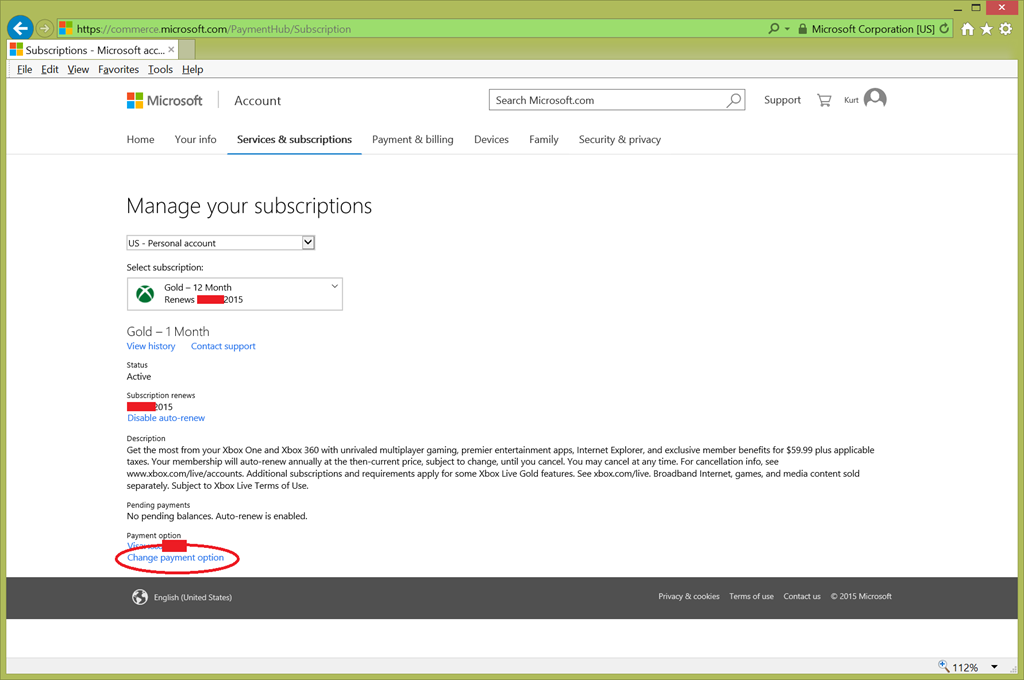
If you’re like me, you’ve had to change the credit card number you’ve used for renewing your Xbox Live and other purchases a couple times.

The place to do this is not obvious.  You’d think it’d be off of Xbox.com, but it’s not. Instead it’s off some “commerce.microsoft.com” web site or something like that.  #rollseyes

If you want to change it, follow the instructions at this link below.  The page you ultimately need to go to is snapshotted below:

image

« Newer Posts - Older Posts »

Categories